1. Tuote ohiview
The EXCEL Tankless Gas Water Heater is designed to provide instant hot water for various applications, including small apartments, lofts, flats, RVs, and mobile homes. This unit operates on Propane (LPG) and features exclusive low water pressure startup technology, requiring only 2 PSI of water pressure to activate. Its vent-free design eliminates the need for complex and costly flue installations, making it a convenient and energy-efficient solution for on-demand hot water.

Kuva 1.1: Etu ja sivu view of the EXCEL Tankless Gas Water Heater, showcasinsen kompaktin rakenteen ja säätönuppien ansiosta.
Tärkeimmät ominaisuudet:
- Propane Gas (LPG) Unit: Designed for use with liquid propane gas.
- Low Water Pressure Startup: Activates with as little as 2 PSI of water pressure, ideal for areas with fluctuating water supply. This is achieved through a magnetic water flow sensor, unlike older units that rely on rubber diaphragms requiring higher pressure.
- Vent-Free Technology: Does not require a traditional flue or ductwork for exhaust. Equipped with an Oxygen Depletion Safety (ODS) shutoff and an exclusive 20-minute safety shutoff feature for indoor installation with proper ventilation.
- Kompakti koko: Dimensions are approximately 12.8 inches (front width) x 8 inches (depth) x 18.75 inches (height), allowing for flexible installation.
- Automaattinen sytytys: Powered by 2 D-size batteries (included) for automatic ignition upon water flow.
- Energian ja veden säästäminen: Delivers hot water instantly, reducing waste.
2. Turvallisuustiedot
Read and understand all safety warnings and instructions before installing, operating, or performing maintenance on this appliance. Failure to follow these instructions could result in property damage, personal injury, or death.
Yleiset turvallisuusohjeet:
- Tämän laitteen asennuksen saa tehdä ainoastaan pätevä ammattilainen kaikkien paikallisten määräysten ja määräysten mukaisesti.
- Ensure adequate ventilation when installing the unit indoors due to its vent-free design.
- Älä säilytä tai käytä bensiiniä tai muita syttyviä höyryjä tai nesteitä tämän tai minkään muun laitteen läheisyydessä.
- Check for gas leaks using a soapy water solution after installation and during maintenance. Never use an open flame.
- The unit is equipped with an Oxygen Depletion Safety (ODS) shutoff system and a 20-minute safety shutoff feature. Do not bypass or tampnäiden turvalaitteiden kanssa.
- Ensure proper battery installation for automatic ignition. Use new, high-quality D-size alkaline batteries.
- Protect the unit from freezing temperatures. Drain the unit if it will be exposed to freezing conditions (see Maintenance section).
- Tämä tuote sisältää kemikaaleja, joiden Kalifornian osavaltio tietää aiheuttavan syöpää ja synnynnäisiä epämuodostumia tai muita lisääntymisterveydellisiä haittoja (ehdotus 65 -varoitus).
3. Asennus ja asennus
Proper installation is critical for the safe and efficient operation of your EXCEL Tankless Gas Water Heater. Refer to the diagrams below for connection points.
Komponentin tunnistus:

Figure 3.1: Connection points at the bottom of the unit.

Figure 3.2: Location of the Winter Drain and Battery Box.
Asennusvaiheet:
- Asennus: Securely mount the unit to a wall using appropriate hardware. Ensure the mounting surface can support the weight of the unit when filled with water.
- Vesiliitännät:
- Liitä kylmän veden syöttöletku laitteeseen Kylmän veden sisääntulo.
- Connect the hot water output line to the Kuuman veden ulostulo.
- Ensure all water connections are tight and leak-free. Use appropriate sealing tape or compound.
- Kaasuliitäntä:
- Connect the Propane (LPG) gas supply line to the Kaasun sisääntulo. The unit includes an LPG Brass Fitting for a ⅜" Flare connection.
- Verify all gas connections are secure and test for leaks using a soapy water solution.
- Akun asennus: Open the battery box and insert two D-size batteries. Ensure correct polarity. These batteries power the automatic ignition system.
- Ilmanvaihto: For indoor installations, ensure the area has adequate ventilation as this is a vent-free appliance.

Kuva 3.3: Sisäinen view highlighting the magnetic water flow sensor, which enables low water pressure startup.
4. Käyttöohjeet
Follow these steps to operate your EXCEL Tankless Gas Water Heater.
Ensimmäinen käynnistys:
- Ensure all water and gas connections are properly made and leak-free.
- Avaa kaasun pääsyöttöventtiili.
- Open a hot water faucet in your system. The unit will detect water flow (as low as 2 PSI) and automatically ignite.
- Allow water to run for a few moments to purge any air from the lines.
Päivittäinen toiminta:
- To get hot water, simply open any hot water faucet connected to the unit. The heater will automatically ignite and begin heating water as it flows through.
- The unit is designed for a temperature rise of approximately 45°F, delivering 1.6 Gallons Per Minute (GPM).
- While suitable for multiple points of use, it is recommended to use no more than one point of use at a time for optimal performance.
- For incoming cold water temperatures below 50°F (down to 40°F), you may need to reduce the water flow rate using the control knob to achieve desired hot water temperature.
- The unit features a 20-minute safety shutoff. If hot water is continuously drawn for more than 20 minutes, the unit will automatically shut off. To restart, close the hot water faucet and then reopen it.
5. Huolto
Säännöllinen huolto varmistaa lämminvesivaraajasi pitkän käyttöiän ja tehokkaan toiminnan.
Rutiinitarkastukset:
- Akun vaihto: Replace the two D-size batteries annually, or if the ignition becomes inconsistent. Use high-quality alkaline batteries.
- Vuototarkastus: Periodically check all water and gas connections for leaks. For gas leaks, use a soapy water solution.
- Ulkopuolen puhdistus: Puhdista laitteen ulkopuoli pehmeällä, damp kangas. Älä käytä hankaavia puhdistusaineita tai liuottimia.
Winterization (Freezing Protection):
If the unit will be exposed to freezing temperatures, it is crucial to drain all water from the system to prevent damage.
- Katkaise kaasun syöttö yksikköön.
- Katkaise kylmän veden syöttö laitteeseen.
- Open a hot water faucet in your system to relieve pressure.
- Paikanna Winter Drain valve at the bottom of the unit (refer to Figure 3.2). Open this valve to drain the water from the heat exchanger.
- Once drained, close the drain valve.

Kuva 5.1: Sisäinen view of the copper heat exchanger, which should be drained to prevent freezing damage.
6. Vianmääritys
Tässä osiossa on ratkaisuja yleisiin ongelmiin, joita saatat kohdata vedenlämmittimesi kanssa.
| Ongelma | Mahdollinen syy | Ratkaisu |
|---|---|---|
| Ei kuumaa vettä / Laite ei syty | No water flow or insufficient water pressure | Ensure water supply is on and water pressure is at least 2 PSI. Check for kinks in water lines. |
| Tyhjät tai vähissä akut | Replace both D-size batteries with new alkaline batteries. | |
| Ei kaasun syöttöä | Ensure gas tank is not empty and gas supply valve is fully open. | |
| ODS or 20-minute safety shutoff activated | Ensure adequate ventilation. If unit ran for 20 minutes, close and reopen hot water faucet to reset. | |
| Vesi ei ole tarpeeksi kuumaa | High water flow rate for incoming temperature | Reduce water flow rate using the control knob on the unit. |
| Alhainen tuloveden lämpötila | The unit adds approximately 45°F to incoming water. If incoming water is very cold, the output temperature will be lower. Reduce flow rate. | |
| Gas or water leaks | Löystyneet liitännät tai vaurioituneet osat | Tighten all connections. If leaks persist, contact a qualified professional for inspection and repair. Do not attempt to repair gas leaks yourself. |
Jos ongelma jatkuu näiden ratkaisujen kokeilemisen jälkeen, ota yhteyttä pätevään huoltoteknikkoon.
7. Tekniset tiedot
Technical specifications for the EXCEL Tankless Gas Water Heater.
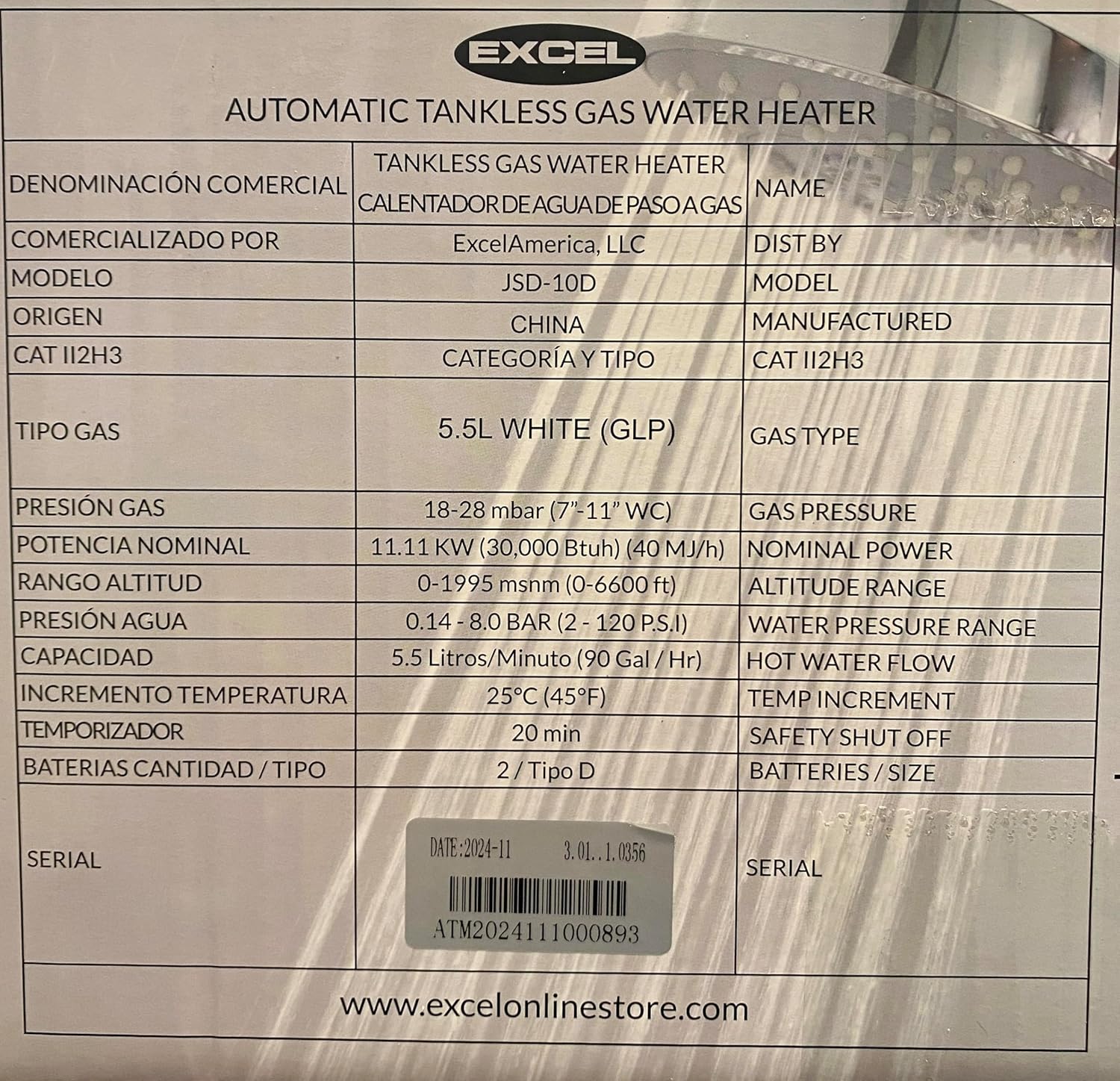
Kuva 7.1: Tuotetarra, jossa on yksityiskohtaiset tiedot.
| Erittely | Arvo |
|---|---|
| Merkki | EXCEL |
| Mallinumero | 850020757060 |
| Tuotteen mitat (L x S x K) | 12.8 cm x 8 cm x 18.75 cm (noin) |
| Tuotteen paino | 8.6 kiloa |
| Polttoainetyyppi | Propaani (nestekaasu) |
| Voitage | 3 volttia (sytytystä varten) |
| Paristot vaaditaan | 2 D-size batteries |
| Suurin virtausnopeus | 1.6 gallonaa minuutissa (GPM) |
| Lämpöteho | 40,000 brittiläistä lämpöyksikköä (BTU) |
| Lämpötilan nousu | Adds approximately 45°F to cold water |
| Minimum Water Pressure Startup | 2 PSI |
| Suurin käyttöpaine | 120 PSI |
| Turvaominaisuudet | Oxygen Depletion Safety (ODS) shutoff, 20-minute safety shutoff |
| Asennustyyppi | Seinäteline |
| Mukana olevat komponentit | 2 Size D Batteries, Exhaust diffuser Plate, LPG Brass Fitting for ⅜" Flare connection |
8. Takuu ja tuki
For warranty information and technical support, please refer to the documentation included with your purchase or contact the seller directly. The seller for this product is typically Energy-Store.
For additional resources and product information, you may visit the official EXCEL websivusto: www.excelonlinestore.com


