1. Johdanto
Thank you for choosing the NexiGo 15.6-inch Portable QLED Monitor. This manual provides detailed instructions to help you set up, operate, and maintain your new monitor. Please read this manual thoroughly before use to ensure optimal performance and longevity of your device.
2. Tuote ohiview
2.1 Tärkeimmät ominaisuudet
- Full HD 1080P QLED Screen: Delivers stunning 1920 x 1080 resolution with a 178° full viewing angle and Eye Care technology.
- Laaja yhteensopivuus: Connects via USB Type-C or Mini HDMI to various devices including laptops, PCs, Macs, PS4, Xbox, and Switch.
- Smart Cover & Screen Protector: Includes a durable PU leather smart cover that doubles as a stand, and a screen protector for added safety.
- Ohut, kevyt ja kannettava: Features a 0.3-inch profile and weighs 1.48 pounds, ideal for mobile setups.
- Kehittyneet liitännät: Equipped with 2 x USB Type-C Full Function ports (data transfer, power source), 1 x Mini HDMI port, and built-in speakers.
2.2 Pakkauksen sisältö
- NexiGo 15.6-inch Portable QLED Monitor
- Älysuoja
- Näytön suojakalvo
- USB Type-C - Type-C -kaapeli
- Mini HDMI - HDMI-kaapeli
- USB Type-A to Type-C Power Cable
- Virtalähde
- Käyttöopas
2.3 Näytön asettelu

Kuva 2.3.1: Etuosa view of the NexiGo 15.6-inch Portable QLED Monitor with its smart cover acting as a stand, displaying a scenic landscape.
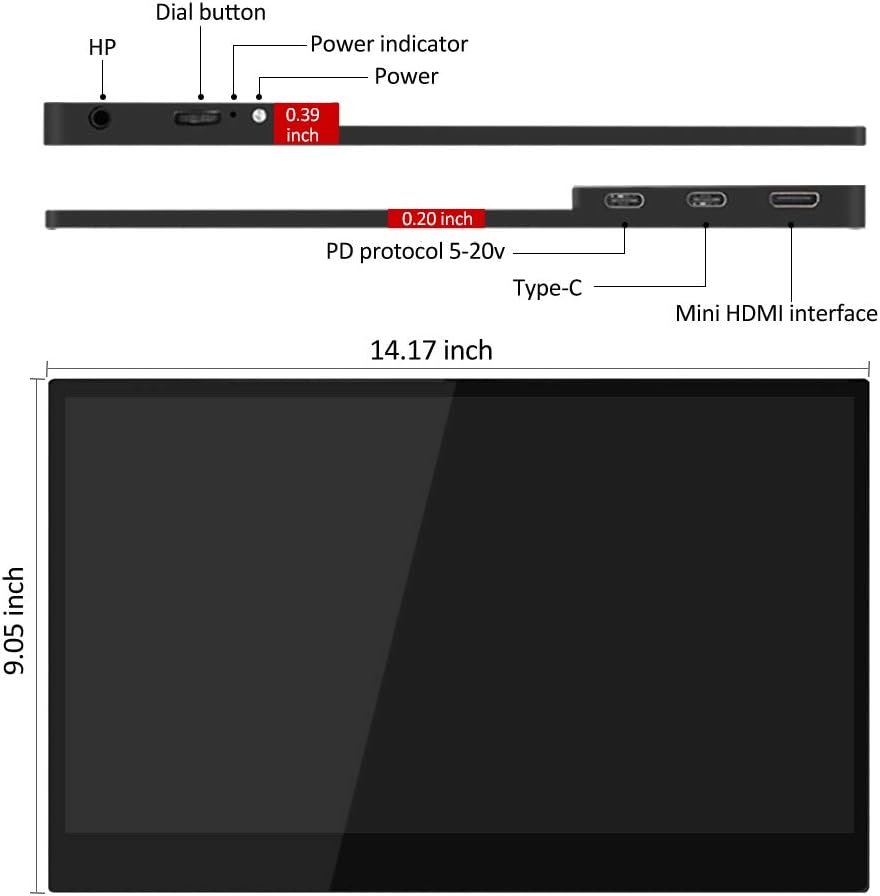
Figure 2.3.2: Diagram illustrating the side and top views of the monitor, highlighting the dial button, power indicator, power port, two Type-C ports, and Mini HDMI interface, along with its dimensions (14.17 inches width, 9.05 inches height, 0.19-0.39 inches thickness).
- Valintapainike: Used for navigating the On-Screen Display (OSD) menu and adjusting settings.
- Virran ilmaisin: Illuminates when the monitor is powered on.
- Virtaportti: Connects to the power adapter for external power.
- C-tyypin portit (x2): Full-function ports for power, video, and data transfer.
- Mini HDMI Interface: Connects to devices via Mini HDMI for video input.
- HP (Headphone Jack): 3.5 mm:n äänilähtö kuulokkeille.
3. Asennusohjeet
3.1 Smart Coverin käyttö jalustana
The included smart cover can be folded into various positions to serve as a stand for your monitor. Position the monitor securely to ensure stability.
3.2 Laitteisiin yhdistäminen
The NexiGo portable monitor offers flexible connectivity options. Ensure your device supports video output via the chosen port.

Kuva 3.2.1: Esimamples of the monitor's wide application, including duplicate monitor setup, connection to a Raspberry Pi, phone screen mirroring, and extended desktop use.
- USB Type-C Connection (Single Cable Solution):
If your device (laptop, smartphone, etc.) has a full-function USB Type-C port (supporting DisplayPort Alternate Mode and power delivery), you can connect the monitor using a single USB Type-C to Type-C cable. This cable will provide both power and video signal.
- Connect one end of the USB Type-C to Type-C cable to your device's full-function USB Type-C port.
- Connect the other end to either of the Type-C ports on the NexiGo monitor.
- The monitor should automatically power on and display your device's screen.
- Mini HDMI Connection (Video) + USB Type-C (Power):
If your device uses HDMI for video output or does not have a full-function USB Type-C port, you will need two cables:
- Liitä Mini HDMI - HDMI -kaapelin toinen pää laitteesi HDMI-porttiin.
- Connect the Mini HDMI end to the Mini HDMI port on the NexiGo monitor.
- Connect the USB Type-A to Type-C power cable to a power source (e.g., the included power adapter, a USB wall charger, or a laptop's USB-A port).
- Connect the Type-C end of the power cable to one of the Type-C ports on the NexiGo monitor for power.
- The monitor will power on and display the video signal from your device.
- Gaming Console Connection (e.g., PS4, Xbox, Switch):
For gaming consoles, use the Mini HDMI connection for video and a USB Type-C power connection as described above. For Nintendo Switch, ensure the console is powered by its original adapter or a compatible power bank to provide sufficient power to the monitor.

Figure 3.2.2: The NexiGo portable monitor displaying a game from a Nintendo Switch console, demonstrating its use as a gaming display.
4. Käyttöohjeet
4.1 On-Screen Display (OSD) -valikko
The OSD menu allows you to adjust various display settings. Use the dial button located on the side of the monitor to navigate and select options.
- Press the Dial Button: Avaa näyttövalikko.
- Roll the Dial Button Up/Down: Valikkovaihtoehtojen selaamiseen.
- Press the Dial Button Again: Vaihtoehdon valitseminen tai asetuksen vahvistaminen.
- Roll the Dial Button Left/Right: Valitun vaihtoehdon arvojen säätäminen.
- Long Press the Dial Button: Poistuaksesi OSD-valikosta.
4.2 Yleiset näyttövalikon asetukset
- Kirkkaus/kontrasti: Säädä näytön kirkkautta ja kontrastia.
- Väriasetukset: Muokkaa värilämpötilaa, sävyä ja kylläisyyttä.
- Syöttölähde: Manually select between Type-C and Mini HDMI inputs if auto-detection fails.
- Kuvasuhde: Choose between 16:9, 4:3, or other available aspect ratios.
- Äänenvoimakkuus: Säädä sisäänrakennettujen kaiuttimien tai kytkettyjen kuulokkeiden äänenvoimakkuutta.
- HDR-tila: Enable or disable High Dynamic Range (HDR) if supported by your device and content.
- Silmienhoitotila: Activate low blue light filter for reduced eye strain during prolonged use.
4.3 Display Modes (Windows/macOS)
Once connected, your operating system will detect the monitor. You can configure how your computer uses the external display:
- Duplicate Mode (Mirror): Näyttö näyttää saman sisällön kuin ensisijainen näyttösi.
- Laajenna tila: The monitor acts as an extension of your desktop, allowing you to drag windows between screens.
- Vain toinen näyttö: Only the portable monitor displays content, with your primary screen turned off.
Refer to your operating system's display settings for detailed configuration options.
5. Huolto
5.1 Näytön puhdistaminen
- Sammuta aina näyttö ja irrota se pistorasiasta ennen puhdistamista.
- Käytä pehmeää, nukkaamatonta liinaa hieman dampvedellä tai hankaamattomalla näytönpuhdistusaineella.
- Älä suihkuta puhdistusainetta suoraan näytölle. Levitä sitä ensin liinaan.
- Vältä alkoholin, ammoniakin tai hankaavien puhdistusaineiden käyttöä, sillä ne voivat vahingoittaa näytön pintaa.
5.2 Screen Protector Care
The included screen protector helps guard against scratches. If applying a new one, ensure the screen is clean and dust-free for best adhesion. Replace if it becomes excessively scratched or damaged.
5.3 Storage and Portability

Figure 5.3.1: A person demonstrating the portability of the NexiGo monitor by easily sliding it into a messenger bag.
- When transporting the monitor, always use the smart cover to protect the screen.
- Säilytä näyttöä viileässä, kuivassa paikassa, poissa suorasta auringonvalosta ja äärimmäisistä lämpötiloista.
- Vältä raskaiden esineiden asettamista näytön päälle.
6. Vianmääritys
If you encounter issues with your NexiGo portable monitor, please refer to the following common problems and solutions:
| Ongelma | Mahdollinen syy | Ratkaisu |
|---|---|---|
| "No Signal" message or blank screen |
|
|
| Monitor flickers or disconnects intermittently |
|
|
| Ei ääntä kaiuttimista/kuulokkeista |
|
|
| Image quality issues (blurry, distorted colors) |
|
|
7. Tekniset tiedot
| Ominaisuus | Yksityiskohta |
|---|---|
| Mallinumero | PMFHD15-HS01 |
| Näytön koko | 15.6 tuumaa |
| Paneelin tyyppi | QLED |
| Resoluutio | 1920 x 1080 (FHD 1080p) |
| Kuvasuhde | 16:9 |
| Kuvan kirkkaus | 400 cd/m² |
| Näytön pinta | Kiiltävä |
| Yhteydet | 2 x USB Type-C (Full Function), 1 x Mini HDMI, 1 x 3.5mm Headphone Jack |
| Tuotteen mitat | 13.9 x 8.5 x 0.19 tuumaa |
| Tuotteen paino | 1.48 kiloa |
| Valmistaja | NexiGo |
8. Takuu ja tuki
NexiGo is committed to providing high-quality products and excellent customer service. Your NexiGo portable monitor comes with a standard manufacturer's warranty. Please refer to the warranty card included in your package for specific terms and conditions.
For technical support, troubleshooting assistance, or warranty claims, please contact NexiGo Customer Support:
- Websivusto: www.nexigo.com/support
- Sähköposti: support@nexigo.com
- Please have your model number (PMFHD15-HS01) and purchase information ready when contacting support.


