Johdanto
Kiitos ostoksestasiasing the Altec Lansing AL-5003 Multimedia DJ Trolly Speaker. This speaker is designed to deliver powerful audio for various applications, including parties and surround sound systems. Featuring wireless connectivity, a built-in trolley for portability, and multiple input options, the AL-5003 offers a versatile audio experience. Please read this manual carefully to ensure proper setup, operation, and maintenance of your speaker.
Tärkeitä turvallisuusohjeita
- Read these instructions thoroughly before operating the speaker.
- Säilytä tämä käyttöopas myöhempää tarvetta varten.
- Älä altista kaiutinta sateelle tai kosteudelle.
- Älä tuki tuuletusaukkoja.
- Älä asenna lähelle mitään lämmönlähteitä, kuten lämpöpattereita, lämpöpattereita, liesiä tai muita laitteita (mukaan lukien ampnostimet), jotka tuottavat lämpöä.
- Suojaa virtajohtoa kävelemiseltä tai puristumiselta, erityisesti pistokkeiden, pistorasian kohdalta ja kohdasta, jossa ne tulevat ulos laitteesta.
- Käytä vain valmistajan määrittelemiä lisälaitteita/lisävarusteita.
- Irrota tämä laite verkkovirrasta ukkosmyrskyjen aikana tai kun sitä ei käytetä pitkään aikaan.
- Anna kaikki huoltotoimenpiteet pätevän huoltohenkilöstön tehtäväksi.
Pakkauksen sisältö
Tarkista pakkauksesta seuraavat tuotteet:
- Altec Lansing AL-5003 Multimedia DJ Trolly Speaker
- Virtajohto
- Kaukosäädin
- Käyttöopas
- Lisäkaapeli (voi vaihdella alueittain)
Tuote loppuview
The AL-5003 speaker features a robust design with integrated wheels and a handle for easy transport. It includes a powerful 10-inch speaker and a 1-inch tweeter, providing clear and dynamic sound. The control panel is located on the top of the unit, offering easy access to various functions.
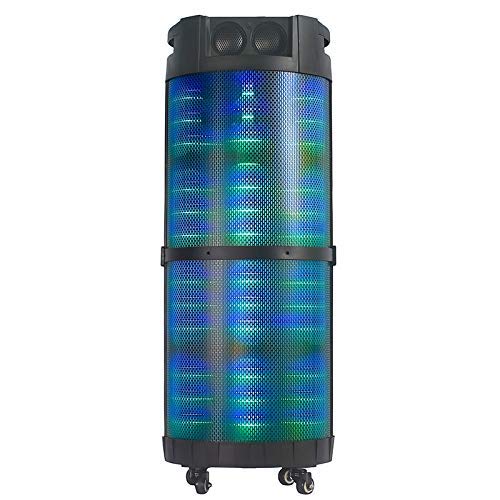
Kuva 1: Edessä view of the Altec Lansing AL-5003 speaker, showcasing its cylindrical design and illuminated grille. The speaker features a sturdy build with integrated wheels at the base for portability.
Ohjauspaneeli ja liitännät
The top panel of the speaker houses the main controls and input/output ports.
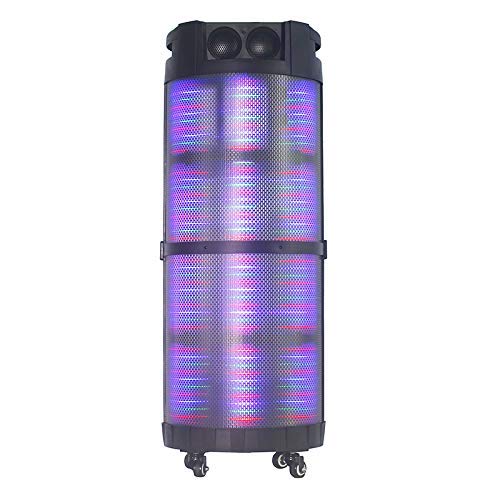
Kuva 2: Ylhäältä alas view of the AL-5003 speaker, highlighting the control panel with various buttons and knobs, along with the top-mounted speakers. This view also shows the integrated handle for easy transport.
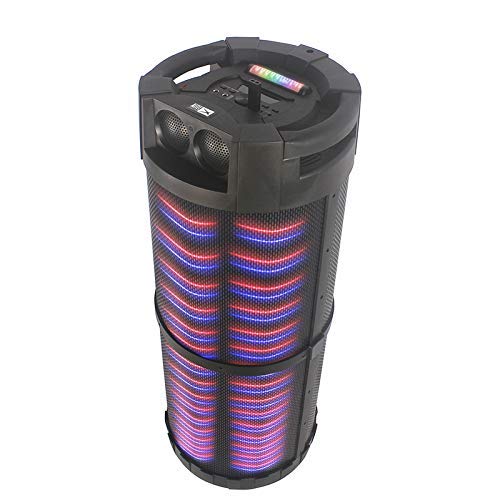
Kuva 3: Kulma view of the AL-5003 speaker, providing a perspective of its overall structure, including the side grille and the top control area. The dynamic lighting effects are visible through the mesh.
Common controls include Power, Volume, Mode selection, Play/Pause, Track Skip, and inputs for USB, Auxiliary, and potentially Microphone (if available on the model).
Asennusohjeet
- Purkaminen: Carefully remove the speaker and all accessories from the packaging. Retain the packaging for future transport or storage.
- Sijoitus: Place the speaker on a stable, flat surface. Ensure there is adequate ventilation around the unit. For optimal sound, position the speaker in a central location within the listening area.
- Virtaliitäntä: Connect the provided power cord to the AC input on the speaker and then plug it into a standard wall outlet (AC 100-240V, 50/60Hz).
- Alkuperäinen maksu (jos sovellettavissa): If the speaker has an internal battery (Lead Acid battery mentioned in specs), it is recommended to fully charge it before first use. The charging indicator light will typically show charging status.
- Virta päälle: Press the Power button on the control panel or remote control to turn on the speaker.
Käyttöohjeet
1. Bluetooth-tila
- Aktivoi Bluetooth: Turn on the speaker. Press the "Mode" button on the control panel or remote until "Bluetooth" or "BT" is displayed (or indicated by a blue LED). The speaker will enter pairing mode, indicated by a flashing light or audible prompt.
- Pariliitos laitteen kanssa: On your mobile device (smartphone, tablet, laptop), go to Bluetooth settings and enable Bluetooth. Etsi available devices. You should see "AL-5003" or "Altec Lansing" in the list. Select it to pair.
- Yhteyden vahvistus: Once successfully paired, the speaker will emit a confirmation sound, and the Bluetooth indicator light will become solid.
- Toisto: Start playing audio on your connected device. Use the speaker's volume controls or your device's volume controls to adjust the sound level. Use the Play/Pause, Next, and Previous buttons on the speaker or remote to control playback.
2. Lisälaitetila (AUX)
- Liitä AUX-kaapeli: Insert one end of a 3.5mm auxiliary cable into the AUX input port on the speaker. Connect the other end to the headphone jack or audio output of your external audio device (e.g., MP3 player, laptop).
- Valitse AUX-tila: Press the "Mode" button on the speaker or remote until "AUX" is displayed or indicated.
- Toisto: Play audio from your connected device. Adjust volume using both the speaker's controls and your device's volume.
3. USB Playback Mode
- Aseta USB-muistitikku: Aseta MP3-ääntä sisältävä USB-muistitikku files kaiuttimen USB-porttiin.
- Valitse USB-tila: The speaker may automatically switch to USB mode. If not, press the "Mode" button until "USB" is displayed or indicated.
- Toisto: Kaiutin alkaa automaattisesti toistaa ääntä files from the USB drive. Use the Play/Pause, Next, and Previous buttons to control playback.
4. Karaoke Function (if applicable)
If your AL-5003 model includes a microphone input, you can use it for karaoke:
- Mikrofonin liittäminen: Plug a wired microphone into the designated microphone input jack.
- Säädä äänenvoimakkuutta: Use the dedicated Microphone Volume knob (if present) to adjust the microphone's volume.
- Kaiunhallinta: Some models may have an Echo knob to add an echo effect to the microphone audio.
5. Kaukosäätimen käyttö
The included remote control provides convenient access to all major functions:
- Teho: Kytke kaiutin päälle/pois.
- Tila: Switch between Bluetooth, AUX, USB, and other available modes.
- Äänenvoimakkuus +/-: Säädä päääänenvoimakkuutta.
- Toista/tauko: Aloita tai keskeytä toisto.
- Edellinen Seuraava: Siirry edelliseen tai seuraavaan kappaleeseen.
- EQ: Select different equalizer presets (if available).
- Mykistä: Mykistä ääni tai poista mykistys.
Huolto
- Puhdistus: Puhdista kaiuttimen ulkopinta pehmeällä, kuivalla liinalla. Älä käytä nestemäisiä puhdistusaineita tai hankaavia aineita.
- Varastointi: Kun kaiutinta ei käytetä pitkään aikaan, säilytä sitä viileässä, kuivassa paikassa, poissa suorasta auringonvalosta ja äärimmäisistä lämpötiloista.
- Akun hoito: If the speaker has a built-in rechargeable battery, avoid fully discharging it frequently. For long-term storage, charge the battery to approximately 50-70% every few months to prolong its lifespan.
- Ilmanvaihto: Varmista, että tuuletusaukot eivät ole tukossa ylikuumenemisen estämiseksi.
Vianetsintä
| Ongelma | Mahdollinen syy | Ratkaisu |
|---|---|---|
| Ei virtaa | Power cord not connected; Power outlet not working; Speaker is off; Battery drained. | Ensure power cord is securely connected. Try a different outlet. Press the Power button. Charge the battery. |
| Ei ääntä | Volume too low; Incorrect mode selected; Device not connected properly; Mute function active. | Increase volume on speaker and source device. Select the correct input mode (Bluetooth, AUX, USB). Reconnect device. Check if mute is active on remote. |
| Bluetooth-pariliitosvirhe | Kaiutin ei ole pariliitostilassa; Laitteen Bluetooth pois päältä; Kaiutin liian kaukana laitteesta; Häiriöitä. | Ensure speaker is in Bluetooth pairing mode. Turn on Bluetooth on your device. Move device closer to speaker. Turn off other Bluetooth devices nearby. |
| USB-toisto ei toimi | USB-asema ei ole asetettu oikein; Yhteensopimaton file alustus; USB-asema vioittunut. | Aseta USB-asema takaisin paikalleen. Varmista, että files are in MP3 format. Try a different USB drive. |
| Kaukosäädin ei toimi | Batteries drained; Obstruction between remote and speaker; Remote not pointed at sensor. | Replace remote control batteries. Remove any obstructions. Point remote directly at the speaker's IR sensor. |
Tekniset tiedot
| Ominaisuus | Yksityiskohta |
|---|---|
| Mallin nimi | Altec Lansing AL-5003 Multimedia DJ Trolly Speaker |
| Kaiuttimen tyyppi | Surround Sound |
| Erikoisominaisuus | Langaton |
| Suositellut käyttötavat | For Surround Sound Systems, Party |
| Yhteensopivat laitteet | Gaming Console, Karaoke Machine, Laptop, MP3 Player, Smartphone, Tablet |
| Surround-äänikanavan asetukset | 1.0 |
| Valvontamenetelmä | Kauko |
| Langaton viestintätekniikka | Bluetooth |
| Kaiuttimen koko | 10 tuumaa |
| Virtalähde | Johdollinen sähkö |
| Diskantin halkaisija | 1 tuumaa |
| Äänitulo yhteensopiva | Lisälaite, USB |
| Kaiuttimien liitettävyys | Wired (for power), Wireless (Bluetooth) |
| Audio Wattage | 100 wattia |
| Akkukennon koostumus | Lyijyhappo |
| Asennustyyppi | Lattia seisoo |
Takuu ja tuki
Altec Lansing products are manufactured to the highest quality standards. For information regarding warranty coverage, technical support, or service inquiries, please refer to the warranty card included with your product or visit the official Altec Lansing website. Please have your model number (AL-5003) and purchase details ready when contacting support.
Websivusto: www.alteclansing.com (Tämä on geneerinen linkki, todellinen linkki voi vaihdella alueittain)


