Johdanto
The Sonoff S26 Smart WiFi Socket is an intelligent plug designed to bring smart automation to your home. It allows you to remotely control connected devices via the eWeLink app, set schedules, and integrate with voice assistants like Amazon Alexa and Google Home. This manual provides detailed instructions for setting up, operating, and maintaining your Sonoff S26 Smart WiFi Socket.

Kuva 1: Etuosa view of the Sonoff S26 Smart WiFi Socket, showing the power button and the Brazilian standard outlet.
Turvallisuustiedot
- Ensure the socket is used within its specified voltage (220 Volts) and load limits (Max. load: 2200W/10A).
- Älä pura tai muokkaa laitetta.
- Pidä laite poissa vedestä, kosteudesta ja korkeista lämpötiloista.
- Vain sisäkäyttöön.
- Irrota laite pistorasiasta ennen puhdistamista.
Pakkauksen sisältö
- 1 x Sonoff S26 Smart WiFi Socket
- 1 x Käyttöohje (tämä asiakirja)
Asennusopas
1. Fyysinen asennus
- Plug the Sonoff S26 Smart WiFi Socket into a standard Brazilian wall outlet.
- Plug the appliance you wish to control into the Sonoff S26 socket.
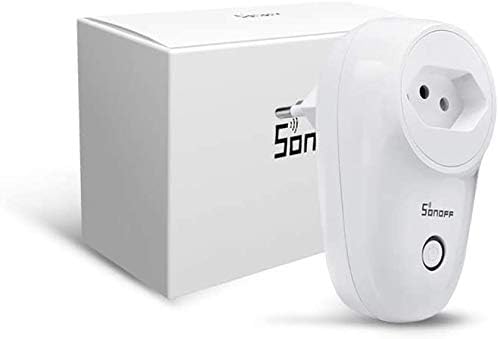
Figure 2: Sonoff S26 Smart WiFi Socket alongside its packaging, illustrating the compact design.
2. Sovelluksen asennus
Download the eWeLink app from the App Store (iOS) or Google Play Store (Android). Alternatively, scan the QR code usually found on the product packaging or quick start guide.
- Etsi "eWeLink" in your app store.
- Install the app and register a new account if you don't have one.
3. Device Pairing (Wi-Fi Connection)
- Ensure your Sonoff S26 is plugged in and the indicator light is blinking rapidly (Quick Pairing Mode). If not, press and hold the manual control button for 5-7 seconds until it blinks rapidly.
- Open the eWeLink app, tap the "+" icon at the bottom center, and select "Quick Pairing".
- Confirm the indicator light is blinking rapidly and tap "Next".
- Enter your Wi-Fi network name (SSID) and password. Ensure your Wi-Fi is 2.4GHz.
- The app will search for and connect to the device. Once connected, you can rename your device.
Käyttöohjeet
1. Peruskäyttö päälle/pois
- Manuaali ohjaus: Press the physical button on the Sonoff S26 to manually turn the connected appliance on or off.
- Sovelluksen hallinta: Open the eWeLink app, select your Sonoff S26 device, and tap the power icon to toggle its status. The app will display the real-time status of the device.
2. Aikataulutus ja ajastimet
The eWeLink app allows you to set various timers for automated control:
- Schedule Timer: Set specific times for the device to turn on or off daily or on selected days of the week.
- Ajastin: Set a countdown for the device to turn on or off after a specified duration.
- Silmukka-ajastin: Program the device to cycle on and off repeatedly for set intervals.
3. Scene Creation
Create "Scenes" in the eWeLink app to automate actions based on conditions or to control multiple devices simultaneously:
- Älykäs kohtaus: Trigger actions based on environmental conditions (e.g., temperature, humidity) or other device statuses.
- One-Tap Scene: Create a shortcut to turn on/off a group of devices with a single tap.
4. Ääniohjauksen integrointi
The Sonoff S26 is compatible with popular voice assistants:
- Amazon Alexa: Link your eWeLink account in the Alexa app. Once linked, you can say commands like, "Alexa, turn on [device name]."
- Googlen etusivu: Link your eWeLink account in the Google Home app. Use commands such as, "Hey Google, turn off [device name]."
- IFTTT: Integrate with IFTTT (If This Then That) for advanced automation recipes.
Huolto
- Puhdistus: Puhdista laitteen pinta pehmeällä, kuivalla liinalla. Älä käytä nestemäisiä puhdistusaineita tai aerosoleja.
- Varastointi: Säilytä laitetta viileässä, kuivassa paikassa, kun sitä ei käytetä.
- Laiteohjelmistopäivitykset: Tarkista säännöllisesti eWeLink-sovelluksesta saatavilla olevat laiteohjelmistopäivitykset varmistaaksesi optimaalisen suorituskyvyn ja turvallisuuden.
Vianetsintä
| Ongelma | Mahdollinen syy | Ratkaisu |
|---|---|---|
| Device fails to connect to Wi-Fi. | Incorrect Wi-Fi password, 5GHz Wi-Fi network, device too far from router. |
|
| Laite on offline-tilassa sovelluksessa. | Voimia sinulletage, Wi-Fi disconnected, device malfunction. |
|
| Ääniohjaus ei toimi. | Incorrect device name, eWeLink account not linked, voice assistant issues. |
|
Tekniset tiedot
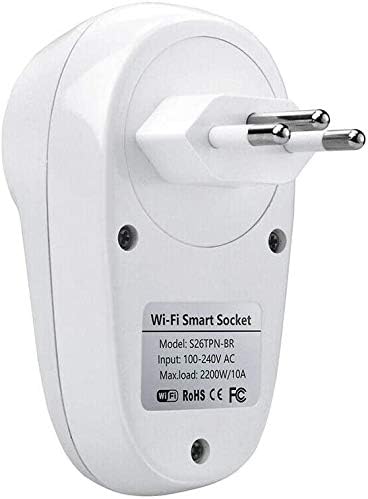
Kuva 3: Takaosa view of the Sonoff S26 Smart WiFi Socket, displaying the model number (S26TPN-BR) and electrical input/load details.
| Ominaisuus | Yksityiskohta |
|---|---|
| Malli | S26 (Part Number: 0301XNWG30V) |
| Merkki | SONOFF |
| Tulo Voltage | 100-240V AC (Bivolt) |
| Max. Ladata | 2200 W / 10 A |
| Wi-Fi-standardin | IEEE 802.11 b / g / n 2.4GHz |
| Materiaali | PC V0 |
| Mitat | 6 x 5 x 9 cm (pituus x leveys x korkeus) |
| Paino | 120 g |
| Väri | Valkoinen |
| Yhteensopivuus | Amazon Alexa, Google Home, IFTTT |
Takuu ja tuki
Rajoitettu takuu: SONOFF products typically come with a limited warranty covering manufacturing defects. Please refer to the warranty card included with your product or visit the official SONOFF websivustolta tarkemmat takuuehdot.
Asiakastuki: For technical assistance, troubleshooting, or product inquiries, please contact SONOFF customer support through their official website or the eWeLink app. You can also visit the SONOFF-kauppa Amazonissa saadaksesi lisätietoja.


