1. Johdanto
Thank you for choosing the Rapoo H1030 Bluetooth Stereo Headset. This manual provides detailed instructions to help you set up, operate, and maintain your headset for optimal performance. Please read this manual thoroughly before using the product.
2. Tuote ohiview
The Rapoo H1030 is a wireless over-ear stereo headset designed for comfortable audio listening and communication. It features Bluetooth connectivity, an integrated microphone, and volume controls.

Kuva 2.1: Edessä view of the Rapoo H1030 Bluetooth Stereo Headset. This image shows the overall design of the headset, with both earcups and the headband visible from the front.

Kuva 2.2: Sivu view of the Rapoo H1030 Bluetooth Stereo Headset, illustrating the adjustable headband and the design of the over-ear cushions.
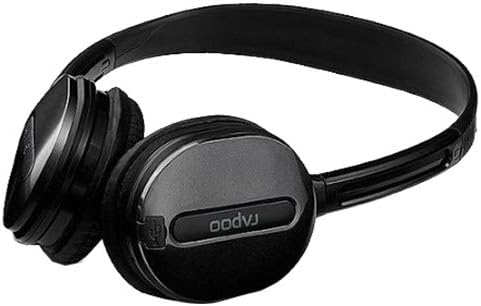
Kuva 2.3: Lähikuva view of an earcup, highlighting the integrated controls and the "rapoo" branding. This image details the buttons for volume and playback control, and potentially the charging port or microphone location.
2.1 Tärkeimmät ominaisuudet
- Wireless Bluetooth connectivity (2.4 GHz, up to 10 meters / 33 feet range)
- Korvan peittävä muotoilu mukavuutta varten
- Built-in omni-directional microphone with noise cancelling
- Integroitu äänenvoimakkuuden säätö
- Ladattava litiumakku (360mAh)
- Säädettävä sanka
3. Asennus
3.1 Kuulokkeiden lataaminen
Before initial use, fully charge the headset. The Rapoo H1030 features a built-in 360mAh rechargeable lithium battery.
- Locate the charging port on the headset (refer to Figure 2.3 for general control area).
- Connect the charging cable (typically Micro-USB) to the headset and the other end to a USB power source (e.g., computer USB port, USB wall adapter).
- The charging indicator light will illuminate (color may vary, refer to product packaging for specifics).
- A full charge takes approximately 2 hours. The indicator light will change or turn off once charging is complete.
A fully charged headset provides approximately 6 hours of usage time.
3.2 Bluetooth -pariliitos
The headset uses smart connection technology for easy pairing.
- Varmista, että kuulokkeet on ladattu ja että niiden virta on katkaistu.
- Press and hold the power button (or pairing button, if separate) on the headset until the indicator light begins to flash rapidly, indicating it is in pairing mode.
- Ota Bluetooth käyttöön laitteellasi (älypuhelin, tabletti, tietokone) ja hae käytettävissä olevia laitteita.
- Select "RAPOO H1030" (or similar name) from the list of found devices.
- Once connected, the indicator light on the headset will typically stop flashing and remain solid, or turn off.
- The headset is now ready for use. It should automatically reconnect to the last paired device when powered on and within range.
4. Käyttöohjeet
4.1 Virta päälle/pois
- Virta päälle: Paina virtapainiketta ja pidä sitä painettuna noin 3 sekuntia, kunnes merkkivalo syttyy.
- Virta pois: Press and hold the power button for approximately 3-5 seconds until the indicator light turns off.
4.2 Äänenvoimakkuuden säätö
The headset features integrated volume controls.
- Lisää äänenvoimakkuutta: Paina äänenvoimakkuuden lisäyspainiketta.
- Vähennä äänenvoimakkuutta: Paina äänenvoimakkuuden vähennyspainiketta.
4.3 Puheluiden hallinta
When connected to a smartphone, the headset can manage phone calls.
- Puhelun vastaaminen/lopetus: Press the Multi-function button (often the power button or a dedicated call button) once.
- Hylkää puhelu: Paina monitoimipainiketta ja pidä sitä painettuna noin 2 sekuntia.
- Uudelleenvalinta viimeinen numero: Paina monitoimipainiketta kahdesti.
4.4 Musiikin toisto
When playing music from a connected device, use the headset controls.
- Toista/tauko: Paina monitoimipainiketta kerran.
- Seuraava kappale: Press and hold the Volume Up button (or a dedicated 'Next' button).
- Edellinen kappale: Press and hold the Volume Down button (or a dedicated 'Previous' button).
5. Huolto
- Puhdistus: Puhdista kuulokkeet pehmeällä, kuivalla liinalla. Älä käytä hankaavia puhdistusaineita tai liuottimia.
- Varastointi: Store the headset in a cool, dry place away from direct sunlight and extreme temperatures. When not in use, consider folding the headset (refer to Figure 5.1) to save space and protect it.
- Akun hoito: Akun käyttöiän pidentämiseksi vältä akun usein tapahtuvaa täydellistä purkamista. Lataa kuulokkeet säännöllisesti, vaikka niitä ei käytettäisikään jatkuvasti.
- Veden altistuminen: Kuulokkeet eivät ole vedenpitävät. Vältä altistumista vedelle tai liialliselle kosteudelle.

Kuva 5.1: The Rapoo H1030 headset in a folded position, demonstrating its portability and ease of storage. This compact form helps protect the earcups and headband when not in use.
6. Vianmääritys
| Ongelma | Mahdollinen syy | Ratkaisu |
|---|---|---|
| Kuulokemikrofoni ei käynnisty. | Akku vähissä. | Lataa kuulokkeita vähintään 2 tuntia. |
| Laitteen pariliitos ei onnistu. | Kuulokkeet eivät ole pariliitostilassa; Bluetooth on poistettu käytöstä laitteessa; laite on liian kaukana. | Ensure headset is in pairing mode (flashing light). Enable Bluetooth on your device. Move headset closer to the device (within 10 meters). Try restarting both devices. |
| Ei ääntä tai äänenvoimakkuus on alhainen. | Volume too low on headset or device; headset not properly connected. | Lisää äänenvoimakkuutta sekä kuulokkeissa että yhdistetyssä laitteessa. Yhdistä kuulokkeet uudelleen. |
| Huono äänenlaatu tai katkoksia. | Interference; device out of range; low battery. | Move closer to the connected device. Avoid obstacles between headset and device. Charge the headset. Avoid environments with strong Wi-Fi or other 2.4 GHz signals. |
7. Tekniset tiedot
| Malli | H1030 |
| Merkki | RAPOO |
| Yhteydet | Wireless (Bluetooth, 2.4 GHz) |
| Vaihteisto | Jopa 10 metriä (33 jalkaa) |
| Kuuloketyyppi | Korvan yläpuolella |
| Mikrofoni | Built-in, Omni-Directional, Noise Cancelling |
| Akun tyyppi | Ladattava litiumakku |
| Akun kapasiteetti | 360 mAh |
| Latausaika | Noin 2 tuntia |
| Käyttöaika | Noin 6 tuntia |
| Mitat (P x L x K) | 6.85 x 5.43 x 2.17 tuumaa |
| Paino | 80 g |
| Väri | Musta |
| Materiaali | Metallia, kumia |
8. Takuu ja tuki
For warranty information and technical support, please refer to the warranty card included with your product or visit the official RAPOO websivusto. Säilytä ostokuitti ostotodistuksena takuuvaatimuksia varten.
Valmistaja: Rapoo


