1. Johdanto
The FidgetGear GTMEDIA V8 Finder Meter (V-73HD) is a high-definition digital satellite finder designed for quick and accurate setup of satellite dishes. It supports DVB-S/S2/S2X signals and features H.265 hardware decoding. This manual provides essential information for operating and maintaining your device.

Image 1.1: The GTMEDIA V8 Finder Meter product packaging.
2. Turvallisuustiedot
- Lue kaikki ohjeet huolellisesti ennen käyttöä.
- Älä altista laitetta sateelle tai kosteudelle.
- Käytä ainoastaan laitteen mukana toimitettua virtalähdettä ja autolaturikaapelia.
- Avoid extreme temperatures. Operating temperature: 0℃ to +45℃; Storage temperature: -10℃ to +60℃.
- Älä yritä purkaa tai korjata laitetta itse. Jätä kaikki huoltotyöt pätevän henkilöstön tehtäväksi.
- Pidä laite poissa vahvoista magneettikentistä.
3. Pakkauksen sisältö
Varmista, että pakkauksessasi on kaikki alla luetellut tuotteet:
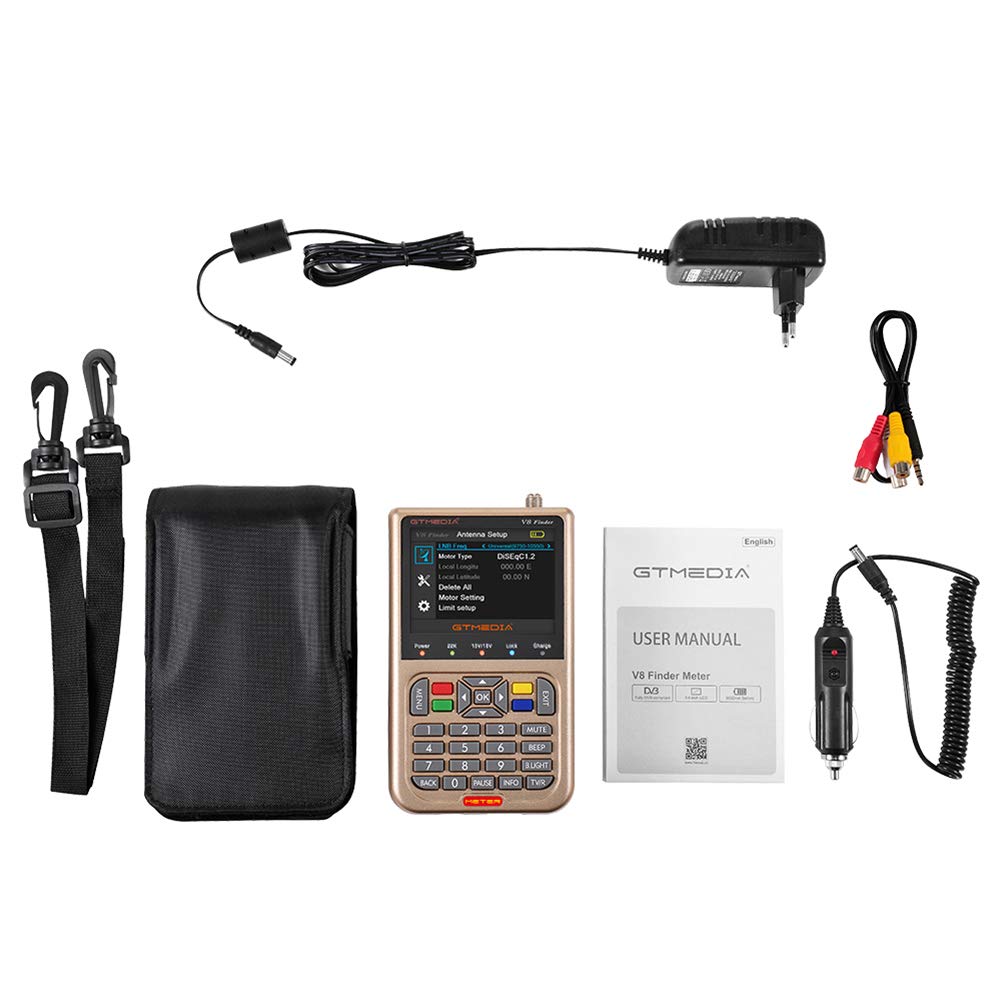
Image 3.1: All components included in the GTMEDIA V8 Finder Meter package.
- 1x Digital Satellite Meter (GTMEDIA V8 Finder Meter)
- 1x Power Adapter (UK Plug)
- 1x AV-kaapeli
- 1x autolaturikaapeli
- 1x kantolaukku
- 1x Strap for Carrying Bag
- 1x käyttöopas
4. Tuote ohiview
4.1 Etupaneeli ja säätimet
The front panel features a 3.5-inch LCD screen for displaying menus and signal information, along with 28 operational keys for navigation and control.

Kuva 4.1: Edessä view of the GTMEDIA V8 Finder Meter.
- 3.5 Inch High Definition LCD Screen: Displays signal strength, quality, and menu options.
- 28 Key Operation: For navigating menus, entering values, and controlling functions.
- LED-ilmaisimet: Status panel LED display for power, 22KHz, 13V/18V, Lock, and Charge status.
4.2 Takapaneelin liitännät
The rear panel provides various input and output ports for connectivity.

Kuva 4.2: Takaosa view of the GTMEDIA V8 Finder Meter.
- LNB IN: F-type connector for satellite dish LNB input (Frequency Range: 950MHz to 2150MHz).
- HD OUT: HDMI output for connecting to a display.
- AV OUT: 4-pin 3.5 mm jack for analog video/audio output.
- AV IN: 4-pin 3.5 mm jack for analog video/audio input.
- USB-portti: Ohjelmistopäivityksiä ja tiedonsiirtoa varten.
- Tehon syöttö: DC 12V/1.5A input for charging and operation.
5. Asennus
5.1 Laitteen lataaminen
- Connect the provided power adapter to the DC 12V/1.5A input port on the rear panel of the V8 Finder Meter.
- Plug the adapter into a standard AC 110-240V, 50/60Hz power outlet.
- The Charge LED indicator will illuminate during charging. A full charge provides up to 4 hours of operating time.
- Alternatively, use the car charger cable to charge the device in a vehicle.
5.2 Ensimmäinen käynnistys
- Ensure the device is sufficiently charged or connected to power.
- Käynnistä laite painamalla virtapainiketta.
- The 3.5-inch LCD screen will display the startup logo, followed by the main menu or last used screen.
6. Käyttöohjeet
6.1 Satellite Dish Alignment
The V8 Finder Meter simplifies satellite dish installation by providing real-time signal measurements.

Image 6.1: The V8 Finder Meter displaying the main installation menu.
- Connect the LNB cable from your satellite dish to the LNB IN port on the V8 Finder Meter.
- Navigoi kohtaan Asennus menu using the arrow keys and OK button.
- Valitse Antenniliitäntä or Satelliittiluettelo to choose the desired satellite.
- Adjust your satellite dish's azimuth, elevation, and polarization while observing the signal strength and quality indicators on the screen.
- Fine-tune the dish position until the signal strength and quality are maximized. The device will provide audible feedback (BEEP) and visual lock indication.
6.2 Navigointi valikossa
Use the following buttons for menu navigation:
- VALIKKO: Siirry päävalikkoon.
- Nuolinäppäimet (ylös/alas/vasemmalle/oikealle): Selaa valikkovaihtoehtoja ja säädä asetuksia.
- OK: Vahvista valinnat tai siirry alivalikoihin.
- EXIT: Go back to the previous menu or exit the current function.
- Numeronäppäimet (0-9): Syötä numeroarvot.
- TIEDOT: Display detailed information about the current selection.
- VITSAUS: Säädä taustavalon kirkkautta.
7. Huolto
- Puhdistus: Puhdista laite pehmeällä, kuivalla liinalla. Älä käytä nestemäisiä puhdistusaineita tai liuottimia.
- Varastointi: Store the device in a cool, dry place when not in use. If storing for extended periods, ensure the battery is partially charged (around 50%) and recharge every few months to maintain battery health.
- Akun hoito: The device uses a Li-Ion battery (7.4V/3000mAh). Avoid fully discharging the battery frequently.
- Ohjelmistopäivitykset: Tarkista säännöllisesti valmistajan websivusto (http://www.freesat.cn) for firmware updates. Updates can be performed via the USB port.
8. Vianmääritys
| Ongelma | Mahdollinen syy | Ratkaisu |
|---|---|---|
| Laite ei käynnisty. | Akun heikkous tai virtalähteen ongelma. | Charge the device using the provided adapter. Ensure the adapter is properly connected and the power outlet is functional. |
| Signaalia ei havaittu. | Incorrect LNB connection, wrong satellite selected, or dish misalignment. | Check LNB cable connection. Verify the correct satellite is selected in the menu. Adjust dish alignment carefully. |
| Näyttö on tyhjä tai jumiutunut. | Ohjelmistohäiriö tai tilapäinen virhe. | Perform a soft reset by holding the Power button until the device turns off, then restart. If persistent, consider a firmware update. |
| Poor signal quality despite high strength. | Interference or LNB/cable issue. | Check for obstructions near the dish. Inspect LNB and cables for damage. Ensure LNB skew is correctly set. |
9. Tekniset tiedot
| Ominaisuus | Erittely |
|---|---|
| Mallinumero | SZZSC-LD1014DZ-PEL_06I01BMN |
| CPU | Ali M3S10 MPEG-4, MPEG-2, H.265 |
| DDR | 1G DDR3 |
| Salama | 64M SPI |
| Demodulaatio | M1502 + Tuner M3031 |
| Videon dekoodaus | MPEG-2 MP@HL; MPEG4/H.265, BP MP HP@L4.1; AVS profile@L6.1/4.0/2.0 |
| HDMI-lähtö | 480i/p, 576i/p, 720p, 1080i, 1080P |
| Äänen dekoodaus | MPEG1 layer I, II, III; MPEG2 AAC; MPEG4 HE-AAC; Dolby |
| Näyttö | 3.5 tuumainen LCD-näyttö |
| LNB Input Connector | F-tyyppi, uros |
| Taajuusalue | 950 MHz - 2150 MHz |
| Tuloimpedanssi | 75Ω |
| Tulosignaalin taso | -65dBm ~ -25dBm (average power) |
| Active Antenna Power | 13/18V DC @ 400mA MAX, Overload Protection |
| DiSEqC-tuki | DiSEqC1.0/1.1/1.2/USALS Motor fully support |
| LNB Switch Control | 22KHz |
| Virtalähde | AC IN 110-240V, DC 12V/1.5A |
| Akku | Li-oN 3000mA/7.4V |
| Käyttölämpötila | 0℃ ~ +45℃ |
| Varastointilämpötila | -10℃ ~ +60℃ |
| Kosteus | 20% ~ 90%, non-condensed |
| Tuotteen mitat | 95 x 155 x 45 mm (P*L*K) |
| Yksikköpaino | 0.85 Kg (with gift box) |
10. Takuu ja tuki
This FidgetGear product is covered by a standard manufacturer's warranty. Please refer to the warranty card included in your package for specific terms and conditions. For technical support, troubleshooting assistance, or warranty claims, please contact your retailer or visit the official GTMEDIA websivusto osoitteessa http://www.freesat.cn.
The serial number for your device is V8FA18000198. Please have this information ready when contacting support.