Johdanto
The I·CODE Time to Wake Alarm Clock is a multi-functional device designed to assist children in developing healthy sleep habits. It combines a sleep trainer, alarm clock, sleep sound machine, night light, and sleep timer into one compact unit. This manual provides detailed instructions for setting up and operating your I·CODE alarm clock.

Kuva 1: Etuosa view of the I·CODE Time to Wake Alarm Clock.
Asennusopas
Virtaliitäntä
The I·CODE Time to Wake Alarm Clock requires continuous power to operate. Use the provided 5V 1A AC adapter charger for safe and durable operation. Ensure the clock is plugged into a power outlet before use.

Figure 2: Power adapter for the alarm clock.
Alkuajan asetus
To set the current time, locate the "Time Setting" button on the back of the unit (labeled '1' in Figure 3). Press and hold this button to enter time setting mode. Use the '+' and '-' buttons to adjust the hours and minutes. Press the "Time Setting" button again to confirm.
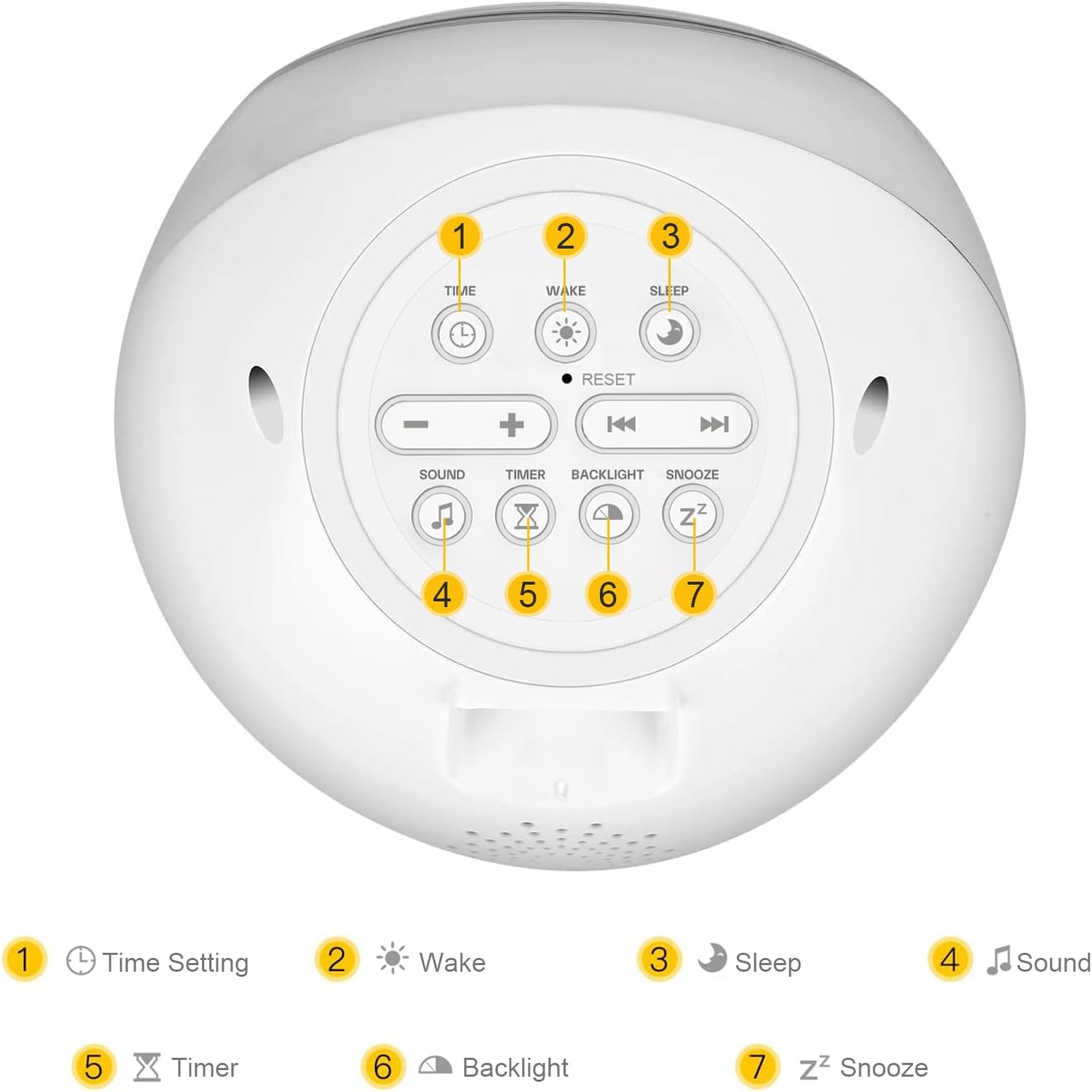
Figure 3: Rear panel controls and their functions.
- 1. Ajan asetus: Adjust current time.
- 2. Wake: Set wake-up time and sun icon.
- 3. Nukkua: Set sleep time and moon icon.
- 4. Ääni: Select soothing sounds.
- 5. Ajastin: Set sleep timer for sounds/lights.
- 6. Backlight: Säädä näytön kirkkautta.
- 7. Snooze: Activate snooze function.
Käyttöohjeet
Uniharjoittelutoiminto
This clock uses visual cues to help children understand when it's time to sleep and wake up. A moon icon indicates sleep time, and a sun icon indicates wake-up time.
- Setting Sleep Time: Press and hold the "Sleep" button (labeled '3' in Figure 3). Use '+' and '-' to set the desired sleep time. The clock will display a moon icon and may glow red to indicate it's time to stay in bed.
- Setting Wake-Up Time: Press and hold the "Wake" button (labeled '2' in Figure 3). Use '+' and '-' to set the desired wake-up time. The clock will display a sun icon and may glow green to indicate it's time to get up.

Figure 4: Visual cues for sleep and wake times.

Figure 5: Sun icon indicating wake-up time.

Figure 6: Moon icon indicating sleep time.
Touch Sensitive Night Light
The clock features a touch-sensitive night light with adjustable brightness and color options. Simply touch the top of the clock to turn the light on/off or to cycle through colors and brightness levels.
- Kirkkaus: There are 3 brightness levels for warm/white light.
- Värivaihtoehdot: The light can display various colors or be set to a fixed color of your choice.
- Uniajastimen toiminto: The night light can be set to automatically turn off after a certain period using the Timer function (labeled '5' in Figure 3).

Figure 7: Night light color and timer options.
Sleep-äänilaite
The clock includes a built-in sound machine with 6 high-quality soothing sounds to aid sleep. Press the "Sound" button (labeled '4' in Figure 3) to cycle through the available sounds.
- Käytettävissä olevat äänet: Sea wave, heartbeat, lullaby, rain, cricket, and baby soothing.
- Toistovaihtoehdot: Sounds can be set to play continuously throughout the night or with an AUTO-OFF TIMER.

Figure 8: Sleep sound machine features.
Torkkutoiminto
When the alarm sounds, press the "Snooze" button (labeled '7' in Figure 3) to temporarily silence the alarm and activate the snooze function. The alarm will sound again after a set interval.
Lapsilukkotoiminto
To prevent accidental changes to settings by children, the clock features a child lock. Refer to the detailed instructions in the included quick start guide for activating and deactivating this feature.

Figure 9: Child lock icon.
Huolto
To ensure the longevity and proper functioning of your I·CODE Time to Wake Alarm Clock, follow these maintenance guidelines:
- Puhdistus: Pyyhi kello pehmeällä, kuivalla liinalla. Älä käytä hankaavia puhdistusaineita tai liuottimia, sillä ne voivat vahingoittaa pintaa.
- Virtalähde: Always use the original 5V 1A AC adapter. Inspect the cord and adapter regularly for any signs of damage. Do not use if damaged.
- Sijoitus: Place the clock on a stable, flat surface away from direct sunlight, excessive heat, or moisture.
Vianetsintä
If you encounter issues with your I·CODE Time to Wake Alarm Clock, please refer to the following common solutions:
| Ongelma | Mahdollinen syy / Ratkaisu |
|---|---|
| Kello ei käynnisty. | Ensure the power adapter is securely plugged into both the clock and a working wall outlet. Verify the power outlet is functional. |
| Sound machine produces high-pitched noise or no sound. | Try resetting the device by unplugging it for a few minutes and then plugging it back in. If the issue persists, contact customer support. |
| Display is too bright at night. | Adjust the backlight brightness using the "Backlight" button (labeled '6' in Figure 3). Ensure the night light perimeter is off if not desired. |
| Time display does not update or is incorrect. | Re-set the time using the "Time Setting" button. If the issue is intermittent, ensure the power connection is stable and not easily disturbed. |
| Sleep/Wake icons (sun/moon) are not changing correctly. | Verify that the sleep and wake times are set correctly. Ensure the clock is not in child lock mode if you are trying to adjust settings. |
Tekniset tiedot
| Ominaisuus | Yksityiskohta |
|---|---|
| Merkki | I·CODE |
| Mallinumero (ASIN) | B07YTS1KWP |
| Väri | Valkoinen |
| Näytön tyyppi | Digitaalinen |
| Tuotteen paino | 395 g |
| Paristot vaaditaan | No (requires continuous plug-in power) |
| Virransyöttö | 5V 1A AC adapter (included) |
| Erikoisominaisuudet | Alarm, Sleep Trainer (Sun/Moon icons), Night Light (touch sensitive, color changing), Sleep Sound Machine (6 sounds), Sleep Timer, Snooze, Child Lock. |
| Päivämäärä ensimmäinen saatavilla | 26. lokakuuta 2019 |
Takuu ja tuki
The I·CODE Time to Wake Alarm Clock comes with a 12 kuukauden takuu ostopäivästä lukien, kattaa valmistusvirheet. Säilytä ostokuitti takuuvaatimuksia varten.
For technical support, troubleshooting assistance, or warranty inquiries, please contact the seller, ICODE, through the platform where you purchased the product. They are committed to providing excellent customer service and will assist you with any issues.
For more information or to explore other I·CODE products, visit the official I·CODE Store.


