1. Johdanto
The KONNWEI KW903 is a compact and versatile Bluetooth OBD-II diagnostic scan tool designed to provide real-time vehicle data and diagnostic capabilities. It connects to your vehicle's On-Board Diagnostics (OBD-II) port and communicates wirelessly with compatible devices.
This device is compatible with Android smartphones, Windows PCs, and iOS devices, allowing users to monitor vehicle performance, read and clear diagnostic trouble codes (DTCs), and access various sensor data.
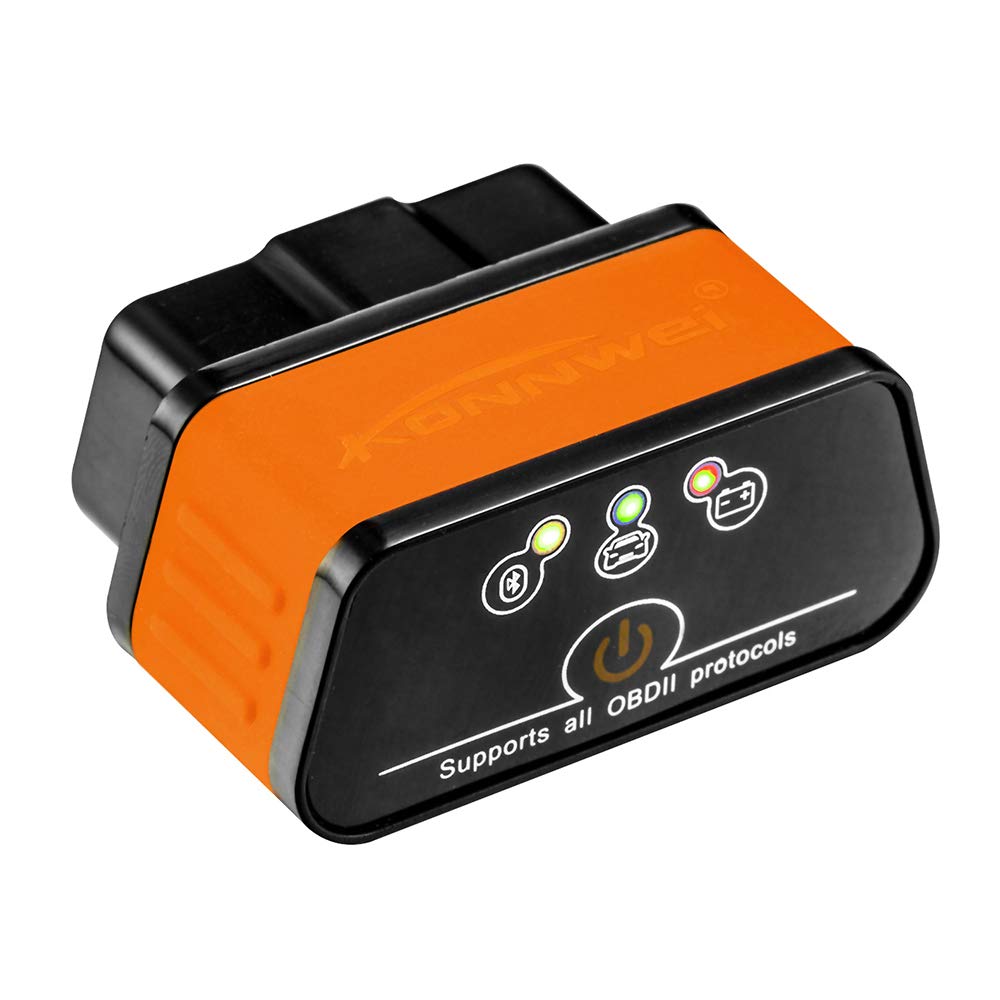
Image 1.1: The KONNWEI KW903 Mini Bluetooth OBD-II Diagnostic Scan Tool.
2. Pakkauksen sisältö
Kun avaat paketin, tarkista, että kaikki osat ovat mukana:
- KONNWEI KW903 Mini Bluetooth OBD-II Device
- Pika-aloitusopas
- Software CD (for Windows PC applications)

Image 2.1: Contents of the KONNWEI KW903 package, including the device, quick start guide, and software CD.
3. Tuotteen ominaisuudet
The KONNWEI KW903 offers a range of features for vehicle diagnostics and monitoring:
- Reaaliaikainen suorituskykynäyttö: View vehicle parameters such as speed, engine RPM, oil pressure, coolant temperature, engine load, intake manifold pressure, throttle position, and air intake temperature.
- Automaattinen lepotila: The device automatically enters sleep mode after 30 minutes of communication termination to conserve power.
- Vakaa langaton yhteys: Utilizes fast and reliable chips for a consistent Bluetooth connection.
- Laaja protokollatuki: Supports all standard OBDII protocols, including J1850 VPW, J1850 PWM, ISO9141-2, KWP2000, and CAN.
- Kompakti muotoilu: Pieni koko ja kompakti rakenne helpottavat plug-and-play-käyttöä.
- External App Connectivity: Can be connected to various external diagnostic applications.

Image 3.1: Diagram illustrating the powerful functions of the KW903, including check engine, sensor data display, fault code detection/clearing, vehicle information, real-time connection, and data logging.
4. Asennusopas
Asenna KONNWEI KW903 -laitteesi seuraavasti:
4.1. Locate the OBD-II Port
The OBD-II port is typically located under the dashboard on the driver's side of the vehicle, often near the steering column. Refer to your vehicle's owner's manual if you have difficulty locating it.
4.2. Liitä laite
With the vehicle's ignition off, firmly plug the KONNWEI KW903 into the OBD-II port. Ensure a secure connection. The device will power on automatically once connected.

Image 4.1: The KONNWEI KW903 device with its 16-pin connector, ready to be plugged into a vehicle's OBD-II port.
4.3. Install Software/Application
Android/iOS: Download a compatible OBD-II diagnostic application from your device's app store (e.g., Torque Lite/Pro for Android, Car Scanner ELM OBD2 for iOS). Many applications are available, some free and some paid.
Windows PC:lle: Insert the provided software CD into your computer's CD-ROM drive and follow the on-screen instructions to install the necessary drivers and diagnostic software. Alternatively, compatible software can be downloaded online.
4.4. Yhdistä Bluetoothin kautta
- Kytke ajoneuvosi sytytysvirta päälle (älä käynnistä moottoria).
- Enable Bluetooth on your Android/iOS device or Windows PC.
- Etsi käytettävissä olevat Bluetooth-laitteet. KW903 näkyy yleensä nimellä "OBDII" tai "V-LINK".
- Select the device and enter the pairing code if prompted. Common pairing codes are "1234" or "0000".
- Once paired, open your diagnostic application and select the KONNWEI KW903 as the Bluetooth device for connection.
5. Käyttöohjeet
After successful setup and pairing, you can begin using the KW903 to monitor your vehicle.
5.1. Starting the Diagnostic Session
Ensure the KW903 is plugged into the OBD-II port and your vehicle's ignition is on. Launch your chosen diagnostic application on your paired device. The application should automatically attempt to connect to the KW903 and then to the vehicle's Engine Control Unit (ECU).
5.2. Viewreaaliaikaista dataa
Most diagnostic applications provide a dashboard or data display section where you can view various real-time parameters. These may include:
- Moottorin kierrosluku (kierrosta minuutissa)
- Ajoneuvon nopeus
- Jäähdytysnesteen lämpötila
- Polttoainejärjestelmän tila
- Lyhytaikainen polttoaineen säätö
- Pitkäaikainen polttoaineen säätö
- Imusarjan paine
- Ajastuksen eteneminen
- Air Flow Rate (MAF)
- Kaasuvivun asento
- Happianturi Voitages
5.3. Vikakoodien (DTC) lukeminen ja poistaminen
If your Check Engine Light (CEL) is illuminated, the KW903 can help identify the cause. Navigate to the "Read Codes" or "DTCs" section within your application. The application will display any stored trouble codes and their descriptions. To clear codes, select the "Clear Codes" or "Erase DTCs" option. Clearing codes will turn off the Check Engine Light, but if the underlying issue is not resolved, the light will reappear.

Image 5.1: Diagram illustrating how the KW903 connects to the car's OBDII port and an Android app to read diagnostic trouble codes and view reaaliaikaista dataa.
5.4. Tiedonkeruu
Many applications allow you to log real-time sensor data over a period. This feature is useful for diagnosing intermittent problems or analyzing vehicle performance under specific driving conditions. Consult your application's manual for instructions on how to initiate and save data logs.
5.5. Automaattinen lepotila
The KW903 is designed to enter a low-power sleep mode automatically if no communication is detected for approximately 30 minutes. This prevents battery drain when the device is left plugged into the vehicle's OBD-II port after the ignition is turned off.
6. Huolto
Proper care and maintenance will ensure the longevity and reliable operation of your KONNWEI KW903.
- Puhdistus: Use a soft, dry cloth to clean the exterior of the device. Do not use liquid cleaners or solvents, as they may damage the electronics.
- Varastointi: Kun laitetta ei käytetä, säilytä sitä viileässä, kuivassa paikassa, poissa suorasta auringonvalosta ja äärimmäisistä lämpötiloista.
- Käsittely: Vältä laitteen pudottamista tai voimakkaiden iskujen kohteeksi joutumista. Älä yritä purkaa laitetta, sillä se mitätöi takuun.
- Liittimen hoito: Keep the 16-pin OBD-II connector free from dirt and debris to ensure a good connection.
7. Vianmääritys
If you encounter issues with your KONNWEI KW903, refer to the following troubleshooting steps:
7.1. Laite ei käynnisty
- Varmista, että laite on kytketty tiukasti ajoneuvon OBD-II-porttiin.
- Verify that the vehicle's ignition is turned on.
- Check the vehicle's OBD-II port for any damage or debris.
7.2. Bluetooth-yhteysongelmat
- Make sure Bluetooth is enabled on your smartphone or PC.
- Ensure the KW903 is within range of your device.
- Try unpairing and re-pairing the KW903 from your device's Bluetooth settings.
- Restart your smartphone/PC and the diagnostic application.
- Confirm the correct pairing code (1234 or 0000) is used.
7.3. No Data Display or Connection to ECU
- Verify that your vehicle is OBD-II compliant (most vehicles manufactured after 1996 are).
- Ensure the diagnostic application is correctly configured to use the KW903 Bluetooth device.
- Kokeile toista diagnostiikkaohjelmaa sulkeaksesi pois ohjelmisto-ongelmat.
- Check for any vehicle-specific issues that might prevent ECU communication.
7.4. Error Codes Not Clearing
- If the underlying fault that triggered the code is still present, the code will reappear after being cleared. Address the vehicle issue first.
- Some critical codes may require multiple drive cycles or specific conditions to clear permanently.
8. Tekniset tiedot
| Ominaisuus | Erittely |
|---|---|
| Malli | KW903 |
| Merkki | KONNWEI |
| Yhteydet | Bluetooth 4.0-5.0 |
| Tuetut käyttöjärjestelmät | Android, Windows PC, iOS |
| Tuetut protokollat | J1850 VPW, J1850 PWM, ISO9141-2, KWP2000, CAN |
| Mitat (P x L x K) | Noin 5 cm x 2.5 cm x 3.5 cm (1.96 tuumaa x 0.98 tuumaa x 1.37 tuumaa) |
| Tuotteen paino | Noin 36.3 g |
| Virtalähde | Ajoneuvon OBD-II-portti |
| Väri | Oranssi & Musta |
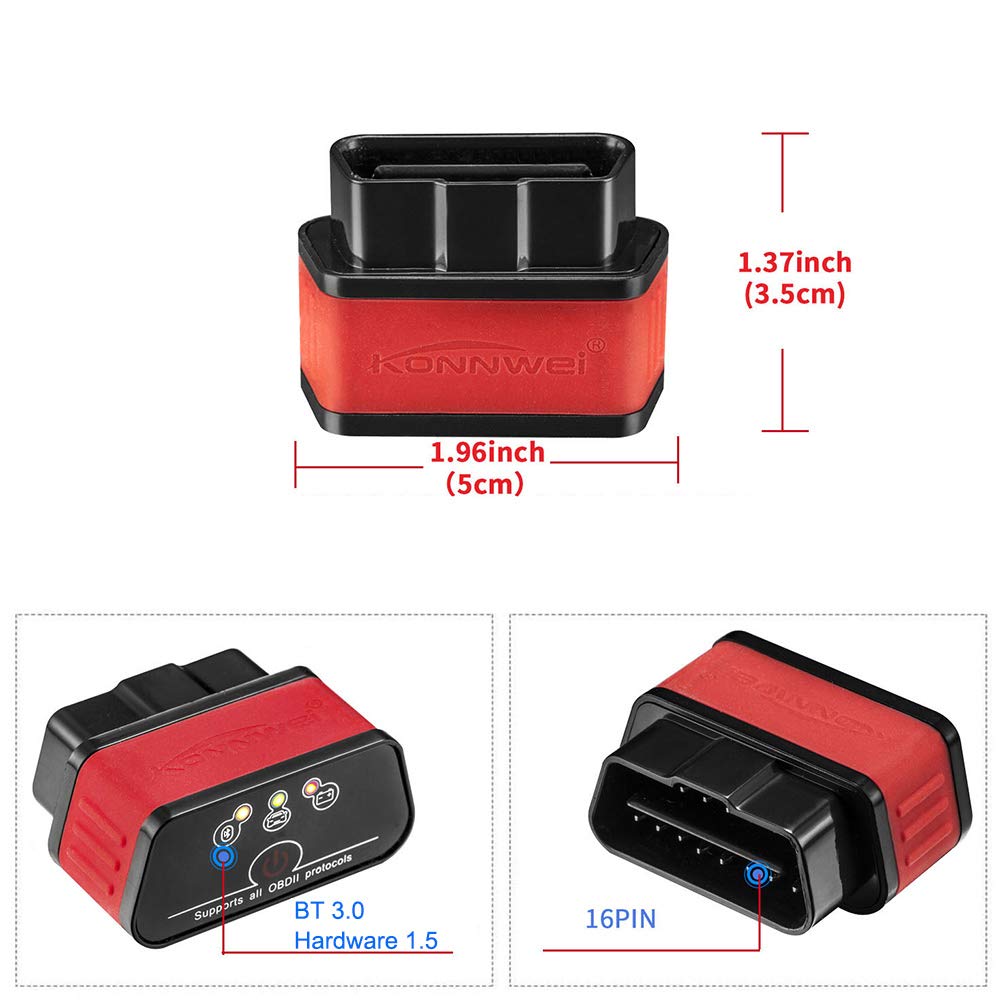
Image 8.1: Visual representation of the KONNWEI KW903's dimensions and its 16-pin OBD-II connector.
9. Takuu ja tuki
For warranty information, please refer to the documentation provided with your purchase or contact the retailer. Warranty terms typically cover manufacturing defects for a specified period from the date of purchase.
For technical support or further assistance, please visit the official KONNWEI website or contact their customer service department. Ensure you have your product model (KW903) and purchase details available when seeking support.


