Johdanto
This manual provides essential information for setting up, operating, maintaining, and troubleshooting your Dell Latitude 5420 Rugged Laptop. Please read these instructions carefully to ensure proper use and longevity of your device.
Tuote loppuview
The Dell Latitude 5420 Rugged Laptop is designed for durability and performance in challenging environments. It features a 14-inch Full HD touchscreen display, an Intel Core i5-8350U processor, 16GB DDR4 RAM, and a 256GB SSD, running on Windows 10 Pro.

Figure 1: Dell Latitude 5420 Rugged Laptop, open view.
Asennus
1. Ensimmäinen käynnistys
- Liitä verkkolaite: Kytke virtalähde kannettavan tietokoneen virtaliitäntään ja sitten pistorasiaan.
- Virta päälle: Avaa kannettavan tietokoneen kansi ja paina virtapainiketta, joka sijaitsee yleensä näppäimistön oikeassa yläkulmassa.
- Käyttöjärjestelmän asennus: Suorita Windows 10 Pron alkuasennus loppuun noudattamalla näytön ohjeita, mukaan lukien kielen, alueen, verkkoyhteyden ja käyttäjätilin luominen.
2. Battery Installation/Removal
The Dell Latitude 5420 Rugged Laptop supports user-serviceable batteries. To install or remove the battery:
- Virta pois: Ensure the laptop is powered off and disconnected from the AC adapter.
- Akkulokeron avaaminen: Turn the laptop over. Locate the battery compartment latches, usually on the underside.
- Remove/Insert Battery: Slide the latches to unlock and carefully remove the battery. To install, align the battery with the compartment and push until it clicks into place.

Kuva 2: Alapuoli view showing battery compartments.
Käyttöohjeet
1. Perusvuorovaikutus
- Näppäimistö: Use the backlit keyboard for typing. Adjust backlight intensity using function keys (refer to your laptop's specific key combinations, often Fn + F10).
- Kosketuslevy: Use the integrated touchpad for cursor control. Supports multi-touch gestures.
- Kosketusnäyttö: Interact directly with the display using touch gestures for navigation and input.
2. Oheislaitteiden liittäminen
The laptop offers various ports for connectivity:
- USB 3.1 Gen 1 Type-A -portit: Connect USB devices such as external drives, mice, or keyboards. One port supports PowerShare for charging devices when the laptop is off.
- USB Type-C DisplayPort Alt Mode: Connect compatible displays or USB-C devices.
- 3.5 mm Universal Audio Port: Liitä kuulokkeet tai kuulokkeet.
- SD-kortinlukija: Aseta SD-kortit tiedonsiirtoa varten.
- RJ-45 Connector: Connect to a wired Ethernet network.
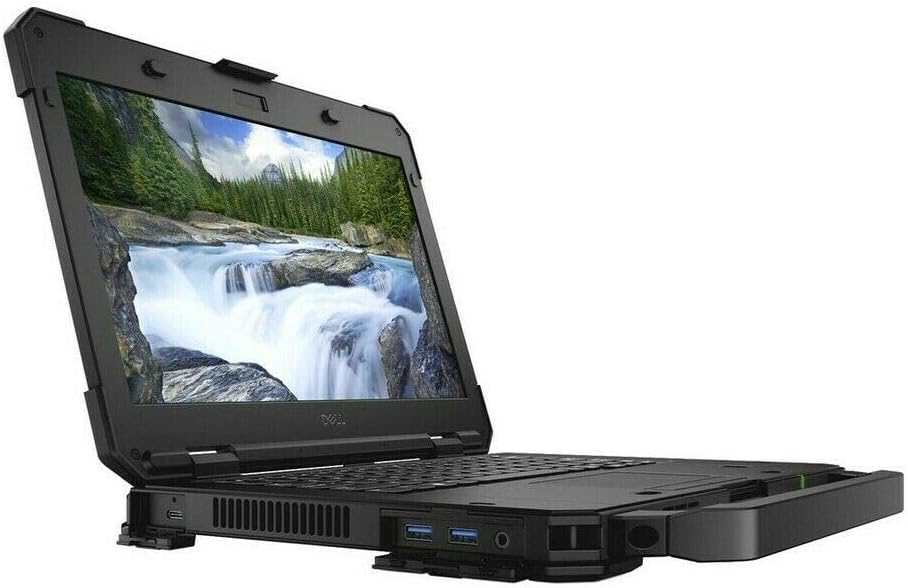
Kuva 3: Sivu view with accessible ports.
3. Langaton yhteys
- Wi-Fi (802.11ac): Yhdistä langattomaan verkkoon napsauttamalla tehtäväpalkin Wi-Fi-kuvaketta, valitsemalla verkkosi ja antamalla tarvittaessa salasana.
- Bluetooth 4.2: Voit parittaa Bluetooth-laitteet valitsemalla Windowsin asetukset > Laitteet > Bluetooth ja muut laitteet ja noudattamalla pariliitoksen ohjeita.
Huolto
1. Kannettavan tietokoneen puhdistaminen
- Näyttö: Käytä pehmeää, nukkaamatonta liinaa kevyesti dampvedellä tai näytönpuhdistusaineella. Vältä voimakkaita kemikaaleja.
- Näppäimistö ja runko: Käytä pehmeää liinaa. Pinttyneeseen likaan kevyesti hankaavaa liinaa.amp voidaan käyttää miedolla saippualla kostutettua liinaa varmistaen, ettei nestettä pääse aukkoihin.
- Portit: Puhdista pöly porteista varovasti paineilmalla.
2. Akun hoito
- Vältä äärimmäisiä lämpötiloja.
- Älä tyhjennä akkua kokonaan usein.
- Pitkäaikaissailytystä varten lataa akku noin 50 %:iin ja säilytä viileässä ja kuivassa paikassa.
3. Ohjelmistopäivitykset
Regularly update your Windows operating system and drivers to ensure optimal performance and security. Access Windows Update via Settings > Update & Security.
Vianetsintä
This section addresses common issues you might encounter with your Dell Latitude 5420 Rugged Laptop.
- Kannettava tietokone ei käynnisty: Ensure the AC adapter is securely connected and the battery is charged. Try a different power outlet.
- Näyttöongelmat: Jos näyttö on tyhjä, kokeile ulkoisen näytön kytkemistä tarkistaaksesi, onko ongelma kannettavan tietokoneen näytössä. Käynnistä kannettava tietokone uudelleen.
- Ei Wi-Fi-yhteyttä: Tarkista Windowsin asetuksista, onko Wi-Fi käytössä. Käynnistä reititin ja kannettava tietokone uudelleen.
- Hidas suorituskyky: Sulje tarpeettomat sovellukset. Tarkista taustalla olevat päivitykset. Varmista, että SSD-levyllä on riittävästi vapaata tilaa.
For more complex issues, refer to Dell's official support websivustolla tai ota yhteyttä heidän asiakaspalveluunsa.
Tekniset tiedot
| Ominaisuus | Erittely |
|---|---|
| Prosessori | Intel Core i5-8350U Quad-Core (1.7 GHz, up to 3.60 GHz Turbo) |
| RAM | 16GB DDR4 SDRAM |
| Varastointi | 256 Gt:n SSD-levy |
| Näyttö | 14 tuuman Full HD (1920x1080) -kosketusnäyttö |
| Grafiikka | Integroitu Intel Graphics |
| Käyttöjärjestelmä | Windows 10 Pro |
| Langaton yhteys | 802.11ac Wi-Fi, Bluetooth 4.2 |
| Portit | USB 3.1 Gen 1 Type-A (with PowerShare), Two USB 3.1 Gen 1 Type-A, USB Type-C DisplayPort Alt mode, RJ-45, 3.5 mm Universal audio port, SD Card Reader |
| Kamera | Integrated 1280x720 Camera |
| Näppäimistö | Taustavalaistu näppäimistö |
| Paino | Noin 4.5 kiloa |
| Mitat (PxLxK) | 9.27 x 13.8 x 1.29 tuumaa |
Takuu ja tuki
Takuutiedot
This Dell Latitude 5420 Rugged Laptop is a renewed product and typically comes with a 90-day warranty from the seller. Please refer to your purchase documentation for specific warranty terms and conditions.
Asiakastuki
For technical assistance, driver downloads, or further support, please visit the official Dell Support website or contact Dell customer service directly. Have your laptop's service tag ready for quicker assistance.
Tuotevideot
Video 1: Dell Latitude 5420 Rugged Laptop overview (0:30 duration). This video provides a brief visual introduction to the laptop's features and design.
Video 2: Dell Latitude 5420 Rugged Laptop features demonstration (1:08 duration). This video highlights key functionalities and rugged design aspects of the laptop.


