1. Johdanto
Thank you for choosing the Kungfuking Surge Protector Power Strip with USB Ports. This device is designed to provide convenient power access and surge protection for your electronic devices. It features two AC outlets and two USB ports, along with a 6.56 ft extension cord and a flat plug for versatile placement. This manual provides essential information for safe installation, operation, and maintenance of your power strip.

Figure 1: Kungfuking Surge Protector Power Strip (Model: Kungfuking 2AC+2USB)
2. Tärkeitä turvallisuusohjeita
Lue ja ymmärrä kaikki turvallisuusohjeet ennen tuotteen käyttöä. Näiden ohjeiden noudattamatta jättäminen voi aiheuttaa sähköiskun, tulipalon tai vakavan vamman.
- ÄLÄ exceed the electrical ratings of 120V, 12A, 60Hz, and 2.1A for USB ports.
- ÄLÄ use in wet environments or near water.
- ÄLÄ purkaa tai muokata laitetta.
- ÄLÄ use with aquariums or other water-related products.
- ÄLÄ kytke toiseen siirrettävään virtahanaan.
- ÄLÄ use if the cord or plug is damaged.
- Pidä poissa lasten ulottuvilta.
- Varmista, että pistoke on työnnetty kokonaan pistorasiaan.
- Tämä tuote on tarkoitettu vain sisäkäyttöön.
3. Tuotteen ominaisuudet
The Kungfuking Surge Protector Power Strip is designed for convenience and safety, offering multiple power options in a compact form factor.
- 2 pistorasiaa: Provides standard power for electronic devices.
- 2 USB-A-porttia: Delivers 5V/2.1A for charging smartphones, tablets, and other USB-powered devices.
- 6.56 FT Extension Cord: Offers flexibility in placement, reaching distant outlets.
- Litteä pistokesuunnittelu: Minimizes obstruction and allows furniture to be placed closer to the wall.
- Ylijännitesuoja: Suojaa kytkettyjä laitteita virtapiikeiltä ja -piikeiltä.
- Kestävä rakenne: Built with fireproof ABS+PC materials for enhanced safety.
- Kiinnitettävä muotoilu: Can be easily mounted on or under desks, walls, or other surfaces.

Kuva 2: Tärkeimmät ominaisuudet ja tekniset tiedot

Figure 3: All-in-One Charging Station in use
4. Asennus ja asennus
The power strip can be installed in various locations to suit your needs. Mounting screws are included for secure installation.
4.1 Asennusvaihtoehdot
The power strip offers flexible mounting options:
- Under Desk/Table: Mount horizontally or vertically under a desk or table to keep surfaces clear.
- Seinäkiinnitys: Secure to a wall for convenient access, such as near a TV or bedside.
- Side of Cabinets/Headboards: Install vertically on the side of furniture for discreet power access.

Figure 4: Installation Options and Dimensions
4.2 Asennusvaiheet
- Valitse sijainti: Select a flat, stable surface for mounting, ensuring it is within reach of a wall outlet and your devices.
- Merkitse ruuvinreiät: Place the power strip in the desired position and mark the locations for the mounting screws using a pencil.
- Poraa ohjausreiät (valinnainen): For wood surfaces, you may pre-drill small pilot holes to prevent wood splitting.
- Secure the Power Strip: Use the provided screws to firmly attach the power strip to the surface. Ensure it is securely fastened before use.
- Liitä virtalähteeseen: Plug the power strip's flat plug into a standard 120V wall outlet. The flat plug design allows for placement behind furniture.
4.3 Esimample Asennukset
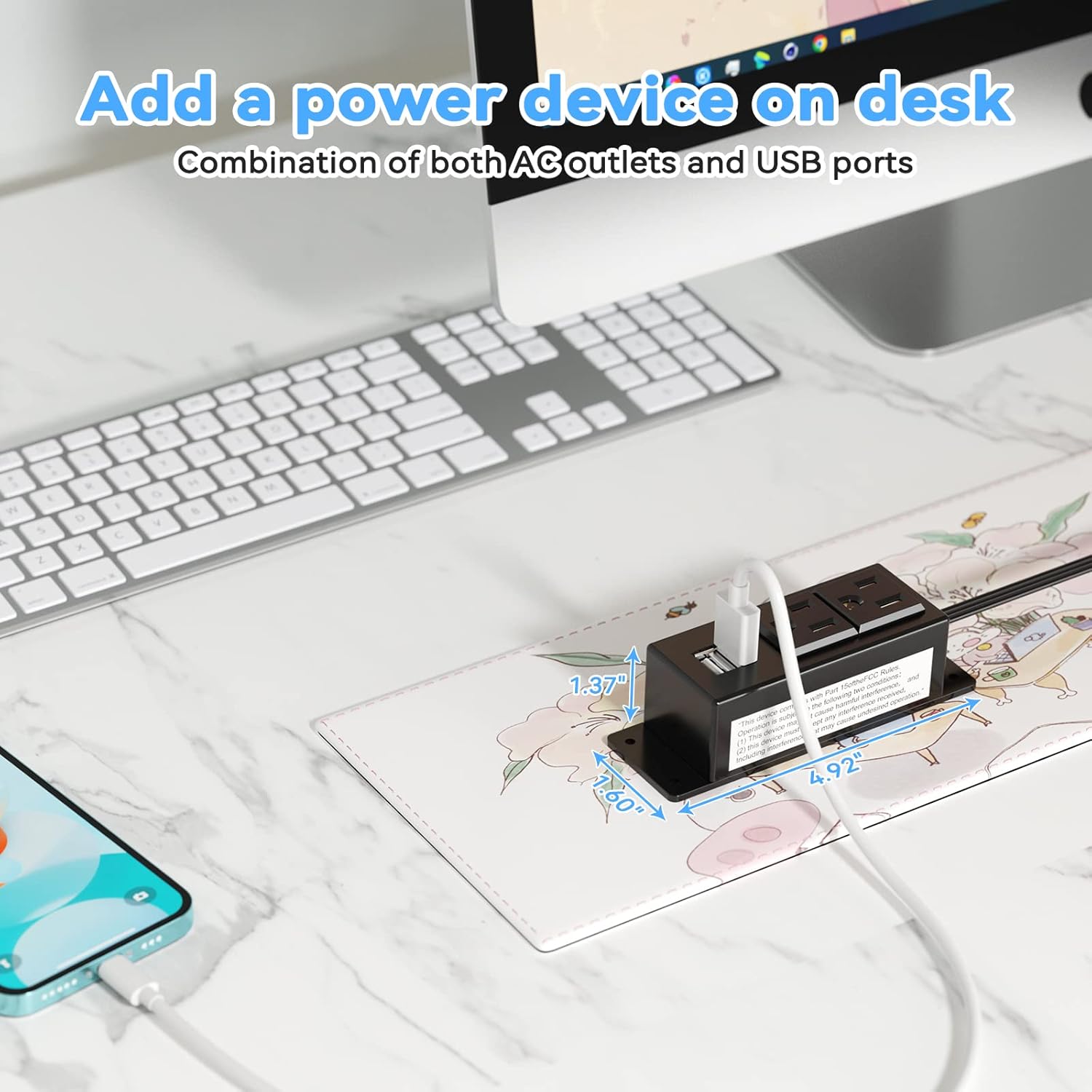
Figure 5: Desk Surface Installation

Figure 6: Under-Desk Installation

Figure 7: Wall-Mounted for TV

Figure 8: Nightstand Installation

Figure 9: Kitchen Cabinet Installation

Figure 10: Flat Plug for Space-Saving Placement
5. Käyttöohjeet
Using your Kungfuking Surge Protector Power Strip is straightforward:
- Liitä seinäpistorasiaan: Ensure the power strip's flat plug is securely connected to a grounded 120V AC wall outlet.
- Kytke AC-laitteet: Insert the power cords of your electronic devices into the two AC outlets.
- USB-laitteiden liittäminen: Plug your USB charging cables into the two USB-A ports to charge compatible devices.
- Virta päälle: The power strip is designed for continuous operation once plugged in. There is no on/off switch.
- Näytön käyttö: Avoid overloading the power strip by ensuring the total power consumption of connected devices does not exceed the rated capacity (12A, 120V).
6. Vianmääritys
Jos kohtaat ongelmia jatkojohdon kanssa, katso seuraavat yleiset ongelmat ja ratkaisut:
| Ongelma | Mahdollinen syy | Ratkaisu |
|---|---|---|
| Ei virtaa pistorasioista tai USB-porteista. |
|
|
| USB-laitteet eivät lataudu. |
|
|
| Jatkojohto tuntuu kuumalta. |
|
|
7. Tekniset tiedot
| Ominaisuus | Yksityiskohta |
|---|---|
| Malli | Kungfuking 2AC+2USB |
| Pistorasiat | 2 |
| USB-portit | 2 (USB-A) |
| Tulo Voltage | 120V AC |
| AC-virran luokitus | 12A |
| Taajuus | 60 Hz |
| USB-lähtö | 5V / 2.1A (Total) |
| Johdon pituus | 6.56 jalkaa (2 metriä) |
| Pistoketyyppi | Litteä pistoke |
| Materiaali | Palonkestävä ABS+PC |
| Mitat (noin) | 4.92 x 3.74 x 1.37 tuumaa (L x L x K) |
| Paino (noin) | 10.5 unssia |
| Erikoisominaisuudet | Surge Protection, Mountable Design |
8. Huolto
Proper maintenance ensures the longevity and safe operation of your power strip:
- Puhdistus: Disconnect the power strip from the wall outlet before cleaning. Use a dry, soft cloth to wipe the exterior. Do not use liquid cleaners or sprays.
- Tarkastus: Periodically inspect the power cord, plug, and housing for any signs of damage, such as cuts, fraying, or cracks. If damage is found, discontinue use immediately.
- Varastointi: Kun jatkojohtoa ei käytetä pitkään aikaan, säilytä sitä viileässä, kuivassa paikassa, poissa suorasta auringonvalosta ja kosteudesta.
9. Takuu ja tuki
Kungfuking products are designed for reliability and performance. For warranty information, technical support, or any questions regarding your product, please refer to the contact information provided at the point of purchase or visit the official Kungfuking websivusto.
Säilytä ostokuitti takuuvaatimuksia varten.


