Johdanto
This manual provides detailed instructions for the safe and effective operation of your Donner DJ Par Light. Please read this manual thoroughly before use and retain it for future reference. This device is designed to produce various lighting effects for events, parties, and stage esityksiä.
Turvallisuustiedot
- Varmista virtalähteen voltage vastaa laitteen vaatimuksia.
- Älä altista laitetta sateelle tai kosteudelle sähköiskun tai tulipalon välttämiseksi.
- Irrota aina virtalähteestä ennen puhdistusta tai huoltoa.
- Vältä suoraa valonlähteen osumista silmiin, sillä se voi aiheuttaa silmävaurioita.
- Varmista riittävä ilmanvaihto ylikuumenemisen estämiseksi. Älä tuki tuuletusaukkoja.
- Käsittele laitetta varoen. Vältä sen pudottamista tai voimakkaita iskuja.
- Pidä poissa lasten ulottuvilta.
Pakkauksen sisältö
Varmista, että kaikki osat ovat mukana purkaessasi pakkauksesta:
- Donner DJ Par Light (1 unit)
- Kaukosäädin (1 kpl)
- Asennusteline (1 yksikkö)
- Virtakaapeli (1 kpl)
- Käyttöopas (tämä asiakirja)
Tuotteen ominaisuudet
- 18 RGB LEDs: Features 18 x 3W RGB LED lights (6 Red, 6 Green, 6 Blue) for a wide range of color effects.
- Monitilakäyttö: Includes Static Color, Color Changing, Color Fade, Auto, Sound-activated, Master-slave, and DMX modes.
- Kaukosäädin: Easy control via the included IR remote.
- DMX512 yhteensopiva: For professional lighting control.
- Sisäänrakennettu tuuletin: Ensures stable operation and extends lifespan.
- Adjustable Dual Brackets: Allows for flexible mounting on trusses, walls, or standing on the floor.
Asennus
- Purkaminen: Poista valaisin ja kaikki lisävarusteet varovasti pakkauksesta.
- Kiinnikkeen asennus: Attach the dual brackets to the sides of the light using the provided screws and knobs. Ensure they are securely fastened.
- Asennus:
- Lattiajalusta: Position the light on a flat, stable surface using the brackets as a stand. Adjust the angle as desired.
- Hanging/Truss Mount: Käytä sopivaa clamps (not included) to secure the light to a truss or ceiling. Always use a safety cable (not included) when hanging the unit.
- Virtaliitäntä: Connect the power cable to the light's power input and then to a suitable power outlet.

Toimintatilat
The Donner DJ Par Light offers multiple operating modes, selectable via the remote control or the control panel on the back of the unit.

- Staattinen väritila: Displays a single, constant color. Use the remote's color buttons (Red, Green, Blue) or the control panel to select specific colors or mix RGB values.
- Color Changing (Jump) Mode: The light rapidly switches between different colors. The speed of the color change can be adjusted.
- Color Fade (Gradual) Mode: The light smoothly transitions from one color to another. The transition speed can be adjusted.
- Automaattitila: The light cycles through various pre-programmed lighting effects automatically.
- Ääniaktivoitu tila: The light reacts to ambient sound or music, changing colors and patterns in sync with the beat. Ensure the built-in microphone is not obstructed.
- Master-Slave-tila: Connect multiple lights using DMX cables. One unit acts as the master, controlling all connected slave units, ensuring synchronized lighting effects.
- DMX-tila: For advanced control using a DMX512 controller. This mode allows precise control over individual light parameters such as color intensity, strobe, and mode selection.
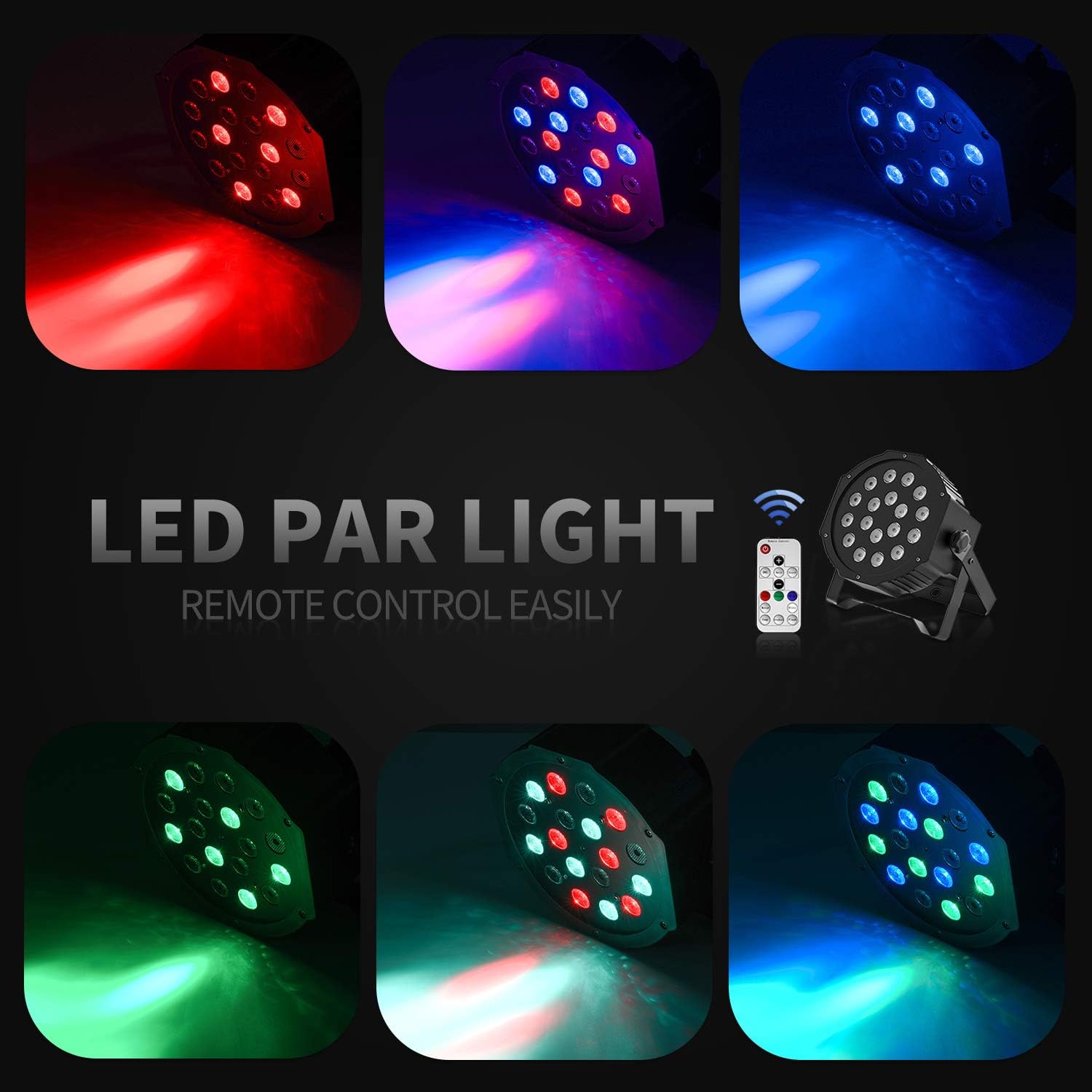
Kaukosäätimen toiminta
The included IR remote control provides convenient access to the light's functions:
- VALMIUSTILASSA: Press to power on or put the device in standby mode.
- DMX: Activates DMX mode. Use '+' and '-' to adjust the DMX address.
- Auto: Activates Auto mode.
- Ääni: Activates Sound-Activated mode.
- Punainen/vihreä/sininen: Selects static red, green, or blue color.
- Valkoinen: Selects static white color.
- Hypätä: Activates Color Changing (Jump) mode.
- Gradual: Activates Color Fade (Gradual) mode.
- Flash: Aktivoi stroboskooppitilan.
- +/- painikkeet: Adjust speed in Jump/Gradual/Flash modes, or DMX address in DMX mode.
DMX-ohjaus
The Donner DJ Par Light supports DMX512 protocol for professional control. Connect a DMX controller to the DMX IN port using a 3-pin XLR cable. For multiple units, daisy-chain them by connecting the DMX OUT of one unit to the DMX IN of the next.
DMX Channel Functions (Example for 7-channel mode):
| kanava | Toiminto | Arvoalue | Kuvaus |
|---|---|---|---|
| 1 | Mestari Dimmer | 0-255 | Overall brightness (0=off, 255=max) |
| 2 | Punainen intensiteetti | 0-255 | Red LED brightness (0=off, 255=max) |
| 3 | Vihreä intensiteetti | 0-255 | Green LED brightness (0=off, 255=max) |
| 4 | Sininen intensiteetti | 0-255 | Blue LED brightness (0=off, 255=max) |
| 5 | Strobe | 0-255 | Strobe speed (0=off, 255=fastest) |
| 6 | Tilan valinta | 0-255 | Selects various internal programs (Auto, Sound, Jump, Gradual) |
| 7 | Ohjelman nopeus | 0-255 | Adjusts speed of selected program (0=slow, 255=fast) |
Huolto
- Puhdistus: Regularly clean the lens and housing with a soft, lint-free cloth. Do not use abrasive cleaners.
- Varastointi: Säilytä laitetta kuivassa ja pölyttömässä paikassa, kun sitä ei käytetä.
- Tarkastus: Tarkista virtajohto ja DMX-liitännät säännöllisesti mahdollisten vaurioiden varalta.
Vianetsintä
| Ongelma | Mahdollinen syy | Ratkaisu |
|---|---|---|
| Valo ei syty. | No power, faulty cable, device in standby. | Check power connection. Ensure outlet is functional. Press ON/STANDBY button on remote or control panel. |
| Kaukosäädin ei toimi. | Low battery, remote not aimed correctly, IR sensor blocked. | Replace remote battery. Point remote directly at the IR sensor on the front of the light. Ensure no obstructions. |
| Light not responding in DMX mode. | Incorrect DMX address, faulty DMX cable, incorrect DMX mode selected. | Verify DMX address matches controller. Check DMX cable connections. Ensure DMX mode is active on the light. |
| Ääniaktivoitu tila ei toimi. | Microphone obstructed, sound level too low. | Ensure the microphone on the back panel is clear. Increase music volume or move the light closer to the sound source. |
Tekniset tiedot
| Malli: | Remote Control/DMX |
| Valon lähde: | 18 x 3W RGB LEDs (6 Red, 6 Green, 6 Blue) |
| Virtalähde: | Johdollinen sähkö |
| Ohjaustilat: | Static Color, Color Changing, Color Fade, Auto, Sound-activated, Master-slave, DMX512 |
| Materiaali: | Muovi |
| Tuotteen mitat: | 7.48 cm P x 5.12 cm L x 7.48 cm K |
| Tuotteen paino: | 1.45 kiloa |
Takuu ja tuki
Donner provides a 12-month warranty for this product, covering manufacturing defects from the date of purchase. For warranty claims, technical support, or service inquiries, please contact Donner customer service through the retailer where the product was purchased or visit the official Donner websivustolta yhteystiedot.


