1. Johdanto
This manual provides detailed instructions for the installation, operation, maintenance, and troubleshooting of your FidgetGear IPMMB-FM 664040-001 motherboard. Please read this manual thoroughly before attempting any installation or operation to ensure proper functionality and to prevent damage to your components.
The FidgetGear IPMMB-FM 664040-001 is a micro-ATX (mATX) motherboard designed for Intel LGA 1155 processors, featuring a Z75 chipset, DDR3 memory support, DVI video output, and USB 3.0 connectivity. It serves as the central hub for your computer system, connecting all essential components.
2. Turvallisuustiedot
Noudata aina seuraavia turvaohjeita emolevyä käsitellessäsi tai asentaessasi:
- Sähköstaattisten purkausten (ESD) estäminen: Always wear an anti-static wrist strap or frequently touch a grounded metal object (like the computer case) before handling the motherboard or any internal components. ESD can severely damage electronic parts.
- Virran katkaisu: Ensure the power supply is unplugged from the wall outlet before installing or removing any components.
- Komponenttien käsittely: Hold components by their edges and avoid touching pins, circuits, or connectors directly.
- Ilmanvaihto: Varmista tietokoneen kotelon riittävä ilmanvaihto ylikuumenemisen estämiseksi.
- Ammattimainen apu: Jos olet epävarma jostakin asennusvaiheesta, ota yhteyttä pätevään teknikkoon.
3. Pakkauksen sisältö
Verify that all items are present in your motherboard package. If any item is missing or damaged, contact your retailer.
- FidgetGear IPMMB-FM 664040-001 Motherboard
- I / O-suojus
- SATA Data Cables (quantity may vary)
- Käyttöopas (tämä asiakirja)
- Ohjain-CD/DVD (tai linkki ohjainten lataamiseen)
4. Asennus ja asennus
Follow these steps carefully to install your motherboard and essential components.
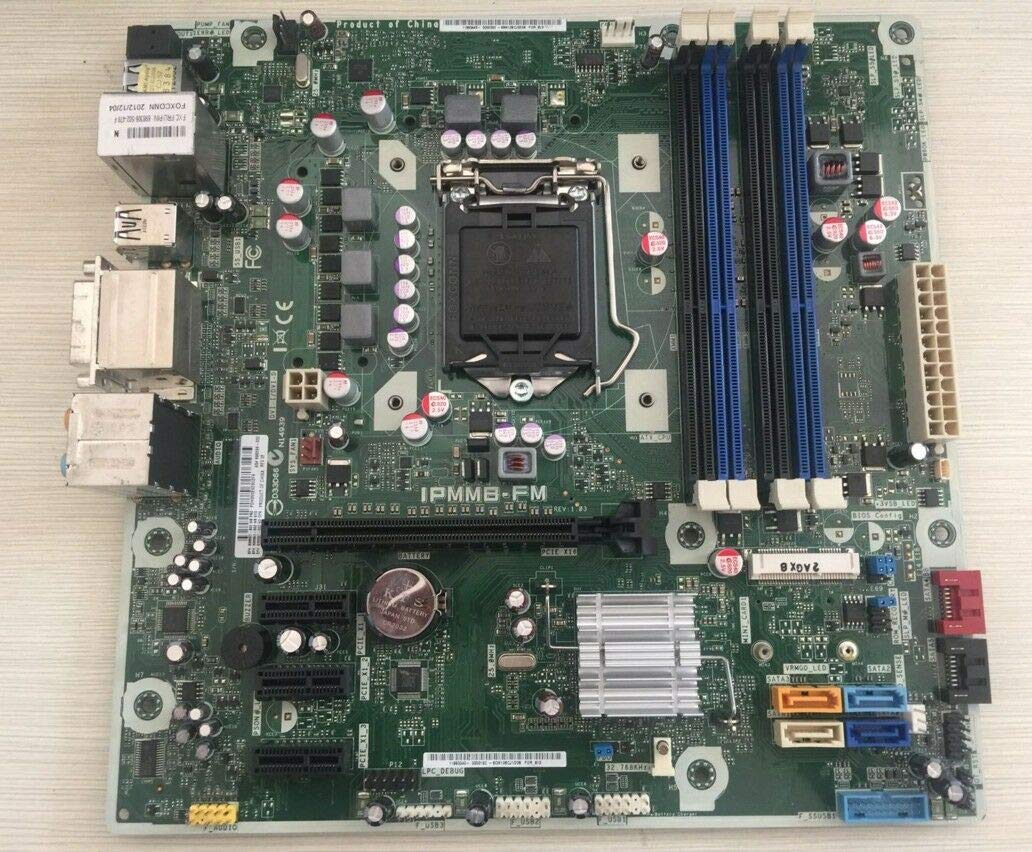
Image 1: FidgetGear IPMMB-FM 664040-001 Motherboard. This image displays the overall layout of the motherboard, including the CPU socket, RAM slots, PCIe slots, and various connectors.
4.1. Asian valmistelu
- Open your computer case and remove any existing components if you are upgrading.
- Install the I/O shield provided with your motherboard into the corresponding opening at the rear of your computer case. Ensure it snaps securely into place.
4.2. Suorittimen asentaminen
- Paikanna emolevyn LGA 1155 -suorittimen kanta.
- Gently push down the load lever and pull it to the side to open the CPU socket retention frame.
- Carefully align the CPU with the socket. Match the golden triangle on the CPU with the triangle mark on the socket. Do not force the CPU into the socket.
- Once the CPU is seated correctly, close the retention frame and push the load lever back into its locked position.
4.3. CPU-jäähdyttimen asentaminen
- Apply a thin, even layer of thermal paste to the top of the CPU if your cooler does not have it pre-applied.
- Carefully place the CPU cooler onto the CPU, aligning the mounting holes or clips.
- Secure the cooler according to its manufacturer's instructions (e.g., push-pins, screws, or backplate).
- Liitä CPU-tuulettimen kaapeli emolevyn CPU_FAN-otsakkeeseen.
4.4. RAM-muistin (DDR3) asentaminen
- Locate the DDR3 memory slots on the motherboard. This model supports 2 DDR3 memory slots.
- Avaa muistipaikan molemmissa päissä olevat pidikkeet.
- Kohdista DDR3-muistimoduulin lovi muistipaikan kiilaan.
- Paina muistimoduulin molempia päitä lujasti alas, kunnes klipsit napsahtavat paikoilleen.
4.5. Emolevyn asentaminen
- Ensure that standoffs are correctly installed in your computer case, matching the screw holes on your mATX motherboard.
- Carefully place the motherboard into the case, aligning the screw holes with the standoffs and the I/O ports with the I/O shield.
- Kiinnitä emolevy ruuveilla. Älä kiristä liikaa.
4.6. Connecting Power Supply Cables
- Kytke virtalähteen 24-nastainen ATX-päävirtaliitin emolevyn vastaavaan liitäntään.
- Connect the 4-pin or 8-pin ATX 12V CPU power connector to the header near the CPU socket.
4.7. Connecting Storage Devices (SATA 3)
- Kytke SATA-datakaapelin toinen pää emolevyn SATA 3 -porttiin.
- Liitä SATA-datakaapelin toinen pää kiintolevyyn tai SSD-levyyn.
- Kytke SATA-virtakaapeli virtalähteestä tallennuslaitteeseen.
4.8. Etupaneelin otsikoiden kytkeminen
Connect the cables from your computer case's front panel (Power Button, Reset Button, HDD LED, Power LED, USB 2.0/3.0, Audio) to the corresponding headers on the motherboard. Refer to the motherboard's silkscreen labels for correct pin alignment.
4.9. Laajennuskorttien (PCIe) asentaminen
If you are installing a graphics card or other PCIe expansion cards:
- Remove the appropriate slot cover from your computer case.
- Kohdista laajennuskortti PCIe-paikkaan ja paina se lujasti alas, kunnes se on kokonaan paikallaan.
- Secure the card with a screw or retention clip to the case.
- Kytke kaikki tarvittavat PCIe-virtakaapelit virtalähteestä näytönohjaimeen.
5. Käyttöohjeet
5.1. Ensimmäinen käynnistys
After completing all hardware installations, connect your monitor, keyboard, and mouse. Plug in the power supply and press the power button on your case. The system should power on, and you should see a display on your monitor.
5.2. BIOSin/UEFI:n käyttö
To enter the BIOS/UEFI setup utility, press the designated key (commonly DEL, F2, tai F10 XNUMX) repeatedly during the initial boot sequence. The BIOS allows you to configure system settings, boot order, and monitor hardware status.
5.3. Käyttöjärjestelmän asennus
Aseta käyttöjärjestelmän asennusmedia (USB-asema tai DVD) asemaan ja määritä käynnistysjärjestys BIOSissa niin, että järjestelmä käynnistyy asennusmedialta. Asenna haluamasi käyttöjärjestelmä noudattamalla näytön ohjeita.
5.4. Ohjaimen asennus
After installing the operating system, install the necessary drivers for your motherboard components. These typically include chipset drivers, audio drivers, network drivers, and any specific drivers for integrated peripherals. Use the provided driver CD/DVD or download the latest drivers from the FidgetGear support websivusto.
6. Huolto
Säännöllinen huolto auttaa varmistamaan emolevyn ja järjestelmän pitkän käyttöiän ja optimaalisen suorituskyvyn.
- Pölynpuhdistus: Puhdista tietokoneen kotelo säännöllisesti pölystä, erityisesti tuulettimista ja jäähdytyselementeistä, paineilmalla. Varmista, että järjestelmä on sammutettu ja irrotettu pistorasiasta ennen puhdistamista.
- BIOS-päivitykset: Check the FidgetGear support webBIOS-päivitysten sivusto. BIOS-päivitykset voivat parantaa yhteensopivuutta, vakautta ja suorituskykyä. Noudata päivitysohjeita huolellisesti, jotta emolevy ei vahingoitu.
- Ohjaimen päivitykset: Pidä ajurit ajan tasalla varmistaaksesi yhteensopivuuden uusien ohjelmistojen kanssa ja hyötyäksesi suorituskyvyn parannuksista ja virheenkorjauksista.
7. Vianmääritys
Tässä osiossa käsitellään yleisiä ongelmia, joita saatat kohdata.
7.1. No Power / System Does Not Turn On
- Check if the power supply is plugged into a working outlet and switched on.
- Verify that the 24-pin ATX and 4/8-pin CPU power cables are securely connected to the motherboard.
- Varmista, että etupaneelin virtapainikkeen kaapeli on kytketty oikein emolevyn liittimeen.
- Test the power supply with another system or a power supply tester if available.
7.2. Ei näyttöä näytöllä
- Ensure the monitor is powered on and connected to the correct video output (DVI) on the motherboard or graphics card.
- Aseta näytönohjain (jos sellainen on) ja RAM-moduulit uudelleen paikoilleen.
- Kokeile käynnistää kone vain yhdellä RAM-muistitikulla.
- Check for any diagnostic LEDs or POST (Power-On Self-Test) beep codes from the motherboard, which can indicate specific hardware issues.
7.3. Järjestelmän epävakaus / kaatumiset
- Tarkista suorittimen ja näytönohjaimen lämpötilat valvontaohjelmistolla. Ylikuumeneminen voi aiheuttaa epävakautta.
- Varmista, että kaikki ajurit ovat ajan tasalla.
- Suorita muistidiagnostiikkatyökalut tarkistaaksesi viallisen RAM-muistin.
- Verify that the power supply provides sufficient and stable power to all components.
8. Tekniset tiedot
Key technical specifications for the FidgetGear IPMMB-FM 664040-001 Motherboard:
| Ominaisuus | Kuvaus |
|---|---|
| Malli | IPMMB-FM 664040-001 |
| Merkki | FidgetGear |
| RAM-muistitekniikka | DDR3 |
| Muistipaikat saatavilla | 2 |
| Tuettu järjestelmäväylän standardi | SATA 3 |
| ASIN | B07SW6T8FS |
| Päivämäärä ensimmäinen saatavilla | 19. kesäkuuta 2019 |
9. Takuu ja tuki
FidgetGear products are manufactured to high-quality standards. This motherboard comes with a standard manufacturer's warranty against defects in materials and workmanship. The specific terms and duration of the warranty may vary by region and retailer.
For technical support, warranty claims, or further assistance, please visit the official FidgetGear support website or contact your point of purchase. Please have your product model (IPMMB-FM 664040-001) and purchase information ready when contacting support.