Johdanto
Thank you for choosing the Noval N-40-TN Rechargeable 40 Kg Scale. This manual provides essential information for the safe and efficient operation, maintenance, and troubleshooting of your new scale. Please read this manual thoroughly before using the device and keep it for future reference.
Turvallisuusohjeet
- Älä ylikuormita vaakaa yli sen enimmäispainon, joka on 40 kg.
- Place the scale on a stable, flat, and level surface to ensure accurate readings.
- Vältä vaa'an altistamista äärimmäisille lämpötiloille, suoralle auringonvalolle tai korkealle kosteudelle.
- Pidä vaaka poissa voimakkaista sähkömagneettisista kentistä.
- Älä upota vaakaa veteen tai muihin nesteisiin.
- Käytä lataamiseen ainoastaan määritettyä virtalähdettä.
- Pidä poissa lasten ulottuvilta.
Pakkauksen sisältö
Tarkista pakkauksesta seuraavat tuotteet:
- Noval N-40-TN Rechargeable 40 Kg Scale Unit
- Ruostumattomasta teräksestä valmistettu punnitusastia
- Virtasovitin/latauskaapeli
- Käyttöopas (tämä asiakirja)
Tuote loppuview
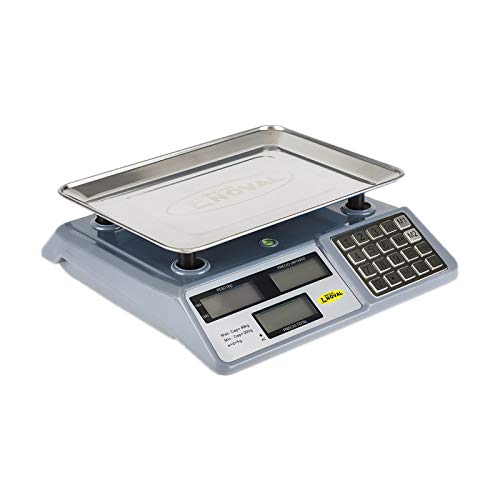
Kuva 1: Edessä view of the Noval N-40-TN scale, showing the main unit with the stainless steel weighing pan attached. The display panel and keypad are visible on the right side.
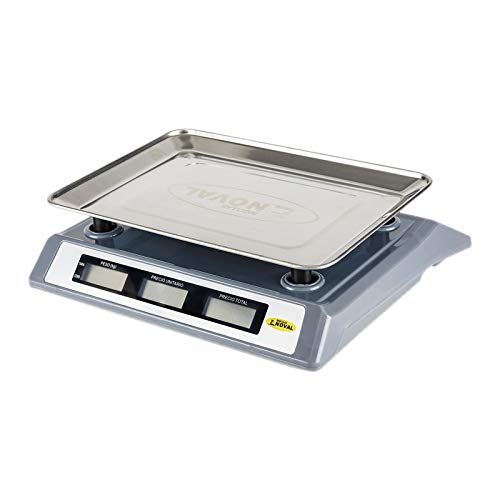
Kuva 2: Sivu view of the Noval N-40-TN scale, highlighting its compact design and the elevated weighing pan for easy placement of items.
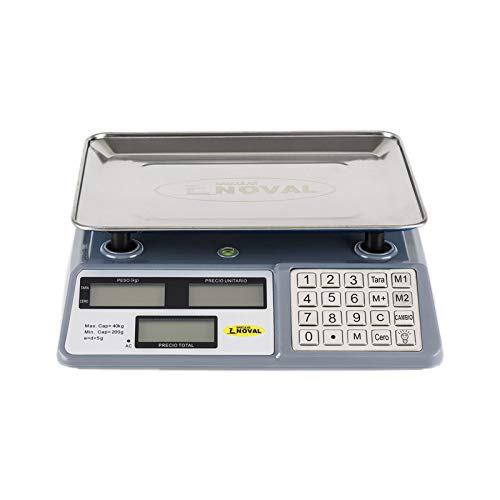
Kuva 3: Ylhäältä alas view of the Noval N-40-TN scale, clearly showing the three display windows (Weight, Unit Price, Total Price) and the full numeric keypad with function buttons like Tare, Zero, M1, M2, M, C, and Cambio.
Komponentit:
- Punnituslevy: Stainless steel platform for placing items to be weighed.
- Näyttöpaneeli: Features three LCD screens for displaying Weight (PESO), Unit Price (P.UNITARIO), and Total Price (PRECIO TOTAL).
- näppäimistö: Numeric keys (0-9) and function keys for various operations.
- Tehon syöttö: Port for connecting the AC power adapter for charging and continuous operation.
Asennus
- Purkaminen: Poista kaikki osat varovasti pakkauksesta. Säilytä pakkaus myöhempää säilytystä tai kuljetusta varten.
- Pannun asennus: Place the stainless steel weighing pan securely onto the scale's support posts. Ensure it sits flat and stable.
- Alkulataus: Before first use, connect the power adapter to the scale's power input port and plug it into a suitable electrical outlet. Allow the scale to charge for at least 8-10 hours. The 'AC' indicator on the display will illuminate when connected to power.
- Sijoitus: Position the scale on a firm, level, and vibration-free surface. Avoid placing it near air vents, fans, or direct sunlight, which can affect accuracy.
Käyttöohjeet
Virta päälle/pois:
- Kytke vaaka päälle painamalla [ON/OFF] button (location may vary, typically on the front or side).
- Sammuta vaaka painamalla ja pitämällä [ON/OFF] -painiketta, kunnes näyttö sammuu.
Peruspunnitus:
- Ensure the scale displays '0.000' in the Weight (PESO) window. If not, press the [Cero] -painiketta nollataksesi asteikon.
- Aseta punnittava esine varovasti punnituslevyn keskelle.
- Read the weight displayed in the 'PESO' window.
Taaratoiminto:
Taara-toiminnolla voit vähentää säiliön painon, jolloin mitataan vain sisällön nettopaino.
- Place the empty container on the weighing pan. The scale will display its weight.
- Paina [Tara] button. The 'PESO' display will return to '0.000'.
- Add the items to be weighed into the container. The scale will now display only the weight of the items.
- Tyhjennä taara poistamalla säiliö ja painamalla [Tara] again, or turn the scale off and on.
Unit Price and Total Price Calculation:
- Place the item on the weighing pan. The weight will be displayed in the 'PESO' window.
- Using the numeric keypad, enter the unit price (e.g., price per kilogram) into the scale. The entered value will appear in the 'P.UNITARIO' (Unit Price) window.
- The 'PRECIO TOTAL' (Total Price) window will automatically calculate and display the total cost based on the weight and unit price.
Memory Functions (M1, M2, M):
These buttons allow you to store and recall frequently used unit prices.
- To Store a Unit Price: Enter the desired unit price using the numeric keypad. Press and hold [M1], [M2], tai [M] until a confirmation beep or display change occurs.
- To Recall a Unit Price: Paina vain [M1], [M2], tai [M]. The stored unit price will appear in the 'P.UNITARIO' window.
Clear (C) Button:
Paina [C] button to clear any entered unit price or incorrect input from the display.
Change (Cambio) Button:
This function is typically used in retail settings to calculate change. After a total price is displayed, enter the amount paid by the customer, then press [Cambio]. The display will show the change due.
Huolto
- Puhdistus: Wipe the scale surface and weighing pan with a soft, damp cloth. Do not use abrasive cleaners, solvents, or immerse the unit in water. Ensure the scale is dry before storage or next use.
- Akun hoito: To prolong battery life, avoid completely draining the battery frequently. Recharge the scale when the low battery indicator appears. If storing for an extended period, charge the battery every 3 months to prevent deep discharge.
- Varastointi: Säilytä vaakaa viileässä, kuivassa paikassa, poissa suorasta auringonvalosta ja äärimmäisistä lämpötiloista.
- Kalibrointi: This scale is factory calibrated. If you suspect accuracy issues, consult a qualified technician for recalibration. Do not attempt to calibrate it yourself unless you have proper equipment and training.
Vianetsintä
| Ongelma | Mahdollinen syy | Ratkaisu |
|---|---|---|
| Vaaka ei käynnisty. | Akun varaus on heikko tai virtaa ei ole kytketty. | Connect the power adapter and charge the battery. Ensure the power outlet is working. |
| Epätarkkoja lukemia. | Scale not on a level surface, pan not seated correctly, or external interference. | Place on a stable, level surface. Re-seat the weighing pan. Avoid vibrations or drafts. Press [Cero] ennen punnitsemista. |
| Display shows "Lo" or similar. | Akku vähissä. | Recharge the scale's battery. |
| Display shows "Err" or overload message. | Vaaka on ylikuormitettu. | Poista esine välittömästi. Älä ylitä 40 kg:n enimmäiskantavuutta. |
Tekniset tiedot
- Malli: N-40-TN
- Merkki: OBI
- Suurin kapasiteetti: 40 kiloa (40 kg)
- Minimikapasiteetti: 200 grammaa (0.2 kg)
- Division (e): 5 grammaa (0.005 kg)
- Virtalähde: Rechargeable Battery & AC Power
- Mittayksiköt: kiloa (kg)
Takuu ja tuki
This product is manufactured by OBI. For specific warranty terms and conditions, please refer to the warranty card included with your purchase or contact your retailer. Please note that spare parts availability in the EU is guaranteed for 1 year from the date of purchase.
For technical support, service, or inquiries, please contact your local distributor or the point of purchase. Keep your purchase receipt as proof of purchase for warranty claims.
For general inquiries, you may visit the OBI official website or contact their customer service department (contact details not provided in this manual).


