1. Johdanto
The Amazon Echo Flex is a compact, plug-in smart speaker designed to bring Alexa to more places in your home. It allows you to control smart home devices, get information, make announcements, and more, all with your voice. Its small form factor and direct plug-in design make it ideal for hallways, bathrooms, kitchens, or any area where a full-sized smart speaker might be inconvenient.

Image: The Amazon Echo Flex, a compact smart speaker designed to plug directly into a standard wall outlet, bringing Alexa functionality to any room.
2. Aloittaminen: Asennus
Follow these steps to set up your Echo Flex and connect it to your home Wi-Fi network.
- Plug In Your Echo Flex: Insert the Echo Flex directly into a standard electrical outlet. The light ring on the device will turn blue, then orange, indicating it is ready for setup.
- Lataa Alexa-sovellus: On your smartphone or tablet, download the Amazon Alexa app from your device's app store (available for Fire OS, Android, and iOS).
- Lisää laitteesi: Open the Alexa app, navigate to the 'Devices' tab, tap the '+' icon, and select 'Add Device'. Choose 'Amazon Echo' then 'Echo Flex'.
- Yhdistä Wi-Fi-verkkoon: Follow the on-screen instructions in the Alexa app to connect your Echo Flex to your home Wi-Fi network. The Echo Flex supports dual-band Wi-Fi (2.4 GHz and 5 GHz). Amazon Wi-Fi simple setup can assist in connecting your device to your Wi-Fi network easily.
- Mukauta asetuksia: Once connected, you can personalize settings such as your location, preferred language, and enable various Alexa skills within the app.

Image: The Echo Flex is shown plugged into a standard wall outlet, demonstrating its compact and unobtrusive design for easy placement in any room.
3. Operating Your Echo Flex
The Echo Flex is designed for hands-free voice control. Simply say the wake word "Alexa" followed by your command or question.
Voice Commands and Features:
- Tiedot ja tuki: Ask Alexa for weather updates, news briefings, traffic reports, set alarms, create shopping lists, or get answers to general questions.
- Älykäs kodin ohjaus: Control compatible smart home devices such as lights, thermostats, and door locks. For example, "Alexa, laita olohuoneen valot päälle."
- Viestintä: Use Drop In to connect instantly with other compatible Echo devices in your home or make announcements to all devices. You can also make hands-free calls to contacts.
- Äänilähtö: While the Echo Flex has a built-in speaker for voice feedback, you can connect it to external speakers via Bluetooth or the 3.5mm audio output for enhanced sound.

Image: The Echo Flex is shown in a bathroom, illustrating its use for smart home control with the command, "Alexa, turn on the coffee maker."
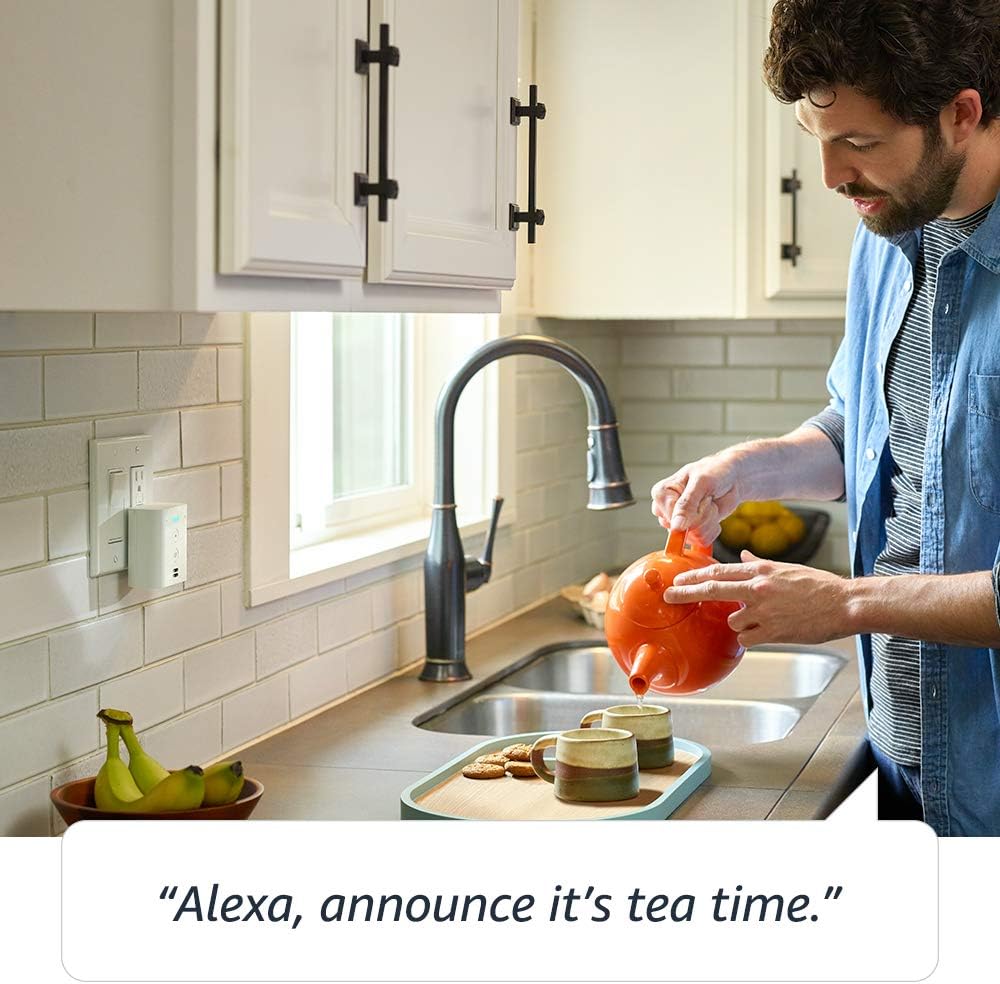
Image: The Echo Flex is positioned in a kitchen, demonstrating its communication feature with the command, "Alexa, announce it's tea time."
Sisäänrakennettu USB-portti:
The Echo Flex features a USB-A port on the bottom. This port can be used to:
- Charge your smartphone (7.5W output).
- Connect optional accessories (sold separately), such as a night-light or motion sensor, to extend its functionality.
Tietosuoja-asetukset:
Your Echo Flex is designed with multiple layers of privacy protection:
- Mikrofonin poiskytkentäpainike: Press the microphone off button on the device to electronically disconnect the microphones. The light ring will turn red to indicate that the microphones are off and Alexa cannot hear you.
- Äänitallenteet: Voit view, kuunnella ja poistaa äänitallenteitasi milloin tahansa Alexa-sovelluksen kautta tai käymällä Alexan tietosuojakeskuksessa.

Image: A close-up of the Echo Flex showing the microphone off button, which, when pressed, disconnects the microphones and illuminates a red indicator light for privacy.
4. Huolto
To ensure the longevity and optimal performance of your Echo Flex, follow these simple maintenance guidelines:
- Puhdistus: Use a soft, dry, lint-free cloth to clean the exterior of the device. Do not use abrasive cleaners, liquids, or chemical sprays.
- Sijoitus: Ensure the device is plugged into a well-ventilated area and not obstructed by furniture or curtains. Avoid placing it in direct sunlight or near heat sources.
- Ympäristöolosuhteet: Do not expose the Echo Flex to water or excessive humidity. It is designed for indoor use only.
5. Vianmääritys
If you encounter issues with your Echo Flex, try the following troubleshooting steps:
- No Power/No Light: Ensure the Echo Flex is securely plugged into a working electrical outlet. Try a different outlet if necessary.
- Alexa ei vastaa: Check if the microphone is turned off (red light indicator). If so, press the microphone button to turn it back on. Ensure your device is connected to Wi-Fi.
- Wi-Fi-yhteysongelmat:
- Varmista, että Wi-Fi-verkkosi on aktiivinen ja että muut laitteet voivat muodostaa yhteyden siihen.
- Käynnistä Wi-Fi-reititin ja modeemi uudelleen.
- Open the Alexa app and go to 'Devices' > 'Echo & Alexa' > 'Echo Flex' > 'Change' next to Wi-Fi Network to reconfigure your Wi-Fi settings.
- Amazon Sidewalk can help your device reconnect to your Wi-Fi router if your password or network name changes. Ensure Sidewalk is enabled in your Alexa app settings if you wish to use this feature.
- Huono äänenlaatu: If using the built-in speaker, remember it is primarily for voice feedback. For music or richer audio, connect external speakers via Bluetooth or the 3.5mm audio output.
- Tehdasasetusten palautus: If problems persist, you can factory reset your Echo Flex. To do this, press and hold the Action button (the button with a dot) for 20 seconds until the light ring turns orange.
For further assistance, refer to the help section within the Alexa app or visit Amazon's official support websivusto.
6. Tekniset tiedot
| Ominaisuus | Yksityiskohta |
|---|---|
| Malli | Echo Flex (1st Gen) - 2019 release |
| Koko | 5.8 x 3.4 x 2.9 tuumaa (148 x 86 mm x 73 mm) |
| Paino | 5.3 g (150 unssia) |
| Wi-Fi-yhteys | Dual-band Wi-Fi (802.11 a/b/g/n/ac, 2.4 and 5 GHz). Does not support ad-hoc networks. |
| Bluetooth-yhteys | A2DP support for audio streaming, AVRCP for voice control of connected mobile devices. PIN-coded Bluetooth speakers not supported. |
| USB-liitäntä | USB-A port for optional accessories or phone charging (7.5W) |
| Audio | Built-in speaker for voice feedback, 3.5 mm stereo audio output |
| Järjestelmävaatimukset | Alexa app compatible with Fire OS, Android, iOS, and web selaimissa. |
| Sisältyy laatikkoon | Echo Flex, Quick Start Guide |
| Kieli | Alexa puhuu englantia ja espanjaa |
7. Takuu ja tuki
Your Echo Flex comes with a 90-day limited warranty and service. Optional 1-year, 2-year, and 3-year extended warranties are available for U.S. customers, sold separately. Use of the Echo Flex is subject to Amazon's terms and conditions.
Esteettömyysominaisuudet:
The Alexa app and Alexa-enabled products include various features for customers with accessibility needs related to vision, hearing, mobility, and speech. More information can be found on the Alexa accessibility page.
Tietosuojatiedot:
For detailed information on how Alexa and Echo devices are designed to protect your privacy, including wake word technology, streaming indicators, and the ability to manage your voice recordings, please visit the Alexan tietosuojakeskus.


