1. Johdanto
This manual provides essential information for the installation, operation, and maintenance of your Samsung 970 EVO Plus 1TB NVMe M.2 Internal Solid State Drive. Please read these instructions carefully before proceeding to ensure proper usage and to maximize the performance and lifespan of your SSD.

Figure 1: Samsung 970 EVO Plus SSD and its retail packaging.
2. Tuote ohiview
The Samsung 970 EVO Plus is a high-performance NVMe M.2 SSD designed for demanding computing tasks. It leverages V-NAND technology and a PCIe Gen 3.0 x4 interface to deliver exceptional read and write speeds, making it suitable for gaming, graphics, and intensive workloads.
Tärkeimmät ominaisuudet:
- Kapasiteetti: 1TB
- Käyttöliittymä: NVMe M.2 (PCIe Gen 3.0 x4)
- Jaksollinen lukunopeus: Jopa 3,500 XNUMX Mt/s
- Jaksottainen kirjoitusnopeus: Jopa 3,300 XNUMX Mt/s
- Tekniikka: V-NAND, Dynamic Thermal Guard, Intelligent TurboWrite
- Ohjelmisto: Samsung Magician for drive management

Figure 2: The 970 EVO Plus SSD delivering high performance in a laptop environment.
3. Asennus ja asennus
Before installation, ensure your system's motherboard supports NVMe M.2 SSDs and has an available M.2 slot. Refer to your motherboard's manual for specific M.2 slot locations and installation procedures.
Turvallisuusohjeet:
- Sammuta aina tietokone ja irrota se virtalähteestä ennen sisäisten komponenttien asentamista.
- Discharge any static electricity by touching a grounded metal object before handling the SSD.
- Käsittele SSD-levyä sen reunoista, jotta vältät koskettamasta kultaisia liittimiä tai komponentteja.
Asennusvaiheet:
- Etsi vapaana oleva M.2-paikka emolevyltäsi.
- Carefully insert the Samsung 970 EVO Plus SSD into the M.2 slot at a slight angle.
- Gently push the SSD down until it is parallel with the motherboard.
- Kiinnitä SSD-levy mukana toimitetulla ruuvilla (tai emolevyn M.2-tuentakappaleen ruuvilla).
- Sulje tietokoneen kotelo ja kytke virta takaisin.
- Boot your computer and initialize the new SSD through your operating system's Disk Management utility.
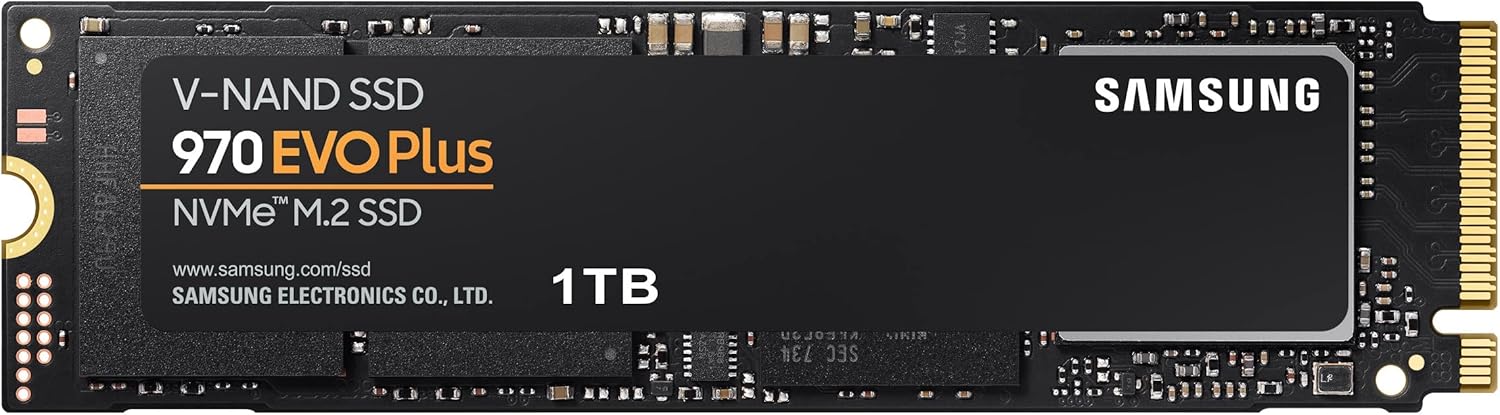
Figure 3: The Samsung 970 EVO Plus NVMe M.2 SSD module.
4. Käyttöohjeet
Once installed and initialized, your Samsung 970 EVO Plus SSD is ready for use. For optimal performance and drive health management, it is recommended to install the Samsung Magician software.
Samsung Magician -ohjelmisto:
Samsung Magician is a suite of user-friendly tools designed to help you manage your SSD. It allows you to:
- Monitor drive health and temperature.
- Benchmark performance.
- Päivitä laiteohjelmisto.
- Optimize performance settings.
- Securely erase data.
Lataa Samsung Magicianin uusin versio Samsungin viralliselta sivustolta. websivusto.

Figure 4: The Samsung Magician software interface for SSD management.
5. Huolto
Regular maintenance helps ensure the longevity and optimal performance of your SSD.
Laiteohjelmistopäivitykset:
Periodically check for and install firmware updates using the Samsung Magician software. Firmware updates can improve performance, stability, and compatibility.
Lämmönhallinta:
The 970 EVO Plus features Dynamic Thermal Guard technology, which automatically monitors and maintains optimal operating temperatures to minimize performance drops. Ensure adequate airflow within your computer case to assist with heat dissipation.

Figure 5: Illustration of Dynamic Thermal Guard for heat dissipation.
6. Vianmääritys
If you encounter issues with your Samsung 970 EVO Plus SSD, consider the following troubleshooting steps:
- SSD-levyä ei havaittu:
- Varmista, että SSD-levy on oikein paikallaan M.2-paikkaan.
- Check your motherboard's BIOS/UEFI settings to confirm the M.2 slot is enabled and configured correctly.
- Verify that your motherboard drivers are up to date.
- Suorituskykyongelmat:
- Ensure the latest firmware is installed via Samsung Magician.
- Check for sufficient free space on the drive (performance can degrade with very full drives).
- Monitor drive temperature using Samsung Magician to ensure it's not overheating.
- Käyttöjärjestelmä ei käynnisty:
- Verify the boot order in your BIOS/UEFI settings.
- If migrating an OS, ensure the migration process was completed successfully.
Jatkuvien ongelmien varalta ota yhteyttä Samsungin tukeen websivustolla tai ota yhteyttä asiakaspalveluun.
7. Tekniset tiedot
| Ominaisuus | Yksityiskohta |
|---|---|
| Mallinumero | MZ-V7S1T0B/AM |
| Kapasiteetti | 1 TB |
| Käyttöliittymä | NVMe (PCIe Gen 3.0 x 4) |
| Muototekijä | M.2 (2280) |
| Jaksollinen lukunopeus | Jopa 3,500 XNUMX Mt/s |
| Jaksottainen kirjoitusnopeus | Jopa 3,300 XNUMX Mt/s |
| V-NAND Technology | Kyllä |
| Dynaaminen lämpösuoja | Kyllä |
| Tuotteen mitat (PxLxK) | 3.15 x 0.87 x 0.09 tuumaa |
| Tuotteen paino | 0.32 unssia |
| Voitage | 3.3 V ± 5% Allowable voltage |

Figure 6: Physical dimensions of the Samsung 970 EVO Plus SSD.
8. Takuu ja tuki
Rajoitettu takuu:
The Samsung 970 EVO Plus 1TB SSD comes with a 5-year limited warranty or up to 600 Terabytes Written (TBW), whichever comes first. For detailed warranty terms and conditions, please refer to the enclosed warranty statement in the product package.
Asiakastuki:
For further assistance, technical support, or warranty claims, please visit the official Samsung website or contact their customer service department. Keep your product's model number (MZ-V7S1T0B/AM) and serial number handy when seeking support.


