Jabra Evolve 20 MS Stereo Headset Instruction Manual
Model: Evolve 20 (GSA4999-823-109)
1. Johdanto
The Jabra Evolve 20 MS Stereo Headset is a professional wired headset designed for clear communication and music listening. It features a noise-canceling microphone to reduce background distractions and an intuitive control unit for easy call management. This manual provides essential information for setting up, operating, and maintaining your headset.
2. Pakkauksen sisältö
Tarkista pakkauksesta seuraavat tuotteet:
- Jabra Evolve 20 MS Stereo Headset with integrated control unit
3. Tuote ohiview
3.1 Kuulokkeiden osat
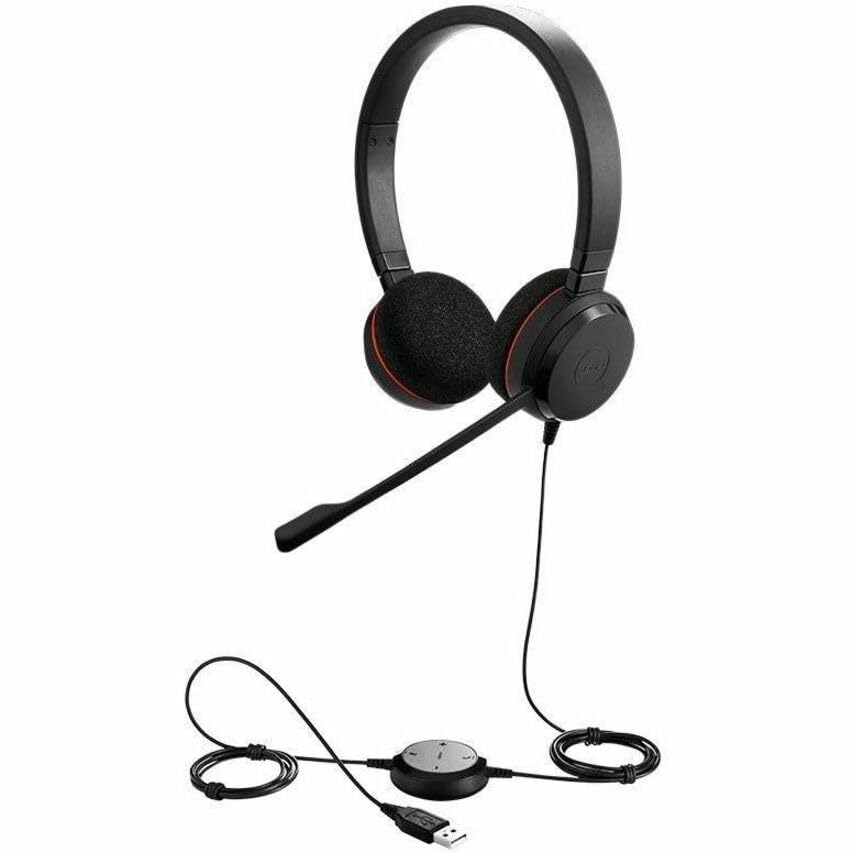
The Jabra Evolve 20 MS Stereo Headset features an adjustable headband, foam ear cushions for comfort, and a flexible microphone boom arm that can be positioned for optimal voice pickup.
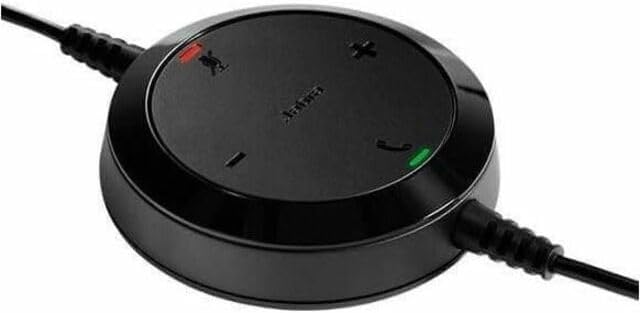
The inline control unit provides easy access to essential call management functions, including volume adjustment, microphone mute, and answer/end call buttons.
4. Asennus
4.1 Tietokoneeseen liittäminen
- Etsi tietokoneeltasi (pöytätietokoneelta tai kannettavalta) vapaa USB-portti.
- Plug the USB connector of the Jabra Evolve 20 headset into the USB port.
- Tietokoneesi pitäisi automaattisesti tunnistaa ja asentaa tarvittavat ajurit. Tämä voi kestää hetken.
- Once installed, the headset will be ready for use. You may need to select the Jabra Evolve 20 as your default audio device (microphone and speaker) in your operating system's sound settings or your communication software (e.g., Microsoft Teams, Skype for Business).
5. Käyttöohjeet
5.1 Kuulokkeiden käyttö
- Säädä pääpanta varmistaaksesi mukavan ja tukevan istuvuuden päässäsi.
- Position the microphone boom arm so that the microphone is approximately 2-3 cm (1 inch) from your mouth.
5.2 Using the Control Unit
- Äänenvoimakkuuden lisääminen (+): Paina lisätäksesi kuuntelun äänenvoimakkuutta.
- Äänenvoimakkuutta pienemmälle (-): Paina vähentääksesi kuuntelun äänenvoimakkuutta.
- Mykistä mikrofoni: Press the microphone icon button to mute or unmute your microphone during a call. An indicator light on the control unit may show the mute status.
- Puhelun vastaaminen/lopetus: Press the phone icon button to answer an incoming call or end an active call.
6. Huolto
Oikea huolto varmistaa kuulokkeiden pitkän käyttöiän ja suorituskyvyn.
- Puhdistus: Gently wipe the headset and control unit with a soft, dry cloth. For ear cushions, use a slightly damp cloth if necessary, but avoid excessive moisture. Do not use harsh chemicals or abrasive cleaners.
- Varastointi: When not in use, store the headset in a clean, dry place, away from extreme temperatures and direct sunlight. Avoid tangling the cable.
- Kaapelihuolto: Do not pull on the cable to disconnect the headset. Always grasp the USB connector.
7. Vianmääritys
If you encounter issues with your Jabra Evolve 20 headset, refer to the table below for common problems and solutions.
| Ongelma | Ratkaisu |
|---|---|
| Kuulokkeista ei kuulu ääntä |
|
| Mikrofoni ei toimi |
|
| Call control buttons not responding |
|
8. Tekniset tiedot
Key technical specifications for the Jabra Evolve 20 MS Stereo Headset:
| Ominaisuus | Kuvaus |
|---|---|
| Mallin nimi | Kehitä 20 |
| Yhteystekniikka | Langallinen (USB) |
| Melunhallinta | Active Noise Cancellation, Passive Noise Cancellation |
| Mikrofoni | Melua vaimentava |
| Korvien sijoitus | Korvan yli |
| Muototekijä | Korvassa |
| Material (Ear Cushions) | Vaahto |
| Tuotteen paino | 4.6 unssia (0.29 puntaa) |
| Tuotteen mitat | 8 x 7 x 1.5 tuumaa |
| Yhteensopivat laitteet | Desktops, Laptops, Softphones, Web Clients, Desk Phones |
| Ohjaimen tyyppi | Answer/End, Mute, Volume |
9. Takuu ja tuki
For detailed warranty information, please refer to the warranty card included with your product or visit the official Jabra websivusto. Takuuehdot voivat vaihdella alueittain ja jälleenmyyjiltä riippuen.
For technical support, product registration, or to access additional resources, please visit the official Jabra support websivustolta tai ota yhteyttä suoraan heidän asiakaspalveluunsa. Säilytä ostokuitti takuuvaatimuksia varten.