Johdanto
The Insignia NS-SPBTWAVE2-BK Wave 2 Portable Bluetooth Speaker provides high-quality wireless audio streaming from your compatible devices. Designed for versatility, its robust construction and rubberized feet allow for stable placement in both horizontal and vertical orientations. Enjoy hands-free communication with the built-in speakerphone and extended listening sessions thanks to its 12-hour battery life.
This manual provides essential information for setting up, operating, maintaining, and troubleshooting your speaker. Please read it thoroughly before use and retain it for future reference.
Pakkauksen sisältö
Varmista, että pakkauksessa on kaikki tarvittavat osat:
- Insignia NS-SPBTWAVE2-BK Wave 2 Portable Bluetooth Speaker
- USB-latauskaapeli
- 3.5mm Audio Cable (Auxiliary)
- Quick Setup Guide (or similar documentation)
Tuotteen ominaisuudet
- Langaton yhteys: Connects wirelessly to smartphones, tablets, and other Bluetooth-enabled devices.
- Pitkä akun käyttöikä: Features a rechargeable 2,000 mAh battery, providing up to 12 hours of playback on a full charge.
- Sisäänrakennettu mikrofoni: Enables hands-free calling directly through the speaker.
- Auxiliary Audio Input: Allows for wired connection to audio devices via a 3.5mm audio cable.
- Monipuolinen sijoitus: Designed to stand securely in both horizontal and vertical positions.
Kaiuttimen osat
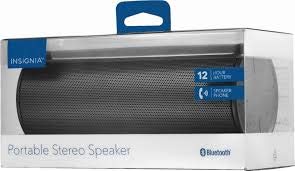
Kuva 1: Etuosa view of the Insignia Wave 2 Speaker in horizontal orientation.

Kuva 2: Pystysuuntainen view of the speaker, illustrating the power button, charging port, and auxiliary input port at the bottom.
Refer to the images above for the location of key components such as the power button, volume controls, Bluetooth indicator, charging port, and auxiliary input.
Asennus
1. Kaiuttimen lataaminen
- Connect the small end of the USB charging cable to the charging port on the speaker (refer to Figure 2).
- Connect the large end of the USB charging cable to a USB power adapter (not included) or a powered USB port on a computer.
- The charging indicator light will illuminate. Allow approximately 12 hours for a full charge before first use. The indicator light will change or turn off once charging is complete.
2. Bluetooth-pariliitos
- Ensure the speaker is fully charged. Press and hold the Power button to turn on the speaker. The Bluetooth indicator light will begin to flash, indicating it is in pairing mode.
- On your Bluetooth-enabled device (smartphone, tablet, etc.), navigate to the Bluetooth settings and ensure Bluetooth is enabled.
- Etsi available devices. Select "Insignia Wave 2" from the list.
- Once paired, the Bluetooth indicator light on the speaker will become solid, and you may hear an audible confirmation.
- Jos salasanaa pyydetään, kirjoita "0000".
3. Auxiliary (Wired) Connection
- Connect one end of the 3.5mm audio cable to the AUX input port on the speaker (refer to Figure 2).
- Liitä 3.5 mm:n äänikaapelin toinen pää äänilaitteen kuulokeliitäntään tai äänilähtöporttiin.
- The speaker will automatically switch to auxiliary mode when a cable is detected.
Kaiuttimen käyttö
Virta päälle/pois
- To turn on: Press and hold the Power button until the indicator lights illuminate.
- To turn off: Press and hold the Power button until the indicator lights turn off.
Äänenvoimakkuuden säätö
- Säädä äänenvoimakkuutta kaiuttimen äänenvoimakkuuspainikkeilla.
- You can also control the volume from your connected Bluetooth device or auxiliary audio source.
Handsfree-puhelut
Kun kaiutin on yhdistetty Bluetooth-yhteyden kautta, sitä voidaan käyttää handsfree-puheluihin:
- Vastaa puheluun: Paina Toista/Tauko/Soita-painiketta kerran.
- Lopeta puhelu: Paina Toista/Tauko/Soita-painiketta kerran puhelun aikana.
- Hylkää puhelu: Press and hold the Play/Pause/Call button.
- Speak clearly towards the speaker's built-in microphone for optimal voice pickup.
Huolto
- Puhdistus: Puhdista kaiuttimen ulkopinta pehmeällä, kuivalla ja nukkaamattomalla liinalla. Älä käytä nestemäisiä puhdistusaineita, aerosoleja tai liuottimia.
- Akun hoito: To prolong battery life, avoid fully discharging the battery frequently. Recharge the speaker regularly, even if not in use. Avoid exposing the speaker to extreme temperatures (hot or cold).
- Varastointi: Kun kaiutinta ei käytetä pitkään aikaan, säilytä sitä viileässä, kuivassa paikassa, poissa suorasta auringonvalosta ja kosteudesta.
- Vedenkestävyys: Tämä kaiutin on EI vedenpitävä. Vältä altistumista vedelle tai liialliselle kosteudelle.
Vianetsintä
| Ongelma | Mahdollinen ratkaisu |
|---|---|
| Kaiutin ei käynnisty. | Varmista, että akku on ladattu. Liitä kaiutin virtalähteeseen USB-latauskaapelilla. |
| Kaiuttimesta ei kuulu ääntä. | Check the volume level on both the speaker and the connected device. Ensure the correct input source (Bluetooth or AUX) is selected. Verify the Bluetooth connection or auxiliary cable. |
| Pariliitos Bluetoothin kautta ei onnistu. | Ensure the speaker is in pairing mode (flashing Bluetooth indicator). Turn off and on Bluetooth on your device. Move the speaker closer to your device. Forget the speaker from your device's Bluetooth list and try pairing again. |
| Huono äänenlaatu tai vääristymä. | Ensure the speaker is within Bluetooth range (approx. 33 ft / 10 m). Reduce the volume on the source device or speaker. Check for interference from other wireless devices. Try a different audio source or file. |
| Mikrofoni ei toimi puheluiden aikana. | Ensure the speaker is properly connected via Bluetooth. Speak directly towards the speaker. Check your phone's call settings to ensure audio is routed to the Bluetooth speaker. |
Tekniset tiedot
- Mallin nimi: Aalto 2
- Mallinumero: NS-SPBTWAVE2-BK
- Yhteystekniikka: Bluetooth
- Akun kesto: Jopa 12 tuntia
- Akun tyyppi: 1 litiumioni (mukana)
- Latausaika: Noin 12 tuntia
- Tuotteen mitat: 6.8 x 2.8 x 2.8 tuumaa (17.3 x 7.1 x 7.1 cm)
- Tuotteen paino: 1 kg
- Äänilähtötila: Stereot
- Signaali-kohinasuhde: 80 dB
- Sisäänrakennettu mikrofoni: Kyllä
- Aputulo: Kyllä (3.5 mm)
- Vedenpitävä: Ei
- Materiaali: Muovi
- UPC: 600603230455
Takuu ja tuki
This Insignia NS-SPBTWAVE2-BK Wave 2 Portable Bluetooth Speaker comes with a Rajoitettu takuu. For specific terms and conditions of your warranty, please refer to the warranty card included with your purchase or visit the official Insignia websivusto.
For technical support, troubleshooting assistance, or warranty claims, please contact Insignia Customer Service. Contact information can typically be found on the Insignia websivustolla tai tuotedokumentaatiossa.