Johdanto
This manual provides detailed instructions for the installation, operation, and maintenance of your Defiant Electronic Deadbolt Door Lock. Please read this manual thoroughly before installation and use to ensure proper function and safety.
The Defiant Electronic Deadbolt offers convenient keyless access with a touch keypad, along with the security of a traditional mechanical key. It is designed for use on garage, entry, home office, computer room, or utility room doors.
Turvallisuustiedot
Noudata aina perusturvallisuusohjeita tätä tuotetta asennettaessa ja käytettäessä loukkaantumis- tai vaurioriskin vähentämiseksi.
- Älä yritä purkaa tai muokata lukkoa tässä käyttöoppaassa annettujen ohjeiden vastaisesti.
- Käytä vain määritettyä paristotyyppiä (ei sisälly toimitukseen).
- Säilytä avaimia turvallisessa paikassa erillään lukosta.
- Varmista, että kaikki osat on kiinnitetty tukevasti asennuksen aikana.
Pakkauksen sisältö
Varmista, että kaikki osat ovat mukana ennen asennuksen aloittamista:
- Ulkoinen näppäimistökokoonpano
- Sisäkokoonpano peukalokytkimellä
- Kuollut salpa
- Lakkolevy
- Kiinnitysruuvit
- Avaimet (2)
- Asennusmalli (jos sovellettavissa)

Image: Included components such as keys, strike plate, and the cylinder housing.
Asennusopas
Tarvittavat työkalut: Philips screwdriver (included), measuring tape, pencil.
- Valmista ovi: Ensure your door has the standard bore holes for a deadbolt. If not, use the provided template (if applicable) to drill necessary holes.
- Asenna salpa: Insert the deadbolt latch into the edge of the door. Ensure the "UP" arrow on the latch is pointing upwards. Secure with screws.
- Ulkoisen näppäimistön asentaminen: Feed the cable from the exterior keypad through the cross bore hole. Align the keypad with the latch and press it firmly against the door.
- Asenna sisäosa: Connect the cable from the exterior keypad to the interior assembly. Align the interior assembly with the mounting posts from the exterior keypad and secure with screws. Ensure the thumb turn operates smoothly.
- Asenna vastalevy: Asenna vastakappale ovenkarmiin kohdistamalla se salvan kanssa. Kiinnitä ruuveilla.
- Aseta paristot: Avaa sisäyksikön paristokotelon kansi ja aseta sisään 4 AA-paristoa (eivät sisälly toimitukseen) huomioiden napaisuuden.
- Testitoiminta: Test the lock with the mechanical key and by entering a default code (if any) or a newly programmed code.
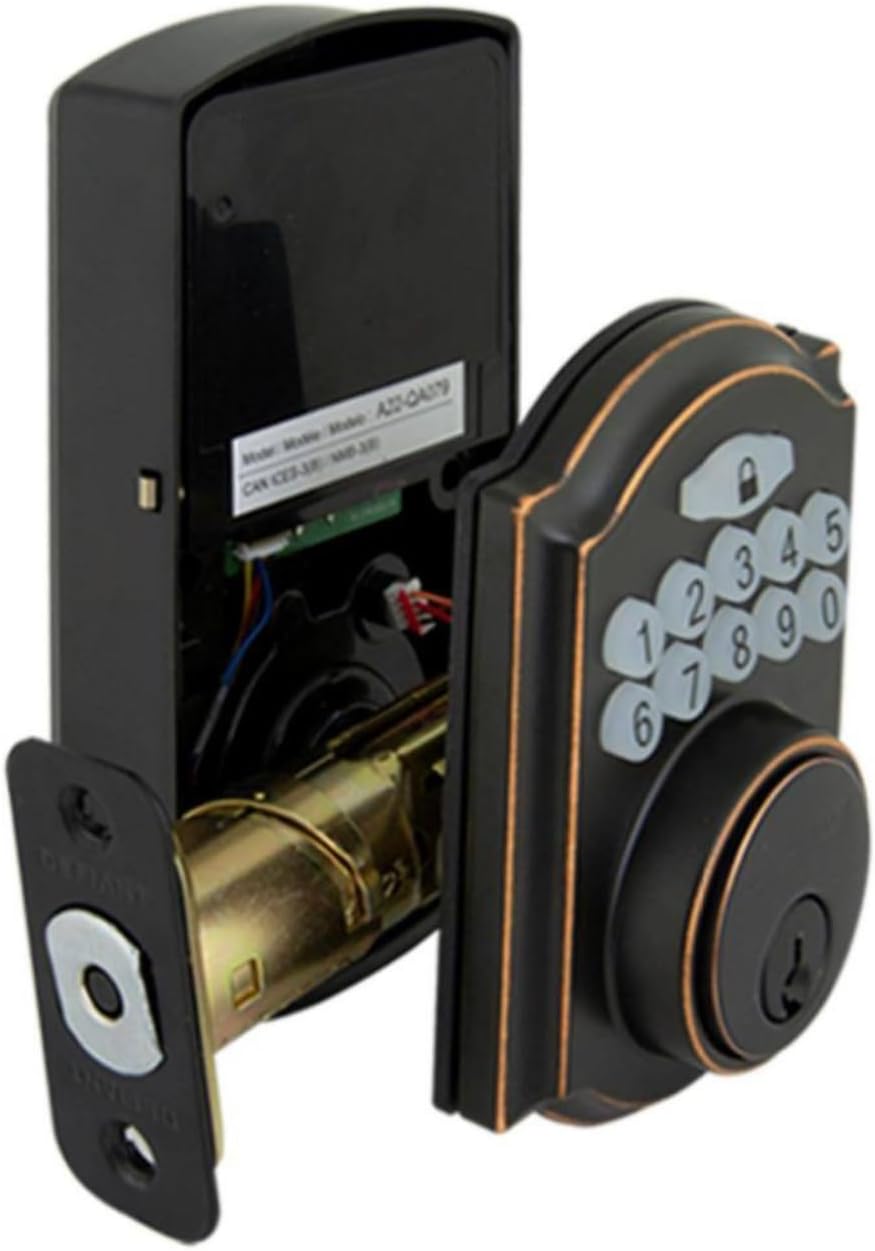
Image: The electronic deadbolt assembly, showing the interior mechanism and exterior keypad.

Kuva: Ulkopuoli view of the electronic deadbolt installed on a door, showcasing the keypad.
Käyttöohjeet
Käyttäjäkoodien ohjelmointi
The lock can hold up to 10 user codes and 5 single-entry codes.
- Siirry ohjelmointitilaan: Locate the program button on the interior assembly (usually on the battery cover or near the battery compartment). Press it once. The keypad will illuminate.
- Lisää uusi käyttäjäkoodi: Enter your desired 4-digit user code. Press the Lock button (padlock icon) to confirm. The lock will beep to confirm successful programming.
- Poista käyttäjäkoodi: Enter programming mode. Enter the 4-digit user code you wish to delete. Press the Lock button. The lock will beep to confirm deletion.
Lukitseminen ja lukituksen avaaminen
- Lukituksen avaaminen: Enter your 4-digit user code on the keypad. The keypad will illuminate, and the deadbolt will retract after a few seconds.
- To Lock (from outside): Press the Lock button (padlock icon) on the keypad. The deadbolt will extend after a few seconds.
- To Lock (from inside): Käännä sisäkokoonpanon peukalonuppi lukitusasentoon.
Automaattinen lukitusominaisuus
The lock features an auto-lock function with an adjustable delay from 10 to 99 seconds. Refer to the full programming guide (usually a separate sheet or detailed section in the manual) for instructions on enabling and adjusting this feature.

Image: Close-up of the electronic keypad for code entry.
Huolto
- Puhdistus: Puhdista lukko pehmeällä,amp liinalla. Vältä hankaavia puhdistusaineita tai liuottimia, jotka voivat vahingoittaa pintaa tai elektronisia komponentteja.
- Akun vaihto: When the battery indicator light flashes or the lock makes a low battery warning sound, replace all four AA batteries. Use only new, high-quality alkaline batteries.
- Voitelu: Periodically lubricate the deadbolt mechanism with a silicone-based lubricant to ensure smooth operation. Do not lubricate the keypad.
Vianetsintä
| Ongelma | Mahdollinen syy | Ratkaisu |
|---|---|---|
| Näppäimistö ei syty. | Tyhjät paristot tai paristojen virheellinen asennus. | Vaihda paristot ja varmista oikea napaisuus. |
| Lock does not respond to code. | Incorrect code entered, code not programmed, or lock is jammed. | Verify code, reprogram code, check for obstructions in door frame or latch. |
| Salpa ei mene kokonaan ulos/sisään. | Misalignment of strike plate or latch, low battery. | Adjust strike plate, replace batteries. |
| Lukitus piippaa jatkuvasti. | Alhaisen akun varoitus. | Vaihda paristot välittömästi. |
Tekniset tiedot
- Merkki: Uhmakas
- Mallinumero: 9a843b7d-eaac-472e-b6d2-4b1006f6f6a5
- Lukon tyyppi: Elektroninen Deadbolt
- Materiaali: Pronssi
- Tyyli: Moderni
- Erikoisominaisuus: Keyless Entry, Back-up Mechanical Key
- Käyttäjäkoodit: Jopa 10
- Single Entry Codes: Jopa 5
- Automaattisen lukituksen viive: 10-99 sekuntia (säädettävä)
- Virtalähde: 4 kpl AA-paristoja (ei mukana)
- Tuotteen paino: 2.26 kiloa
- Paketin mitat: 7.48 x 5.51 x 4.61 tuumaa
- UPC: 050134991163
Takuu ja tuki
For warranty information or technical support, please refer to the official Defiant websivustolta tai ota yhteyttä heidän asiakaspalveluunsa. Säilytä ostokuitti takuuvaatimuksia varten.
Verkkoresurssit: Visit the Defiant websivusto usein kysyttyjen kysymysten, lisäoppaiden ja tuoterekisteröinnin osalta.
Asiakaspalvelu: Contact Defiant customer support for assistance with installation, programming, or troubleshooting issues.


