1. Tuote ohiview
The Elecom M-FBL01DBXSBK is a 5-button wireless mouse designed for comfortable and quiet operation. It features a Blue LED sensor for versatile surface compatibility and a compact USB receiver.

Image 1.1: Elecom M-FBL01DBXSBK Wireless Mouse with its compact USB receiver.
2. Pakkauksen sisältö
- Elecom M-FBL01DBXSBK Wireless Mouse
- Langaton USB-vastaanotin
- AA Alkaline Battery (for operation confirmation)
- Käyttöopas (tämä asiakirja)
3. Asennusohjeet
3.1. Akun asennus
- Paikanna hiiren pohjassa oleva paristolokeron kansi.
- Avaa lokero liu'uttamalla tai nostamalla kantta.
- Insert one AA alkaline battery, ensuring the positive (+) and negative (-) terminals align correctly with the markings inside the compartment.
- Sulje paristolokeron kansi kunnolla.

Image 3.1: The underside of the mouse, indicating the battery compartment and power switch.
3.2. USB-vastaanottimen kytkeminen
- Remove the compact USB receiver from its storage slot on the underside of the mouse.
- Kytke USB-vastaanotin tietokoneen vapaana olevaan USB-A-porttiin.
- Tietokoneesi pitäisi automaattisesti tunnistaa ja asentaa tarvittavat ajurit. Tämä voi kestää hetken.
3.3. Hiiren käynnistäminen
After installing the battery and connecting the receiver, locate the power switch on the underside of the mouse and slide it to the 'ON' position. The mouse is now ready for use.
3.4. OS Compatibility
The Elecom M-FBL01DBXSBK Wireless Mouse is compatible with:
- Windows 11, Windows 10, Windows RT8.1, Windows 8.1, Windows 7, Windows Vista
- macOS High Sierra 10.13 ja uudemmat
Ensure your operating system is updated to the latest version and any service packs are installed for optimal performance.
4. Hiiren käyttö
4.1. Perustoiminnot
The mouse features five buttons and a scroll wheel:
- Vasen painike: Ensisijainen napsautustoiminto.
- Oikea painike: Toissijainen napsautustoiminto (kontekstivalikko).
- Vierityspyörä: Vierittää asiakirjoja ja web pages vertically. Can also be pressed for a middle-click function.
- Eteenpäin-painike: Navigoi eteenpäin kohdassa web selaimet tai file tutkimusmatkailijoita.
- Takaisin-painike: Navigoi taaksepäin web selaimet tai file tutkimusmatkailijoita.

Image 4.1: The five buttons of the Elecom M-FBL01DBXSBK mouse, including the scroll wheel.
4.2. Quiet Click Feature
All five buttons incorporate a silent switch mechanism, significantly reducing clicking noise. This allows for quiet operation in various environments.

Image 4.2: The silent switch design minimizes operational noise.
4.3. Blue LED Sensor
The mouse is equipped with a Blue LED optical sensor, which provides accurate tracking on a variety of surfaces, including those with slight unevenness or dust. This enhances usability in diverse settings.

Image 4.3: The Blue LED sensor allows for comfortable use on various surfaces.
4.4. Langaton yhteys
The mouse utilizes a 2.4 GHz wireless band for stable communication. The effective radio distance is approximately 3 meters (9.8 feet) on magnetic surfaces (e.g., steel desks) and up to 10 meters (32.8 feet) on non-magnetic surfaces (e.g., wooden desks).
4.5. Pariston ilmaisin
An integrated battery indicator light notifies you when the battery level is low, signaling that a replacement is needed.
4.6. Elecom Mouse Assistant Software
Button functions can be customized using the free downloadable Elecom Mouse Assistant software. This allows users to reassign functions to the mouse buttons for improved workflow efficiency.
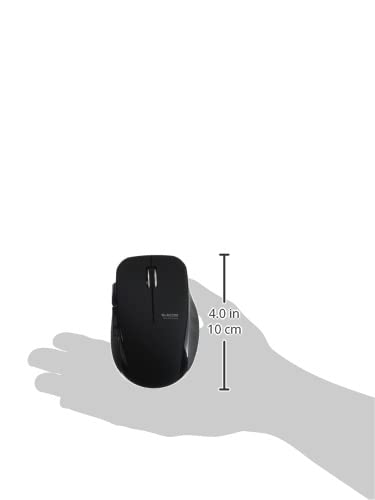
Image 4.4: The Elecom Mouse Assistant software enables button customization.
5. Huolto
5.1. Pariston vaihto
When the battery indicator signals low power, replace the AA battery with a new AA alkaline, manganese, or NiMH battery. Follow the battery installation steps outlined in Section 3.1.
5.2. Puhdistus
To clean the mouse, gently wipe its surface with a soft, dry cloth. Avoid using harsh chemicals or abrasive materials, as these can damage the finish. Ensure no liquid enters the mouse.
5.3. Vastaanottimen säilytys
The USB receiver can be stored inside the mouse body when not in use or during transport. This helps prevent loss of the receiver.
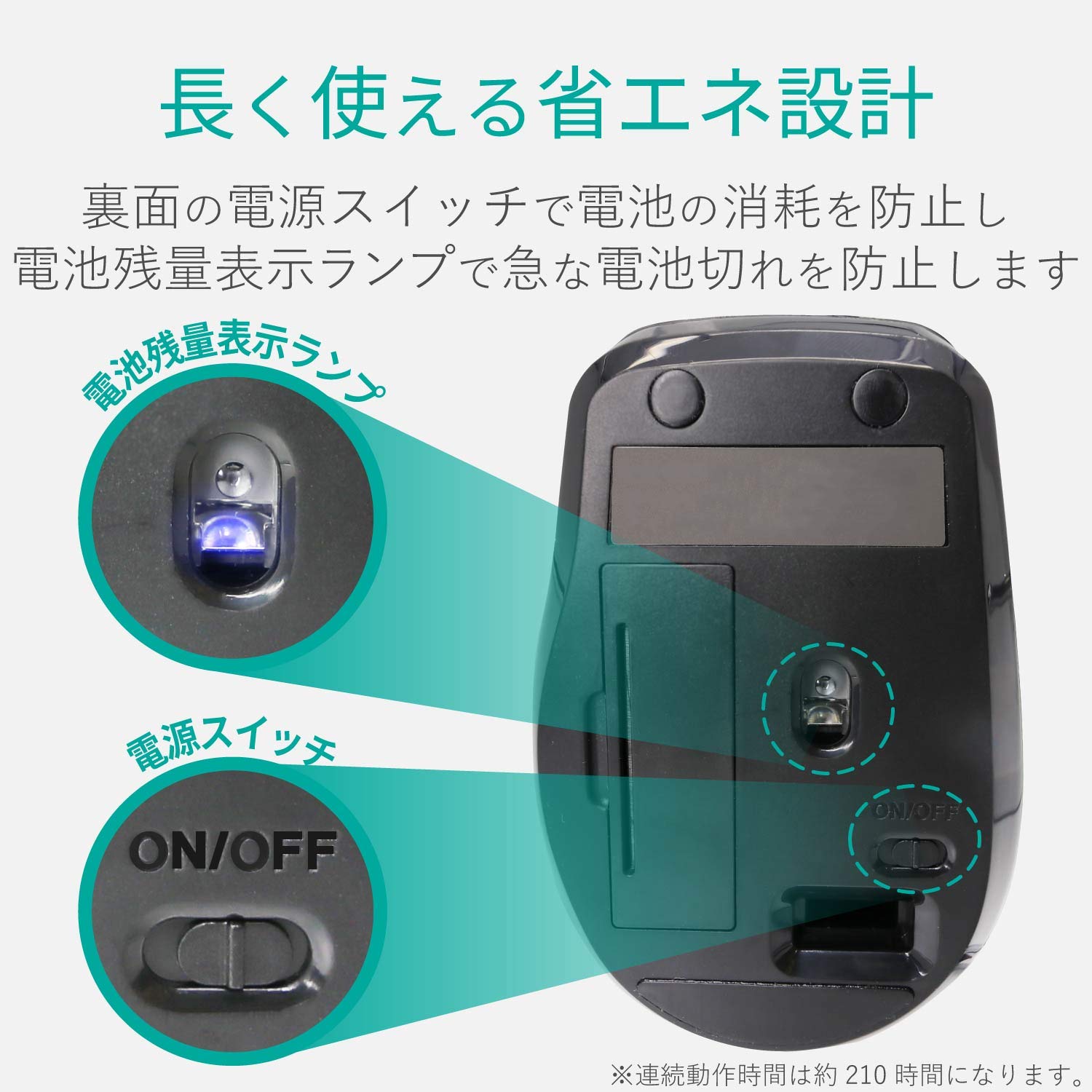
Image 5.1: The compact receiver can be stored within the mouse for convenience.
6. Vianmääritys
- Hiiri ei vastaa:
- Check if the mouse is powered on (power switch on the underside).
- Varmista, että akku on asennettu oikein eikä se ole tyhjentynyt. Vaihda akku tarvittaessa.
- Varmista, että USB-vastaanotin on kytketty kunnolla tietokoneen toimivaan USB-porttiin. Kokeile toista USB-porttia.
- Käynnistä tietokone uudelleen.
- Kohdistimen epäsäännöllinen liike:
- Clean the optical sensor area on the underside of the mouse.
- Varmista, että käytät hiirtä sopivalla alustalla. Vältä voimakkaasti heijastavia tai läpinäkyviä pintoja.
- Check for interference from other wireless devices. Move the mouse closer to the receiver.
- Painikkeet eivät toimi oikein:
- If using Elecom Mouse Assistant, ensure button assignments are correct.
- Reinstall the Elecom Mouse Assistant software if issues persist.
7. Tekniset tiedot
| Käyttöliittymä | USB |
| Liittimen muoto | USB-A-uros |
| Yhteensopiva käyttöjärjestelmä | Windows 11, 10, RT8.1, 8.1, 7, Vista; macOS High Sierra 10.13+ |
| Resoluutio | 1600 määrä |
| Viestintämenetelmä | GFSK menetelmä |
| Radio Frequency | 2.4 GHz taajuus |
| Radio Distance | Magnetic objects: 3m (9.8 ft); Non-magnetic objects: 10m (32.8 ft) |
| Lukumenetelmä | Optinen anturijärjestelmä (sininen LED) |
| Painikkeiden lukumäärä | 5 (including wheel button) |
| Pyörien lukumäärä | 1 |
| Vastaanottimen tallennustila | Kyllä |
| Jatkuva käyttöaika | Noin 210 tuntia |
| Valmiusaika | N. 1666 päivää |
| Estimated Battery Usage Time | N. 478 päivää |
| Virtalähde (pääyksikkö) | 1 AA alkaline, manganese, or NiMH battery |
| Rated Voltage (Body) | 1.5V |
| Väri | Musta |
| Weight (Mouse) | Noin 62g (ilman akkua) |
| External Dimensions (Receiver) | 14.5 x 18.0 x 6.3 mm |
| Paino (vastaanotin) | Noin 2 g |
8. Takuu ja tuki
8.1. Takuuaika
Tällä tuotteella on 6 kuukauden takuu ostopäivästä lukien.
8.2. Product Inquiries
For product inquiries or technical support, please contact the Elecom General Information Center:
- PUH: 0570-084-465
- FAKSI: 0570-050-012
- Vastaanottoaika: 10:00 - 19:00 (24/7)


