Johdanto
This manual provides detailed instructions for the installation, setup, and operation of your JVC KD-X260BT Digital Media Receiver. This unit is designed to provide high-quality audio playback and hands-free communication in your vehicle, featuring Bluetooth connectivity, USB input, and a 13-band equalizer. Please note, this unit does not play CDs. Read this manual thoroughly before use to ensure proper operation and to prevent damage.

Kuva: Edessä view of the JVC KD-X260BT Digital Media Receiver, showing the display and control buttons.
Turvallisuustiedot
- Do not operate the unit in a way that distracts you from driving. Always keep your attention on the road.
- Varmista asianmukaiset johdotusliitännät oikosulkujen tai ajoneuvon sähköjärjestelmän vaurioitumisen estämiseksi.
- Vältä laitteen altistamista kosteudelle tai äärimmäisille lämpötiloille.
- Älä yritä purkaa tai muokata laitetta. Jätä kaikki huoltotyöt pätevän henkilöstön tehtäväksi.
- Use only accessories specified by JVC.
Pakkauksen sisältö
Varmista, että pakkauksessa on kaikki tarvittavat osat:
- JVC KD-X260BT digitaalinen mediavastaanotin
- Johtosarja
- External Wired Microphone
- Asennuslaitteisto
- Käyttöohje (tämä asiakirja)
Asennus
Professional installation is recommended for this product. Incorrect installation can lead to damage to the unit or vehicle. The KD-X260BT features a short body design, which facilitates easier installation in various vehicle dashboards.
Johdotusliitännät:
- Connect the wiring harness according to your vehicle's wiring diagram.
- Varmista, että kaikki liitännät ovat tukevat ja eristettyjä oikosulkujen välttämiseksi.
- Connect the external microphone to the designated input for hands-free calling. Position the microphone in a location that provides clear voice pickup.
- Liitä antennikaapeli.
- Jos käytät ulkoista amplifiers, connect the 2.5V preamp outputs (rear/subwoofer selectable).
Asennus:
- Asenna kiinnitysholkki kojelaudan aukkoon.
- Liu'uta vastaanotin kiinnitysholkkiin, kunnes se lukittuu paikalleen.
- Kiinnitä trimmirengas.
Asennus
Ensimmäinen käynnistys:
After installation, turn on your vehicle's ignition. The unit should power on. Follow any on-screen prompts for initial setup, such as language selection.
Bluetooth-pariliitos:
The KD-X260BT supports Bluetooth 3.0+EDR and allows for two phones to be connected full-time. This enables receiving calls from either phone with a push of a key.
- On the receiver, navigate to the Bluetooth menu.
- Valitse "Yhdistäminen" tai "Laitteen haku".
- Ota älypuhelimellasi käyttöön Bluetooth ja hae käytettävissä olevia laitteita.
- Select "KD-X260BT" from the list on your phone.
- Vahvista pariliitoskoodi molemmissa laitteissa, jos sitä pyydetään.
- Once paired, the unit will display a confirmation.
The unit supports Bluetooth profiles HFP (Hands-Free Profile 1.6 for wideband speech), HSP (Headset Profile), PBAP (Phone Book Access Profile), A2DP (Advanced Audio Distribution Profile) ja AVRCP (Audio/Video Remote Control Profile 1.5).
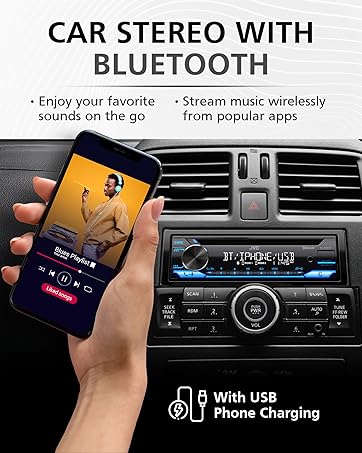
Image: JVC KD-X260BT display indicating Bluetooth connection, with a smartphone showing music playback, illustrating wireless audio streaming.
JVC-etäsovellus:
Download the "JVC Remote" app (available for iOS and Android) to control the receiver's source directly from your smartphone using simple finger gestures.
Käyttöohjeet
Perusohjaimet:
- Virtapainike: Paina kytkeäksesi laitteen päälle/pois.
- Äänenvoimakkuuden säädin: Rotate to adjust the volume level. Press to access menu options.
- Lähde-painike: Press to cycle through available audio sources (Tuner, USB, Bluetooth Audio, AUX).
- Näyttöpainike: Changes display information (e.g., clock, track title).
Radioviritin:
- Press the Source button to select "Tuner" (AM/FM).
- Käytä hakupainikkeita radioasemien etsimiseen.
- Press and hold a preset button (1-6) to store a station.
USB-toisto:
Connect a USB device to the front USB port. The unit supports MP3/WMA/WAV/FLAC playback. The USB port also provides high current 1.5A charging for smartphones.
- Insert the USB device. The unit will automatically switch to USB source and begin playback.
- Use the track buttons to skip tracks.
- Use the folder buttons to navigate through folders.
- MP3 ID3 Tag Display (title/artist/album) is supported.
- Android music playback (AOA 2.0) is supported for Android phones (version 4.1 or later).
Bluetooth-äänen suoratoisto:
Once a Bluetooth device is paired, select "Bluetooth Audio" as the source to stream music wirelessly. Use the receiver's controls or the paired device to manage playback (play, pause, skip, search via AVRCP 1.5).
Handsfree-puhelut:
When a call comes in on a paired phone, the unit will display the caller ID. Press the call button to answer, and the end call button to hang up. The external microphone ensures clear communication.
Ääniasetukset (taajuuskorjain):
The unit features a 13-Band Graphic Equalizer with 10 preset EQ settings and 1 user-customizable setting. Access the audio menu to adjust:
- Taajuuskorjain: Select from preset curves or customize your own.
- Basson korostus: Enhances low frequencies.
- Äänekkyys: Compensates for perceived loss of bass and treble at low volumes.
- Tasapaino/Fader: Adjusts sound distribution between left/right and front/rear speakers.
- Subwooferin ohjaus: Adjust subwoofer output level and frequency if connected.
Internet Radio/Digital Radio Control:
Control Pandora, iHeartRadio, and Spotify directly from the receiver when connected to a compatible Android device via Bluetooth.
Steering Wheel Remote Control:
Factory steering wheel control functions can be retained with a third-party adapter (sold separately).
Huolto
- Laitteen puhdistus: Pyyhi etupaneeli pehmeällä, kuivalla liinalla. Älä käytä hankaavia puhdistusaineita tai liuottimia.
- USB-portti: Pidä USB-portti puhtaana pölystä ja roskista.
- Laiteohjelmistopäivitykset: Check the JVC website periodically for any available firmware updates for improved performance and features.
Vianetsintä
| Ongelma | Ratkaisu |
|---|---|
| Ei virtaa | Check vehicle's fuse. Ensure wiring harness is correctly connected. |
| Ei ääntä | Check speaker connections. Verify volume level. Ensure correct source is selected. |
| Bluetooth ei muodosta yhteyttä | Ensure Bluetooth is enabled on both devices. Delete previous pairing and re-pair. Move devices closer. |
| USB-laitetta ei tunnistettu | Ensure USB device is formatted correctly (FAT16/32). Check for compatible file types. Try a different USB device. |
| Huono radiovastaanotto | Check antenna connection. Ensure antenna is fully extended (if applicable). |
Tekniset tiedot
| Ominaisuus | Yksityiskohta |
|---|---|
| Mallinumero | KD-X260BT |
| Teho (huippu) | 50 wattia x 4 kanavaa |
| Lähtöteho (RMS) | 22 wattia x 4 kanavaa |
| Näyttö | VA LCD Display, Spanish Text Display |
| USB-tulo | Front USB, 1.5A Charging, MP3/WMA/WAV/FLAC Playback, Android AOA 2.0 |
| Aputulo | 3.5mm Front Audio Auxiliary Input |
| Bluetooth-versio | 3.0+EDR Certified |
| Bluetooth Profiles | HFP 1.6, HSP, PBAP, A2DP, AVRCP 1.5 |
| Taajuuskorjain | 13-Band Graphic Equalizer (10 Preset x 1 User) |
| Preamp Lähdöt | 1 Set of 2.5V (Rear/Subwoofer Selectable) |
| Internet Radio Control | Pandora, Spotify, iHeartRadio (for Android) |
| Mitat (tuote) | 4 x 9 x 8 tuumaa |
| Tuotteen paino | 1.79 kiloa |
Takuu ja tuki
This JVC KD-X260BT Digital Media Receiver comes with a 1-Year Manufacturer's Warranty. For warranty claims, technical support, or service inquiries, please contact JVC customer support or visit the official JVC websivusto. Säilytä ostokuitti takuun voimassaoloa varten.
JVC Customer Support: Refer to the contact information provided with your product packaging or on the official JVC websivusto.


