1. Johdanto
This manual provides detailed instructions for the setup, operation, and maintenance of your DIERYA DK68 60% Wireless Mechanical Gaming Keyboard. Please read this manual thoroughly before using the product to ensure proper functionality and to maximize your user experience.

Image 1.1: DIERYA DK68 keyboard highlighting its main features.
2. Pakkauksen sisältö
Varmista, että pakkauksessa on kaikki tarvittavat osat:
- DIERYA DK68 60% Wireless Mechanical Gaming Keyboard
- USB-C-USB-A-kaapeli
- Näppäimistön vetäjä
- Käyttöopas (tämä asiakirja)
3. Tuote ohiview
The DIERYA DK68 is a compact 60% mechanical keyboard designed for versatility and performance. It features a 68-key layout, tri-mode connectivity, RGB backlighting, and durable mechanical switches.
Tärkeimmät ominaisuudet:
- Kolmitilayhteys: Tukee Bluetooth 5.0:aa, 2.4 GHz:n langatonta yhteyttä ja USB-C-langallista yhteyttä.
- 68-näppäimen kompakti asettelu: Saves desk space while retaining essential keys.
- Clicky Blue Mechanical Switches: Provide tactile feedback and an audible click, ideal for typing and gaming.
- RGB-taustavalo: Customizable lighting with multiple modes and brightness levels.
- N-näppäimen rollover ja haamujen esto: Varmistaa useiden samanaikaisten näppäinpainallusten tarkan rekisteröinnin.
- 3000mAh akku: Long-lasting rechargeable battery for extended wireless use.
- Double-Shot-näppäinhatut: Durable and fade-resistant keycaps.
- Ergonominen muotoilu: Features two-stage adjustable feet and anti-slip pads for comfortable and stable use.

Image 3.1: Details of the Clicky Blue Mechanical Switches.

Image 3.2: Ergonomic features including double-shot keycaps, adjustable feet, and anti-slip pads.
4. Asennus
The DK68 keyboard offers three connection modes: wired, 2.4GHz wireless, and Bluetooth. Choose the mode that best suits your device and needs.
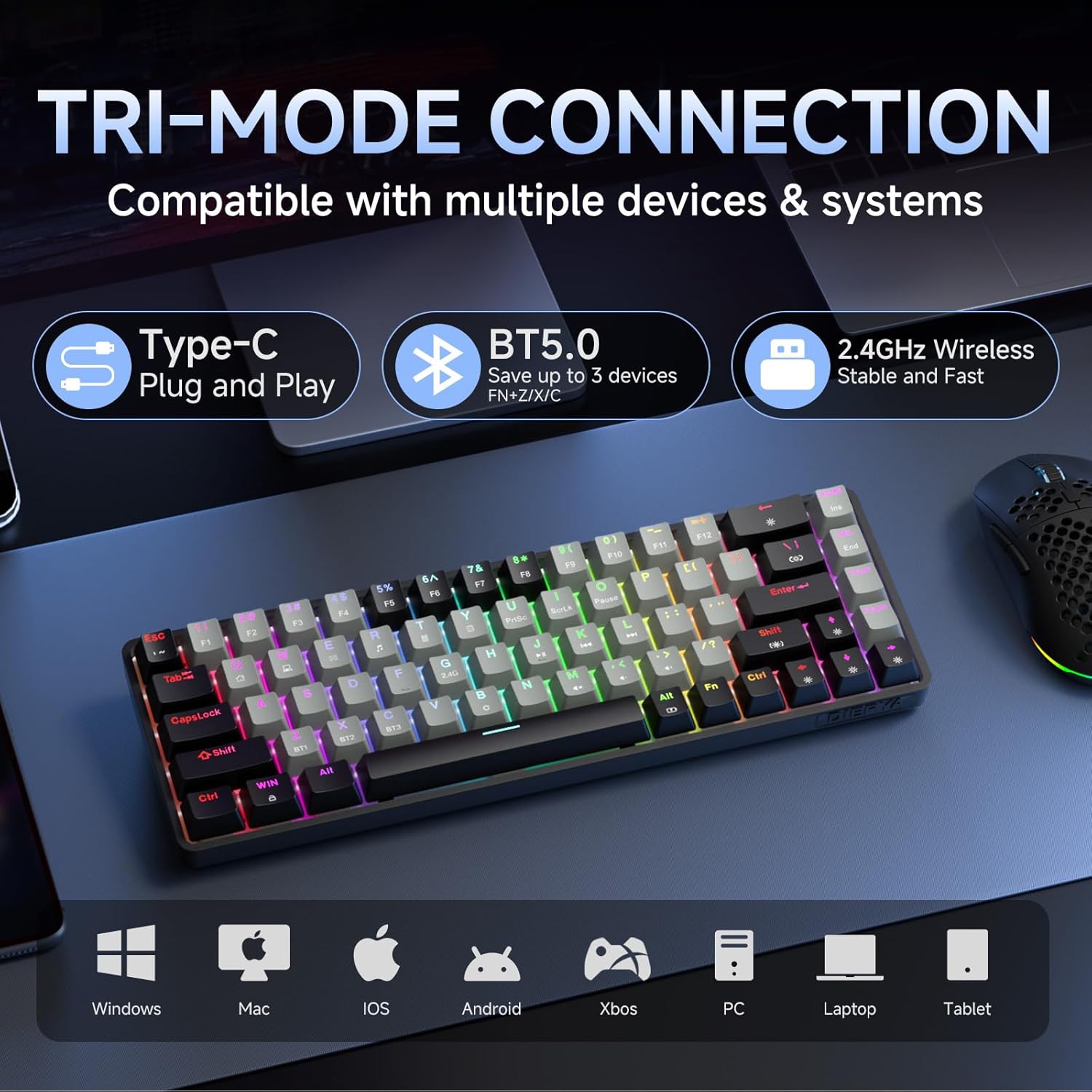
Image 4.1: Tri-mode connectivity and device compatibility.
4.1 Langallinen yhteys (USB-C)
- Liitä mukana toimitettu USB-C-kaapeli näppäimistön USB-C-porttiin.
- Liitä kaapelin USB-A-pää tietokoneen vapaaseen USB-porttiin.
- The keyboard will automatically be recognized and ready for use. The keyboard will also charge in this mode.
4.2 2.4 GHz:n langaton yhteys
- Etsi 2.4 GHz:n USB-vastaanotin (yleensä näppäimistön lokerossa tai toimitetaan erikseen).
- Liitä 2.4 GHz:n USB-vastaanotin tietokoneesi vapaaseen USB-porttiin.
- Käynnistä näppäimistö. Näppäimistön pitäisi muodostaa automaattisesti yhteys vastaanottimeen.
- If connection is not established, press Fn + 2.4G (usually indicated by a specific keycap legend) to activate 2.4GHz pairing mode.
4.3 Bluetooth-yhteys
Näppäimistö tukee yhteyden muodostamista jopa kolmeen Bluetooth-laitteeseen.
- Varmista, että näppäimistö on päällä.
- Paina ja pidä painettuna Fn + BT1, Fn + BT2, tai Fn + BT3 for 3-5 seconds until the corresponding key (BT1, BT2, or BT3) flashes rapidly. This indicates pairing mode.
- Avaa laitteellasi (tietokone, tabletti, älypuhelin) Bluetooth-asetukset ja hae uusia laitteita.
- Select "DIERYA DK68" (or similar name) from the list of available devices to pair.
- Once paired, the BT key will stop flashing and remain steadily lit.
- Vaihda paritettujen Bluetooth-laitteiden välillä painamalla Fn + BT1/BT2/BT3.
5. Käyttöohjeet
5.1 RGB-taustavalon säätö
The DK68 features dynamic RGB backlighting with multiple modes and customization options.
- Fn + Askelpalautin: Turn backlighting on/off.
- Fn + Vaihto: Switch between different lighting colors (for static modes).
- Fn + \|: Cycle through 20 different lighting modes.
- Fn + ↓: Vähennä kirkkautta.
- Fn + ↑: Lisää kirkkautta.
- Fn + ←: Decrease lighting speed (for dynamic modes).
- Fn + →: Increase lighting speed (for dynamic modes).

Image 5.1: RGB Backlighting control key combinations.
5.2 Toimintonäppäinyhdistelmät
Kompaktin 60 %:n asettelun ansiosta monia toimintoja voi käyttää sen kautta. Fn avain yhdistettynä muihin avaimiin.
- Fn + F1–F12: Access multimedia and system functions (e.g., volume, media control). Specific functions are often indicated by secondary legends on the keycaps.
- Fn + Win: Lukitse/avaa Windows-näppäin.
- Fn + P: Tulostusnäyttö.
- Fn + [: Kotiin.
- Fn + ]: Loppu.
- Fn + ;: Sivu ylös.
- Fn + ': Sivu alas.
- Fn + Enter: Lisää.
- Fn + Poista: Poistaa.
- Fn + välilyönti: Check battery indicator (when wired, it pulsates blue while charging).
5.3 Lataus
The keyboard is equipped with a 3000mAh rechargeable lithium battery.
- Connect the keyboard to a USB power source using the provided USB-C cable.
- The spacebar will typically indicate charging status (e.g., pulsating blue).
- A full charge provides approximately 12 hours of use with backlighting on, or up to 333 hours with backlighting off.
- The keyboard features an auto-stop function after 3 minutes of inactivity to conserve battery.

Image 5.2: Battery life and charging information.
6. Huolto
Asianmukainen huolto varmistaa näppäimistösi pitkän käyttöiän ja suorituskyvyn.
- Näppäinhattujen puhdistus: Irrota näppäinhatut varovasti mukana toimitetulla ulosvetimellä. Puhdista ne pehmeällä,amp liinalla ja miedolla saippualla tarvittaessa. Varmista, että ne ovat täysin kuivat ennen takaisin kiinnittämistä.
- Näppäimistön rungon puhdistaminen: Pyyhi näppäimistön runko pehmeällä, kuivalla liinalla. Poista pöly näppäinten välistä paineilmalla.
- Vältä nesteitä: Do not expose the keyboard to excessive moisture or liquids. If spills occur, immediately disconnect the keyboard and allow it to dry completely before reuse.
- Varastointi: Säilytä näppäimistöä viileässä, kuivassa paikassa, poissa suorasta auringonvalosta ja äärimmäisistä lämpötiloista.
7. Vianmääritys
If you encounter issues with your DIERYA DK68 keyboard, refer to the following common solutions:
- Näppäimistö ei vastaa:
- Ensure the keyboard is charged. Connect it via USB-C cable to check if it works in wired mode.
- For wireless modes, ensure the keyboard is powered on and correctly paired (2.4GHz receiver plugged in, or Bluetooth paired to the correct channel).
- Kokeile käynnistää tietokone tai laite uudelleen.
- Bluetooth-yhteysongelmat:
- Varmista, että Bluetooth on käytössä laitteessasi.
- Forget the keyboard in your device's Bluetooth settings and re-pair it.
- Varmista, ettei mikään muu laite häiritse Bluetooth-signaalia.
- 2.4GHz wireless lag or disconnection:
- Ensure the 2.4GHz receiver is plugged into a direct USB port, not a hub.
- Siirrä näppäimistöä lähemmäs vastaanotinta.
- Avoid placing large metal objects between the keyboard and receiver.
- RGB-taustavalo ei toimi:
- Paina Fn + askelpalautin to ensure backlighting is turned on.
- Lisää kirkkautta käyttämällä Fn + ↑.
- Keys not registering correctly (ghosting):
- The keyboard features N-Key rollover, so this should be rare. Ensure no debris is under the keycap.
- If the issue persists, try resetting the keyboard (refer to manufacturer's website for specific reset procedures if available).
8. Tekniset tiedot
| Ominaisuus | Erittely |
|---|---|
| Malli | DK68 |
| Layout | 68-kosketin (60 % kompakti) |
| Kytkimen tyyppi | Clicky Blue -mekaaniset kytkimet |
| Käyttövoima | 60gf (±15gf) |
| Keystroke Travel | 2.3mm (±0.6mm) |
| Vaihda elinikä | 50 miljoonaa napsautusta |
| Yhteydet | Bluetooth 5.0, 2.4 GHz langaton, USB-C-johdollinen |
| Taustavalo | RGB (20 tilaa) |
| Akun kapasiteetti | 3000 mAh litiumpolymeeri |
| Akun kesto (valo päällä) | Noin 12 tuntia |
| Akun kesto (valo sammutettuna) | Noin 333 tuntia |
| Automaattinen lepotila | 3 minuuttia käyttämättömyyttä |
| Avaimen kierto | N-näppäimen kiertäminen |
| Mitat (P x L x K) | 372 x 115 x 51 mm (14.65 x 4.53 x 2.01 tuumaa) |
| Paino | 820 g (1.79 paunaa) |
| Yhteensopiva käyttöjärjestelmä | Windows, macOS, Linux, iOS, Android |

Image 8.1: Keyboard dimensions.
9. Takuu ja tuki
DIERYA products are designed for reliability and performance. For warranty information and technical support, please refer to the official DIERYA websivustolta tai ota yhteyttä suoraan heidän asiakaspalveluunsa.
- Virallinen Websivusto: Visit the DIERYA Store on Amazon
- Asiakaspalvelu: Katso tuotepakkauksessa tai virallisella myyntiedustajalla olevat yhteystiedot. webtukisivusto.
Säilytä ostokuitti takuuvaatimuksia varten.


