1. Johdanto
Kiitos ostoksestasiasing the Homtime D2qi Bluetooth Speaker with Wireless Charging and Alarm Clock. This device is designed to provide a versatile audio experience with convenient features for your daily life. Please read this manual carefully before use to ensure proper operation and to maximize the product's lifespan.
2. Turvallisuustiedot
- Älä altista laitetta äärimmäisille lämpötiloille, kosteudelle tai suoralle auringonvalolle.
- Pidä poissa vedestä ja muista nesteistä.
- Älä pura tai yritä korjata laitetta itse. Jätä kaikki huoltotyöt pätevän henkilöstön tehtäväksi.
- Use only the provided or recommended power adapter.
- Vältä laitteen pudottamista tai altistamista voimakkaille iskuille.
3. Pakkauksen sisältö
Tarkista pakkauksesta seuraavat tuotteet:
- Homtime D2qi Bluetooth Speaker
- Virtalähde
- Käyttöopas
4. Tuote ohiview
The Homtime D2qi combines a high-quality Bluetooth speaker with a digital alarm clock and a convenient wireless charging pad. It features intuitive controls for easy operation.

Kuva 4.1: Etuosa view of the Homtime D2qi speaker with a smartphone placed on its top surface for wireless charging.

Figure 4.2: The Homtime D2qi speaker positioned on a book, showcasing its compact design and the digital clock display.

Figure 4.3: The Homtime D2qi speaker in a home setting, demonstrating wireless charging functionality.
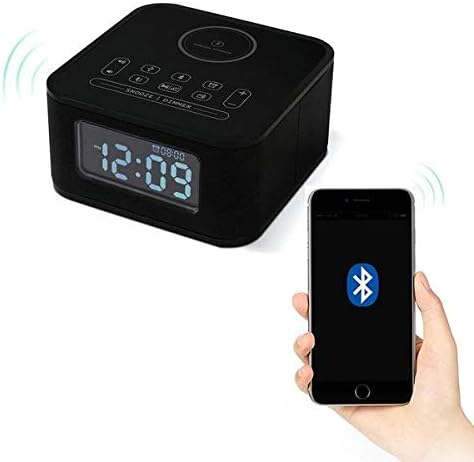
Figure 4.4: The Homtime D2qi speaker connected via Bluetooth to a smartphone.
5. Asennus
5.1 Virtaliitäntä
- Connect the provided power adapter to the DC input port on the back of the Homtime D2qi.
- Liitä virtalähde tavalliseen pistorasiaan.
- Näyttö syttyy osoittaen, että laite on päällä.
5.2 Alkuperäinen aika-asetus
Ensimmäisen käynnistyksen yhteydessä tai virrankatkaisun jälkeentage, you may need to set the time. Refer to the 'Operating Instructions' section for detailed steps on setting the clock.
6. Käyttöohjeet
6.1 Bluetooth-yhteys
- Paina Bluetooth-painike on the top panel to enter Bluetooth pairing mode. The Bluetooth indicator will flash.
- Ota Bluetooth käyttöön älypuhelimessa tai äänilaitteessa ja hae käytettävissä olevia laitteita.
- Select "Homtime D2qi" from the list.
- Once connected, the Bluetooth indicator will stop flashing and remain solid. You can now play audio through the speaker.
6.2 Langaton lataus
- Place your Qi-compatible smartphone centrally on the wireless charging pad located on the top surface of the speaker.
- Ensure the phone is properly aligned with the charging coil.
- Puhelimesi latausmerkkivalo näyttää, että lataus on alkanut.
6.3 Herätyskellotoiminto
- Paina Hälytyspainike siirtyäksesi hälytyksen asetustilaan.
- Käytä +/- painikkeet säätääksesi tunti- ja minuuttilukemia.
- Paina Hälytyspainike uudelleen vahvistaaksesi jokaisen asetuksen.
- Voit aktivoida/deaktivoida hälytyksen painamalla Hälytyspainike briefly when not in setting mode.
- Voit torkkua painamalla Torkku/himmennyspainike kun hälytys soi.
6.4 Radiotoiminto
- Paina Tilapainike vaihtaaksesi FM-radiotilaan.
- Paina ja pidä painettuna Toista/Tauko-painike to auto-scan and save available stations.
- Käytä Edellinen/Seuraava-painikkeet to navigate through saved stations.
6.5 Call Answering
Kun kaiutin on yhdistetty Bluetooth-yhteyden kautta, sitä voidaan käyttää handsfree-puheluihin.
- Vastaa saapuvaan puheluun painamalla Toista/Tauko-painike.
- Lopeta puhelu painamalla Toista/Tauko-painike uudelleen.
7. Huolto
- Puhdista laite pehmeällä, kuivalla liinalla. Älä käytä hankaavia puhdistusaineita tai liuottimia.
- Keep the charging pad free of dust and debris to ensure efficient wireless charging.
- Säilytä laitetta viileässä ja kuivassa paikassa, kun sitä ei käytetä pitkään aikaan.
8. Vianmääritys
| Ongelma | Mahdollinen syy | Ratkaisu |
|---|---|---|
| Ei virtaa | Virtasovitin ei ole kytketty tai pistorasia on viallinen. | Ensure power adapter is securely plugged into the device and a working wall outlet. |
| Ei ääntä kaiuttimesta | Bluetooth not connected; volume too low; incorrect mode. | Ensure Bluetooth is paired. Increase volume on both the speaker and your device. Check if the speaker is in the correct mode (Bluetooth/Radio). |
| Langaton lataus ei toimi | Phone not Qi-compatible; phone not aligned; phone case too thick. | Verify phone supports Qi wireless charging. Realign phone on the charging pad. Remove thick phone cases. |
| Buttons difficult to locate in the dark | Buttons are flush with the surface. | Familiarize yourself with button layout during daylight. Use the dimmer function to adjust display brightness. |
| Bluetooth disconnects automatically | Power saving feature; device out of range. | Reconnect Bluetooth manually. Keep devices within Bluetooth range (approx. 10 meters). |
9. Tekniset tiedot
| Ominaisuus | Yksityiskohta |
|---|---|
| Merkki | Homtime |
| Mallinumero | D2qi |
| Väri | Musta |
| Kaiuttimen tyyppi | Bluetooth kaiuttimet |
| Yhteydet | Langaton |
| Yhteensopivat laitteet | Älypuhelimet |
| Lähtöteho | 5–10 wattia |
| Tuotteen paino | 0.5 kg |
| Pakkauksen mitat | 19.6 x 18.8 x 14.8 cm |
| Laitteistorajapinta | Audio/Video Port |
10. Takuu ja tuki
Homtime products are manufactured to the highest quality standards. For warranty information and customer support, please refer to the warranty card included in your package or visit the official Homtime websivusto. Säilytä ostokuitti ostotodistuksena.


