1. Tuote ohiview
The UGREEN 10Gbps USB C Female to USB Male Adapter is designed to convert a standard USB-A port into a USB-C port. This allows for the connection of USB-C peripherals such as smartphones, tablets, and flash drives to devices equipped with USB-A ports, including laptops, hubs, and chargers. This adapter supports high-speed data transfer and efficient charging.

Image: UGREEN USB C Female to USB Male Adapter, showcasing sen kompakti muotoilu.
2. Asennus ja asennus
This adapter features a plug-and-play design, requiring no driver installation for operation. Simply connect the adapter to your device's USB-A port, and then connect your USB-C cable or peripheral to the adapter's USB-C female port.
Sovittimen liittäminen:
- Locate an available USB-A port on your host device (e.g., laptop, charger, car USB port).
- Insert the USB-A male end of the UGREEN adapter into the USB-A port.
- Connect your USB-C cable or device into the USB-C female port of the adapter.

Image: Illustration of plugging a USB-C device into the UGREEN adapter, which is then connected to a USB-A port.
Huomautus: This adapter does not support connecting USB-C to HDMI adapters.
3. Käyttöohjeet
Tiedonsiirto:
When connected to a USB 3.0 port, the adapter supports data syncing at a maximum speed of 10Gbps. This allows for rapid transfer of large files between your USB-C device and the host device. The adapter is also backward compatible with USB 2.0 and USB 1.1, operating at their respective speeds.

Image: Diagram illustrating 10Gbps data transfer speed compared to USB 3.0 and USB 2.0, showing a USB-C flash drive connected via the adapter.
Lataus:
The adapter supports up to 3 Amps of power output, enabling fast charging for your compatible USB-C devices. Ensure your charger and cable also support fast charging for optimal performance.

Image: Two smartphones charging via UGREEN adapters connected to a wall charger, demonstrating fast charging capability.
4. Ominaisuudet ja muotoilu
- Kestävä rakenne: The adapter features an aluminum alloy case for enhanced durability and a built-in 56KΩ resistance to protect internal circuits, ensuring safe and stable performance.
- Kompakti koko: With dimensions of approximately 35mm × 12mm, the adapter is ultra-compact and easy to carry, minimizing space usage.
- Nauhan reikä: A small hole is integrated into the design, allowing users to attach a lanyard or keychain to prevent loss.
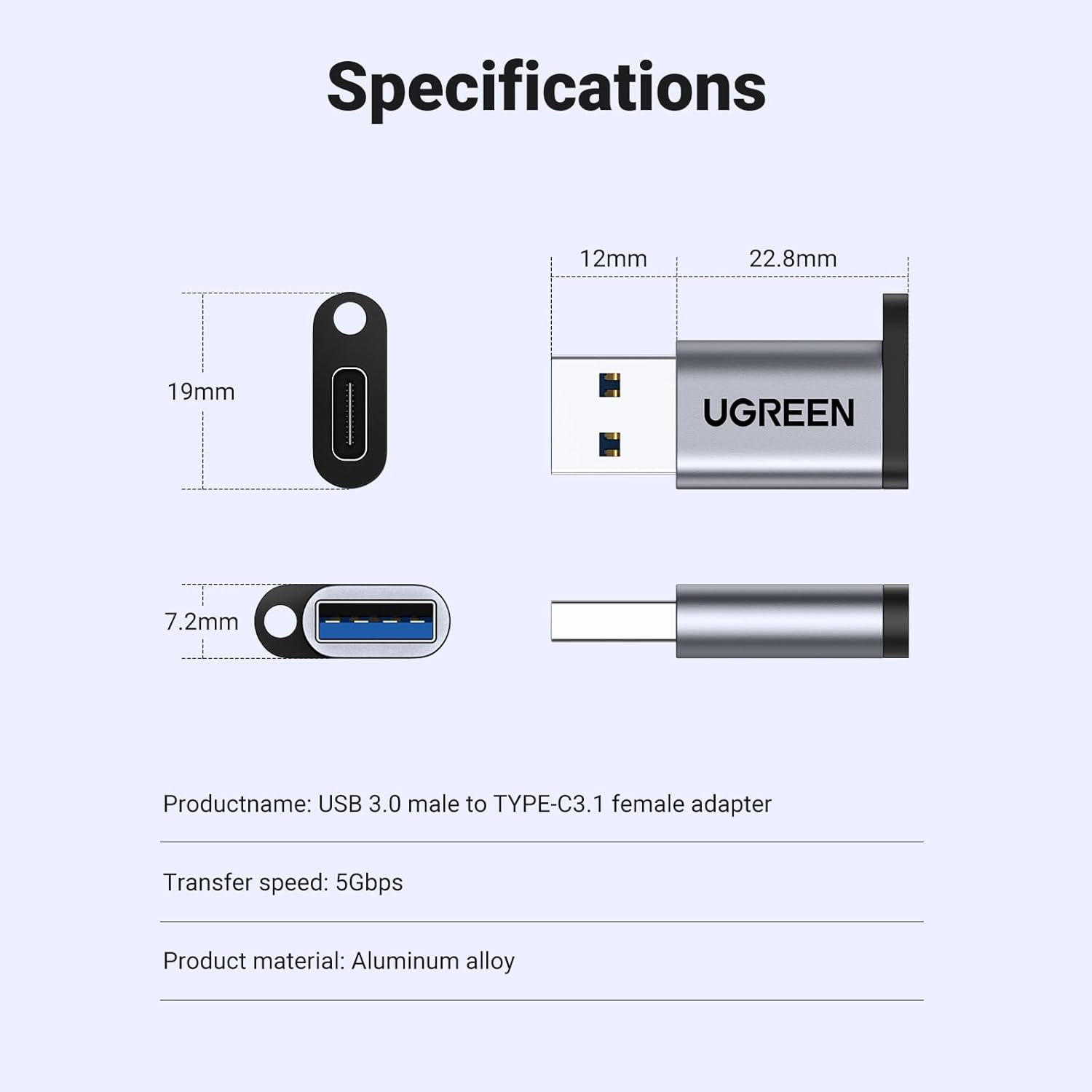
Image: Technical diagram showing the dimensions (12mm x 22.8mm x 7.2mm) and material (aluminum alloy) of the UGREEN adapter.
5. Yhteensopivuus
The USB-A male connector is widely compatible with various devices, including:
- Computers and Laptops with USB Type-A ports
- USB chargers with USB Type-A ports
- Car USB ports (for charging and data, e.g., CarPlay)
The USB-C female port is compatible with a broad range of USB-C enabled devices, such as:
- Smartphones (e.g., iPhone 15 series, Samsung Galaxy, Google Pixel)
- Tablets (e.g., iPad Air)
- USB-C enabled hard drives and flash disks
- Apple Watch Magnetic Chargers
- USB-C headphones (Note: Only supported on Windows 10/11 and macOS)

Image: Visual chart displaying various compatible devices for both USB 3.0 (USB-A) and USB-C connections.

Image: Demonstrates the adapter's use in a car for connecting a smartphone to a car's USB-A port, enabling features like CarPlay.

Image: A person using the UGREEN adapter to connect USB-C headphones to a laptop's USB-A port.
6. Tekniset tiedot
| Tuotteen nimi | UGREEN USB C Female to USB Male Adapter |
| Mallinumero | 50533 |
| Liittimen tyyppi | USB C Female to USB Male |
| Tiedonsiirtonopeus | Up to 10Gbps (when connected to USB 3.0 port) |
| Teholähtö | Jopa 3 Amps |
| Materiaali | Alumiiniseoskotelo |
| Mitat (P x L x K) | Approximately 0.3 x 0.11 x 0.35 inches (35mm x 12mm) |
| Tuotteen paino | 0.141 unssia |
| Väri | Harmaa |
7. Huolto
To ensure the longevity and optimal performance of your UGREEN adapter, follow these maintenance guidelines:
- Puhdistus: Pyyhi sovitin varovasti pehmeällä, kuivalla liinalla. Vältä nestemäisten puhdistusaineiden tai hankaavien materiaalien käyttöä.
- Varastointi: Säilytä sovitinta viileässä, kuivassa paikassa, poissa suorasta auringonvalosta ja äärimmäisistä lämpötiloista.
- Käsittely: Avoid excessive force when plugging or unplugging the adapter to prevent damage to the connectors.
8. Vianmääritys
If you encounter issues with your UGREEN adapter, consider the following troubleshooting steps:
- Ei yhteyttä: Ensure both the USB-A end of the adapter and the USB-C device/cable are fully and correctly inserted. Try connecting to a different USB-A port or with a different USB-C cable/device to rule out other component issues.
- Hidas tiedonsiirto/lataus: Verify that the host USB-A port supports USB 3.0 (often indicated by a blue interior) for 10Gbps speeds. Ensure your USB-C cable and connected device also support the desired speed and charging rate.
- Sovitinta ei tunnistettu: Restart your host device (computer, laptop). For specific functionalities like USB-C headphones, ensure your operating system (Windows 10/11 or macOS) is supported.
- Incompatibility with HDMI Adapters: As noted, this adapter does not support USB-C to HDMI video output.
9. Takuu ja tuki
UGREEN-tuotteet on suunniteltu luotettaviksi ja tehokkaiksi. Takuutietoja, teknistä tukea tai lisäapua varten käy UGREENin virallisella verkkosivustolla. websivustolta tai ota yhteyttä suoraan heidän asiakaspalveluunsa. Säilytä ostokuitti takuuvaatimuksia varten.
Virallinen UGREEN-kauppa: UGREEN-kauppa Amazonissa


