Johdanto
Thank you for choosing the Redragon Nothosaur M606 Gaming Mouse. This manual provides detailed instructions to help you set up, operate, and maintain your new gaming mouse. Please read this manual thoroughly before use to ensure optimal performance and longevity of your device.
The Redragon Nothosaur M606 is a wired gaming mouse designed for precision and comfort, featuring adjustable DPI, programmable buttons, and customizable LED lighting.
Tuote loppuview
The Redragon Nothosaur M606 gaming mouse is engineered for an enhanced gaming experience. It features a comfortable ergonomic design, a high-precision optical sensor, and customizable functions.

Figure 1: Redragon Nothosaur M606 Gaming Mouse, showcasing its design and red LED illumination.
Tärkeimmät ominaisuudet:
- Korkean tarkkuuden anturi: Equipped with a PMW3168 optical sensor for accurate tracking.
- Säädettävä DPI: Four customizable DPI levels for varying sensitivity needs.
- Ohjelmoitavat painikkeet: Side buttons can be configured for macros and in-game functions.
- LED-taustavalo: Features 4 distinct lighting colors, each corresponding to a DPI setting.
- Ergonominen muotoilu: Crafted for comfortable use during extended gaming sessions.

Figure 2: Various angles of the Redragon Nothosaur M606 mouse, highlighting its ergonomic shape and button placement.
Asennus
- Pura hiiri pakkauksesta: Carefully remove the Redragon Nothosaur M606 mouse from its packaging. Ensure all components are present (mouse, user manual).
- Yhdistä tietokoneeseen: Liitä hiiren USB-liitin tietokoneen vapaaseen USB-porttiin.
- Ohjaimen asennus: The mouse is typically plug-and-play, and your operating system should automatically detect and install the necessary drivers. No additional software is required for basic functionality. For advanced customization of buttons and macros, please refer to the Redragon official website for any available software or drivers, though some models may not offer dedicated software.
- Testauksen toiminnallisuus: Once connected, move the mouse to check cursor movement. Click the left and right buttons to ensure they are responsive.
Käyttöohjeet
DPI-säätö
The Redragon Nothosaur M606 features a dedicated DPI button located behind the scroll wheel, allowing you to switch between four preset DPI levels. Each DPI level is indicated by a specific LED color:
- Punainen LED: 1000 DPI
- Sininen LED: 1600 DPI
- Vihreä LED: 2400 DPI
- Violetti LED: 3200 DPI
Press the DPI button repeatedly to cycle through these sensitivity settings to find the one that best suits your needs.
Ohjelmoitavat painikkeet
The mouse includes side buttons that can be configured for macros and in-game functions. While the mouse is plug-and-play for basic use, advanced customization for these buttons typically requires specific software. Please check the Redragon support website for any available software for the M606 model to set up macros.
LED Valaistus
The Nothosaur M606 features dynamic LED backlighting. The color of the LED lighting directly corresponds to the currently selected DPI setting, as detailed in the DPI Adjustment section. There is no independent control for the LED colors; they change automatically with DPI selection.
Huolto
Proper maintenance ensures the longevity and optimal performance of your Redragon Nothosaur M606 mouse.
- Puhdistus: Pyyhi hiiren pinta pehmeällä, kuivalla liinalla. Pinttyneeseen likaan pyyhi kevyesti.ampKostuta liina vedellä tai miedolla puhdistusliuoksella. Vältä voimakkaiden kemikaalien tai hankaavien materiaalien käyttöä.
- Anturin puhdistus: Occasionally, dust or debris may accumulate around the optical sensor. Use a cotton swab lightly dampened with isopropyl alcohol to gently clean the sensor area. Ensure the mouse is disconnected from the computer before cleaning.
- Kaapelihuolto: Vältä teräviä taivutuksia tai USB-kaapelin liiallista vetämistä vaurioiden välttämiseksi.
- Varastointi: Kun hiirtä ei käytetä, säilytä sitä puhtaassa, kuivassa paikassa, poissa äärimmäisistä lämpötiloista.
Vianetsintä
If you encounter issues with your Redragon Nothosaur M606 mouse, refer to the following common solutions:
- Hiiri ei vastaa:
- Varmista, että USB-kaapeli on kytketty tukevasti tietokoneen toimivaan USB-porttiin.
- Kokeile kytkeä hiiri toiseen USB-porttiin.
- Käynnistä tietokone uudelleen.
- Kohdistimen epäsäännöllinen liike:
- Clean the optical sensor at the bottom of the mouse.
- Varmista, että käytät hiirtä puhtaalla, heijastamattomalla ja tasaisella alustalla (esim. hiirimatolla).
- Tarkista, onko anturin ympärillä fyysisiä esteitä.
- DPI Button Not Changing Sensitivity/Color:
- Paina DPI-painiketta lujasti.
- Ensure the mouse is properly connected and recognized by your computer.
- Sivupainikkeet eivät toimi:
- For basic forward/backward functionality, ensure your operating system or browser supports these actions.
- For custom macros, verify that any necessary Redragon software is installed and configured correctly (if available for this model).
Tekniset tiedot
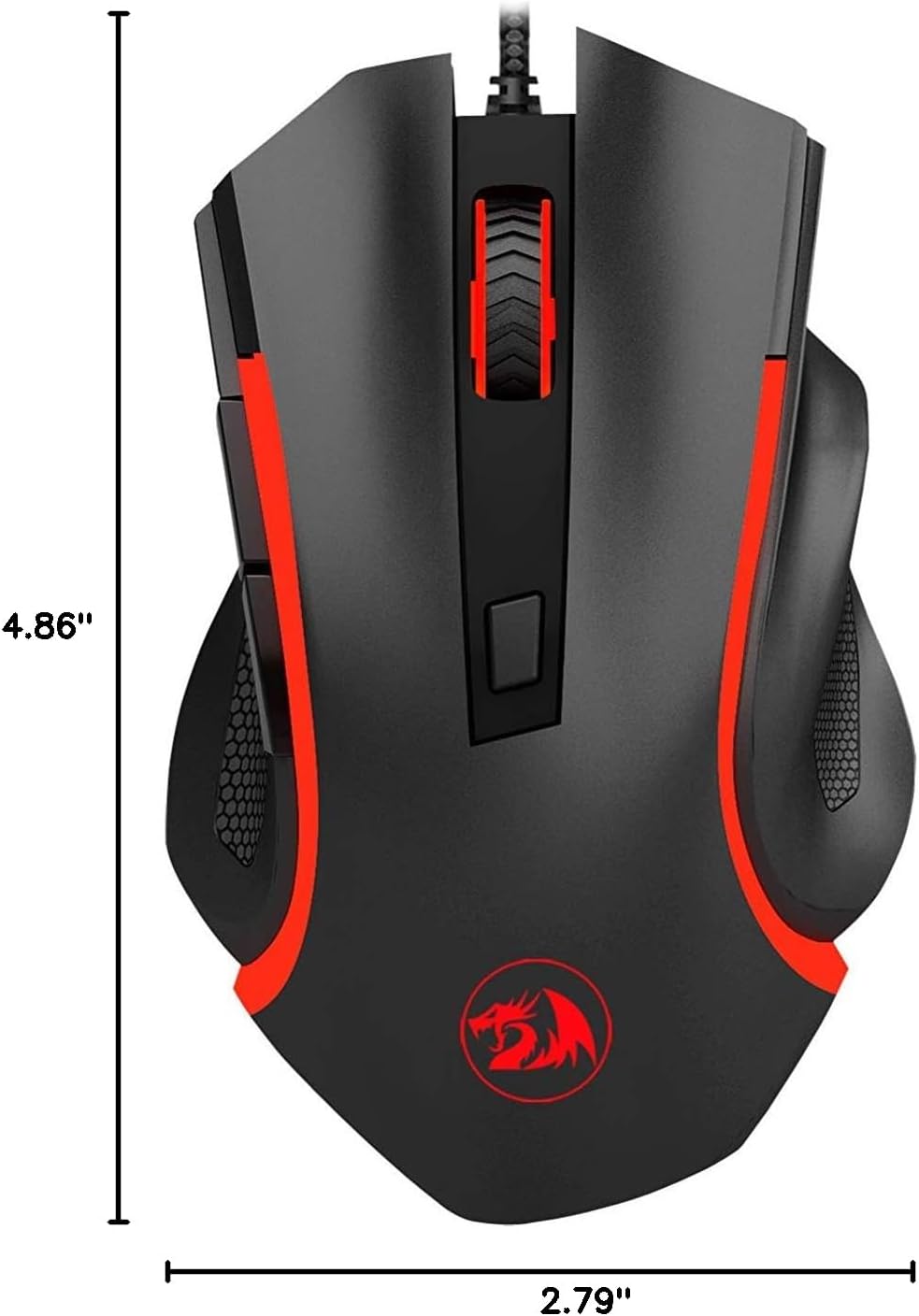
Figure 3: Physical dimensions of the Redragon Nothosaur M606 mouse.
| Ominaisuus | Yksityiskohta |
|---|---|
| Mallinumero | M606 |
| Yhteystekniikka | Langallinen (USB) |
| Liiketunnistustekniikka | Optinen (PMW3168-anturi) |
| DPI-asetukset | 1000 / 1600 / 2400 / 3200 DPI |
| Erikoisominaisuus | LED Backlit (4 Colors corresponding to DPI) |
| Painikkeet | 6 (Left, Right, Scroll Click, DPI, 2 Side Buttons) |
| Tuotteen mitat | 4.84 x 2.91 x 0.1 tuumaa (noin 12.3 x 7.4 x 0.25 cm) |
| Tuotteen paino | 0.01 ounces (approx. 0.28 grams) - Note: This weight seems unusually low and may be a data entry error. Actual weight is likely higher. |
| Väri | Musta punaisilla yksityiskohdilla |
| Valmistaja | Redragon |
Takuutiedot
Redragon products typically come with a limited manufacturer's warranty. The specific terms and duration of the warranty may vary by region and retailer. Please refer to the warranty card included with your purchase or visit the official Redragon websivustolta löydät yksityiskohtaiset takuutiedot ja rekisteröintimenettelyt.
Säilytä ostokuitti (kuitti tai lasku), sillä sitä tarvitaan mahdollisten takuuvaatimusten varalta.
Tukea
For further assistance, technical support, or to download the latest drivers and software (if available for your model), please visit the official Redragon support websivusto:
Löydät myös hyödyllisiä usein kysyttyjä kysymyksiä ja yhteisöfoorumeita heidän osoitteestaan websivusto.


