Tärkeitä turvallisuustietoja
Lue kaikki ohjeet huolellisesti ennen kokoamista ja käyttöä. Säilytä tämä käyttöohje myöhempää tarvetta varten.
- Painokapasiteetti: Do not exceed the maximum weight capacity of 42.5 kilograms (93.7 lbs) for the entire stand. Distribute weight evenly across shelves.
- Puristuspisteet: Use caution when adjusting the shelves to avoid pinch points.
- Vakaus: Always ensure the TV stand is stable and level before placing a television or any components on it.
- Sijoitus: Aseta jalusta tasaiselle ja vakaalle alustalle. Vältä sijoittamasta sitä vilkkaasti liikennöidyille alueille, joilla se voi helposti kolhiintua.
- Lapset: Keep children away from the stand during assembly. Do not allow children to climb on or play with the stand.
Tuote loppuview
The Insignia TV Stand (Model B077SNBPFH) is designed to support most televisions up to 48 inches. It features a durable alloy steel frame and safety-tempered glass shelves, providing a secure and organized space for your entertainment components. The open frame design facilitates easy cable management.

Figure 1: Insignia TV Stand with a television and various media devices on its shelves, showcasing sen suunnittelu ja kapasiteetti.
Asennus ja kokoonpano
This Insignia TV stand is designed for freestanding installation and does not require assembly. It comes pre-assembled for your convenience.
Purkaminen ja tarkastus
- Carefully remove the TV stand from its packaging.
- Inspect all components for any signs of damage. If any parts are damaged or missing, do not proceed with setup. Contact customer support immediately.
- Ensure all packing materials are removed before placement.
Sijoitus
- Choose a flat, level, and stable surface for the TV stand.
- Ensure there is adequate space around the stand for ventilation of electronic devices and easy access to cables.
- Verify that the chosen location can support the combined weight of the stand, your television, and all components.
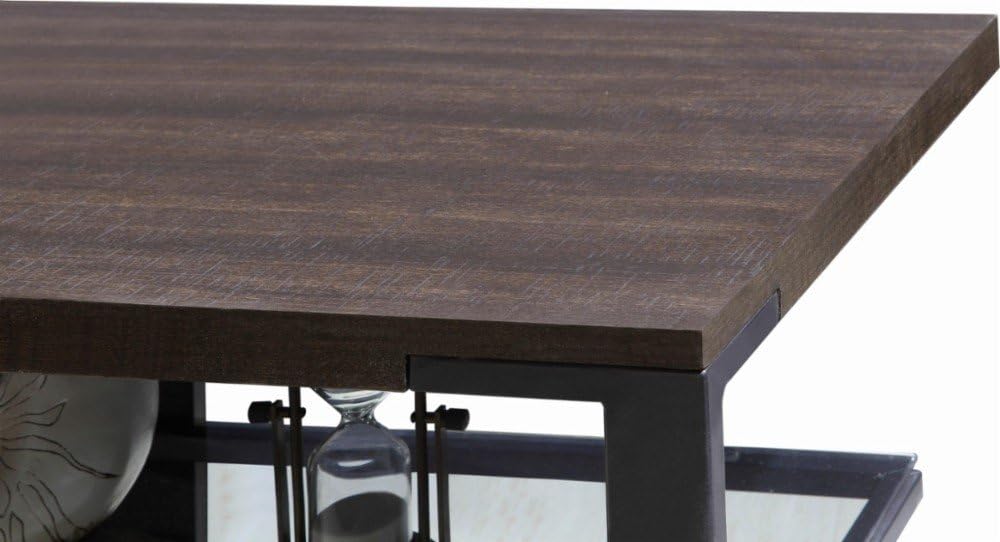
Figure 2: Detail of the top shelf and frame connection, highlighting the sturdy construction.
Käyttöohjeet
Placing Your Television
- Carefully lift your television and center it on the top surface of the TV stand.
- Ensure the television's base is fully supported by the stand's top surface.
- Do not place a television larger than 48 inches or exceeding the stand's weight capacity (42.5 kg / 93.7 lbs).
Arranging Components
The stand features two safety-tempered glass shelves for organizing your media devices, such as DVD players, gaming consoles, soundbars, and cable boxes.
- Distribute the weight of your components evenly across the shelves.
- Ensure adequate airflow around electronic devices to prevent overheating.
Kaapelin hallinta
The open frame design and integrated cable management holes (as shown in Figure 3) allow for neat routing of power cords and signal cables.
- Route cables through the designated holes at the back of the stand.
- Use cable ties or wraps (not included) to bundle cables together for a tidy appearance and to prevent tangling.
- Ensure cables are not pinched or strained.

Kuva 3: View of the stand's shelves and the circular cutouts designed for cable routing.
Huolto
Puhdistus
- Lasihyllyt: Use a soft, lint-free cloth and a non-abrasive glass cleaner. Spray cleaner onto the cloth, not directly onto the glass, to avoid streaks and potential damage to other materials.
- Frame and Wood Surfaces: Pyyhi pehmeällä, damp liinalla. Käytä pinttyneisiin tahroihin mietoa, hankaamatonta puhdistusainetta. Kuivaa heti puhtaalla liinalla.
- Vältä voimakkaiden kemikaalien, hankaavien puhdistusaineiden tai hankaussienten käyttöä, sillä ne voivat vahingoittaa pintaa.
Säännölliset tarkastukset
- Periodically check the stand for stability. Ensure it remains level and all connections are secure.
- Inspect glass shelves for any chips or cracks. If damage is found, discontinue use and contact customer support.
Vianetsintä
Tässä osiossa käsitellään yleisiä ongelmia, joita saatat kohdata TV-tasojesi kanssa.
Stand is Unstable/Wobbly
- Tarkista pinta: Ensure the stand is placed on a completely flat and level surface. Uneven flooring can cause instability.
- Painon jakautuminen: Verify that the weight of your television and components is evenly distributed. Overloading one side can affect stability.
- Tarkista runko: Check the alloy steel frame for any signs of bending or damage.
Glass Shelf Damage
- If a glass shelf is chipped, cracked, or broken, discontinue use immediately to prevent injury.
- Contact Insignia customer support for replacement options. Do not attempt to repair damaged glass yourself.
Cables are Tangled/Messy
- Utilize the cable management holes at the back of the stand.
- Bundle cables together using cable ties or Velcro straps to keep them organized and out of sight.
Tekniset tiedot
| Merkki | ARVOMERKKI |
| Mallinumero | B077SNBPFH |
| Väri | Espresso/Gray |
| Suositeltu television koko | Jopa 48 tuumaa |
| Painorajoitus | 42.5 kiloa (93.7 paunaa) |
| Materiaali | Alloy Steel (Frame), Tempered Glass (Shelves) |
| Hyllyjen määrä | 2 |
| Asennustyyppi | freestanding |
| Asennus vaaditaan | Ei |
| UPC | 600603212314 |
Takuutiedot
Specific warranty details for the Insignia TV Stand (Model B077SNBPFH) are typically provided with the product packaging or can be found on the official Insignia websivusto. Katso tarkimmat ja ajantasaisimmat takuuehdot näistä lähteistä.
Generally, warranties cover manufacturing defects under normal use. Keep your proof of purchase for any warranty claims.
Asiakastuki
If you have any questions, require assistance with your Insignia TV stand, or need to report a damaged part, please contact Insignia customer support.
- Online-tuki: Visit the official Insignia website for FAQs, support documents, and contact options.
- Jälleenmyyjän tuki: For purchase-related inquiries, you may also contact the retailer from whom you purchased the product.


