Kaise EM480A Insulation Tester User Manual
Malli: EM480A
1. Johdanto
The Kaise EM480A is a robust and reliable insulation tester designed for professional use in electrical fault location, machine commissioning, and preventive maintenance of various electrical installations. This device provides accurate insulation resistance measurements at multiple test voltages, ensuring the safety and efficiency of electrical systems.
Keskeisiä ominaisuuksia ovat:
- Multiple test voltages: 250V, 500V ja 1000V.
- Measurement range up to 2000 MΩ.
- Kirkas LCD-näyttö, jossa 1999 laskuria.
2. Turvallisuustiedot
Noudata aina seuraavia turvaohjeita henkilövahinkojen ja laitteen vaurioitumisen välttämiseksi:
- Lue koko käsikirja before using the instrument.
- Do not use the tester if it appears damaged or is operating abnormally.
- Ensure the circuit under test is de-energized and locked out before connecting the test leads.
- Käytä asianmukaisia henkilönsuojaimia, including insulated gloves and safety glasses.
- Avoid touching the test leads or the circuit under test during measurement, especially when high test voltages sovelletaan.
- Discharge the circuit completely after testing before disconnecting the leads.
- Do not operate the tester in wet environments or in the presence of explosive gases or dust.
- Vaihda paristot promptly when the low battery indicator appears.
3. Pakkauksen sisältö
Varmista avatessasi pakkauksen, että kaikki osat ovat mukana ja vahingoittumattomia:
- Kaise EM480A Insulation Tester
- Testijohtosarja
- 6 x AA-paristoa (esiasennettu tai toimitetaan erikseen)
- Käyttöopas
4. Asennus
4.1 Akun asennus
The Kaise EM480A requires 6 AA batteries for operation. If the batteries are not pre-installed, follow these steps:
- Paikanna paristolokero testerin takaa.
- Avaa paristolokeron kansi ruuvimeisselillä.
- Aseta 6 AA-paristoa lokeroon varmistaen oikean napaisuuden (+ ja -) lokeron sisällä olevien merkkien mukaisesti.
- Aseta paristolokeron kansi takaisin paikalleen ja kiinnitä se ruuvilla.
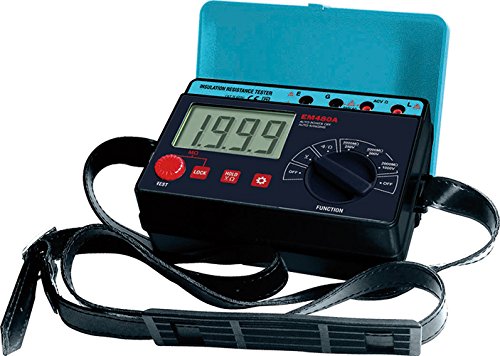
Kuva 1: Etuosa view of the Kaise EM480A Insulation Tester, showing the LCD display, function selector, and test buttons. This image illustrates the general appearance and layout of the device.
4.2 Mittausjohtojen kytkeminen
Connect the red and black test leads to the corresponding input terminals on the tester. Ensure a secure connection to prevent inaccurate readings or hazards.
5. Käyttöohjeet
5.1 Virran kytkeminen päälle/pois
To power on the tester, rotate the function selector dial to any desired measurement function. To power off, rotate the dial to the 'OFF' position.
5.2 Performing an Insulation Resistance Test
Follow these steps to perform an insulation resistance measurement:
- Varmista turvallisuus: Verify that the circuit under test is completely de-energized and isolated from all power sources. Apply lockout/tagmenettelyistä.
- Yhdistä johdot: Connect the test leads to the circuit or component you wish to test. Typically, one lead connects to the conductor and the other to ground or another conductor.
- Valitse testimäärätage: Rotate the function selector dial to the desired insulation test voltage (250V, 500V, or 1000V). Choose a voltage appropriate for the insulation rating of the circuit.
- Aloita testi: Paina ja pidä pohjassa 'TEST'-painiketta. Testaaja käyttää valittua äänenvoimakkuutta.tage and display the insulation resistance value on the LCD.
- Lue mittaus: Observe the reading on the LCD. The unit will typically be in MΩ (Megaohms).
- Discharge Circuit: Release the 'TEST' button. The tester will automatically discharge any residual charge in the circuit. Wait for the discharge to complete before disconnecting the leads.
- Disconnect Leads: Once the circuit is safely discharged, disconnect the test leads.
Huomautus: Always refer to relevant electrical codes and standards for acceptable insulation resistance values for specific applications.
6. Huolto
6.1 Puhdistus
Pyyhi instrumentin casing mainoksellaamp cloth and a mild detergent. Do not use abrasive cleaners or solvents. Ensure the tester is completely dry before storage or next use.
6.2 Pariston vaihto
When the low battery indicator appears on the display, replace all 6 AA batteries promptly to ensure accurate measurements. Refer to Section 4.1 for battery installation instructions. Dispose of old batteries responsibly according to local regulations.
6.3 Varastointi
Säilytä testeriä viileässä, kuivassa paikassa, poissa suorasta auringonvalosta ja äärimmäisistä lämpötiloista. Jos säilytät testeriä pitkään, poista paristot vuotojen estämiseksi.
7. Vianmääritys
| Ongelma | Mahdollinen syy | Ratkaisu |
|---|---|---|
| Testeri ei käynnisty. | Tyhjät tai väärin asennetut paristot. | Tarkista paristojen napaisuus; vaihda paristot. |
| Epätarkkoja lukemia. | Poor test lead connection; low batteries; external interference. | Ensure secure lead connections; replace batteries; test in a different environment. |
| Näytössä näkyy 'OL' (ylikuormitus). | Resistance value exceeds the tester's maximum range. | This indicates very high insulation resistance, which is often a good result. |
| Display shows '0.00' or very low resistance. | Short circuit or very low insulation resistance. | Indicates a fault in the circuit. Investigate the circuit for shorts or damaged insulation. |
8. Tekniset tiedot
- Malli: EM480A
- Merkki: KAISE
- Test Voitages: 250 V, 500 V, 1000 V
- Maximum Measurement Range: 2000 MΩ
- Näyttö: LCD, 1999 lasketaan
- Virtalähde: 6 x AA paristot (mukana)
- Suurin käyttötilavuustage: 1000 volttia
- Mitat (P x L x K): 11 x 16.8 x 6.2 cm (4.33 x 6.61 x 2.44 tuumaa)
- Paino: Noin 485 grammaa (1.07 paunaa)
- Mukana tulevat komponentit: Insulation Tester, Test Lead Set, Batteries, User Manual
- Alkuperämaa: Kiina
9. Takuu ja tuki
This product is covered by a standard manufacturer's warranty against defects in materials and workmanship. The specific duration and terms of the warranty may vary by region. Please retain your proof of purchase for warranty claims.
For technical support, troubleshooting assistance, or warranty inquiries, please contact your local KAISE distributor or the point of purchase. Provide the model number (EM480A) and a detailed description of the issue when seeking support.