1. Johdanto
The ATEN VE8950T is a 4K HDMI Over IP Transmitter designed for extending 4K audio/video signals over a standard Gigabit Ethernet network. This device delivers visually lossless 4K AV signals with low latency, making it suitable for long-distance transmission in various professional environments. Its design focuses on ease of setup and operation, providing a scalable and flexible solution for multi-display 4K signal distribution.
The VE8950T offers an economical digital signage solution, addressing common challenges in AV over IP system implementation. Key benefits include limitless scalability, flexible deployment, simplified IP setup without the need for additional server PCs or software, and support for daisy-chaining to extend reach efficiently.
2. Tärkeimmät ominaisuudet
- 4K HDMI Over IP Extender: Functions as a transmitter for extending HDMI signals over an IP network.
- Laadukas videolähetys: Supports visually lossless video up to 4K at 60 Hz (4:2:0) and 4K at 30 Hz (4:4:4).
- Edistynyt videonpakkaus: Utilizes ATEN's advanced video lossless compression technology for stunning video quality.
- EDID Expert Technology: Automatically selects optimal EDID settings for smooth power-up, high-quality display, and best video resolution across various screens.
- Flexible AV Connections: Extends AV connections from simple point-to-point to complex multi-point to multi-point setups via LAN, without distance limitations.
3. Laitteiston kuvaus
3.1. Etupaneeli
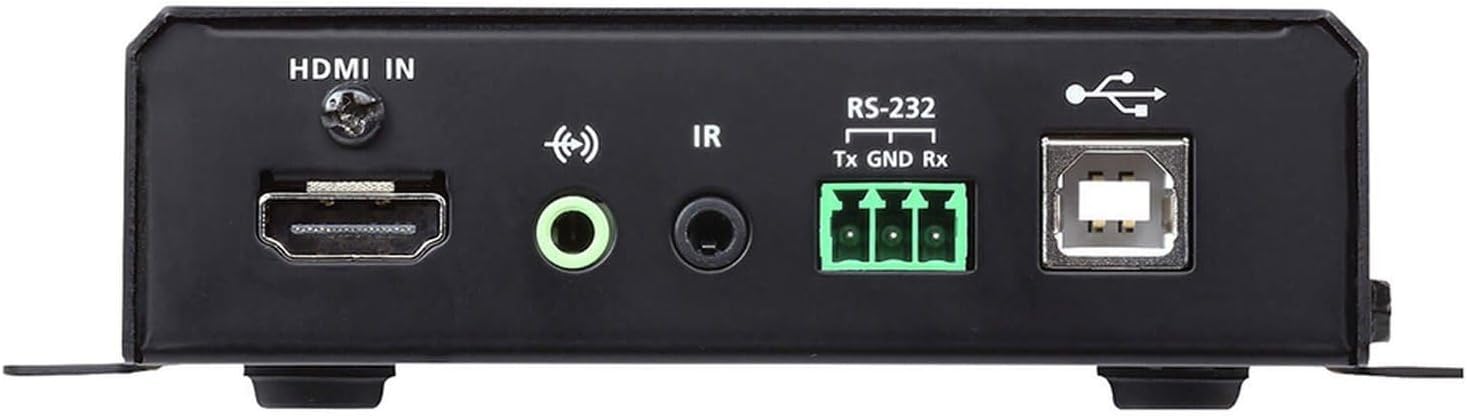
Kuva 1: Front Panel of the ATEN VE8950T Transmitter.
- HDMI IN: Liitetään HDMI-lähdelaitteeseen.
- ÄÄNI SISÄÄN: 3.5 mm:n liitin analogiselle audiotulolle.
- IR: 3.5mm jack for IR receiver connection.
- RS-232: Serial port for control and configuration.
- USB: USB Type B port for connecting to a computer or other USB host device.
3.2. Takapaneeli

Kuva 2: Rear Panel of the ATEN VE8950T Transmitter.
- LAN: RJ-45 Ethernet port for network connection.
- DC5V: Power input jack for the 5V DC power adapter.
3.3. Yläpaneeli

Kuva 3: Top Panel of the ATEN VE8950T Transmitter.
- ID NUMBER Display: Three-digit LED display showing the device's ID.
- +/- painikkeet: Used to adjust the device ID or navigate menu options.
- LINKKI-LED: Indicates network link status.
- VIRTA LED: Osoittaa virran tilan.
4. Asennus ja asennus
Follow these steps to set up your ATEN VE8950T Transmitter:
- Virran sammutuslaitteet: Ensure all devices, including the HDMI source, display, and the VE8950T, are powered off before making any connections.
- Liitä HDMI-lähde: Use an HDMI cable to connect your HDMI source device (e.g., Blu-ray player, PC) to the HDMI-IN port on the VE8950T Transmitter.
- Verkkoyhteys: Connect an Ethernet cable from your Gigabit network switch to the LAN port on the VE8950T Transmitter. Ensure the network switch supports Gigabit speeds.
- Virtaliitäntä: Kytke mukana toimitettu 5 V:n tasavirtasovitin DC 5V port on the VE8950T Transmitter, then plug the adapter into a power outlet.
- Virta päälle: Power on the VE8950T Transmitter. The POWER LED should illuminate.
- Configure ID (Optional): If using multiple transmitters and receivers, configure the unique ID for each transmitter using the +/- buttons on the top panel. This ID must match the ID set on the corresponding receiver(s).
- Connect Receiver (Sold Separately): For a complete system, connect a compatible ATEN VE8950R Receiver (sold separately) to your display and the same network.
- Power On Source and Display: Power on your HDMI source device and the display.
For advanced configurations, including web GUI management and video wall setups, refer to the comprehensive user manual available on the ATEN websivusto.
5. Käyttö
Once the VE8950T Transmitter and its corresponding receiver(s) are properly connected and powered on, the system will automatically begin transmitting the HDMI signal over the IP network.
- Signaalin siirto: The HDMI video and audio from the source connected to the VE8950T will be extended to the display connected to the receiver.
- Tilan ilmaisimet: Huomioi LINKKI ja POWER LEDs on the top panel. The POWER LED should be solid, and the LINK LED should indicate active network connection and data transmission.
- Web GUI Management: The VE8950T supports management via a web-based Graphical User Interface (GUI). Access the web GUI by entering the device's IP address into a web browser on a computer connected to the same network. The web GUI allows for advanced configuration, monitoring, and control, including video wall setup and firmware updates.
- RS-232 ohjaus: The RS-232 port can be used for serial control from a control system. Refer to the detailed product manual for RS-232 command protocols.
- IR-ohjaus: If an IR receiver is connected, you can extend IR remote control signals from the display location back to the source device.
6. Huolto
To ensure optimal performance and longevity of your ATEN VE8950T Transmitter, follow these maintenance guidelines:
- Puhdistus: Puhdista laite pehmeällä, kuivalla liinalla. Älä käytä nestemäisiä tai aerosolipuhdistusaineita.
- Ilmanvaihto: Ensure proper ventilation around the device to prevent overheating. Do not block any ventilation openings.
- Ympäristö: Operate the device within the specified temperature and humidity ranges. Avoid exposing it to direct sunlight, excessive dust, or moisture.
- Laiteohjelmistopäivitykset: Tarkista ATEN säännöllisesti website for firmware updates. Keeping the firmware up-to-date can improve performance, add new features, and resolve potential issues.
- Kaapelin hallinta: Varmista, että kaikki kaapelit on kytketty kunnolla ja reititetty oikein, jotta ne eivät irtoa tai vaurioidu vahingossa.
7. Vianmääritys
If you encounter issues with your ATEN VE8950T Transmitter, refer to the following troubleshooting tips:
| Ongelma | Mahdollinen syy | Ratkaisu |
|---|---|---|
| Näytössä ei ole videolähtöä. |
|
|
| Huono videonlaatu tai välkkymistä. |
|
|
| Ei pääse Web GUI. |
|
|
If the problem persists, please contact ATEN technical support for further assistance.
8. Tekniset tiedot
| Mallinumero | VE8950T |
| Yhteystekniikka | HDMI, Ethernet (IP) |
| Videon koodaus | H.265 |
| Max. Resoluutio | 4K (3840 x 2160) @ 60Hz (4:2:0), 4K (3840 x 2160) @ 30Hz (4:4:4) |
| Äänilähtötila | Stereo, Surround-ääni |
| Surround Sound | 5.1 Kanavan asetukset |
| HDMI-portteja yhteensä | 1 (syöttö) |
| Valvontamenetelmä | Remote (IR), RS-232, Web GUI |
| Tuotteen mitat | 9.5 x 6.5 x 6.3 tuumaa |
| Tuotteen paino | 10.14 kiloa |
9. Takuu ja tuki
ATEN is committed to providing high-quality products and excellent customer service. For support regarding your VE8950T Transmitter, please refer to the following:
- Tekninen tuki: ATEN offers free technical support. For assistance, please contact ATEN's support team. They aim to respond to customer inquiries within 4 hours.
- Takuupalvelu: Information regarding standard warranty coverage and extended warranty service packages can be found on the official ATEN websivustolla tai ottamalla yhteyttä asiakaspalveluun.
- RMA-palvelu: ATEN provides localized repair centers for Return Merchandise Authorization (RMA) services.
- Verkkoresurssit: Visit the official ATEN website for product documentation, FAQs, driver downloads, and firmware updates.
For the most current and detailed warranty information, please visit the ATEN Official Store tai heidän yrityksensä websivusto.


