1. Johdanto
The Dirt Quest 600 Robot Vacuum is designed to efficiently clean dirt, dust, and pet hair from various floor types, including along walls and in corners. This device offers convenient cleaning for daily messes and features Bluetooth connectivity for operation and scheduling via a mobile application.
2. Tärkeitä turvallisuusohjeita
Before operating your Dirt Quest 600 Robot Vacuum, please read and understand all safety instructions. Failure to follow these instructions may result in electric shock, fire, or serious injury.
- Tämä laite on tarkoitettu vain kotitalouskäyttöön.
- Älä käytä pölynimuria ulkona tai märillä pinnoilla.
- Älä anna lasten käyttää pölynimuria. Valvo lapsia ja lemmikkejä pölynimurin ollessa käytössä.
- Älä imuroi syttyviä tai palavia materiaaleja tai mitään, mikä palaa tai savuaa.
- Ensure the charging dock is placed against a wall on a level surface and is free from obstructions.
- Irrota lataustelakka pistorasiasta, kun sitä ei käytetä pitkään aikaan tai ennen puhdistamista.
- Älä käsittele pistoketta tai laitetta märin käsin.
- Use only the manufacturer's recommended attachments and charging dock.
- Store the vacuum in a cool, dry indoor area.
3. Tuotteen osat
Familiarize yourself with the main components of your Dirt Quest 600 Robot Vacuum.
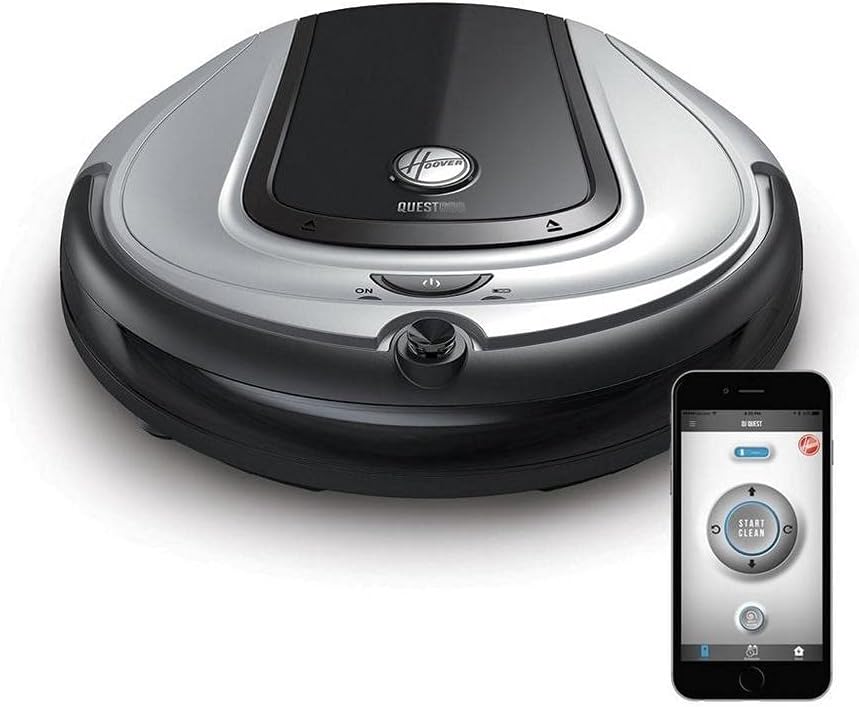
Kuva 3.1: The Dirt Quest 600 Robot Vacuum shown alongside a smartphone displaying its control application. The vacuum features a silver and black finish with control buttons on its top surface. The app interface includes 'Start Clean' and directional controls.
3.1. Robot Vacuum Unit
- Päärunko: Houses the motor, dustbin, and battery.
- Ohjauspaneeli: Buttons for power, cleaning modes, and status indicators.
- Puskuri: Havaitsee esteet törmäysten estämiseksi.
- Sivuharjat: Sweep debris from edges and corners into the main cleaning path.
- Pääharja: Liikaa ja nostaa likaa lattioilta.
- Pyörät: Provide mobility across different floor types.
- Latausyhteystiedot: Connects to the charging dock for power.
- Roskakori: Kerää likaa ja roskia.
- Suodattaa: Traps fine dust particles.
3.2. Lataustelakka
The charging dock provides power to recharge the robot vacuum's battery. Ensure it is placed in an accessible area for the robot.
3.3. Mobiilisovellus
The Dirt Quest mobile application allows for remote control, scheduling, and monitoring of your robot vacuum via Bluetooth connectivity.
4. Alkuasetukset
4.1. Pakkauksen purkaminen ja sijoittaminen
- Poista kaikki osat varovasti pakkauksesta.
- Remove any protective films or stickers from the robot vacuum and charging dock.
- Aseta lataustelakka seinää vasten avoimelle ja siistille alueelle. Varmista, että lataustelakan molemmilla puolilla on vähintään 0.5 metriä vapaata tilaa ja että sen edessä on 1.5 metriä vapaata tilaa.
- Kytke lataustelakka pistorasiaan.
4.2. Alkulataus
- Manually place the robot vacuum onto the charging dock, aligning the charging contacts.
- Ensure the indicator light on the robot or dock illuminates, indicating it is charging.
- Allow the robot to charge completely before its first use. This may take several hours.
4.3. Mobiilisovelluksen yhteys
- Download the Dirt Quest app from your device's app store.
- Avaa sovellus ja luo tili tai kirjaudu sisään noudattamalla näytön ohjeita.
- Varmista, että älypuhelimesi Bluetooth on käytössä.
- Follow the app's prompts to pair your Dirt Quest 600 Robot Vacuum. You may need to be in close proximity to the robot during the pairing process.
5. Käyttöohjeet
5.1. Puhdistusjakson aloittaminen
- Manuaalinen käynnistys: Press the 'ON' button on the robot vacuum's control panel. The robot will begin a cleaning cycle.
- Sovelluksen käynnistys: Open the Dirt Quest app on your smartphone, ensure it's connected to your robot, and tap the 'Start Clean' button.
5.2. Puhdistussyklin tauottaminen/pysäyttäminen
- Manuaalinen pysäytys: Press the 'ON' button again on the robot vacuum. The robot will pause. Press again to resume or hold to send it back to the dock.
- Sovelluksen hallinta: Use the app to pause or stop the cleaning cycle. You can also direct the robot back to its charging dock.
5.3. Siivouksen aikatauluttaminen
The Dirt Quest app allows you to set a cleaning schedule for your robot vacuum.
- Open the Dirt Quest app.
- Siirry osioon ”Aikataulu” tai ”Ajastin”.
- Aseta halutut siivousajat ja -päivät.
- Save your schedule. The robot will automatically start cleaning at the programmed times.
5.4. Navigointi
The Dirt Quest 600 uses an adaptive navigation system to clean your floors. It will move around obstacles and clean different areas of your home. For optimal performance, clear clutter from floors before a cleaning cycle.
6. Huolto
Säännöllinen huolto varmistaa robotti-imurin optimaalisen suorituskyvyn ja pidentää sen käyttöikää.
6.1. Pölysäiliön tyhjennys
Empty the dustbin after each cleaning cycle or when the 'Dustbin Full' indicator (if available) illuminates.
- Paina pölysäiliön vapautuspainiketta ja vedä pölysäiliö ulos.
- Avaa pölysäiliön kansi ja tyhjennä sen sisältö roskasäiliöön.
- Close the dustbin lid and reinsert it into the robot vacuum until it clicks into place.
6.2. Suodattimen puhdistaminen
Clean the filter weekly or as needed. Replace the filter every 2-3 months, depending on usage.
- Poista roskakori.
- Ota suodatin pois pölysäiliöstä.
- Tap the filter gently over a trash can to remove loose dirt. You may use a small brush to clean off stubborn debris.
- Do not wash the filter with water unless specified by the manufacturer.
- Reinsert the clean filter into the dustbin and then the dustbin into the robot.
6.3. Puhdistusharjat
Inspect and clean the main brush and side brushes regularly to remove tangled hair or debris.
- Pääharja: Remove the brush guard and lift out the main brush. Use the cleaning tool (if provided) or scissors to cut and remove tangled hair.
- Sivuharjat: Vedä sivuharjat varovasti irti. Poista mahdolliset hiukset ja roskat. Jos harjat ovat vaurioituneet, vaihda ne.
- Reattach all brushes securely.
6.4. Antureiden ja latauskontaktien puhdistaminen
Pyyhi sekä robotin että lataustelakan anturit ja latauskoskettimet puhtaalla, kuivalla liinalla varmistaaksesi niiden oikean toiminnan.
7. Vianmääritys
Katso tästä osiosta yleisiä ongelmia ja niiden ratkaisuja.
| Ongelma | Mahdollinen syy | Ratkaisu |
|---|---|---|
| Robotti ei käynnisty tai lataudu. | Battery depleted; charging contacts dirty; charging dock unplugged. | Ensure dock is plugged in. Clean charging contacts on robot and dock. Place robot manually on dock. |
| Robotti juuttuu usein. | Obstacles on floor; robot stuck on high-pile carpet or wires. | Clear clutter, loose cables, and small rugs. Use virtual barriers if available. |
| Huono puhdistusteho. | Pölysäiliö täynnä; suodatin tukossa; harjat sotkeutuneet tai kuluneet. | Tyhjennä pölysäiliö. Puhdista tai vaihda suodatin. Puhdista tai vaihda pää- ja sivuharjat. |
| Robotti ei löydä lataustelakkaa. | Dock obstructed; robot too far from dock; dock not powered. | Ensure dock is in an open area. Verify dock is powered. Manually place robot on dock if necessary. |
| Sovellusyhteysongelmat. | Bluetooth off; robot out of range; app not updated. | Ensure Bluetooth is on. Bring phone closer to robot. Update app to latest version. |
8. Tuotteen tekniset tiedot
| Ominaisuus | Erittely |
|---|---|
| Merkki | Lika |
| Mallin nimi | BH70600 |
| Erikoisominaisuus | Pussiton |
| Väri | Hopea |
| Suodattimen tyyppi | Kasetti |
| Akun kesto | 90 minutes (approximate) |
| Voitage | 12 volttia |
| Virtalähde | Paristokäyttöinen |
| Paristot vaaditaan | Kyllä (1 litiumioniakku) |
| Valvontamenetelmä | Sovellus, kosketa |
| Yhteensopivat laitteet | Amazon Echo |
| Muototekijä | Robotti |
| Tuotteen mitat | 12.5 x 12.5 x 2.9 tuumaa |
| Tuotteen paino | 4.4 kiloa |
| UPC | 073502043943 |
9. Takuu ja tuki
9.1. Tuotteen takuu
The Dirt Quest 600 Robot Vacuum comes with a 1 vuoden rajoitettu takuu from the date of purchase. This warranty covers manufacturing defects under normal household use. It does not cover damage caused by misuse, neglect, accident, or unauthorized repair.
9.2. Asiakastuki
For technical assistance, warranty claims, or replacement parts, please contact Dirt customer support. Refer to the product packaging or the official Dirt websivustolta ajantasaisimmat yhteystiedot.
When contacting support, please have your model number (BH70600) and proof of purchase readily available.


