Apple MLA02LL/A

Apple Magic Mouse 2 (MLA02LL/A) Instruction Manual

Model: MLA02LL/A

Tuote loppuview

The Apple Magic Mouse 2 is a wireless, rechargeable mouse designed for seamless integration with Mac OS X. It features a multi-touch surface for intuitive gestures and an ambidextrous design for comfortable use by both left and right-handed users. Its optimized foot design allows for smooth gliding across surfaces, enhancing precision and ease of use.

Tärkeimmät ominaisuudet

Asennus

Pairing Your Magic Mouse 2

The Magic Mouse 2 pairs automatically with your Mac when connected via the included USB-C to Lightning cable. For initial setup or re-pairing:

  1. Ensure your Mac's Bluetooth is turned on. Go to System Settings > Bluetooth.
  2. Connect your Magic Mouse 2 to your Mac using the USB-C to Lightning cable. This will automatically pair the mouse and begin charging it.
  3. Once paired, you can disconnect the cable for wireless use. The mouse will remain connected via Bluetooth.
  4. If the mouse does not appear in the Bluetooth settings, ensure it is charged and the power switch on the bottom of the mouse is in the 'On' position.

Akun lataaminen

The Magic Mouse 2 features a built-in rechargeable lithium-ion battery. To charge:

  1. Connect the Lightning port on the bottom of the Magic Mouse 2 to a USB-C port on your Mac or a USB power adapter using the provided USB-C to Lightning cable.
  2. A full charge typically takes about 2 hours. A quick 2-minute charge can provide approximately 9 hours of use.
  3. You can check the battery level in the Bluetooth menu on your Mac's menu bar.
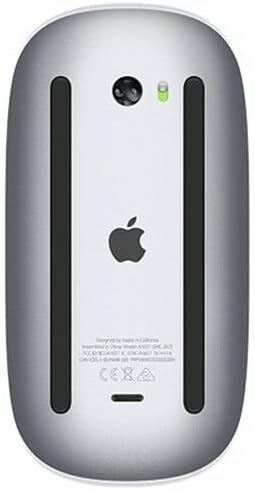
Pohja view of the Apple Magic Mouse 2 showing the Lightning charging port and power switch.
Pohja view of the Apple Magic Mouse 2, highlighting the Lightning charging port and power switch. The green indicator light shows the mouse is powered on.

Operating Your Magic Mouse 2

Monikosketuseleet

The Magic Mouse 2's smooth, seamless Multi-Touch surface allows for simple gestures to navigate your Mac:

Yläosa view of the Apple Magic Mouse 2, showcasing its sleek, white multi-touch surface.
Yläosa view of the Apple Magic Mouse 2, illustrating its minimalist design and multi-touch surface for gesture control.

Hiiren asetusten mukauttaminen

You can customize the tracking speed, scrolling speed, and gesture settings for your Magic Mouse 2:

  1. Siirry osoitteeseen System Settings > Mouse Macissasi.
  2. Säädä Seurantanopeus ja Vieritysnopeus sliders to your preference.
  3. Vuonna Lisää eleitä tab, you can enable or disable specific Multi-Touch gestures and view demonstrations of how to perform them.

Huolto

Cleaning Your Magic Mouse 2

To keep your Magic Mouse 2 clean and functioning optimally:

Akun hoito

To maximize the lifespan of your Magic Mouse 2's rechargeable battery:

Vianetsintä

Yleisiä ongelmia ja ratkaisuja

Tekniset tiedot

OminaisuusYksityiskohta
Tuotteen mitat2 x 2 x 2 tuumaa
Tuotteen paino12.3 unssia
ASINB074T2NWVL
ParistotLadattava (sisäänrakennettu)
MerkkiOmena
VäriHopea
YhteystekniikkaLangaton (Bluetooth)
Painikkeiden lukumäärä3 (virtual, via Multi-Touch)

Takuu ja tuki

Tuotteen takuu

Apple products typically come with a one-year limited warranty against defects in materials and workmanship. For detailed warranty information, please refer to the official Apple warranty documentation included with your product or visit the Apple Support websivusto.

Asiakastuki

Jos tarvitset lisäapua, teknistä tukea tai huoltoa, käy Applen virallisella tukisivustolla. website or contact Apple Customer Service:

Aiheeseen liittyvät asiakirjat - MLA02LL/A

Preview Apple Magic Mousen purkamisopas
Yksityiskohtainen purkuopas Apple Magic Mouse -hiirelle, jossa tutustutaan sen sisäisiin komponentteihin ja suunnitteluun.
Preview Apple Magic Mouse -käyttöopas: Asennus, ominaisuudet ja vianmääritys
Apple Magic Mousen virallinen käyttöopas, joka sisältää pika-aloituksen, ohjelmistopäivitykset, pariliitoksen Macien kanssa, akun vaihdon, Multi-Touch-eleet, puhdistuksen, ergonomian ja säännöstenmukaisuustiedot.
Preview Apple Magic Mouse 2:n purkuopas
Kattava purkuopas, jossa kerrotaan Apple Magic Mouse 2:n sisäisistä osista, kokoamisesta ja korjattavuudesta.
Preview Apple iMacin pikaopas: Asennus ja peruskäyttö
Aloita Apple iMacin käyttö. Tämä opas käsittelee alkuasennusta, lisävarusteiden, kuten Magic Mousen ja näppäimistön, liittämistä, porttien ymmärtämistä ja perusnavigointia.
Preview Apple iMacin pikaopas: Asennus, käyttö ja tuki
Ytimekäs opas Apple iMacin käyttöönottoon ja käyttöön. Opas kattaa lisävarusteet, portit, perustoiminnot ja tukiresurssit. Opi liittämään oheislaitteita, käyttämään käyttöliittymää ja löytämään apua.
Preview iMacin pikaopas
Aloita uuden iMacisi käyttö. Tämä opas käsittelee lisävarusteiden käyttöönottoa, peruskäyttöä ja esittelee iMac-pöytätietokoneesi tärkeimmät osat.