1. Johdanto
This manual provides essential information for the safe and efficient use of your Brother DCP-L8410CDW Color Laser Multifunction Printer. This 3-in-1 device is designed for professional environments, offering printing, copying, and scanning functionalities. It features an intuitive touchscreen, Wi-Fi, and Ethernet connectivity, making it suitable for various work settings.
Keskeisiä ominaisuuksia ovat:
- Print, copy, and scan capabilities
- High-quality color laser printing (up to 2400 dpi)
- Automaattinen kaksipuolinen tulostus
- Flexible paper handling with a maximum capacity of 300 sheets
- Integrated Wi-Fi and Gigabit Ethernet for versatile connectivity

Kuva 1.1: Edessä view of the Brother DCP-L8410CDW printer.
2. Asennus
Follow these steps to set up your Brother DCP-L8410CDW printer:
- Purkaminen: Carefully remove the printer from its packaging. Ensure all protective tapes and packing materials are removed from the exterior and interior of the device.
- Install Toner Cartridges: Open the front cover and install the toner cartridges into their respective slots. Refer to the labels for correct color placement.
- Lataa paperi: Open the paper tray and adjust the paper guides to fit your paper size (e.g., A4). Load paper into the tray and close it securely.
- Liitä virta: Kytke virtajohto tulostimeen ja sitten maadoitettuun pistorasiaan.
- Connect to Network/Computer:
- Langaton (Wi-Fi): On the printer's touchscreen, navigate to Network settings and follow the prompts to connect to your Wi-Fi network.
- Langallinen (Ethernet): Kytke Ethernet-kaapeli tulostimen lähiverkkoportista verkkoreitittimeen tai kytkimeen.
- USB: Connect a USB 2.0 cable from the printer to your computer.
- Asenna ajurit: Aseta asennus-CD (jos toimitettu) tietokoneeseesi tai lataa uusimmat ohjaimet ja ohjelmistot Brotherin virallisesta tukipalvelusta. websivusto. Suorita asennus loppuun noudattamalla näytön ohjeita.

Kuva 2.1: Sivu view of the Brother DCP-L8410CDW, showing the paper tray.
3. Käyttöohjeet
The Brother DCP-L8410CDW features an intuitive touchscreen for easy operation.
3.1. Tulostus
- Varmista, että tulostin on päällä ja yhdistetty verkkoon tai tietokoneeseen.
- Avaa tulostettava asiakirja tai kuva tietokoneellasi tai mobiililaitteellasi.
- Select the 'Print' option from your application.
- Choose the Brother DCP-L8410CDW from the list of available printers.
- Adjust print settings (e.g., number of copies, color/mono, duplex) as needed.
- Napsauta 'Tulosta'.
3.2. Kopiointi
- Aseta asiakirja skannerin lasille kuvapuoli alaspäin tai automaattiseen arkinsyöttölaitteeseen (ADF) kuvapuoli ylöspäin.
- On the printer's touchscreen, select the 'Copy' function.
- Adjust settings such as number of copies, color/mono, and enlargement/reduction.
- Aloita kopiointi painamalla 'Käynnistä'.
3.3. Skannaus
- Aseta asiakirja skannerin lasille kuvapuoli alaspäin tai automaattiseen asiakirjansyöttölaitteeseen kuvapuoli ylöspäin.
- Valitse tulostimen kosketusnäytöltä Skannaa-toiminto.
- Choose your desired scan destination (e.g., Scan to PC, Scan to USB, Scan to Email).
- Säädä skannausasetuksia (esim. resoluutiota, file type) if necessary.
- Aloita skannaus painamalla 'Käynnistä'.

Image 3.1: The intuitive touchscreen control panel of the DCP-L8410CDW.

Image 3.2: Using the Automatic Document Feeder for scanning or copying, and the USB port for direct printing/scanning.
4. Huolto
Säännöllinen huolto varmistaa optimaalisen suorituskyvyn ja pidentää tulostimen käyttöikää.
4.1. Värikasettien vaihtaminen
- When a 'Low Toner' or 'Replace Toner' message appears on the display, order new genuine Brother toner cartridges.
- Avaa tulostimen etukansi.
- Irrota vanha värikasetti- ja rumpuyksikkökokoonpano.
- Separate the toner cartridge from the drum unit.
- Unpack the new toner cartridge and install it into the drum unit until it clicks into place.
- Insert the new toner and drum unit assembly back into the printer.
- Sulje etukansi.
4.2. Tulostimen puhdistaminen
- Ulkopuoli: Pyyhi tulostimen ulkopinta pehmeällä, nukkaamattomalla liinalla. Älä käytä hankaavia puhdistusaineita.
- Skannerin lasi: Puhdista skannerin lasi pehmeällä, kuivalla liinalla. Pinttyneisiin tahroihin levitä pieni määrä lasinpuhdistusainetta liinaan (ei suoraan lasille).
- Koronalanka: Periodically clean the corona wire inside the drum unit to prevent print quality issues. Refer to the printer's internal instructions or the full user guide for detailed steps.
5. Vianmääritys
Tässä osiossa käsitellään yleisiä ongelmia, joita saatat kohdata tulostimesi kanssa.
5.1. Paperitukokset
If a 'Paper Jam' message appears:
- Sammuta tulostin ja irrota virtajohto.
- Open the rear cover or other access points as indicated on the display or in the full user guide.
- Carefully pull out any jammed paper in the direction of the paper path. Avoid tearing the paper.
- Check all paper trays and internal areas for small pieces of torn paper.
- Sulje kaikki kannet, kytke virtajohto ja käynnistä tulostin.
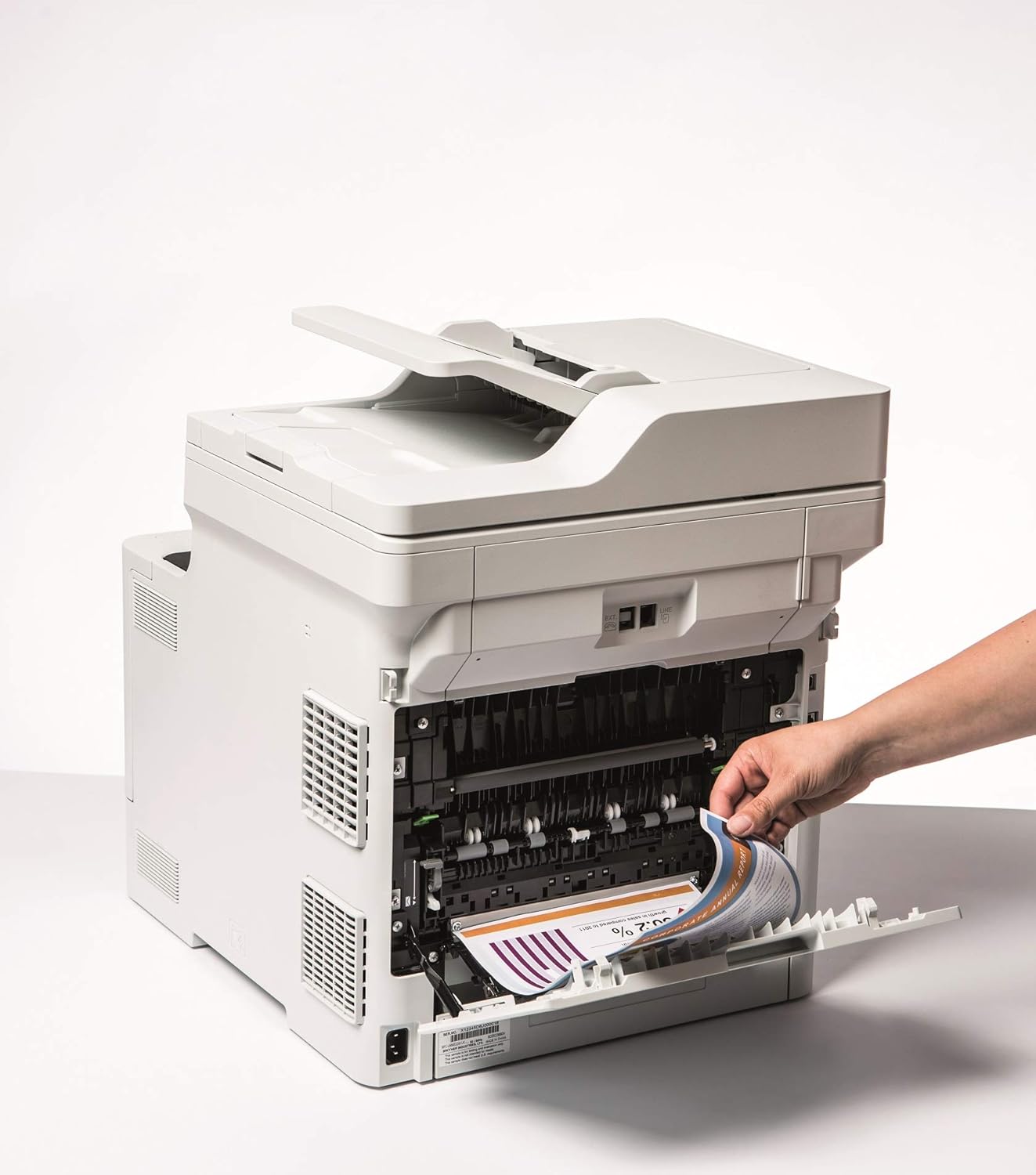
Image 5.1: Clearing a paper jam from the rear of the printer.
5.2. Tulostuslaatuongelmat
- Haalistuneet vedokset: Toner cartridge may be low. Replace if necessary.
- Raitoja tai täpliä: Clean the corona wire or check for foreign objects on the drum unit.
- Väärät värit: Ensure genuine Brother toner cartridges are used and perform a color calibration from the printer's menu.
5.3. Yhteysongelmat
- Wi-Fi Disconnected: Check network settings on the printer and ensure your router is functioning correctly. Restart both devices if needed.
- Cannot Print from PC: Verify that the printer drivers are correctly installed and updated. Check cable connections for wired setups.
6. Tekniset tiedot
| Ominaisuus | Erittely |
|---|---|
| Mallin nimi | DCP-L8410CDW |
| Tuotteen mitat (SxLxK) | 43.5P x 53.9L x 52.6K cm |
| Suurin mediakoko | A4 |
| Arkkien enimmäiskapasiteetti | 300 arkkia |
| Kopioinnin maksiminopeus (mustavalkoinen) | 31 sivua minuutissa |
| Suurin väritulostustarkkuus | 61 dpcm |
| Suurin mustavalkoinen tulostustarkkuus | 2400 dpi |
| Kaksipuolinen tulostus | Kyllä |
| Yhteystekniikka | Ethernet, USB 2.0, Wireless LAN (Wi-Fi) |
| Tulostustekniikka | Laser |
| Tulostimen lähtö | Väri |
| Suurin tulostusnopeus (väri) | 31 sivua minuutissa |
| Tuotteen paino | 27.6 kiloa |
| Virrankulutus | 500 wattia |
| Skannerin tyyppi | Tasosänky |
7. Takuutiedot
This Brother DCP-L8410CDW printer comes with a Rajoitettu takuu. For detailed information regarding the terms, conditions, and duration of your warranty, please refer to the warranty card included with your product or visit the official Brother websivusto. Säilytä ostokuitti takuuvaatimuksia varten.
8. Asiakastuki
For further assistance, including driver downloads, FAQs, and contact information for technical support, please visit the official Brother support websivusto:
You can also find additional resources and troubleshooting guides specific to your model on the support page.


