Johdanto
This manual provides detailed instructions for the setup, operation, and maintenance of your Hyperkin Knight Premium Controller. Designed for use with PlayStation 3 (PS3), PC, and Mac systems, this controller offers a versatile gaming experience with its ergonomic design and responsive controls. Please read this manual thoroughly before using the product to ensure optimal performance and longevity.
Tuotteen ominaisuudet
- Dual Analog Joysticks: Two wide-spectrum analog joysticks for precise control.
- Pressure-Sensitive D-Pad: An eight-way directional pad with pressure sensitivity.
- Pressure-Sensitive Buttons: Four shoulder buttons and four face buttons with pressure sensitivity for nuanced input.
- Pakotettu Palaute: Integrated force feedback for immersive gaming experiences.
- Koti näppäin: Dedicated button for system menu access.
- Pitkä kaapeli: A 6-foot (1.8 meter) cable for flexible positioning.
- Monen alustan yhteensopivuus: Compatible with all PS3 models, as well as PC and Mac via USB.
Pakkauksen sisältö
- Hyperkin Knight Premium Controller (White)
- Integrated USB Cable (6 ft.)
Asennusohjeet
Connecting to PlayStation 3 (PS3)
- Ensure your PS3 console is powered off or in standby mode.
- Locate an available USB port on your PS3 console.
- Plug the USB connector of the Hyperkin Knight Controller into the USB port on your PS3.
- Power on your PS3 console. The controller should be automatically recognized and assigned a player number.
- If the controller does not respond, try a different USB port or restart the console.
Yhdistäminen PC/Mac-tietokoneeseen
- Etsi vapaa USB-portti PC- tai Mac-tietokoneeltasi.
- Plug the USB connector of the Hyperkin Knight Controller into the USB port.
- Your operating system (Windows, macOS) should automatically detect and install the necessary drivers. This process may take a few moments.
- Once installed, the controller will be ready for use with compatible games and applications. You may need to configure controller settings within individual games or system preferences.
- Huomautus: Functionality may vary depending on the operating system and specific game titles.
Käyttöohjeet
The Hyperkin Knight Premium Controller features a standard layout for intuitive gameplay.
Ohjaimen asettelu

Kuva: Yläosa view of the Hyperkin Knight Premium Controller, showing the D-pad, analog sticks, face buttons, and central buttons.
- D-Pad (suuntaohjain): Located on the left, used for directional input.
- Vasen analoginen sauva: Below the D-Pad, for precise movement and camera control.
- Oikea analoginen sauva: On the right side, typically for camera control or aiming.
- Kasvopainikkeet (kolmio, ympyrä, risti, neliö): On the right, used for actions within games.
- Olkapainat (L1, L2, R1, R2): Located on the top edge of the controller, used for various in-game functions.
- SELECT -painike: Käytetään yleensä valikoiden käyttöön tai tiettyihin pelitoimintoihin.
- Aloitusnäppäin: Käytetään yleensä pelien tauottamiseen tai valintojen vahvistamiseen.
- Koti näppäin: Central button to access the PS3 XMB (CrossMediaBar) or system menus on PC/Mac.
Pakota palaute
The controller features force feedback (rumble) functionality, which provides tactile sensations during gameplay, enhancing immersion. This feature is automatically enabled when supported by the game and system. If you wish to disable it, check your game's or system's controller settings.
Huolto
- Puhdistus: Pyyhi ohjain pehmeällä, kuivalla liinalla. Pinttyneeseen likaan pyyhi kevyesti.ampKostuta liina vedellä. Vältä voimakkaiden kemikaalien tai hankaavien puhdistusaineiden käyttöä.
- Varastointi: Säilytä ohjainta viileässä, kuivassa paikassa, poissa suorasta auringonvalosta ja äärimmäisistä lämpötiloista. Vältä kaapelin kiedomista liian tiukalle vaurioiden välttämiseksi.
- Kaapelihuolto: Do not pull the controller by its cable. Always grasp the USB connector when plugging or unplugging.
Vianetsintä
Ohjain ei vastaa
- Tarkista yhteys: Ensure the USB cable is securely plugged into both the controller and the console/computer.
- Kokeile eri USB-porttia: Connect the controller to another USB port on your system.
- Käynnistä järjestelmä uudelleen: Power cycle your PS3, PC, or Mac.
- Driver Check (PC/Mac): On PC, check Device Manager to see if the controller is recognized and if there are any driver issues. On Mac, check System Information > USB.
Incorrect Button Mapping or Limited Functionality
- Peliasetukset: Many games allow for custom controller mapping. Check the in-game settings for controller configuration.
- System Settings (PC/Mac): For PC, some games or emulators may require specific controller configurations or third-party software. For Mac, check System Preferences > Game Controllers (if available) or specific application settings.
- PS3 yhteensopivuus: While compatible with all PS3 models, some older games or specific PS3 system software versions might have unique controller handling. Ensure your PS3 system software is up to date.
Force Feedback Not Working
- Pelituki: Verify that the game you are playing supports force feedback.
- Pelin sisäiset asetukset: Check the game's options menu to ensure force feedback (rumble) is enabled.
- Järjestelmäasetukset: On PC, ensure rumble is enabled in your controller settings.
Tekniset tiedot
| Mallinumero | M07213-WH |
| Yhteensopivuus | PlayStation 3, PC, Mac (via USB) |
| Kaapelin pituus | 6 jalkaa (noin 1.8 metriä) |
| Syöttötyyppi | Pressure-sensitive buttons and D-pad, dual analog joysticks |
| Palaute | Force Feedback (Rumble) |
| Mitat | 2.99 x 7.99 x 7.01 tuumaa (noin 7.6 x 20.3 x 17.8 cm) |
| Paino | 12.5 unssia (noin 354 grammaa) |
| Valmistaja | Hyperkin Inc |
Takuu ja tuki
For warranty information and technical support, please refer to the official Hyperkin websivustolta tai ota yhteyttä suoraan heidän asiakaspalveluunsa. Säilytä ostokuitti ostotodistuksena mahdollisten takuuvaatimusten varalta.
Valmistaja: Hyperkin Inc
Websivusto: www.hyperkin.com (Käy virallisella sivustolla websivustolta uusimmat tukitiedot.)
Tuote loppuview Kuvat
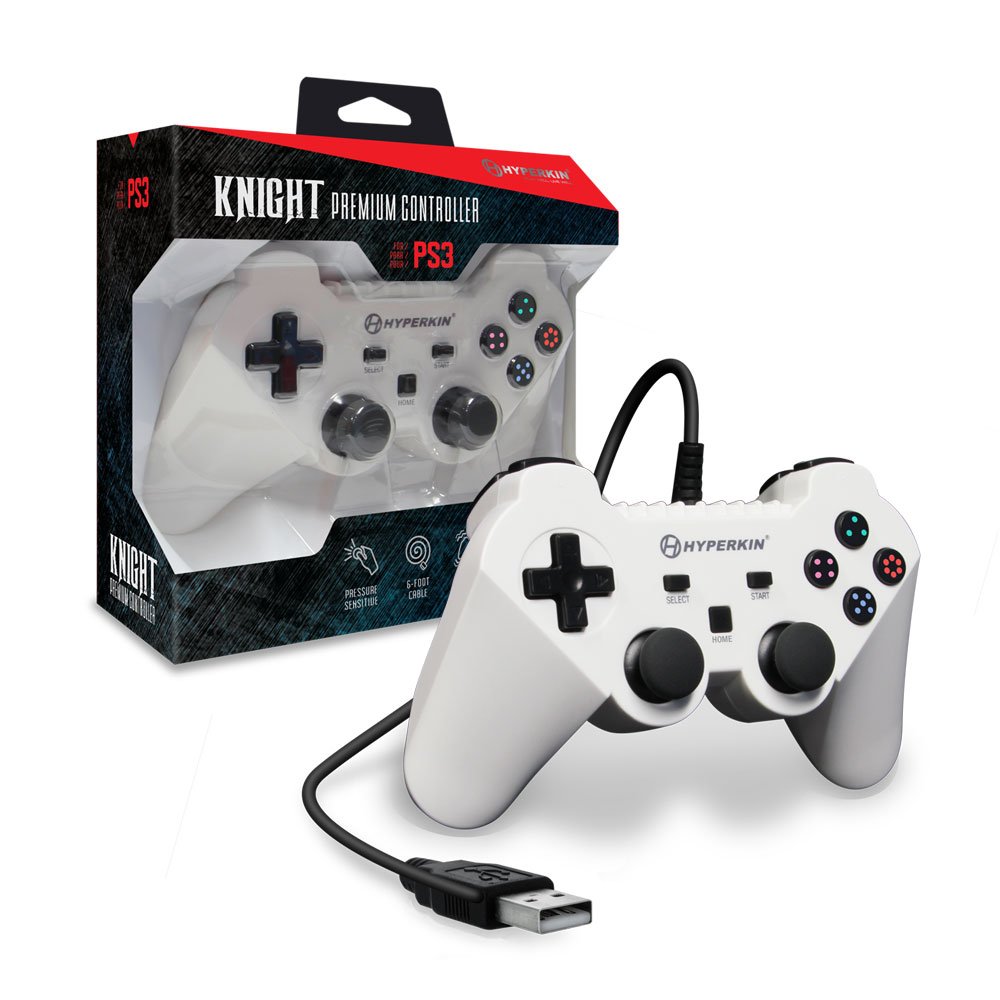
Image: The Hyperkin Knight Premium Controller displayed alongside its retail packaging, highlighting the product's design and branding.

Kuva: Lähikuva view of the Hyperkin Knight Premium Controller's retail box, showcasing tärkeimmät ominaisuudet ja suunnitteluelementit.

Kuva: Kulmikas view of the Hyperkin Knight Premium Controller, emphasizing its ergonomic shape and button placement.


