1. Johdanto
The Imperial DABMAN i400 is a versatile audio adapter designed to enhance your existing stereo system with modern radio and streaming capabilities. It provides access to thousands of internet radio stations, digital radio (DAB+), and traditional FM radio. Additionally, it supports audio streaming via Bluetooth, UPnP/DLNA, and USB, offering a comprehensive listening experience.
2. Turvallisuusohjeet
- Virtalähde: Käytä ainoastaan laitteen mukana toimitettua virtalähdettä. Varmista, että äänenvoimakkuus ontage vastaa paikallista virtalähdettäsi.
- Vesi ja kosteus: Älä altista laitetta sateelle, kosteudelle tai tippuville/roiskeille nesteille. Älä aseta laitteen päälle nesteitä sisältäviä esineitä, kuten maljakoita.
- Ilmanvaihto: Varmista riittävä ilmanvaihto. Älä tuki ilmanvaihtoaukkoja. Vältä laitteen asettamista pehmeille pinnoille, jotka voivat estää ilmanvirtauksen.
- Lämmönlähteet: Pidä laite poissa lämmönlähteistä, kuten pattereista, lämmitysvastuksista, liesistä tai muista lämpöä tuottavista laitteista.
- Puhdistus: Irrota virtajohto ennen puhdistamista. Käytä pehmeää, kuivaa liinaa. Älä käytä nestemäisiä tai aerosolipuhdistusaineita.
- Huolto: Älä yritä huoltaa tätä tuotetta itse. Anna kaikki huoltotoimenpiteet pätevän huoltohenkilöstön tehtäväksi.
3. Pakkauksen sisältö
Tarkista, että pakkauksessa on kaikki tarvittavat osat:
- Imperial DABMAN i400 Internet Digital Radio
- Virtalähde
- Telescopic Antenna with F-connector
- Wire Antenna with F-connector
- RCA kaapeli
- Äänikaapeli (3.5 mm:n liitin)
- Kaukosäädin
- Käyttöopas (tämä asiakirja)

Image: Imperial DABMAN i400 with its power adapter, telescopic antenna, wire antenna, RCA cable, 3.5mm audio cable, and remote control.
4. Tuote ohiview
Edessä View

Image: The front of the Imperial DABMAN i400, showing its display and control buttons on the top edge.
The front of the DABMAN i400 features a clear 3.2-inch LCD display for navigation and information. Control buttons are located on the top edge of the device for easy access to functions like power, mode selection, volume, and station presets.
Takaosa View ja Yhteydet
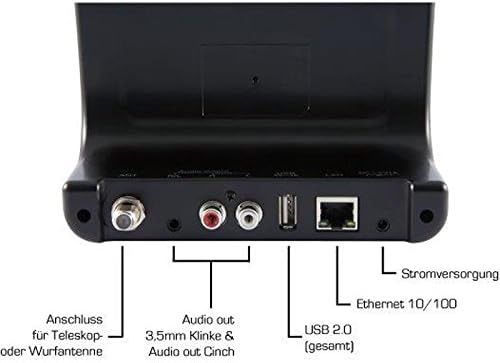
Image: The rear panel of the Imperial DABMAN i400, detailing its various connection ports. From left to right: Antenna connection (ANT), Audio output (RCA L/R and 3.5mm jack), USB 2.0 ports, Ethernet 10/100 (LAN), and Power supply (DC 5V/1A).
- MUURAHAINEN: F-connector for connecting the telescopic or wire antenna for DAB+/FM reception.
- Audio Output (R/L): RCA (Cinch) stereo audio output for connecting to an ampnostin tai stereojärjestelmä.
- Äänilähtö (3.5 mm:n liitin): 3.5mm stereo audio output for connecting to other audio devices.
- USB 2.0: USB port for playing media from a USB storage device.
- LAN: Ethernet port (RJ45) for wired network connection.
- Tasavirta 5 V / 1 A: Mukana tulevan virtalähteen virransyöttö.
5. Asennus
- Liitä antenni: Screw the telescopic antenna or connect the wire antenna to the MUURAHAINEN F-connector on the rear panel. Extend the telescopic antenna for optimal reception.
- Liitä äänijärjestelmään: Use the provided RCA cable to connect the Audio Output (R/L) on the DABMAN i400 to an available audio input (e.g., AUX, CD, LINE IN) on your amplifier or stereo system. Alternatively, use the 3.5mm audio cable if your system has a compatible input.
- Verkkoyhteys:
- Langallinen (lähiverkko): Liitä Ethernet-kaapeli reitittimestäsi tietokoneeseen. LAN port on the rear of the DABMAN i400.
- Wireless (WLAN): The device will prompt you to set up Wi-Fi during the initial startup wizard. Select your network and enter the password.
- Liitä virta: Liitä virtalähde pistorasiaan DC 5V/1A input on the rear panel, then plug the adapter into a wall outlet. The device will power on automatically or enter standby mode.
- Ohjattu alkuasetustoiminto: Upon first power-on, the device will guide you through an initial setup process, including language selection, time/date settings, and network configuration. Follow the on-screen instructions.
6. Käyttöohjeet
Perusnavigointi
Use the control buttons on the top of the device or the remote control to navigate menus, select options, adjust volume, and change modes.
Tilan valinta
Press the 'Mode' button (or equivalent on remote) to switch between available modes:
- Internet-radio: Access thousands of online radio stations worldwide. Browse by genre, location, or search for specific stations.
- DAB+ digitaaliradio: Enjoy high-quality digital radio broadcasts. The device will scan for available stations in your area.
- FM-radio: Tune into traditional analog FM radio stations.
- Bluetooth: Stream audio wirelessly from your Bluetooth-enabled smartphone, tablet, or computer.

Image: Bluetooth connectivity icon.
To pair: Select Bluetooth mode on the DABMAN i400. On your external device, search for available Bluetooth devices and select 'DABMAN i400'.
- UPnP/DLNA: Suoratoista musiikkia files from compatible devices on your local network (e.g., a network-attached storage (NAS) drive or a computer running a media server).

Image: UPnP (Universal Plug & Play) icon.
- USB-toisto: Toista ääni files (e.g., MP3) from a USB flash drive connected to the USB port on the rear of the device.

Image: MP3 music file kuvake.
Esiasetukset
Save your favorite stations as presets for quick access. Refer to the on-screen menu for instructions on how to save and recall presets.
Air Music Control App
Control your DABMAN i400 using the Air Music Control App available for smartphones and tablets. This app allows for convenient remote control and browsing of stations.

Image: Air Music Control App icon.
7. Huolto
- Puhdistus: Wipe the device with a soft, dry, lint-free cloth. Do not use abrasive cleaners, waxes, or solvents.
- Ohjelmistopäivitykset: Periodically check for available software updates through the device's system settings menu to ensure optimal performance and access to new features.
- Varastointi: Jos laitetta säilytetään pitkään, irrota se virtalähteestä ja säilytä sitä viileässä ja kuivassa paikassa.
8. Vianmääritys
- Ei virtaa:
- Varmista, että virtalähde on kytketty kunnolla laitteeseen ja toimivaan pistorasiaan.
- Kokeile toista pistorasiaa.
- Ei ääntä:
- Check the volume level on both the DABMAN i400 and your connected audio system.
- Ensure the audio cables are correctly connected to the appropriate input on your audio system.
- Verify that your audio system is set to the correct input source.
- Cannot Connect to Wi-Fi/Internet:
- Varmista, että Wi-Fi-reitittimesi on päällä ja toimii oikein.
- Tarkista Wi-Fi-salasana uudelleen.
- Try moving the device closer to your Wi-Fi router or use a wired LAN connection.
- Restart your router and the DABMAN i400.
- Poor DAB+/FM Reception:
- Ensure the antenna is fully extended and positioned for optimal reception.
- Try repositioning the device or antenna.
- Check if you are in an area with good DAB+ or FM coverage.
- Bluetooth-pariliitosongelmat:
- Ensure the DABMAN i400 is in Bluetooth pairing mode.
- Make sure your external device's Bluetooth is enabled and discoverable.
- Move your external device closer to the DABMAN i400.
- Kokeile laitteiden pariliitoksen purkamista ja pariliitoksen muodostamista uudelleen.
9. Tekniset tiedot
| Ominaisuus | Erittely |
|---|---|
| Merkki | Keisarillinen |
| Mallinumero | 22-241-00 |
| Väri | Musta |
| Näytön koko | 3.2 tuumaa |
| Yhteystekniikka | Bluetooth, LAN (Ethernet), WLAN (Wi-Fi), RCA (Cinch) L/R, 3.5mm Audio Jack |
| Erikoisominaisuudet | Portable (as an adapter), Internet Radio, DAB+, FM, UPnP/DLNA |
| USB-portteja yhteensä | 1 |
| Yhteensopivat laitteet | Bluetooth devices, UPnP/DLNA compatible devices |
| Virtalähde | AC (virtalähteen kautta) |
| Tuetut radiotaajuusalueet | FM, DAB, DAB+, internetradio |
| Tuotteen mitat | 15 L x 8.1 L x 14 K senttimetriä |
| Mukana olevat komponentit | Power Adapter, Telescopic Antenna, Wire Antenna, RCA Cable, Audio Cable, Remote Control, User Manual |
| Tuetut kielet | German, English, French, Dutch |
10. Takuu ja tuki
Valmistajan takuu
The Imperial DABMAN i400 comes with a manufacturer's warranty. Please refer to the warranty card included in your package or the manufacturer's official website for specific terms and conditions. Spare parts availability is guaranteed for 1 year.
Asiakastuki
For technical assistance, troubleshooting beyond this manual, or warranty claims, please contact Imperial customer support. Contact information can typically be found on the manufacturer's websivustolla tai tuotteen pakkauksessa.


