1. Johdanto
This manual provides essential instructions for the proper setup, operation, and maintenance of your Mitel Aastra 612D Handset with Charger Base. Please read this manual thoroughly before using the device to ensure optimal performance and safety.
2. Tuote ohiview
The Mitel Aastra 612D is a robust cordless DECT handset designed for professional communication environments. It features a clear display, intuitive keypad, and comes with a dedicated charger base for convenient power management.
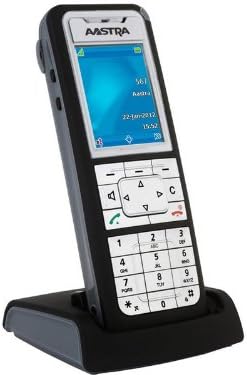
Figure 1: Mitel Aastra 612D Handset and Charger Base. The image displays the Aastra 612D cordless handset docked in its black charger base. The handset features a monochrome display showing 'AASTRA', '567', 'Aara', '22-Jan-2012', and '15:52'. Below the screen is a navigation cluster, function keys, and a standard numeric keypad with '0' through '9', '*', and '#' keys. The handset is primarily dark gray with a silver faceplate.
3. Asennus
3.1 Pakkauksesta purkaminen
- Poista kaikki osat varovasti pakkauksesta.
- Varmista, että kaikki pakkauksessa luetellut osat ovat mukana.
- Säilytä pakkaus tulevaa kuljetusta tai säilytystä varten.
3.2 Luurin lataaminen
- Connect the power adapter to the charger base and plug it into a power outlet.
- Place the handset firmly into the charger base. Ensure the charging contacts align.
- The handset display or an indicator light will confirm charging status.
- Anna luurin latautua vähintään 8–12 tuntia ennen ensimmäistä käyttökertaa, jotta akku latautuu täyteen.
3.3 Ensimmäinen käynnistys
- After charging, remove the handset from the base.
- Press and hold the power button (if applicable) or a designated key to turn on the handset.
- Noudata kaikkia näytön ohjeita alkuasetusten määrittämiseksi, kuten kielen valinnan tai päivämäärän/kellonajan asetuksien määrittämiseksi.
4. Käyttöohjeet
4.1 Soittaminen
- Ensure the handset is powered on and registered to your system.
- Soita haluamasi puhelinnumero näppäimistöllä.
- Press the green call key (often marked with a phone icon) to initiate the call.
- Lopeta puhelu painamalla punaista lopetusnäppäintä.
4.2 Puheluun vastaaminen
- When the handset rings, press the green call key to answer.
- Alternatively, if the auto-answer feature is enabled, simply lifting the handset from the charger base may answer the call.
4.3 Navigointi valikossa
- Use the navigation keys (up, down, left, right) to scroll through menu options on the display.
- Press the 'OK' or 'Select' key (often the center key of the navigation cluster) to confirm a selection.
- Press the 'Back' or 'Cancel' key to return to the previous menu or exit a function.
5. Huolto
5.1 Puhdistus
To clean the handset and charger base, use a soft, dry, lint-free cloth. For stubborn dirt, slightly dampen the cloth with water. Do not use harsh chemicals, cleaning solvents, or abrasive materials, as these can damage the device. Ensure no moisture enters openings.
5.2 Akun hoito
To prolong battery life, avoid exposing the handset to extreme temperatures. If the handset will not be used for an extended period, store it in a cool, dry place. Replace the battery when its performance significantly degrades.
6. Vianmääritys
This section addresses common issues you might encounter with your Mitel Aastra 612D Handset.
| Ongelma | Ratkaisu |
|---|---|
| Luuri ei käynnisty. | Ensure the battery is correctly inserted and fully charged. Place the handset on the charger base for several minutes. |
| Ei valintaääntä. | Verify the handset is registered to the base station. Check the connection of the charger base to the power outlet and the telephone system. |
| Huono puhelun laatu tai staattista kohinaa. | Move closer to the base station to improve signal strength. Check for sources of interference (e.g., other electronic devices). |
| Luuri ei lataudu. | Ensure the charger base power adapter is securely connected. Clean the charging contacts on both the handset and the base with a dry cloth. |
7. Tekniset tiedot
| Ominaisuus | Yksityiskohta |
|---|---|
| Mallinumero | 80E00011AAA-A |
| Tuotteen mitat | 10 x 10 x 6 tuumaa |
| Tuotteen paino | 4 kiloa |
| ASIN | B01DJT69CG |
| Valmistaja | Aastra |
| Päivämäärä ensimmäinen saatavilla | 1. marraskuuta 2013 |
8. Takuutiedot
This product is covered by a standard manufacturer's warranty. Please refer to the warranty card included with your purchase or contact your vendor for specific terms and conditions. Keep your proof of purchase for warranty claims.
9. Tukea
For technical assistance, further information, or if you encounter issues not covered in this manual, please contact your product supplier or Mitel customer support. You may find additional resources, FAQs, and software updates on the official Mitel websivusto.


