1. Johdanto
This manual provides detailed instructions for the installation, operation, and maintenance of your Alpine CDE-163BT Advanced Bluetooth CD Receiver. Please read this manual thoroughly before using the unit to ensure proper operation and to prevent damage. Keep this manual for future reference.
The Alpine CDE-163BT is a versatile car stereo receiver featuring advanced Bluetooth connectivity for hands-free calling and audio streaming, CD playback, USB input, and FM/AM tuner capabilities. It is designed to deliver high-quality audio performance and user-friendly control.
2. Asennus ja asennus
2.1 Pakkauksen sisältö
Ennen asennuksen aloittamista tarkista, että kaikki osat ovat mukana:
- Alpine CDE-163BT Head Unit
- Johtosarja
- Mounting Sleeve and Trim Ring
- Mikrofoni Bluetooth-handsfree-puheluita varten
- Käyttöopas (tämä asiakirja)
- Kiinnitystarvikkeet (ruuvit, kiinnikkeet)
2.2 Kytkentäkaavio
Refer to the wiring diagram provided with the unit's installation guide for specific connections. Key connections include:
- Teho: Yellow (constant 12V), Red (switched 12V), Black (ground).
- Kaiuttimet: White/White-Black (Front Left), Gray/Gray-Black (Front Right), Green/Green-Black (Rear Left), Purple/Purple-Black (Rear Right).
- Antenni: Blue (power antenna/amplifier-kaukosäädin päälle).
- Mikrofoni: Connect the supplied microphone to the dedicated input for hands-free calling.
Varoitus: Incorrect wiring can cause damage to the unit or vehicle's electrical system. If you are unsure about any wiring connections, consult a qualified professional installer.
2.3 Ensimmäinen käynnistys
Asennuksen jälkeen kytke ajoneuvosi sytytysvirta päälle. Laitteen pitäisi käynnistyä. Noudata kaikkia näytön ohjeita alkuasetusten määrittämiseksi, kuten kielen valitsemiseksi tai kellonajan asettamiseksi.
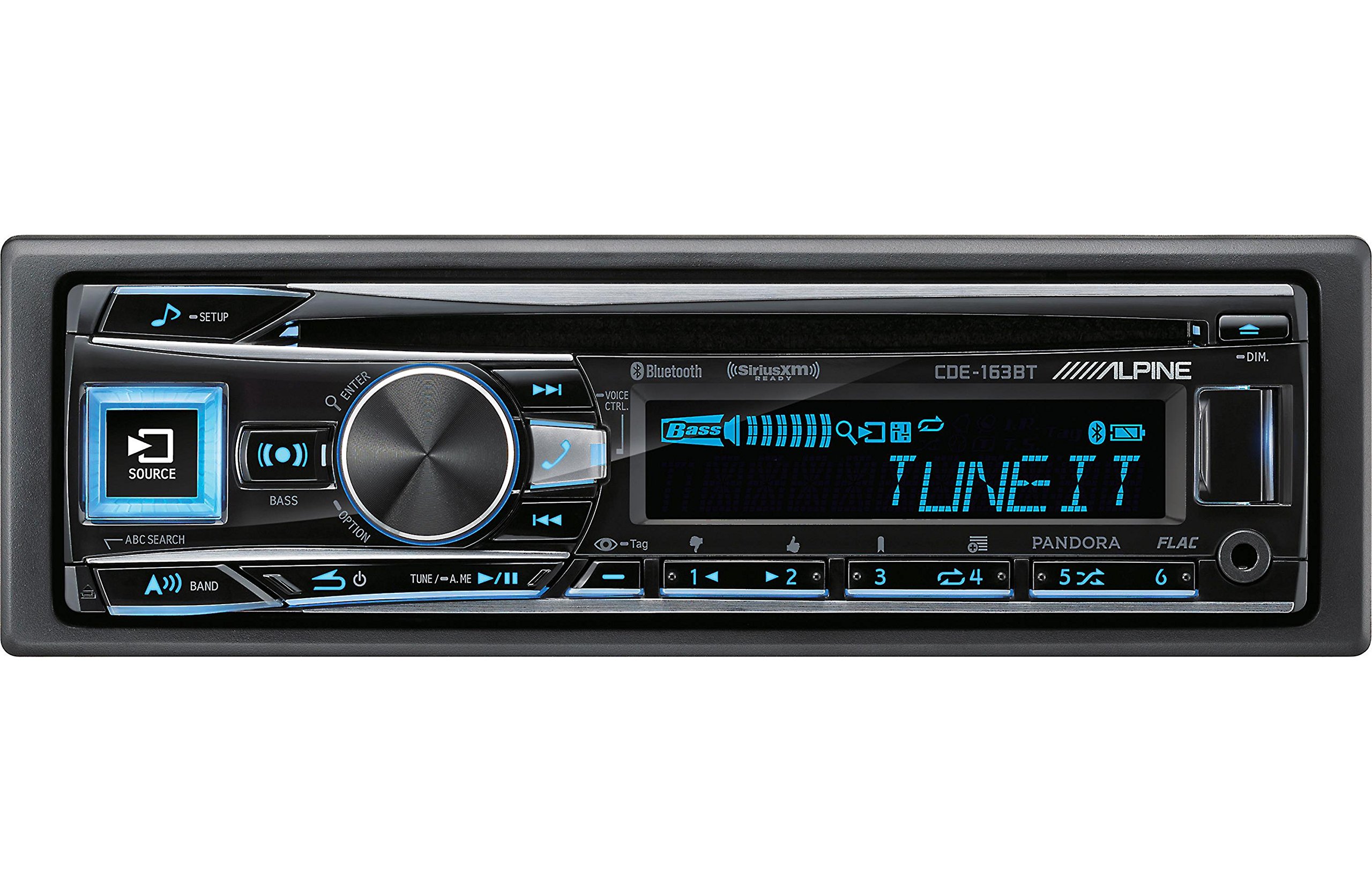
Figure 2.3.1: Front panel of the Alpine CDE-163BT receiver. This image displays the main controls, including the large rotary knob, source button, setup button, and display screen showing "TUNEIT" and "Bass" indicators.
3. Käyttö
3.1 Etupaneelin säätimetview
Tutustu etupaneelin tärkeimpiin säätimiin:
Kuva 3.1.1: Yksityiskohtainen view of the Alpine CDE-163BT front panel. Key controls include the SOURCE button (left, illuminated), SETUP button (top left), large central rotary knob for volume and selection, BASS/OPTION button, VOICE CTRL button, and various preset/track skip buttons along the bottom.
- SOURCE-painike: Selects the audio source (CD, Tuner, USB, Bluetooth Audio, AUX).
- SETUP-painike: Accesses the main setup menu for system adjustments.
- Rotary Knob (Volume/ENTER): Turns to adjust volume. Press to confirm selections in menus.
- BASS/OPTION Button: Provides quick access to bass settings or other options depending on the current mode.
- VOICE CTRL Button: Activates voice control features on connected smartphones.
- BAND-painike: Switches between FM1, FM2, FM3, and AM bands in tuner mode.
- TUNE/A.ME/II Buttons: Used for manual tuning, auto memory, and play/pause functions.
- Track Skip/Preset Buttons (1-6): Used for skipping tracks or selecting radio presets.
- DIM-painike: Säätää näytön kirkkautta.
3.2 Virta päälle/pois ja lähteen valinta
- Laitteen kääntämiseksi ON, press any button (e.g., SOURCE or the Rotary Knob).
- Laitteen kääntämiseksi POIS, press and hold the power button (often integrated with the TUNE/A.ME button).
- Paina LÄHDE button repeatedly to cycle through available audio sources: CD, Tuner, USB, Bluetooth Audio, AUX.
3.3 Äänenvoimakkuuden säätö
Kierrä suurta keskiosaa Kiertonuppi myötäpäivään äänenvoimakkuuden lisäämiseksi ja vastapäivään äänenvoimakkuuden vähentämiseksi.
3.4 Ääniasetukset
Paina BASS/OPTION button or navigate through the SETUP menu to adjust audio settings such as Bass, Treble, Balance (left/right), and Fader (front/rear). Use the Rotary Knob to adjust values and press it to confirm.
3.5 Radio Operation (FM/AM Tuner)
- Select "Tuner" as the source using the LÄHDE -painiketta.
- Paina BAND -painiketta vaihtaaksesi FM1-, FM2-, FM3- ja AM-taajuusalueiden välillä.
- Manuaalinen viritys: Paina VIRITTÄÄ buttons (◀ / ▶) to manually tune frequencies.
- Hakee viritys: Paina ja pidä painettuna VIRITTÄÄ painikkeita hakeaksesi automaattisesti seuraavan vahvan aseman.
- Esiasetetut asemat: To store a station, tune to the desired frequency, then press and hold one of the numbered preset buttons (1-6) until you hear a beep. To recall a preset, simply press the corresponding numbered button.
3.6 CD-toisto
- Aseta CD-levy levypesään. Laite vaihtaa automaattisesti CD-lähteeseen ja aloittaa toiston.
- Use the ◀ / ▶ buttons to skip tracks.
- Paina TUNE/A.ME/II button for Play/Pause.
- Paina ABC SEARCH button to search for tracks by name.
3.7 Bluetooth-yhteys
The CDE-163BT features built-in Bluetooth for hands-free calling and audio streaming.
3.7.1 Bluetooth-laitteen pariliitos
- Varmista, että Bluetooth on käytössä mobiililaitteellasi.
- On the CDE-163BT, go to the SETUP menu and select "Bluetooth Setup".
- Choose "Pairing" or "Device Search".
- On your mobile device, search for available Bluetooth devices and select "Alpine CDE-163BT".
- Confirm the pairing code if prompted. Once paired, the Bluetooth icon on the receiver's display will illuminate.
3.7.2 Handsfree-puhelut
- Kun puhelu saapuu, laite näyttää soittajan tunnuksen. Paina -painiketta. ENTER button (Rotary Knob) to answer.
- Lopeta puhelu painamalla ENTER painiketta uudelleen.
- Use the supplied microphone for clear communication.
- Paina VOICE CTRL -painiketta aktivoidaksesi älypuhelimesi ääniavustaja.
3.7.3 Bluetooth-äänen suoratoisto
- Select "Bluetooth Audio" as the source.
- Start playback on your paired mobile device. Audio will stream through the receiver.
- Use the ◀ / ▶ buttons on the receiver to skip tracks.
3.8 USB-toisto
- Connect a USB storage device (e.g., USB flash drive) to the USB port.
- Select "USB" as the source. The unit will automatically detect and begin playing compatible audio files (including FLAC format).
- Use the ◀ / ▶ buttons to skip tracks.
- The unit supports various audio formats.
3.9 Pandora and SiriusXM Ready
- Pandora: Connect your iPhone or Android smartphone via USB or Bluetooth and launch the Pandora app. Select Pandora as the source on the receiver to control the app.
- SiriusXM: This unit is SiriusXM Ready. An optional SiriusXM Connect Vehicle Tuner and subscription are required for satellite radio reception. Connect the tuner and select SiriusXM as the source.
3.10 Näyttöasetukset
- Paina HIMMEÄ button to adjust the display brightness.
- Access the SETUP menu to customize display colors for buttons and the screen.
4. Huolto
4.1 Laitteen puhdistaminen
Wipe the front panel with a soft, dry cloth. For stubborn stains, dampen the cloth lightly with water. Avoid using harsh chemicals, abrasive cleaners, or solvents as they can damage the finish.
4.2 Levyjen hoito
Handle CDs by their edges. Keep discs clean and free of scratches. If a disc is dirty, wipe it gently from the center outwards with a soft, lint-free cloth. Do not use solvents or abrasive cleaners on discs.
5. Vianmääritys
If you experience issues with your CDE-163BT, refer to the table below for common problems and solutions.
| Ongelma | Mahdollinen syy | Ratkaisu |
|---|---|---|
| Ei virtaa | Väärä johdotus; Palanut sulake; Ajoneuvon sytytysvirta katkaistu. | Tarkista virtaliitännät; Vaihda sulake; Kytke ajoneuvon sytytysvirta päälle. |
| Ei ääntä | Äänenvoimakkuus liian alhainen; Mykistys aktivoitu; Kaiuttimien johdotus on virheellinen; Ampelävämpää. | Lisää äänenvoimakkuutta; Poista mykistys käytöstä; Tarkista kaiutinliitännät; Tarkista ampnostovoimaa. |
| Bluetooth ei muodosta yhteyttä | Laite ei ole pariliitostilassa; Bluetooth pois päältä puhelimessa; Häiriöitä. | Ensure phone Bluetooth is on and discoverable; Re-attempt pairing; Move closer to unit. |
| CD-levy hyppii tai ei soi | Dirty or scratched disc; Disc inserted incorrectly. | Clean disc; Insert disc correctly; Try a different disc. |
| USB-laitetta ei tunnistettu | Incompatible format; Damaged USB device; Loose connection. | Varmista files are compatible; Try a different USB device; Reconnect USB device. |
Jos ongelma jatkuu näiden ratkaisujen kokeilemisen jälkeen, ota yhteyttä Alpinen asiakastukeen.
6. Tekniset tiedot
Below are the technical specifications for the Alpine CDE-163BT Advanced Bluetooth CD Receiver:
- Mallinumero: 79380
- Tuotteen mitat: 5 x 11 x 10 tuumaa
- Tuotteen paino: 4.05 paunaa (4.1 paunaa)
- Langattomat viestintätekniikat: Bluetooth
- Yhteysteknologiat: Bluetooth
- Erikoisominaisuudet: Built-In Bluetooth, FM Tuner
- Muut näytön ominaisuudet: Langaton
- Väri: MUSTA
- Valmistaja: Alpine
- Yhteystekniikka: Bluetooth
- Yhteensopivat laitteet: Älypuhelin
- Liittimen tyyppi: 3.5 mm liitin, USB
- Äänilähtötila: Mono, Stereo
- Surround-äänikanavan asetukset: 4 kanava
- Wattage: 200 wattia
- Päivämäärä, kun ensimmäinen saatavilla: 19. tammikuuta 2016
7. Takuu ja asiakastuki
7.1 Takuutiedot
Alpine products are manufactured to the highest quality standards. This product is covered by a limited warranty. Please refer to the separate warranty card included with your purchase for specific terms, conditions, and duration of coverage. Retain your proof of purchase for warranty claims.
7.2 Asiakastuki
For technical assistance, troubleshooting beyond this manual, or warranty service, please contact Alpine customer support:
- Websivusto: Käy Alpinen virallisella sivustolla websivusto tukiresursseille, usein kysytyille kysymyksille ja yhteydenottolomakkeille.
- Puhelin: Katso Alpine-sivustoa website or your warranty card for regional customer service phone numbers.
- Valtuutetut huoltokeskukset: For repairs, locate an authorized Alpine service center through the official websivusto.
When contacting support, please have your product model number (CDE-163BT) and serial number ready.


