Johdanto
This manual provides comprehensive instructions for the operation and maintenance of your ONN X5 HiFi Music Player. Please read this manual thoroughly before using the device to ensure proper functionality and to maximize your listening experience. The ONN X5 is designed to deliver high-fidelity audio playback in a compact and user-friendly format.
Tuote loppuview
The ONN X5 is a portable HiFi music player featuring a 2.0-inch TFT screen and an aluminum alloy shell. It supports a wide range of audio formats, including lossless files, and offers expandable storage via a MicroSD card.
Tärkeimmät ominaisuudet:
- Korkealaatuinen ääni: Supports WAV, FLAC, ALAC, APE, OGG lossless formats, and high-definition music up to 24Bit/192 KHz.
- Näyttö: 2.0-inch TFT screen (176x220 pixels) for clear navigation and information display.
- Varastointi: 8GB internal memory, expandable up to 32GB with a MicroSD/TF card.
- Kestävä muotoilu: Lightweight aluminum alloy body (60g) for enhanced durability and reduced external interference noise.
- Käyttöliittymä: Intuitive key-based operation.
- Lisäominaisuudet: FM Radio support.
- Akku: High-capacity rechargeable lithium polymer battery.
- Monikielinen tuki: English, Russian, Korean, German, Japanese, Polish, Indonesian, Chinese.
Laitteen asettelu:

Kuva: Edessä view of the ONN X5 HiFi Music Player, showing its display and control buttons. The screen displays track information, audio quality (e.g., 24BIT, 88HHZ), and playback status.

Kuva: Sivu view of the ONN X5 HiFi Music Player, illustrating the location of the MicroSD card slot on the right side of the device.

Kuva: Edestä ja takaa view of the ONN X5 HiFi Music Player. The back panel shows the model number "X5" and branding information.
Asennus
1. Laitteen lataaminen:
- Connect the ONN X5 to a power source using the provided USB cable.
- Näytöllä oleva akun merkkivalo näyttää latauksen tilan.
- A full charge is recommended before first use. The device uses a high-capacity rechargeable lithium polymer battery.
2. Inserting a MicroSD/TF Card:
- Locate the MicroSD/TF card slot on the side of the player.
- Aseta yhteensopiva MicroSD/TF-kortti (enintään 32 Gt) varovasti korttipaikkaan, kunnes se napsahtaa paikalleen.
- Varmista, että kortti on asetettu oikein, jotta se ei vahingoitu.

Image: Contents of the ONN X5 package, showing the player, USB charging cable, and other accessories. This illustrates the components available for setup.
3. Musiikin siirtäminen Files:
- Connect the ONN X5 to your computer using the USB cable.
- Laite näkyy siirrettävänä tallennusasemana.
- Vedä ja pudota haluamasi äänitiedosto files (MP3, WMA, APE, FLAC, WAV, ALAC, OGG) into the player's internal storage or the MicroSD card.
- Irrota laite turvallisesti tietokoneesta ennen USB-kaapelin irrottamista.
Käyttöohjeet
Virta päälle/pois:
- To power on, press and hold the power button (usually marked with a universal power symbol) until the screen illuminates.
- Sammuta laite painamalla virtapainiketta ja pitämällä sitä painettuna, kunnes laite sammuu.
Navigointi:
The ONN X5 uses physical buttons for navigation. Refer to the device layout for button identification.
- LENTO: Säätää äänenvoimakkuutta.
- M (Valikko): Accesses menus and confirms selections.
- Arrow Buttons (< / >): Navigate through menus, select tracks, or fast forward/rewind during playback.
- Virtapainike: Also functions as a play/pause button during music playback.
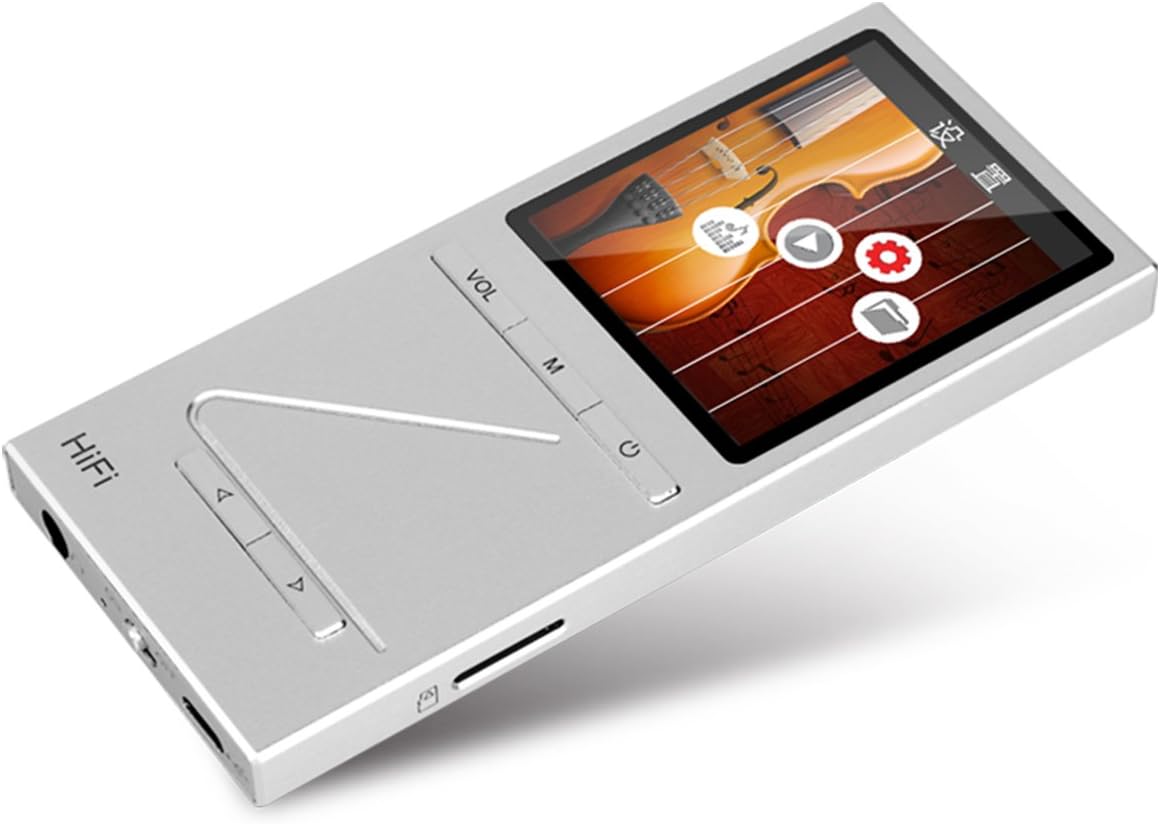
Kuva: Kulmikas view of the ONN X5 HiFi Music Player, showing the screen with various menu icons, indicating the user interface for navigation.
Musiikin toisto:
- From the main menu, navigate to "Music" or "Files ".
- Browse through your folders and select a track to play.
- Press the Power/Play button to start or pause playback.
- Use the arrow buttons to skip tracks or fast forward/rewind.
- Säädä äänenvoimakkuutta VOL-painikkeella.
FM-radio:
- Navigate to the "FM Radio" option from the main menu.
- Käytä navigointipainikkeita asemien hakemiseen tai taajuuden manuaaliseen virittämiseen.
- Ensure headphones are connected as they often act as the antenna for FM radio.
Kieliasetukset:
Laite tukee useita kieliä. Kielen vaihtaminen:
- Siirry päävalikosta kohtaan "Asetukset".
- Select "Language" and choose your preferred language from the list (English, Russian, Korean, German, Japanese, Polish, Indonesian, Chinese).
Huolto
- Puhdistus: Puhdista laite pehmeällä, kuivalla liinalla. Vältä nestemäisiä puhdistusaineita tai hankaavia aineita.
- Varastointi: Säilytä soitinta viileässä, kuivassa paikassa, poissa suorasta auringonvalosta ja äärimmäisistä lämpötiloista.
- Akun hoito: Akun käyttöiän pidentämiseksi vältä akun usein tapahtuvaa täydellistä tyhjentymistä. Lataa laite säännöllisesti, vaikka sitä ei käytettäisi pitkään aikaan.
- Vältä vaikutusta: The aluminum alloy shell provides durability, but avoid dropping the device or subjecting it to strong impacts.
- Veden altistuminen: Tämä laite ei ole vedenpitävä. Vältä altistumista vedelle tai korkealle kosteudelle.
Vianetsintä
Laite ei käynnisty:
- Varmista, että akku on ladattu. Liitä laite virtalähteeseen ja anna sen latautua vähintään 30 minuuttia ennen kuin yrität käynnistää sen uudelleen.
- Try performing a hard reset (if applicable, refer to manufacturer's specific instructions for hard reset, usually involves holding power button for an extended period).
Ei ääntä:
- Check the volume level and ensure it is not muted.
- Verify that headphones or external speakers are properly connected.
- Test with different headphones or audio output devices.
- Varmista ääni file ei ole vioittunut tai ei-tuetussa muodossa.
Ei voida siirtää Files:
- Varmista, että USB-kaapeli on kytketty kunnolla sekä soittimeen että tietokoneeseen.
- Kokeile tietokoneen eri USB-porttia tai eri USB-kaapelia.
- Verify that the device is recognized by your computer as a removable drive.
- Check if the MicroSD card is properly inserted and not full.
Screen Not Responding / Frozen:
- Pakota uudelleenkäynnistys painamalla virtapainiketta noin 10–15 sekuntia.
- If the issue persists, ensure the battery is charged.
Tekniset tiedot
| Ominaisuus | Yksityiskohta |
|---|---|
| Mallinumero | X5 |
| Merkki | ONN |
| Näytön koko | 2.0 Inches TFT (176x220 PIXEL) |
| Sisäinen muisti | 8 Gt |
| Laajennettava tallennustila | MicroSD/TF card up to 32 GB |
| Tuetut äänimuodot | APE, FLAC, ALAC, WAV, WMA, OGG, MP3 (up to 24Bit/192 KHz) |
| Yhteystekniikka | Aux-liitäntä, USB |
| Erikoisominaisuus | FM-radio |
| Akku | 1 Lithium Ion battery required (High-capacity rechargeable lithium polymer) |
| Tuotteen paino | 7 unssia (noin 0.2 kilogrammaa) |
| Pakkauksen mitat | 6.21 x 4.7 x 1.2 tuumaa |
| Valmistaja | SZTZWY |
Takuu ja tuki
For detailed warranty information, please refer to the warranty card included with your purchase or visit the official ONN product support website. For technical assistance or further inquiries, please contact ONN customer support through their official channels.


