Johdanto
This manual provides detailed instructions for the setup, operation, and maintenance of your Homtime C12PRO Docking Station Speaker. The C12PRO integrates a Bluetooth speaker, FM radio, alarm clock, and dual USB charging capabilities, designed for convenient everyday use.
Pakkauksen sisältö
Varmista, että pakkauksessasi on kaikki alla luetellut tuotteet:
- 1 x Homtime C12PRO Speaker Unit
- 1 x virtalähde
- 1 x Käyttöohje
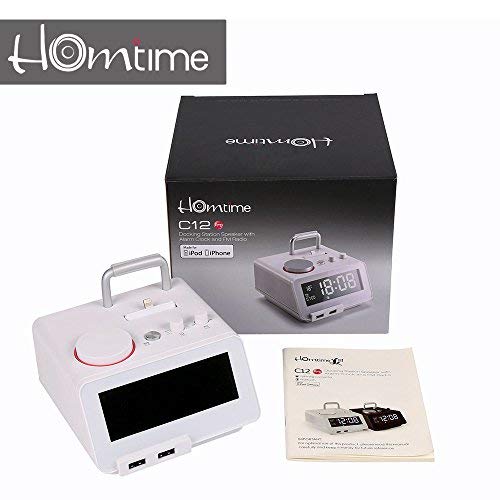
Kuva: Contents of the Homtime C12PRO package, showing the main speaker unit, power adapter, and the user manual.
Tuote loppuview
Familiarize yourself with the various components and controls of your C12PRO unit.

Kuva: Edessä view of the Homtime C12PRO with an iPhone docked. The large digital display shows time and temperature, and the front features dual USB charging ports.

Kuva: Edessä view of the Homtime C12PRO without a phone docked. This image clearly shows the digital display, the docking connector, and the control buttons on the top surface.
Etupaneeli ja näyttö
- Large 4.2-inch LCD Display: Shows time, alarm status, and room temperature (Celsius or Fahrenheit). Brightness is adjustable.
- Kaksi USB-latausporttia: Located at the front base for convenient charging of external devices.
Yläpaneelin säätimet
- Telakointiliitin: Apple Certified Lightning connector for iPod/iPhone.
- Control Buttons/Knobs: For setting time, alarm, volume, mode selection, and FM radio tuning.
Takapaneelin liitännät
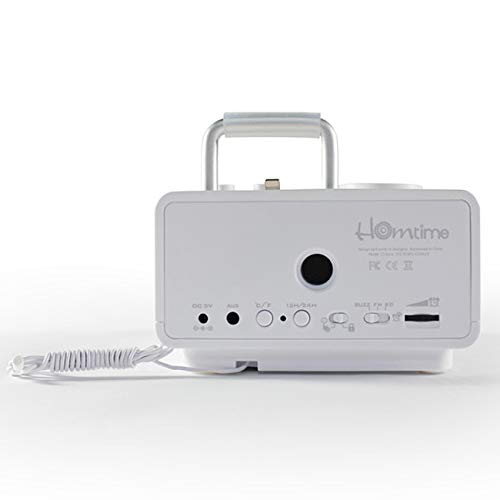
Kuva: Takaosa view of the Homtime C12PRO. This image displays the DC 9V power input, AUX-in port, 12H/24H time format button, and other rear controls.
- DC 9V tehon syöttö: Liitä toimitettu virtalähde tähän.
- AUX-tuloportti: 3.5 mm:n liitin ulkoisten äänilähteiden kytkemiseen.
- 12H/24H Button: Toggles between 12-hour and 24-hour time display formats.
- Muut säätimet: May include snooze/dimmer, alarm on/off, and FM antenna connection.
Asennus
- Pura yksikkö: Carefully remove the C12PRO speaker and all accessories from the packaging.
- Liitä virta: Insert the DC plug of the power adapter into the DC 9V input port on the rear of the unit. Plug the power adapter into a standard wall outlet. The display will illuminate.
- Alkuperäinen aika-asetus:
- Paina ja pidä painettuna AJAN ASETUS button (location may vary, typically on top or rear).
- Käytä +/- buttons or rotary knob to adjust the hour. Press AJAN ASETUS uudelleen vahvistaaksesi.
- Adjust the minute using the +/- buttons or rotary knob. Press AJAN ASETUS vahvistaaksesi ja poistuaksesi ajan asetustilasta.
- Voit vaihtaa 12 tunnin ja 24 tunnin muodon välillä painamalla 12H/24H painiketta takapaneelissa.
- Säädä näytön kirkkautta: Paina SNOOZE / HIMMENNIN button (often combined) repeatedly to cycle through brightness levels.
- Aseta lämpötilayksikkö: Paina tarvittaessa ° C / ° F button to switch between Celsius and Fahrenheit display for room temperature.
Käyttöohjeet
Virta päälle/pois
Paina POWER button to turn the unit on or off. When off, the clock display remains active.
Hälytyksen asettaminen
- Paina ja pidä painettuna HÄLYTYSASETUS button. The alarm hour will flash.
- Käytä +/- buttons or rotary knob to adjust the alarm hour. Press HÄLYTYSASETUS vahvistaaksesi.
- Adjust the alarm minute. Press HÄLYTYSASETUS vahvistaaksesi.
- Select the alarm source (Buzzer, FM Radio, or Docked Device). Use +/- or rotary knob and press HÄLYTYSASETUS vahvistaaksesi.
- Voit aktivoida/deaktivoida hälytyksen painamalla HÄLYTYS ON / OFF -painiketta. Näyttöön ilmestyy hälytyskuvake, kun hälytys on aktiivinen.
- Kun hälytys soi, paina TORKUTA button to temporarily silence it for a few minutes. Press POWER sammuttaaksesi herätyksen päivän ajaksi.
FM-radion toiminta
- Paina MODE -painiketta, kunnes näytössä näkyy "FM".
- For automatic station scanning, press and hold the TOISTA/TAUKO painiketta (tai erillistä SKANNATA button). The radio will scan and save available stations.
- Käytä viritystä manuaalisesti PREV/SEURAAVA buttons or rotary knob to adjust the frequency.
- To select a saved station, press the PRESET -painiketta ja käytä sitten PREV/SEURAAVA navigoidaksesi.
- Säädä äänenvoimakkuutta VOLUME nuppia tai painikkeita.
Bluetooth-pariliitos
- Paina MODE button until "BT" or "Bluetooth" appears on the display. The Bluetooth indicator will flash, indicating pairing mode.
- Ota Bluetooth käyttöön mobiililaitteessasi ja hae uusia laitteita.
- Select "Homtime C12PRO" from the list of available devices.
- Once paired, the Bluetooth indicator on the C12PRO will stop flashing and remain solid. You can now play audio wirelessly from your device.
- Adjust volume on both the C12PRO and your connected device.
Telakointiaseman käyttäminen
The C12PRO features an Apple Certified Lightning connector for compatible iPod/iPhone devices.
- Carefully align your iPhone/iPod with the Lightning connector on the top of the unit.
- Gently push down until the device is securely seated.
- The C12PRO will automatically charge your device and can play audio from it.
- Paina MODE button to select the docking station as the audio source.
USB-lataus
The unit includes dual USB ports for charging other devices.
- Connect your USB charging cable to one of the USB ports on the front of the C12PRO.
- Connect the other end of the cable to your device (e.g., Android phone, tablet).
- The C12PRO will provide power to charge your device.
AUX-in-liitäntä
Connect external audio players via the 3.5mm AUX-in port.
- Connect a 3.5mm audio cable (not included) from your external audio device's headphone jack to the AUX-in port on the rear of the C12PRO.
- Paina MODE -painiketta, kunnes näytössä näkyy "AUX".
- Play audio from your external device. Adjust volume on both the C12PRO and the external device.
Huolto
- Puhdistus: Disconnect the power adapter before cleaning. Use a soft, dry cloth to wipe the exterior surfaces. Do not use abrasive cleaners, waxes, or solvents.
- Varastointi: Jos laitetta säilytetään pitkään, irrota se virtalähteestä ja säilytä sitä viileässä, kuivassa paikassa, poissa suorasta auringonvalosta ja äärimmäisistä lämpötiloista.
- Akku: The unit contains a CR2 battery (included) for clock memory backup. This battery is not user-replaceable for general operation and should only be replaced by qualified service personnel if necessary.
Vianetsintä
| Ongelma | Mahdollinen syy | Ratkaisu |
|---|---|---|
| Ei virtaa/Näyttö pois päältä | Virtasovitin ei ole kytketty tai pistorasia on viallinen. | Varmista, että virtalähde on kytketty kunnolla laitteeseen ja toimivaan pistorasiaan. |
| Ei ääntä kaiuttimesta | Volume too low; incorrect source selected; device not connected properly. | Lisää äänenvoimakkuutta. Paina MODE to select the correct audio source (BT, FM, Dock, AUX). Reconnect Bluetooth device or docked phone. |
| Bluetooth-pariliitos epäonnistuu | C12PRO not in pairing mode; device too far; interference. | Ensure C12PRO is in BT mode and flashing. Move device closer. Turn off other Bluetooth devices. |
| FM-radion kohina/heikko kuuluvuus | Heikko signaali; antenni ei ole ojennettuna. | Extend the FM antenna fully. Reposition the unit for better reception. Perform auto-scan again. |
| Hälytys ei soi | Hälytystä ei ole aktivoitu; hälytyksen äänenvoimakkuus liian alhainen. | Ensure the alarm icon is visible on the display. Check alarm volume settings. |
| Device not charging via USB/Dock | Kaapeliongelma; laite ei ole yhteensopiva; yksikkö ei saa virtaa. | Try a different USB cable. Ensure the C12PRO is powered on. Verify device compatibility with the Lightning dock. |
Tekniset tiedot

Kuva: A table detailing the specifications of the Homtime C12PRO, including driver units, S/N ratio, Bluetooth version, range, radio frequency, power, and dimensions.
| Malli | C12 Pro |
| Kuljettajayksiköt | 2x40mm |
| S/N-suhde | >70dB |
| Bluetooth-versio | 2.1 + EDR |
| Bluetooth-alue | 10 milj |
| Radiotaajuusalue | 87.5 MHz - 108 MHz |
| Yhteensopivat laitteet | iPad, iPhone, Android, Windows Phone, Computer |
| Virtalähde | AC100-240V, 50/60Hz, DC 5V 3A |
| Lähtöteho | 3W + 3W (6 Watts total) |
| Mitat (PxLxK) | 12.8 x 12.9 x 10.7 cm |
| Tuotteen paino | 800 g |
| Äänilähteet | Apple Lightning, USB, Bluetooth, Aux-in |
| Näytön tyyppi | Digital LCD (4.2 inches) |
| Paristot | 1 CR2 battery required (included for clock memory) |
Takuu ja tuki
Takuutiedot
The Homtime C12PRO comes with a 1 vuoden rajoitettu takuu from the date of purchase. This warranty covers manufacturing defects in materials and workmanship under normal use. It does not cover damage caused by misuse, accidents, unauthorized modifications, or external causes.
Säilytä ostokuitti takuuvaatimuksia varten.
Asiakastuki
For technical assistance, troubleshooting not covered in this manual, or warranty inquiries, please contact Homtime customer support. Refer to the contact information provided with your product packaging or visit the official Homtime websivustolta ajantasaisimmat tukitiedot.


