1. Johdanto
This manual provides detailed instructions for the setup, operation, and maintenance of your Intermec EasyCoder PX4i Thermal Transfer Printer. The PX4i is a robust and flexible industrial printer designed for high-volume label printing, offering monochrome output at a resolution of 203 dpi and speeds up to 12 inches per second. Please read this manual thoroughly before using the printer to ensure safe and efficient operation.
2. Tuotteen ominaisuudet
- Nopea tulostus: Capable of printing at speeds up to 12 inches per second.
- Korkea resoluutio: Delivers clear monochrome prints at 203 dpi.
- Joustava mediankäsittely: Supports various media types including black mark, continuous label, fanfold, gap, general identification label, notch, roll fed, tag, and ticket.
- Ethernet-yhteys: Integrated Ethernet for network integration.
- Ohjelmoitava: Designed for optimized printing operations and streamlined deployment.
- Kestävä muotoilu: Industrial-grade construction for demanding environments.
3. Pakkauksen sisältö
Verify that all items listed below are included in your printer package. If any items are missing or damaged, contact your supplier immediately.
- Intermec EasyCoder PX4i Thermal Transfer Printer
- Virtajohto
- Labels (Included Components)
- User Documentation (This manual)
4. Turvallisuustiedot
Noudata aina seuraavia turvaohjeita loukkaantumisten ja tulostimen vaurioitumisen välttämiseksi:
- Varmista, että tulostin on asetettu vakaalle ja tasaiselle alustalle.
- Liitä tulostin maadoitettuun pistorasiaan.
- Älä käytä tulostinta märissä tai liian kosteissa olosuhteissa.
- Pidä kädet ja löysät vaatteet poissa liikkuvista osista käytön aikana.
- Katkaise virta ennen minkään huollon tai puhdistuksen suorittamista.
- Käytä vain hyväksyttyjä varaosia ja lisävarusteita.
5. Asennus
5.1 Pakkauksesta purkaminen
- Poista tulostin varovasti pakkauksestaan.
- Poista kaikki pakkausmateriaalit, teipit ja suojakalvot.
- Säilytä alkuperäinen pakkaus tulevaa kuljetusta tai säilytystä varten.
5.2 Virran kytkeminen
- Varmista, että tulostimen virtakytkin on OFF-asennossa.
- Liitä virtajohto tulostimen virtalähteeseen.
- Liitä virtajohdon toinen pää maadoitettuun pistorasiaan.
5.3 Tulostusmateriaalin (tarrojen) lisääminen
The PX4i printer supports various label types. Follow these general steps to load your labels:

Kuva: Edessä view of the Intermec EasyCoder PX4i printer, showing a label being fed out of the front slot. The control panel with an LCD screen and numeric keypad is visible on the top front.
- Avaa tulostimen materiaalikansi.
- Place the roll of labels onto the media supply spindle, ensuring it unwinds correctly.
- Feed the leading edge of the labels through the media guides and under the printhead assembly.
- Adjust the media guides to fit the width of your labels snugly but without binding.
- Close the media cover. The printer may automatically calibrate to the new media.
5.4 Tietokoneeseen/verkkoon yhdistäminen
The PX4i offers Ethernet connectivity for network integration.
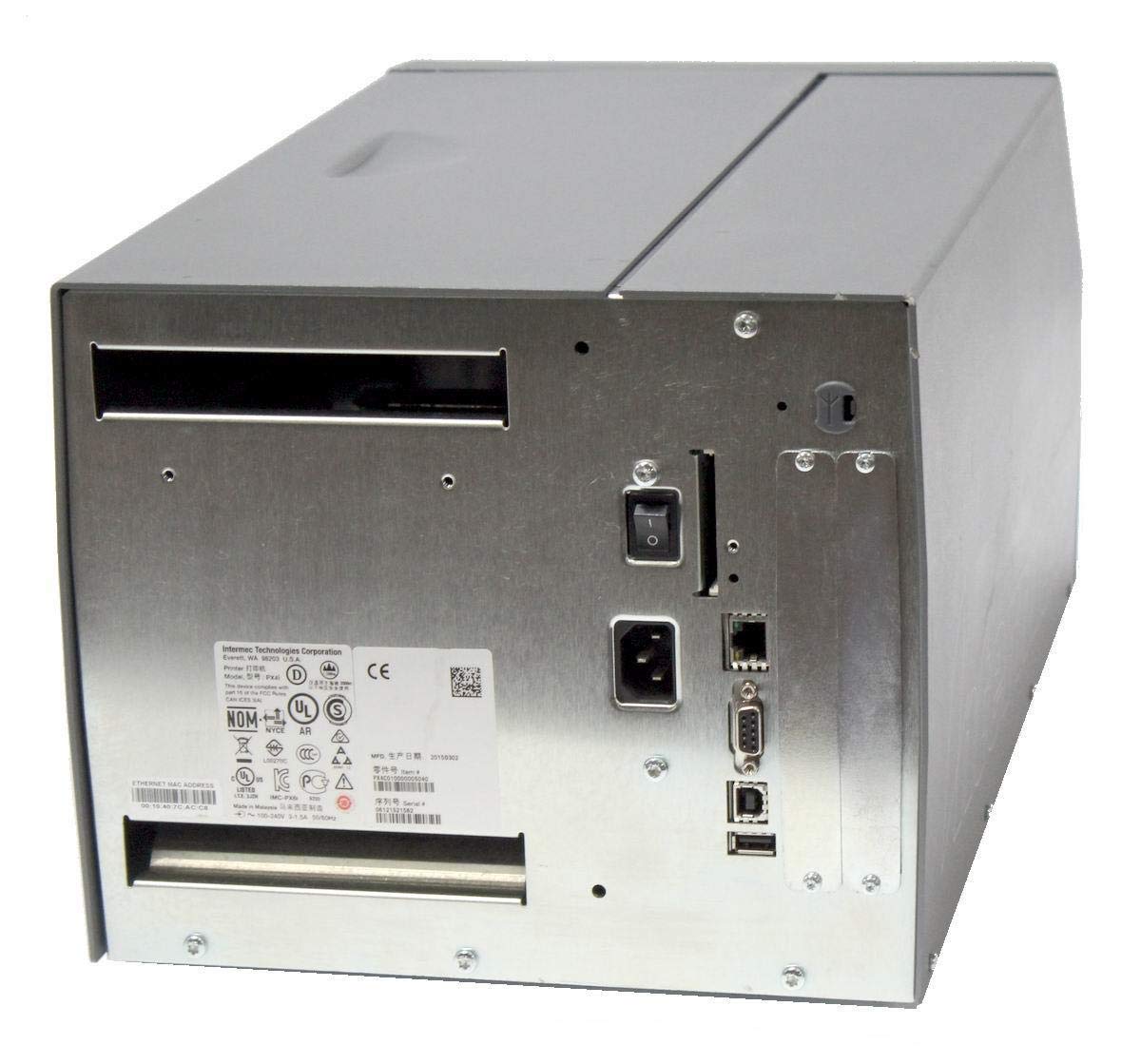
Kuva: Takaosa view of the Intermec EasyCoder PX4i printer, displaying the power inlet, power switch, Ethernet port, serial ports, and USB ports. The metallic casing is clearly visible.
- Locate the Ethernet port on the rear of the printer.
- Connect a standard Ethernet cable from the printer to your network router or switch.
- For direct connection to a computer, use an appropriate USB or serial cable if supported by your system and printer configuration.
- Refer to the printer's network configuration guide for setting up IP addresses and other network parameters.
6. Käyttö
6.1 Ohjauspaneeli ohiview
The front control panel provides access to printer functions and status information.
Image: Close-up of the Intermec EasyCoder PX4i control panel, featuring an LCD display, navigation buttons (up, down, left, right, enter), and a numeric keypad with function keys like Pause, Feed, and Clear.
- LCD-näyttö: Näyttää tulostimen tilan, valikkovaihtoehdot ja virheilmoitukset.
- Navigointipainikkeet: Käytetään valikoiden selaamiseen ja vaihtoehtojen valitsemiseen.
- Numeronäppäimistö: For entering data or selecting numbered options.
- Taukopainike: Temporarily stops printing.
- Syötepainike: Advances one label.
- Asetuspainike: Accesses printer configuration menus.
6.2 Perustulostus
- Varmista, että tulostin on päällä ja yhdistetty tietokoneeseen tai verkkoon.
- Avaa asiakirja tai sovellus, josta haluat tulostaa tarroja.
- Select the Intermec PX4i printer from your printer list.
- Configure print settings such as label size, orientation, and quantity as needed.
- Initiate the print job. The printer will begin feeding and printing labels.
6.3 Adjusting Print Settings
Advanced print settings can be adjusted through the printer's control panel or via the printer driver on your computer. These settings include print darkness, print speed, label gap sensing, and more. Consult your printer driver documentation for software-based adjustments.
7. Huolto
Säännöllinen huolto varmistaa optimaalisen suorituskyvyn ja pidentää tulostimen käyttöikää.
7.1 Tulostuspään puhdistaminen
The printhead should be cleaned regularly, especially if print quality degrades.
- Sammuta tulostin ja irrota virtajohto.
- Avaa tulostuspääkokoonpano.
- Pyyhi tulostuspään pinta varovasti keskeltä reunoille nukkaamattomalla liinalla tai isopropyylialkoholilla kostutetulla tulostuspään puhdistuskynällä.
- Anna tulostuspään kuivua kokonaan ennen kokoonpanon sulkemista ja virran kytkemistä uudelleen.
7.2 Tulostusmateriaalin ja värinauhan vaihtaminen
When the label roll or thermal transfer ribbon (if used) runs out, replace it promptly.
- Turn off the printer and open the media cover.
- Remove the empty label roll and/or used ribbon core.
- Install a new roll of labels and/or a new ribbon, following the loading instructions in Section 5.3.
- Ensure media and ribbon are properly tensioned and aligned.
- Sulje mediakansi.
8. Vianmääritys
This section addresses common issues you might encounter with your PX4i printer.
- Tulostin ei käynnisty: Check power cord connection, power outlet, and printer's power switch.
- Ei tulostusta: Verify printer is online, connected to the computer/network, and has media loaded. Check for error messages on the LCD.
- Huono tulostuslaatu: Clean the printhead (Section 7.1). Adjust print darkness settings. Ensure correct media and ribbon are used.
- Tarrat eivät syöty oikein: Check media loading (Section 5.3) and ensure media guides are properly adjusted. Calibrate media sensors if necessary.
- Virheilmoitukset: Refer to the printer's LCD display for specific error codes and consult the full Intermec PX4i technical manual for detailed explanations and solutions.
9. Tekniset tiedot
| Ominaisuus | Kuvaus |
|---|---|
| Mallin nimi | PX4i |
| Tuotteen mallinumero | PX4C010000000020 |
| Tulostustekniikka | Lämmönsiirto |
| Tulosta Color | Yksivärinen |
| Suurin tulostusnopeus | 12 in/s (Monochrome) |
| Suurin tulostustarkkuus | 203 dpi |
| Yhteystekniikka | Ethernet |
| Suurin mediakoko | 12 tuumaa |
| Mukana olevat komponentit | Tarrat |
| Ohjaimen tyyppi | Painike |
| Valmistaja | INTERMEC INDUSTRIAL PRINTERS |
| Pakkauksen mitat | 23.25 x 15.5 x 15.25 tuumaa; 36.2 puntaa |
10. Takuu ja tuki
The Intermec EasyCoder PX4i Thermal Transfer Printer comes with a standard manufacturer's warranty. For specific warranty terms and conditions, please refer to the warranty card included with your product or visit the official Intermec (Honeywell) support website. For technical assistance, troubleshooting beyond this manual, or to inquire about service, please contact Intermec customer support or your authorized dealer.
Verkkoresurssit: For the latest drivers, firmware updates, and additional documentation, please visit the official Intermec support portal.


