1. Johdanto
Welcome to the user manual for your new Salora SM508 mobile phone. This guide provides essential information to help you set up, operate, maintain, and troubleshoot your device. Please read this manual carefully to ensure proper use and to maximize the performance and longevity of your phone.
2. Tuote ohiview
The Salora SM508 is a compact and reliable basic mobile phone designed for essential communication. It features a color display, a comfortable keypad, and dual SIM support.
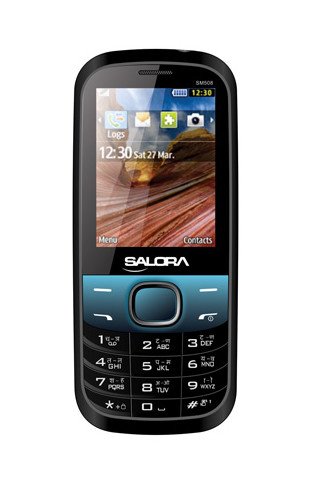
Tämä kuva näyttää etupuolen view of the Salora SM508 mobile phone. It features a color display at the top, a central navigation button, and a standard alphanumeric keypad below. The phone has a black body with blue accents around the navigation cluster.
3. Asennus
3.1 SIM-kortin/-korttien asettaminen
- Sammuta puhelin ja irrota takakansi.
- Irrota akku varovasti.
- Locate the SIM card slots. The Salora SM508 supports dual SIM cards.
- Insert your SIM card(s) into the designated slot(s) with the gold contacts facing down. Ensure they are securely seated.
3.2 Inserting Battery
- Align the battery contacts with the contacts in the phone's battery compartment.
- Gently press the 1800 mAh Li-Ion battery into place until it clicks.
- Aseta takakansi takaisin paikalleen ja varmista, että se on tukevasti kiinni.
3.3 Inserting Memory Card (Optional)
- With the back cover and battery removed, locate the memory card slot.
- Insert a microSD card (up to 8GB) into the slot with the gold contacts facing down.
- Vaihda akku ja takakansi.
3.4 Laitteen lataaminen
- Liitä laturi puhelimesi latausporttiin.
- Liitä laturi pistorasiaan.
- The battery indicator on the screen will show the charging status. Charge the phone fully before first use.
3.5 Ensimmäinen käynnistys/sammutus
- Virran kytkeminen: Pidä virta-/puhelun lopetuspainiketta painettuna, kunnes näyttö syttyy.
- Virran sammuttaminen: Pidä virta-/puhelun lopetuspainiketta painettuna, kunnes virrankatkaisuvaihtoehdot tulevat näkyviin, ja valitse sitten ”Virta pois”.
4. Käyttöohjeet
4.1 Perusnavigointi
- Siirry valikoissa ja asetuksissa navigointinäppäimillä (ylös, alas, vasemmalle, oikealle).
- Press the central 'OK' or 'Select' button to confirm a selection.
- Palaa edelliselle näytölle tai poista merkkejä painamalla 'Takaisin'- tai 'Tyhjennä'-painiketta.
4.2 Puheluiden soittaminen ja vastaanottaminen
- Soittaminen: Syötä puhelinnumero näppäimistöllä ja paina vihreää soittopainiketta.
- Puhelun vastaanottaminen: Kun puhelin soi, vastaa painamalla vihreää soittopainiketta.
- Puhelun lopettaminen: Paina punaista puhelun lopetuspainiketta.
4.3 Tekstiviestien lähettäminen ja vastaanottaminen
- Siirry Viestit-valikkoon.
- Select 'Write Message' or 'New SMS'.
- Kirjoita viestisi näppäimistöllä.
- Lisää vastaanottajan numero tai valitse se yhteystiedoista.
- Paina 'Lähetä'.
4.4 Kameran käyttö
- Käytä kamerasovellusta päävalikosta.
- The phone features a 1.3 MP primary (rear) camera.
- Rajaa kuva näytön avulla.
- Press the 'OK' or 'Capture' button to take a photo.
4.5 Multimedia ja liitettävyys
- Ääniliitäntä: The phone includes a 3.5 mm audio jack for connecting headphones or external speakers.
- Bluetooth: Enable Bluetooth from the settings menu to connect to compatible devices for file siirto tai handsfree-viestintä.
- GPRS: The phone supports GPRS for basic internet connectivity. Consult your network provider for data plan details.
5. Huolto
5.1 Laitteen puhdistaminen
- Puhdista puhelimen näyttö ja runko pehmeällä, kuivalla ja nukkaamattomalla liinalla.
- Vältä vahvojen kemikaalien, puhdistusliuottimien tai vahvojen pesuaineiden käyttöä.
- Do not allow water or liquids to enter the phone.
5.2 Akun hoito
- Vältä akun altistamista äärimmäisille lämpötiloille (kuumalle tai kylmälle).
- Älä puhkaise, pura tai oikosulje akkua.
- If the battery is damaged or swollen, discontinue use immediately and replace it with an authorized Salora battery.
5.3 Varastointi
- Säilytä puhelinta viileässä, kuivassa paikassa, poissa suorasta auringonvalosta ja kosteudesta.
- If storing for an extended period, ensure the battery is partially charged (around 50%) to preserve its lifespan.
6. Vianmääritys
If you encounter issues with your Salora SM508, please refer to the following common solutions:
- Puhelin ei käynnisty:
Varmista, että akku on ladattu. Kytke laturi ja odota muutama minuutti ennen kuin yrität käynnistää laitteen. Tarkista, että akku on asetettu oikein. - Ei verkkosignaalia:
Check if your SIM card is correctly inserted. Ensure you are in an area with network coverage. Try restarting the phone. - Puheluiden soittaminen/vastaanottaminen ei onnistu:
Verify that your SIM card is active and has sufficient balance/plan. Check network signal strength. Ensure call barring or flight mode is not enabled. - Latausongelmat:
Ensure the charger is properly connected to both the phone and the power outlet. Try using a different compatible charger. Check the charging port for any debris. - Näppäimistö ei reagoi:
Restart the phone. If the issue persists, ensure no physical damage to the keypad.
If the problem persists after trying these steps, please contact Salora customer support.
7. Tekniset tiedot
Below are the detailed technical specifications for the Salora SM508 mobile phone:
| Ominaisuus | Erittely |
|---|---|
| Merkki | Salora |
| Malli | SM508 |
| Käyttöjärjestelmä | Android 5.1, Android v5 1 OS (Note: This specification appears to be an error in the source data for a basic phone with a keypad interface. The phone operates on a proprietary feature phone OS.) |
| Näytön koko | 6.1 Centimetres (2.4" TFT Screen) |
| Resoluutio | 320 x 240 pikseliä |
| Ensisijainen kamera | 1.3 megapikseliä (takana) |
| Akku | 1800 mAh, Li-Ion |
| Muistin tallennuskapasiteetti | Laajennettavissa jopa 8 Gt: iin |
| SIM-tuki | Kaksi SIM-korttia |
| Yhteysteknologiat | Bluetooth, GPRS |
| Audio Jack | 3.5 mm |
| Laiteliitäntä - Ensisijainen | Näppäimistö |
| Muototekijä | Baari |
| Väri | Musta, Sininen |
| Tuotteen paino | 140 g |
| Pakkauksen mitat | 14 x 9.4 x 6.2 cm |
| Päivämäärä ensimmäinen saatavilla | 18. helmikuuta 2014 |
8. Takuu ja tuki
8.1 Takuutiedot
The Salora SM508 comes with a 1 vuoden valmistajan takuu for the device from the date of purchase. In-box accessories, including batteries, are covered by a 6kk valmistajan takuu ostopäivästä lukien. Tämä takuu kattaa valmistusvirheet ja normaalista käytöstä johtuvat ongelmat.
Säilytä ostokuittisi todisteena ostosta takuuvaatimuksia varten.
8.2 Asiakastuki
For any technical assistance, warranty claims, or further inquiries regarding your Salora SM508 mobile phone, please contact Salora customer support directly. Refer to the packaging or the official Salora websivustolta ajantasaisimmat yhteystiedot.


