1. Johdanto
This manual provides essential instructions for the safe and efficient use of your Epson L110 Colour Inkjet Printer. The Epson L110 is designed for personal and work projects, offering efficient performance with low running costs. It features a compact design and an integrated ink tank system.
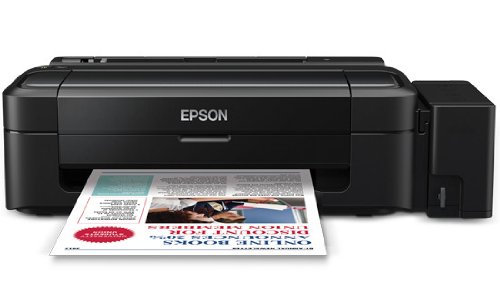
Kuva 1: Etuosa view of the Epson L110 Colour Inkjet Printer.
2. Asennus
2.1 Pakkauksesta purkaminen
Carefully remove the printer from its packaging. Ensure all protective tapes and packing materials are removed from the printer's exterior and interior. Retain the packaging for future transport or storage.
2.2 Virtaliitäntä
- Liitä virtajohto tulostimen virtalähteeseen.
- Liitä virtajohdon toinen pää maadoitettuun pistorasiaan.
- Do not power on the printer until ink tanks are filled.
2.3 Mustesäiliöiden täyttö
The Epson L110 features an integrated ink tank system. Use only genuine Epson ink bottles for optimal performance and to prevent damage.
- Avaa tulostimen sivussa olevan mustesäiliöyksikön kansi.
- Uncap the ink bottle for the corresponding color (Cyan, Magenta, Yellow, Black).
- Carefully pour the ink into the correct tank, aligning the bottle nozzle with the tank's filling port. The "Fast Ink Top-Up Technology" is designed for mess-free refills.
- Fill each tank to the upper line.
- Sulje mustesäiliöyksikön kansi tiiviisti.
Figure 2: Illustration of filling the ink tanks. Ensure correct color matching.
2.4 Ohjaimen asennus
After filling the ink tanks, connect the printer to your computer using a USB cable. Install the printer drivers from the provided CD-ROM or download the latest drivers from the official Epson support websivusto. Suorita asennus loppuun noudattamalla näytön ohjeita.
3. Tulostimen käyttö
3.1 Paperin lisääminen
- Avaa paperituki ja vedä jatke ulos.
- Fan the edges of the paper stack to separate the sheets.
- Load paper into the sheet feeder with the print side facing up.
- Adjust the edge guide to the width of your paper. The maximum input sheet capacity is 50 sheets.
Figure 3: Proper paper loading into the input tray.
3.2 Perustulostus
- Varmista, että tulostin on päällä ja yhdistetty tietokoneeseen.
- Avaa tietokoneellasi asiakirja tai kuva, jonka haluat tulostaa.
- Valitse sovelluksen valikosta "Tulosta" (esim. File > Tulosta).
- In the print dialog box, select "Epson L110" as your printer.
- Säädä tulostusasetuksia, kuten paperikokoa, tulostuslaatua ja kopioiden määrää.
- Aloita tulostus napsauttamalla "Tulosta".
The Epson L110 offers a print speed of up to 27 pages per minute (ppm) for black prints and 15 ppm for color prints. It produces high-resolution prints of 5760 x 1440 dpi.
4. Huolto
4.1 Musteen täyttö
Monitor ink levels regularly. When an ink tank is low, refill it promptly using genuine Epson ink bottles. A single ink bottle provides a high page yield of up to 4000 prints (black) and 6500 prints (color).
Tärkeää: When transporting the printer, ensure the choke valve is locked to prevent messy leaks and ink wastage.
4.2 Tulostuspään puhdistus
If print quality declines (e.g., missing lines, faded colors), perform a print head cleaning. This can typically be done through the printer utility software on your computer. Refer to the software's help section for detailed steps.
4.3 Yleinen puhdistus
Pyyhi tulostimen ulkopinta pehmeällä,amp cloth. Do not use abrasive cleaners or solvents. Keep the paper path clear of dust and debris.
5. Vianmääritys
- Tulostin ei vastaa:
- Tarkista virtaliitäntä ja varmista, että tulostin on päällä.
- Tarkista tulostimen ja tietokoneen välinen USB-kaapeliyhteys.
- Käynnistä sekä tulostin että tietokone uudelleen.
- Varmista, että tulostinohjaimet on asennettu oikein.
- Huono tulostuslaatu:
- Tarkista musteen määrä ja täytä tarvittaessa.
- Suorita tulostuspään puhdistus.
- Run a nozzle check to identify clogged nozzles.
- Varmista, että käytät tulostusasetuksiin sopivaa paperia.
- Paperitukokset:
- Sammuta tulostin ja irrota se.
- Poista varovasti kaikki juuttunut paperi syöttölokerosta, tulostuslokerosta tai tulostimen sisältä.
- Varmista, että paperi on ladattu oikein eikä se ole rypistynyt taiurltoim.
Lisätietoja saat Epsonin tukipalvelusta. websivustolla tai ota yhteyttä asiakaspalveluun.
6. Tekniset tiedot
| Ominaisuus | Erittely |
|---|---|
| Mallin nimi | L110 |
| Tulostustekniikka | Mustesuihku |
| Tulostimen lähtö | Väri |
| Suurin väritulostustarkkuus | 5760 x 1440 dpi |
| Suurin mustavalkoinen tulostustarkkuus | 5760 x 1440 dpi |
| Suurin tulostusnopeus yksivärinen | 27 ppm |
| Suurin tulostusnopeus (väri) | 15 ppm |
| Musteen väri | Cyan, Black, Magenta, Yellow |
| Sivutuotto (mustavalkoinen) | Jopa 4000 XNUMX sivua |
| Sivutuotto (väri) | Jopa 6500 XNUMX sivua |
| Yhteystekniikka | USB |
| Suurin syöttöarkin kapasiteetti | 50 |
| Tuetut mediakoot | A4, A5, A6, A7, A8, A9, B5, B6, B7, B8, B9, C5, C6, C7 |
| Tuotteen mitat (PxLxK) | 47.2 x 22.2 x 13 cm |
| Tuotteen paino | 2.7 kg |
| Virrankulutus | Enintään 10 wattia |
7. Takuu ja tuki
The Epson L110 Colour Inkjet Printer comes with an Epson Warranty, providing peace of mind. For specific warranty terms and conditions, please refer to the warranty card included with your product or visit the official Epson support websivusto.
For technical support, driver downloads, FAQs, and service center locations, please visit the official Epson support website or contact Epson customer service directly.


