Johdanto
This instruction manual provides comprehensive guidance for the installation, operation, maintenance, and troubleshooting of your Intel Classic DH61CR Desktop Motherboard. Please read this manual thoroughly before proceeding with installation or operation to ensure proper functionality and to prevent damage to the product or other components.
The Intel DH61CR motherboard is designed to support Intel LGA 1155 socket processors and DDR3 memory, offering a reliable foundation for personal computer systems.
Asennus ja asennus
1. Unpacking and Component Overview
Carefully remove the motherboard from its packaging. Inspect all components for any signs of damage. Ensure all accessories listed in the product documentation are present.
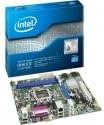
Image: The Intel DH61CR Desktop Motherboard shown alongside its retail packaging. This image provides a visual reference for the product and its initial presentation.
Familiarize yourself with the layout of the motherboard, including the CPU socket, RAM slots, expansion slots, and various connectors.
2. Suorittimen asennus (LGA 1155 -kanta)
- Paikanna emolevyn LGA 1155 -suorittimen kanta.
- Gently push down the load lever and pull it to the side to open the CPU socket retention frame.
- Kohdista suorittimen kolmiomainen merkki kannan vastaavaan merkkiin. Aseta suoritin varovasti kantaan pakottamatta sitä.
- Close the retention frame and secure it by pushing the load lever back into its locked position.
- Apply a thin, even layer of thermal paste to the top of the CPU (if not pre-applied to the cooler).
- Asenna suorittimen jäähdytin valmistajan ohjeiden mukaisesti varmistaen, että se on tukevasti kiinni ja että sillä on hyvä kontakti suorittimeen.
3. RAM-muistin asennus (DDR3)
- Identify the DDR3 memory slots. The Intel DH61CR supports DDR3 RAM.
- Avaa muistipaikan molemmissa päissä olevat pidikkeet.
- Kohdista DDR3-muistimoduulin lovi muistipaikan kiilaan.
- Press down firmly on both ends of the memory module until the clips snap into place, securing the module.
4. Tallennuslaitteen asennus
Connect your SATA hard drives or solid-state drives to the SATA ports on the motherboard using SATA data cables. Ensure the power cables from your power supply are also connected to these devices.
5. Virtalähteen liitännät
- Kytke virtalähteen 24-nastainen ATX-virtaliitin emolevyn päävirtaliittimeen.
- Connect the 4-pin (or 8-pin, if applicable) ATX 12V power connector to the CPU power socket.
- Varmista, että kaikki virtaliitännät ovat tukevasti kiinni.
6. Etupaneelin liitännät
Connect the front panel cables from your computer case (power button, reset button, HDD LED, power LED, USB ports, audio jacks) to the corresponding headers on the motherboard. Refer to the motherboard's silkscreen labels for correct pin assignments.
7. Laajennuskortit
Install any necessary expansion cards (e.g., graphics card, network card) into the appropriate PCIe x16 or PCIe x1 slots. Secure them with the case's retention mechanism.
Käyttöohjeet
1. Ensimmäinen käynnistys
After all components are installed and connected, connect your monitor, keyboard, and mouse. Power on the system. The system should display the BIOS POST screen. If not, refer to the Troubleshooting section.
2. BIOS/UEFI-käyttö
Pääset BIOS/UEFI-asetusohjelmaan painamalla määritettyä näppäintä (yleensä Del, F2, tai F10 XNUMX) during the initial boot sequence. The exact key is usually displayed on the screen during POST.
Within the BIOS/UEFI, you can configure boot order, system time, hardware settings, and other advanced options. Save changes before exiting.
Huolto
1. Puhdistus
Regularly clean the interior of your computer case to prevent dust buildup, which can lead to overheating. Use compressed air to remove dust from fans, heatsinks, and motherboard components. Ensure the system is powered off and unplugged before cleaning.
2. BIOS-päivitykset
Tarkista Intel-tuki säännöllisesti website for BIOS updates for your DH61CR motherboard. BIOS updates can improve system stability, add support for new hardware, or fix bugs. Follow the instructions provided by Intel carefully when performing a BIOS update to avoid system damage.
Vianetsintä
Jos kohtaat ongelmia, uudelleenview seuraavat yleiset vianmääritysvaiheet:
- Ei virtaa: Ensure all power cables (24-pin ATX, 4-pin CPU) are securely connected. Check the power supply unit (PSU) switch and wall outlet.
- Ei näyttöä: Verify the monitor is connected and powered on. Ensure the graphics card (if dedicated) is properly seated and powered. If using integrated graphics, confirm the monitor is connected to the motherboard's video output.
- Järjestelmän piippaukset: A series of beeps during startup usually indicates a hardware issue. Consult the motherboard's beep code guide (often found on the manufacturer's support website) to diagnose the specific problem (e.g., RAM error, graphics card issue).
- Järjestelmän epävakaus/kaatumiset: Check for proper CPU cooler installation and thermal paste application. Ensure RAM modules are correctly seated. Test memory with diagnostic tools. Update drivers and BIOS.
- Käyttöjärjestelmä ei lataudu: Verify the boot order in BIOS/UEFI. Check SATA cable connections to storage devices. Ensure the operating system is correctly installed on a bootable drive.
For persistent issues, consult the Intel support websivustolla tai ota yhteyttä heidän tekniseen tukeensa.
Tekniset tiedot
| Ominaisuus | Erittely |
|---|---|
| Merkki | Intel |
| Mallin nimi | DH61CRB3 |
| CPU-liitäntä | LGA 1155 |
| Yhteensopivat prosessorit | Intel Core i3-2100, Intel Core i5-2400, Intel Core i7-2600, Pentium |
| Piirisarjan tyyppi | Intel H61 Express |
| RAM-muistitekniikka | DDR3 |
| Enimmäismuisti | 8 Gt |
| Muistin kellonopeus | 1333 MHz |
| Yhteensopivat laitteet | Henkilökohtainen tietokone |
| Tallennusliittymä | Serial ATA/300 |
| Laajennuspaikat | 1 x PCIe x16 -paikka |
| Videolähtö | CPU Dependent Video |
| Alusta | Windows 7, Windows Vista Ultimate |
| Tuotteen mitat | 10.5 x 8.5 x 2 tuumaa |
| Tuotteen paino | 1.9 kiloa |
| Valmistaja | INTEL |
| Päivämäärä ensimmäinen saatavilla | 30. huhtikuuta 2012 |
Takuu ja tuki
Warranty information for the Intel Classic DH61CR Desktop Motherboard is typically provided with the product at the time of purchase or can be found on the official Intel websivusto. Säilytä ostokuitti takuuvaatimuksia varten.
For technical support, driver downloads, and additional documentation, please visit the official Intel support website. You can often find detailed FAQs and community forums there to assist with common issues.
Note: Intel's official support channels are the primary resource for product-specific assistance.


