Johdanto
This manual provides comprehensive instructions for the safe and efficient use of your BlackBerry HS-300 Wireless Bluetooth Headset. Please read this manual thoroughly before operating the device and retain it for future reference. The BlackBerry HS-300 is designed for hands-free communication with compatible Bluetooth-enabled devices.
Pakkauksen sisältö
Varmista, että paketti sisältää seuraavat kohteet:
- BlackBerry HS-300 Wireless Bluetooth Headset
- Ear hook (optional, for secure fit)
- Ear gels/tips (various sizes for comfort)
- Latauskaapeli
- Käyttöopas (tämä asiakirja)
Laite ohiview
Familiarize yourself with the components of your BlackBerry HS-300 headset.
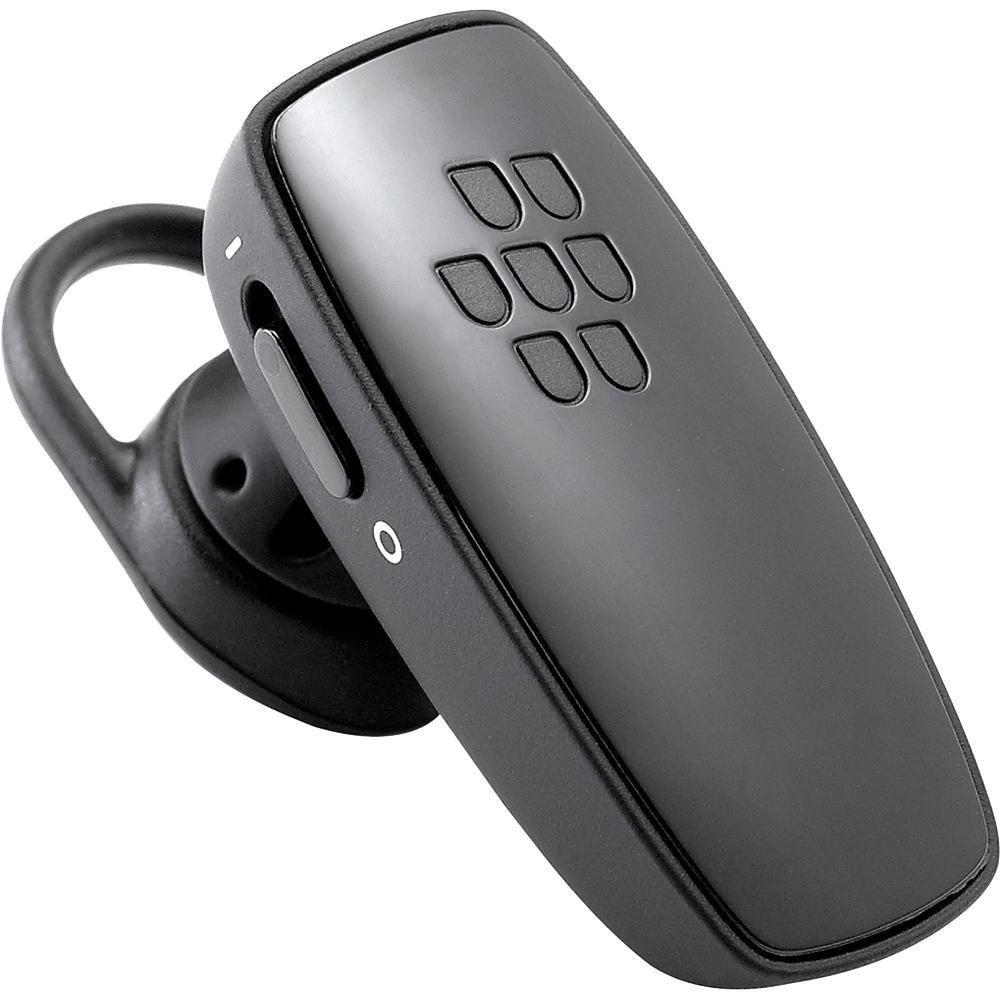
Kuva 1: Edessä view of the BlackBerry HS-300 Wireless Bluetooth Headset. The image displays the main body of the headset, featuring the BlackBerry logo (seven-dot pattern) on the front surface. A slender button, likely for volume control or multi-function, is visible on the side. An ear hook is attached, designed to secure the headset over the ear. A small indicator light is also present near the button.
- Monitoimipainike: Used for answering/ending calls, voice commands, and pairing.
- Äänenvoimakkuuden säätöpainikkeet: Adjusts call and media volume.
- LED-merkkivalo: Näyttää tilan (virta, pariliitos, lataus).
- Mikrofoni: Captures your voice during calls.
- Virtakytkin: Kytkee kuulokkeen päälle tai pois päältä.
- Latausportti: Liitetään latauskaapeliin.
Asennus
1. Kuulokkeen lataaminen
Before initial use, fully charge your headset. The HS-300 features rapid charge capabilities.
- Connect the charging cable to the headset's charging port and to a compatible USB power source.
- The LED indicator will show the charging status (e.g., solid red for charging, solid blue for fully charged).
- Täydellä latauksella puheaikaa on jopa 4 tuntia.
2. Pariliitoksen muodostaminen Bluetooth-laitteen kanssa
To use your headset, it must be paired with a Bluetooth-enabled phone or device.
- Varmista, että HF-laitteesta on katkaistu virta.
- Press and hold the Multi-function Button until the LED indicator flashes blue and red alternately. This indicates pairing mode.
- On your phone, enable Bluetooth and search for new devices.
- Select "BlackBerry HS-300" from the list of available devices.
- Jos sinulta pyydetään salasanaa, anna "0000" (neljä nollaa).
- Kun pariliitos on muodostettu, LED-merkkivalo vilkkuu sinisenä säännöllisesti.
Käyttöohjeet
Virta päälle/pois
- Virran kytkeminen: Slide the Power Switch to the 'On' position. The LED indicator will flash blue.
- Virran sammuttaminen: Liu'uta virtakytkin 'Pois'-asentoon. LED-merkkivalo sammuu.
Puhelujen soittaminen ja vastaanottaminen
- Puheluun vastaaminen: Paina monitoimipainiketta kerran.
- Puhelun lopettaminen: Paina monitoimipainiketta kerran puhelun aikana.
- Puhelun hylkääminen: Paina monitoimipainiketta ja pidä sitä painettuna noin 2 sekuntia.
- Soittaminen: Dial the number on your phone. The call will automatically transfer to the headset if connected.
- Äänivalinta (jos puhelin tukee): Press the Multi-function Button once when not on a call.
Äänenvoimakkuuden säätö
- Use the Volume Control Buttons on the headset to adjust the call or media volume.
Huolto
- Puhdista kuulokkeet säännöllisesti pehmeällä, kuivalla liinalla.
- Vältä kuulokkeiden altistamista äärimmäisille lämpötiloille, kosteudelle tai syövyttäville aineille.
- Säilytä kuulokkeita viileässä ja kuivassa paikassa, kun sitä ei käytetä.
- Do not attempt to disassemble or modify the headset, as this will void the warranty and may cause damage.
Vianetsintä
| Ongelma | Ratkaisu |
|---|---|
| Kuulokemikrofoni ei käynnisty. | Ensure the headset is charged. Connect it to a power source using the charging cable. |
| Kuulokkeiden ja puhelimen parittaminen ei onnistu. |
|
| Ei ääntä tai äänenlaatu on huono. |
|
| Kuulokkeiden yhteys katkeaa usein. |
|
Tekniset tiedot
| Ominaisuus | Yksityiskohta |
|---|---|
| Mallinumero | HS-300 |
| Yhteydet | Bluetooth Wireless (Version 2.1) |
| Puheaika | Jopa 4 tuntia |
| Lataus | Rapid charge capable |
| Säätimet | Volume control, Multi-function button |
| Mikrofoni | Integroitu |
| Muototekijä | On-ear (single ear) |
| Paino | Noin 3.2 unssia |
| Mitat | 2.5 x 2 x 6.5 tuumaa (arvioitu) |
Takuu ja tuki
For warranty information and technical support, please refer to the documentation provided at the time of purchase or visit the official BlackBerry support websivusto. Säilytä ostokuitti takuuvaatimuksia varten.
Online-tuki: www.blackberry.com/support


