1. Johdanto
Thank you for choosing the Takstar E 340 Karaoke Microphone. This manual provides essential information for the proper setup, operation, and maintenance of your microphone. Please read this manual thoroughly before using the product to ensure optimal performance and longevity.
2. Tuote ohiview
The Takstar E 340 is a high-quality unidirectional handheld dynamic microphone designed for clear vocal reproduction, ideal for karaoke and general speech applications. It features a robust construction and a design focused on user comfort and sound clarity.
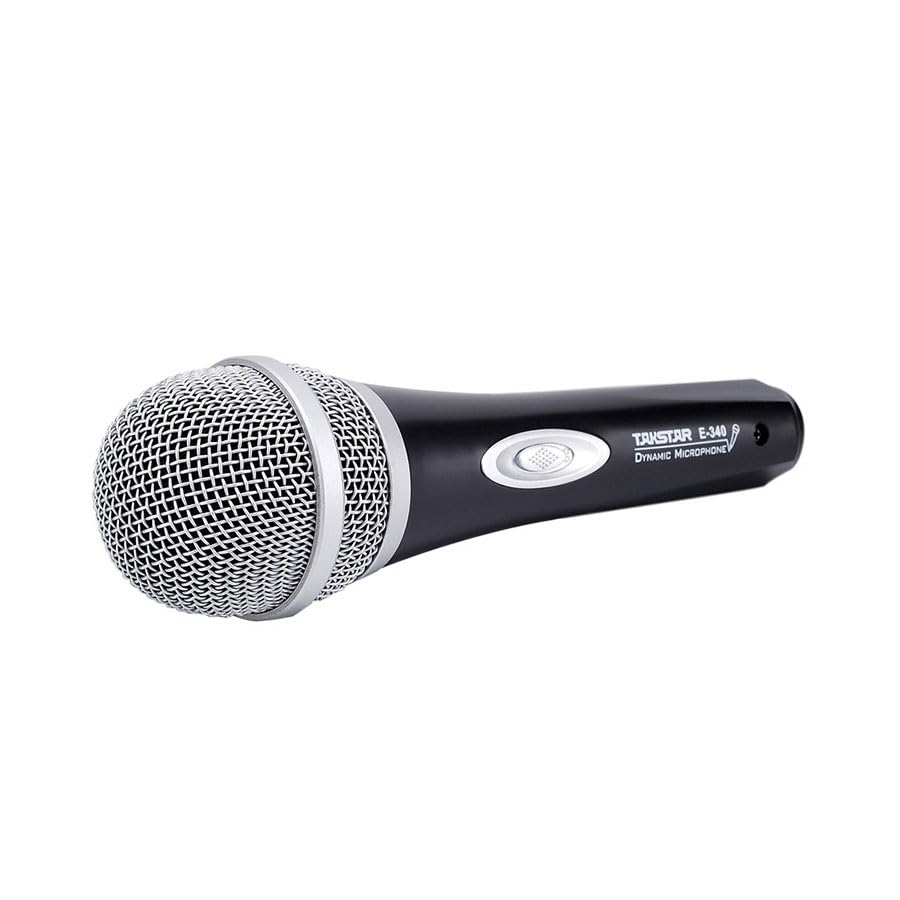
Figure 2.1: Takstar E 340 Handheld Dynamic Microphone. This image shows the full view of the microphone, highlighting its black body and silver grille.
Tärkeimmät ominaisuudet:
- Yksisuuntainen napakuvio: Keskittyy etuosan ääneen vähentäen taustamelua.
- Dynaaminen kapseli: Tarjoaa selkeän ja tehokkaan äänentoiston.
- Kestävä rakenne: Plastic housing with a paint finish for comfortable handling and durability.
- XLR-liitännät: Utilizes a dual-core XLR cable for clear signal transmission and noise interference shielding.
- Kevyt muotoilu: Ensures ease of use and portability.

Kuva 2.2: Yksityiskohtainen view of the Takstar E 340 microphone highlighting its internal dynamic capsule and the robust construction. This image illustrates the quality components and design features.
Komponentin tunnistus:
- Mikrofonin säleikkö: Suojaa mikrofonikapselia ja auttaa muokkaamaan ääntä.
- Mikrofonin runko: Houses the internal components and provides a comfortable grip.
- Päälle/pois-kytkin: Controls the microphone's power.
- XLR Output Connector: For connecting the microphone to an audio interface or karaoke machine.
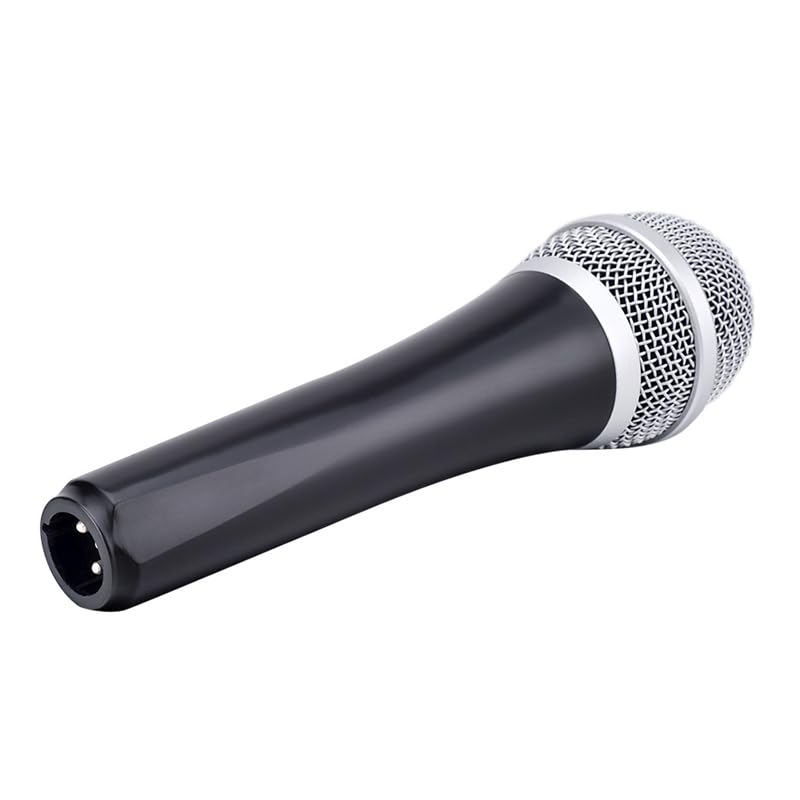
Figure 2.3: The XLR output connector located at the base of the Takstar E 340 microphone. This is where the microphone cable connects.
3. Asennusohjeet
- Pura mikrofoni pakkauksesta: Carefully remove the Takstar E 340 microphone and any included accessories from its packaging.
- Liitä kaapeli: Insert the XLR end of your microphone cable into the XLR output connector at the base of the microphone. Ensure it clicks securely into place.
- Yhdistä äänilaitteeseen: Connect the other end of the microphone cable (e.g., 1/4-inch jack or USB Type-C, depending on your cable) to the microphone input of your karaoke machine, mixer, or audio interface.
- Virta päälle: Ensure your audio device is powered on and its volume is set to a low level before activating the microphone.
4. Käyttöohjeet
- Turn On the Microphone: Locate the On/Off switch on the microphone body and slide it to the 'ON' position.
- Paikannus: Hold the microphone approximately 2-6 inches (5-15 cm) from your mouth for optimal sound pickup. Experiment with distance to find the best sound for your voice and environment.
- Äänenvoimakkuuden säätö: Gradually increase the volume on your connected audio device until the desired sound level is achieved. Avoid setting the volume too high to prevent feedback or distortion.
- Yksisuuntainen nouto: The E 340 is a unidirectional microphone, meaning it primarily picks up sound from the front. Point the top of the microphone directly towards the sound source (your mouth) for the clearest audio.
- Sammutus: When finished, slide the On/Off switch to the 'OFF' position and then turn off your audio device.
5. Hoito ja huolto
- Puhdistus: Use a soft, dry cloth to clean the microphone body. For the grille, a soft brush can be used to gently remove dust or debris. Do not use liquid cleaners or solvents.
- Varastointi: Store the microphone in a dry, cool place away from direct sunlight and extreme temperatures. If possible, use a protective case to prevent physical damage.
- Käsittely: Avoid dropping the microphone or subjecting it to strong impacts, as this can damage the internal components.
- Kaapelihuolto: Always grasp the connector, not the cable, when plugging or unplugging. Avoid bending or kinking the cable excessively.
6. Vianmääritys
| Ongelma | Mahdollinen syy | Ratkaisu |
|---|---|---|
| Ei äänilähtöä | Mikrofonin kytkin on OFF-asennossa Kaapelia ei ole kytketty kunnolla Audio device input volume too low Faulty cable or audio device input | Slide switch to 'ON' Ensure cable is securely connected at both ends Increase input volume on audio device Test with a different cable or audio input |
| Matala tai vääristynyt ääni | Microphone too far from sound source Input volume too high (distortion) Vaurioitunut mikrofonikapseli | Hold microphone closer to mouth Reduce input volume on audio device Contact customer support if damage is suspected |
| Palaute (ulvova ääni) | Mikrofoni liian lähellä kaiuttimia Tila on liian korkea Microphone pointed at speakers | Increase distance between microphone and speakers Reduce overall volume Ensure microphone is not pointed directly at speakers |
7. Tekniset tiedot
| Ominaisuus | Erittely |
|---|---|
| Malli | E340 |
| Napainen kuvio | Yksisuuntainen |
| Mikrofonin muototekijä | Kädessä pidettävä |
| Impedanssi | 600 ohmia |
| Signaali-kohinasuhde (SNR) | 72 dB |
| Taajuusvaste | 16 kHz |
| Audio Herkkyys | 54 desibeliä |
| Yhteystekniikka | UHF (via cable) |
| Liittimen tyyppi | USB Type-C (implied for cable connection, typically XLR on mic) |
| Yhteensopivat laitteet | Karaoke -kone |
| Virtalähde | Johdollinen sähkö |
| Tuotteen paino | 580 g |
| Pakkauksen mitat | 24.8 x 12.6 x 8 cm |
| Erikoisominaisuus | Adjustable Headband (Note: This feature is typically associated with headsets, but listed in product specifications.) |
8. Takuu ja tuki
For warranty information and customer support, please refer to the documentation provided at the time of purchase or visit the official Takstar websivusto. Säilytä ostokuittisi mahdollisten takuuvaatimusten varalta.


