Johdanto
This manual provides comprehensive instructions for the setup, operation, maintenance, and troubleshooting of your Logitech M510 Wireless Mouse. Designed for comfort and efficiency, the M510 offers precise control and convenient features for your computing needs.
The Logitech M510 is a comfortable wireless computer mouse featuring a USB Unifying Receiver, back/forward buttons, and side-to-side scrolling. It operates on 2 AA batteries and is compatible with Personal Computers and Macbooks running operating systems like Windows 10.
Pakkauksen sisältö
- Logitech M510 langaton hiiri
- Logitech Unifying -vastaanotin
- 2 AA-paristoa (esiasennettu tai mukana)
Asennus
1. Akun asennus
The Logitech M510 mouse requires two AA batteries for operation. These are typically included with your purchase. If not already installed, follow these steps:
- Paikanna hiiren pohjassa oleva paristolokeron kansi.
- Avaa lokero liu'uttamalla tai nostamalla kantta.
- Aseta kaksi AA-paristoa paikoilleen varmistaen, että positiiviset (+) ja negatiiviset (-) navat ovat oikein kohdistettuina lokeron sisällä oleviin merkkeihin.
- Sulje paristolokeron kansi kunnolla.
2. Unifying-vastaanottimen kytkeminen
The Logitech M510 uses a Logitech Unifying Receiver for wireless connectivity. This small USB receiver allows you to connect multiple compatible Logitech devices to your computer using a single USB port.
- Locate the Logitech Unifying Receiver. It is often stored inside the battery compartment of the mouse for safekeeping during transport.
- Plug the Unifying Receiver into an available USB port on your computer (desktop, laptop, or Macbook).
- Your computer should automatically detect the receiver and install the necessary drivers. This may take a few moments.
- Once the drivers are installed, the mouse should be ready for use. If not, ensure the mouse's power switch (if present) is in the 'ON' position.

Kuva: Ylhäältä alas view of the Logitech M510 Wireless Mouse alongside its compact USB Unifying Receiver.
Hiiren käyttö
The Logitech M510 Wireless Mouse is designed for intuitive use with several programmable buttons and comfortable ergonomics.
Perustoiminnot
- Vasen napsautuspainike: Ensisijainen painike kohteiden valitsemiseen, avaamiseen fileja vuorovaikutuksessa ohjelmistojen kanssa.
- Hiiren kakkospainikkeen painike: Toissijainen painike kontekstivalikoiden ja lisäasetusten käyttämiseen.
- Vierityspyörä: Vieritä asiakirjoja ylös tai alas ja web sivuja. Vierityspyörä toimii myös keskipainikkeena.
- Side-to-Side Scrolling: Tilt the scroll wheel left or right to scroll horizontally in applications that support this feature.
Advanced Features (Programmable Buttons)
The M510 features two thumb buttons (back/forward) on the left side, which can be customized using Logitech Options software (available for download from the Logitech website). By default, these buttons perform browser navigation functions.
- Takaisin-painike: Navigoi takaisin sisään web selaimet tai file tutkimusmatkailijoita.
- Eteenpäin-painike: Navigoi eteenpäin kohdassa web selaimet tai file tutkimusmatkailijoita.
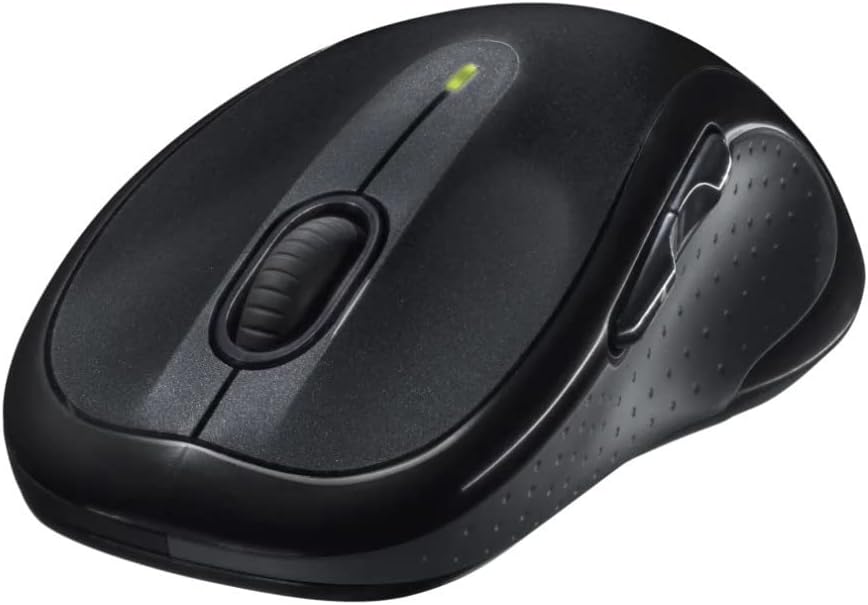
Kuva: Kulmikas view of the Logitech M510 Wireless Mouse, highlighting its ergonomic shape and side buttons.
Huolto
Hiiren puhdistaminen
To ensure optimal performance and hygiene, regularly clean your Logitech M510 mouse:
- Disconnect the mouse from your computer by removing the Unifying Receiver.
- Käytä pehmeää, nukkaamatonta liinaa kevyesti dampened with water or a mild cleaning solution (e.g., isopropyl alcohol) to wipe down the surface of the mouse.
- For crevices and around buttons, use a cotton swab or a soft brush.
- Avoid getting liquid into the internal components or the optical sensor.
- Allow the mouse to dry completely before re-connecting.
Akun vaihto
The Logitech M510 has an average battery life of 18 months. When the battery indicator light (if present) flashes or mouse performance degrades, it's time to replace the batteries.
- Sammuta hiiri pohjassa olevalla virtakytkimellä.
- Avaa paristolokeron kansi.
- Poista vanhat AA-paristot.
- Aseta kaksi uutta AA-paristoa paikoilleen ja huomioi oikea napaisuus (+/-).
- Sulje paristolokeron kansi.
- Käynnistä hiiri uudelleen.
Vianetsintä
| Ongelma | Mahdollinen syy | Ratkaisu |
|---|---|---|
| Hiiri ei vastaa | Low or dead batteries; Unifying Receiver not connected; Mouse power off; Driver issue. | Replace batteries; Ensure Unifying Receiver is securely plugged into a USB port; Turn mouse power switch to 'ON'; Reinstall Logitech Options software or check device manager for driver issues. |
| Lagging or erratic cursor movement | Interference; Dirty optical sensor; Mouse used on unsuitable surface; Low battery. | Move mouse closer to receiver; Clear obstructions; Clean optical sensor; Use a mouse pad or suitable surface; Replace batteries. |
| Sivupainikkeet eivät toimi | Software not installed or configured; Application does not support custom buttons. | Download and install Logitech Options software from the official Logitech website to customize button functions. Ensure the application you are using supports these functions. |
| Unifying Receiver not recognized | Faulty USB port; Driver issue. | Try a different USB port; Restart your computer; Download and install the Logitech Unifying Software to re-pair the mouse with the receiver. |
Tekniset tiedot
| Ominaisuus | Yksityiskohta |
|---|---|
| Merkki | Logitech |
| Mallinumero | 910-001822 |
| Sarja | M510 |
| Yhteystekniikka | Radio Frequency, USB (via Unifying Receiver) |
| Liiketunnistustekniikka | Laser |
| Väri | Tummanharmaa |
| Tuotteen paino | 4.6 unssia (noin 130 grammaa) |
| Tuotteen mitat (PxLxK) | 4.38 x 2.5 x 1.75 tuumaa (noin 11.13 x 6.35 x 4.45 cm) |
| Virtalähde | Paristokäyttöinen |
| Paristot vaaditaan | 2 AA-paristoa (mukana) |
| Keskimääräinen akun käyttöikä | 18 kuukautta |
| Laitteistoalusta | Personal Computer, Macbook |
| Käyttöjärjestelmän yhteensopivuus | Windows 10 (and likely earlier versions, macOS) |
| Erikoisominaisuudet | Battery Life Indicator, Power Saving Mode, Programmable Buttons, Wireless |
| Päivämäärä ensimmäinen saatavilla | 7. kesäkuuta 2010 |

Kuva: Ylhäältä alas view of the Logitech M510 Wireless Mouse showing its approximate dimensions (4.4" length, 2.5" width).
Takuu ja tuki
Takuutiedot
Logitech products typically come with a limited hardware warranty. For specific warranty terms and conditions applicable to your Logitech M510 Wireless Mouse, please refer to the warranty card included with your product or visit the official Logitech websivusto.
Asiakastuki
For further assistance, technical support, or to download the latest software (such as Logitech Options or Unifying Software), please visit the official Logitech support websivusto:
Löydät myös hyödyllisiä resursseja, usein kysyttyjä kysymyksiä ja yhteisöfoorumeita heidän sivustoltaan. websivusto.


