1. Johdanto
This manual provides essential information for the safe and efficient operation of your Intermec PD42 Series Commercial Printer. The PD42 is a dependable and versatile direct thermal printer designed for medium-duty applications in manufacturing, transportation, and warehousing environments. It features a robust all-metal chassis, proven printing mechanics, and powerful electronics to ensure reliable performance. The integrated monochrome graphical display allows for direct setup and configuration, enhancing user control and reducing reliance on host commands.
2. Turvallisuustiedot
Please read and understand all safety instructions before operating the printer. Failure to follow these instructions may result in injury or damage to the equipment.
- Liitä tulostin aina maadoitettuun pistorasiaan.
- Do not operate the printer with a damaged power cord or plug.
- Avoid placing the printer in areas with excessive dust, humidity, or extreme temperatures.
- Älä yritä huoltaa tulostinta itse. Jätä kaikki huoltotyöt pätevän henkilöstön tehtäväksi.
- Pidä kädet ja löysät vaatteet poissa liikkuvista osista käytön aikana.
3. Pakkauksen sisältö
Varmista, että pakkauksessa on kaikki tarvittavat osat. Jos jokin puuttuu tai on vaurioitunut, ota välittömästi yhteyttä toimittajaan.
- Intermec PD42 Series Commercial Printer
- Power Cord (Euro and US compatible)
- Pikaopas (jos mukana)
- Documentation CD (if included)
4. Fyysinen ylitysview
Familiarize yourself with the external components and connection ports of the Intermec PD42 printer.

Kuva 4.1: Edessä ja sivulla View of the Intermec PD42 Printer. This image displays the printer's front panel with its graphical display and control buttons, along with a label partially ejected from the print mechanism. The robust casing and compact design are visible.
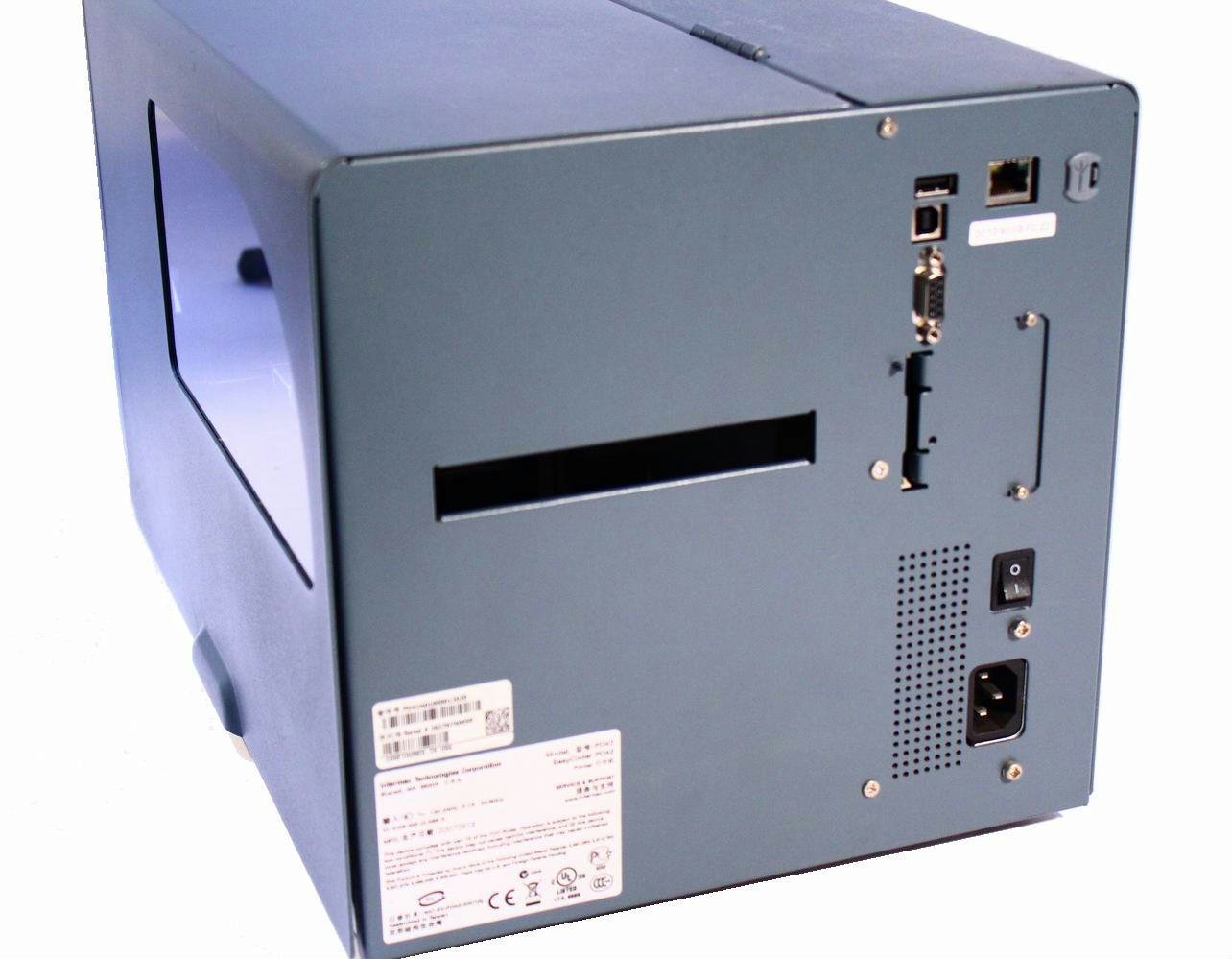
Kuva 4.2: Takaosa View of the Intermec PD42 Printer. This image highlights the various connectivity options available on the back of the printer, including USB, Serial, and Ethernet ports. The power input and main power switch are also visible.

Kuva 4.3: Sisäinen View of the Intermec PD42 Printer. With the top cover open, this image reveals the internal mechanisms for loading labels and ribbon. Key components such as the printhead assembly, media guides, and ribbon spindles are visible, illustrating the media path.
5. Asennus
5.1 Pakkauksesta purkaminen ja sijoittaminen
- Poista tulostin varovasti pakkauksestaan.
- Aseta tulostin vakaalle, tasaiselle alustalle, jossa on riittävä ilmanvaihto.
- Ensure sufficient space around the printer for media loading and maintenance.
5.2 Virran kytkeminen
- Connect the power cord to the power input on the rear of the printer (refer to Figure 4.2).
- Liitä virtajohdon toinen pää maadoitettuun pistorasiaan.
5.3 Datakaapeleiden kytkeminen
The PD42 offers multiple connectivity options:
- USB: Connect a USB cable from the printer's USB port to your computer.
- Sarja: Connect a serial cable from the printer's serial port to your computer or host system.
- Ethernet: Connect an Ethernet cable from the printer's Ethernet port to your network.
5.4 Tulostusmateriaalin (tarrojen ja värinauhojen) lisääminen
The PD42 supports industry-standard 200-mm (8-inch) label rolls and 450-m (18,000-inch) ribbon rolls.
- Open the printer's top cover (refer to Figure 4.3).
- Follow the internal diagrams or specific instructions for your media type to correctly load the label roll onto the media spindle.
- Thread the labels through the media guides and under the printhead assembly.
- If using thermal transfer printing, load the ribbon onto the ribbon supply spindle and thread it according to the internal guides.
- Sulje yläkansi kunnolla.
6. Käyttöohjeet
6.1 Virran kytkeminen päälle/pois
- Virran kytkeminen: Flip the main power switch on the rear of the printer to the 'On' position. The graphical display will illuminate.
- Virran sammuttaminen: Flip the main power switch to the 'Off' position.
6.2 Using the Graphical Display
The monochrome graphical display and control buttons on the front panel allow you to configure printer settings directly. Navigate through menus using the arrow buttons and confirm selections with the 'Enter' button. Refer to the on-screen prompts for specific options.
6.3 Ohjainten ja ohjelmistojen asennus
Ennen tietokoneelta tulostamista asenna asianmukaiset tulostinohjaimet. Nämä ovat yleensä saatavilla valmistajan verkkosivustolla. website or an included CD. Follow the on-screen instructions during installation.
6.4 Testitarran tulostaminen
After setup, it is recommended to print a test label to verify proper operation and media loading. This option is usually available through the printer's front panel menu or via the printer driver software.
7. Huolto
Säännöllinen huolto varmistaa optimaalisen suorituskyvyn ja pidentää tulostimen käyttöikää.
7.1 Tulostuspään puhdistaminen
The printhead should be cleaned regularly, especially if print quality degrades. Use a lint-free cloth or a printhead cleaning pen with isopropyl alcohol. Ensure the printer is powered off and cooled down before cleaning.
7.2 Cleaning Rollers and Media Path
Dust and adhesive residue can accumulate on rollers and within the media path. Use a lint-free cloth dampened with isopropyl alcohol to clean these components. Always power off the printer before cleaning.
7.3 Replacing Media
When the label roll or ribbon runs out, follow the steps in Section 5.4 to load new media.
8. Vianmääritys
Tässä osiossa käsitellään yleisiä ongelmia, joita saatat kohdata PD42-tulostimesi kanssa.
- Tulostin ei käynnisty: Check power cord connections and ensure the power outlet is functional.
- Ei tulostusta: Verify that the printer is online, connected correctly to the host, and that media is loaded properly. Check for error messages on the graphical display.
- Huono tulostuslaatu: Clean the printhead. Ensure the correct media and ribbon (if applicable) are used and properly loaded. Adjust print darkness settings via the display or driver.
- Yhteysongelmat: Check all cable connections. Verify network settings for Ethernet connections. Reinstall printer drivers if necessary.
- Virheilmoitukset näytöllä: Consult the printer's graphical display for specific error codes or messages, then refer to the full product documentation or manufacturer's support websivustolta yksityiskohtaisia ratkaisuja.
9. Tekniset tiedot
| Ominaisuus | Erittely |
|---|---|
| Mallin nimi | PD42BJ1000002021 |
| Tulostustekniikka | Suora lämpö |
| Tulostimen lähtö | Yksivärinen |
| Resoluutio | 203 dpi |
| Tulostusnopeus | Jopa 150 mm/s (6 ips) |
| Yhteystekniikka | USB, sarja, Ethernet |
| Erikoisominaisuus | Graphical Display, Ethernet |
| Tuotteen paino | 28.7 puntaa |
| Tuotteen mitat | 25 x 15 x 15 tuumaa |
| Ohjaimen tyyppi | Painike |
| Painomedia | Tarrat |
10. Takuu ja tuki
For warranty information and technical support, please refer to the documentation provided with your printer or visit the official Intermec (now Honeywell) websivusto. Säilytä ostokuitti ostotodistuksena takuuvaatimuksia varten.
Verkkoresurssit: For the latest drivers, firmware updates, and detailed troubleshooting guides, visit the manufacturer's support portal.


