1. Johdanto
This manual provides essential information for the safe and effective use of your Kodak Easyshare M530 Digital Camera. Please read it thoroughly before operating the device and retain it for future reference. The Kodak Easyshare M530 is a compact digital camera featuring a 12-megapixel sensor, 3x optical zoom, and a 2.7-inch LCD screen, designed for capturing high-quality photos and videos with ease.
2. Mitä laatikossa on
- Kodak Easyshare M530 digitaalikamera
- USB-kaapeli
- Ladattava litiumioniakku
- Rannehihna
- Käyttöohje (tämä asiakirja)
3. Kamera ohiview
Tutustu kamerasi tärkeimpiin osiin.

Kuva 1: Edessä view of the Kodak Easyshare M530 Digital Camera, showing the lens, flash, and brand logo.

Kuva 2: Takaisin view of the Kodak Easyshare M530 Digital Camera, displaying the 2.7-inch LCD screen and control buttons.

Kuva 3: Yläosa view of the Kodak Easyshare M530 Digital Camera, highlighting the power button and shutter release.

Kuva 4: Sivu view of the Kodak Easyshare M530 Digital Camera, illustrating the USB port for connectivity.
4. Asennus
4.1. Akun asennus
- Avaa kameran pohjassa sijaitsevan akkulokeron kansi.
- Insert the rechargeable Lithium-Ion battery with the contacts facing the correct direction, as indicated inside the compartment.
- Sulje paristolokeron kansi tiiviisti, kunnes se napsahtaa paikalleen.
4.2. Muistikortin asentaminen
The camera supports SD/SDHC memory cards (not included).
- Avaa muistikorttipaikan kansi, joka sijaitsee yleensä akkulokeron lähellä.
- Aseta SD/SDHC-kortti paikalleen siten, että tarra on kameran etuosaa kohti, kunnes se napsahtaa paikalleen.
- Sulje muistikorttipaikan kansi.
4.3. Akun lataaminen
- Varmista, että akku on asennettu kameraan oikein.
- Liitä mukana toimitettu USB-kaapeli kameran USB-porttiin.
- Liitä USB-kaapelin toinen pää yhteensopivaan USB-virtalähteeseen tai tietokoneen USB-porttiin.
- The charging indicator light will illuminate. Charging is complete when the light turns off or changes color (refer to camera display for exact status).
5. Kameran käyttö
5.1. Virta päälle/pois
- Virran kytkeminen päälle: Paina Tehoa -painiketta, joka sijaitsee kameran yläosassa.
- Virran katkaiseminen: Pidä painettuna Tehoa button until the camera shuts down.
5.2. Valokuvien ottaminen
- Kytke kamera päälle.
- Rajaa kuvasi 2.7 tuuman LCD-näytöllä.
- Paina Suljin button halfway down to focus. The focus frame will turn green when focus is achieved.
- Paina Suljin button all the way down to capture the photo.
5.3. Videoiden tallentaminen
- Switch the camera to video mode (refer to your camera's specific mode dial or menu for this option).
- Paina Suljin button to start recording. A red indicator will typically appear on the screen.
- Paina Suljin -painiketta uudelleen lopettaaksesi nauhoituksen.
5.4. Zoomaustoiminto
Use the zoom lever (often labeled W for Wide and T for Telephoto) to adjust the 3x optical zoom.
- Työnnä vipua kohti T to zoom in (telephoto).
- Työnnä vipua kohti W to zoom out (wide-angle).
5.5. Salamatilat
Paina Salama button (often indicated by a lightning bolt icon) to cycle through available flash modes:
- Automaattinen salama: Kamera määrittää automaattisesti, tarvitaanko salamaa.
- Täytesalama: Salama välähtää jokaista kuvaa otettaessa.
- Punasilmäisyyden vähennys: Laukaisee esisalaman punasilmäisyyden vähentämiseksi.
- Salama pois päältä: Salama on poistettu käytöstä.
5.6 Reviewvalokuvia ja videoita
- Paina Review painiketta (usein merkitty toistokuvakkeella).
- Use the directional pad to navigate through your captured images and videos.
- Paina OK or Valitse -painiketta view valittu kohde.
5.7. Smart Capture and Face Recognition
The Kodak Easyshare M530 features Smart Capture, which automatically adjusts camera settings for optimal results, and Face Recognition, which detects and optimizes settings for faces in your shots.
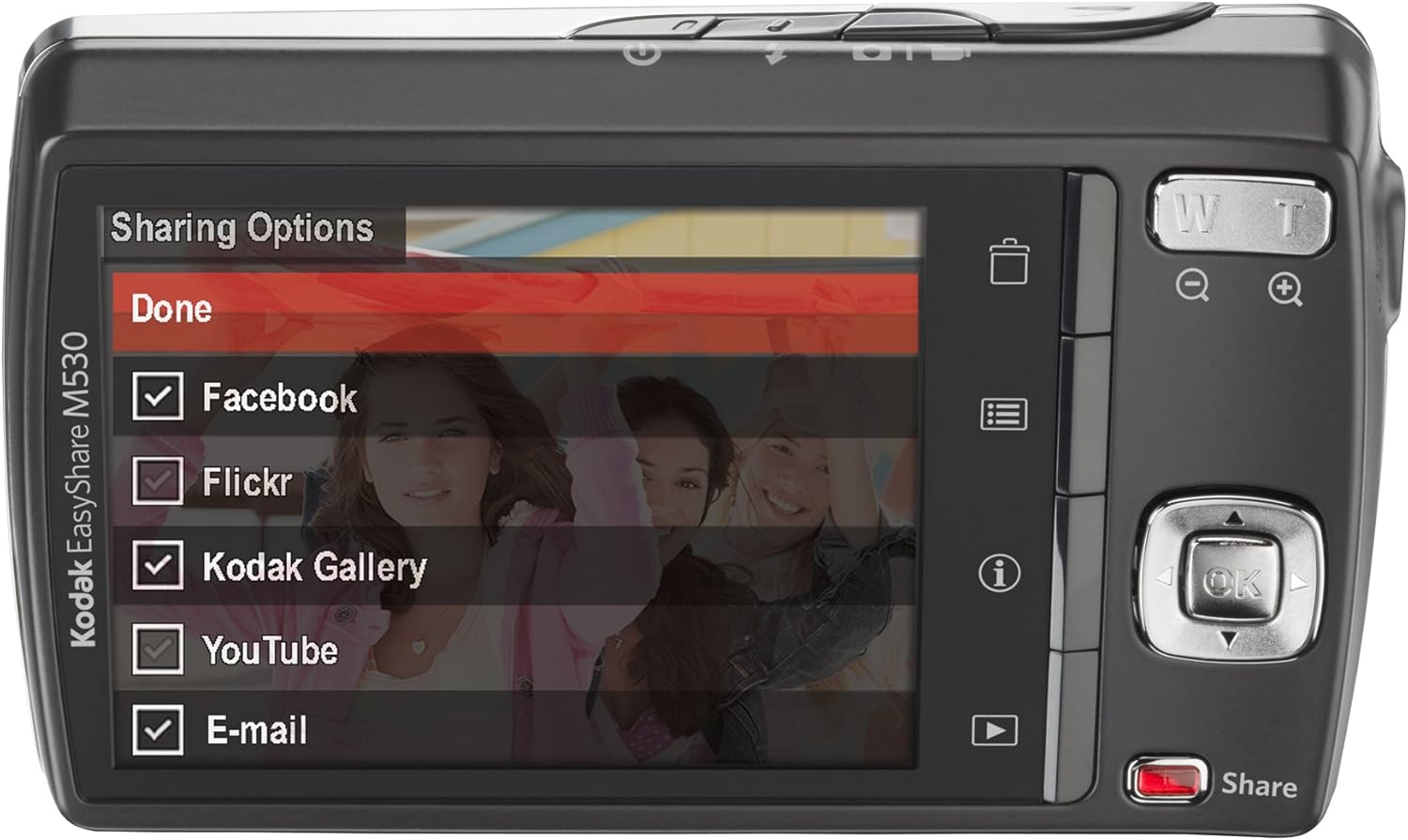
Kuva 5: The camera's LCD screen displaying sharing options, including Facebook, Flickr, Kodak Gallery, YouTube, and Email.
5.8. Sharing Your Content
Utilize the dedicated Share button for easy uploading of your photos and videos to various platforms when connected to a computer with Kodak's EasyShare software.
6. Huolto
6.1. Kameran puhdistaminen
- Puhdista kameran runko pehmeällä, nukkaamattomalla liinalla.
- Käytä linssin ja LCD-näytön puhdistukseen erityistä linssinpuhdistusliinaa ja -liuosta. Vältä voimakkaita kemikaaleja.
6.2. Akun hoito
- Säilytä akkuja viileässä ja kuivassa paikassa, kun niitä ei käytetä.
- Vältä altistamasta akkuja äärimmäisille lämpötiloille.
- Lataa akku täyteen ennen pitkäaikaista säilytystä.
6.3. Varastointi
When storing the camera for long periods, remove the battery and memory card. Store the camera in a dry, dust-free environment, preferably in a camera bag.
7. Vianmääritys
| Ongelma | Mahdollinen syy | Ratkaisu |
|---|---|---|
| Kamera ei käynnisty | Alhainen tai tyhjä akku | Lataa akku täyteen. |
| Paristo on asetettu väärin paikalleen | Reinsert the battery correctly. | |
| Epäselviä kuvia | Kameran tärinä | Pidä kamera vakaana tai käytä jalustaa. |
| Subject out of focus | Ensure the camera focuses before fully pressing the shutter. | |
| Muistikorttivirhe | Card not inserted correctly or corrupted | Reinsert the card. If the problem persists, try formatting the card (this will erase all data) or use a different card. |
| Salama ei välähdä | Flash mode set to 'Off' | Change the flash mode to Auto or Fill Flash. |
8. Tekniset tiedot
- Kuvaanturin resoluutio: 12 MP
- Optinen zoom: 3x
- Näytön koko: 2.7 tuumaa (LCD)
- Videon resoluutio: 640 x 480 (30 kuvaa sekunnissa)
- Akun tyyppi: Litium-ioni
- Kuvanvakautus: Ei mitään
- Tuettu File Muoto: RAAKA
- Yhteystekniikka: USB
- Tuotteen paino: 0.33 puntaa
- Väri: Blue (for this specific model variant)
9. Takuu ja tuki
Your Kodak Easyshare M530 Digital Camera comes with a 30-day warranty from the manufacturer, Eastman Kodak Company. This warranty covers defects in materials and workmanship under normal use. For warranty claims or technical support, please refer to the contact information provided with your purchase documentation or visit the official Kodak support websivusto.
Saat lisätukea ja resursseja osoitteesta KODAK-kauppa Amazonissa.


