
Johdanto
Thank you for choosing the Hodozzy 7-Inch Double Din Car Stereo. This unit features a vibrant 7-inch touchscreen, Wireless CarPlay, Android Auto, Bluetooth connectivity, FM radio, EQ sound customization, online video playback, Mirror Link, and support for USB, AUX, Type-C, and Steering Wheel Controls (SWC). It also includes a dedicated input for a backup camera. This manual provides detailed instructions for installation, operation, and troubleshooting to ensure optimal performance and user experience.
Mitä laatikossa on
Tarkista pakkauksen sisältö. Jos jokin puuttuu tai on vaurioitunut, ota yhteyttä jälleenmyyjään.
- Hodozzy 7-Inch Double Din Car Stereo Unit
- Virtakaapeli
- Sarvikaapeli
- Asennusteline
- Käyttöopas (tämä asiakirja)
- Varakamera
- Accessories (e.g., screws, trim frame)

Kuva 1: Pakkauksen sisältökaavio
Asennus ja asennus
Professional installation is recommended. Ensure the vehicle's power is disconnected before beginning installation. Refer to the wiring diagram provided on the unit and in the included user manual for correct connections.
Johdotusliitännät
Connect the power cable, horn cable, and other necessary inputs (e.g., backup camera, USB, AUX) according to the wiring diagram. Pay close attention to positive, negative, and accessory power lines.

Figure 2: Car Stereo Unit Overview
Asennus
Use the provided mounting brackets to secure the unit into your vehicle's double DIN slot. Ensure the unit is firmly in place to prevent movement during driving.
Käyttöohjeet
7-Inch Touchscreen and Physical Controls
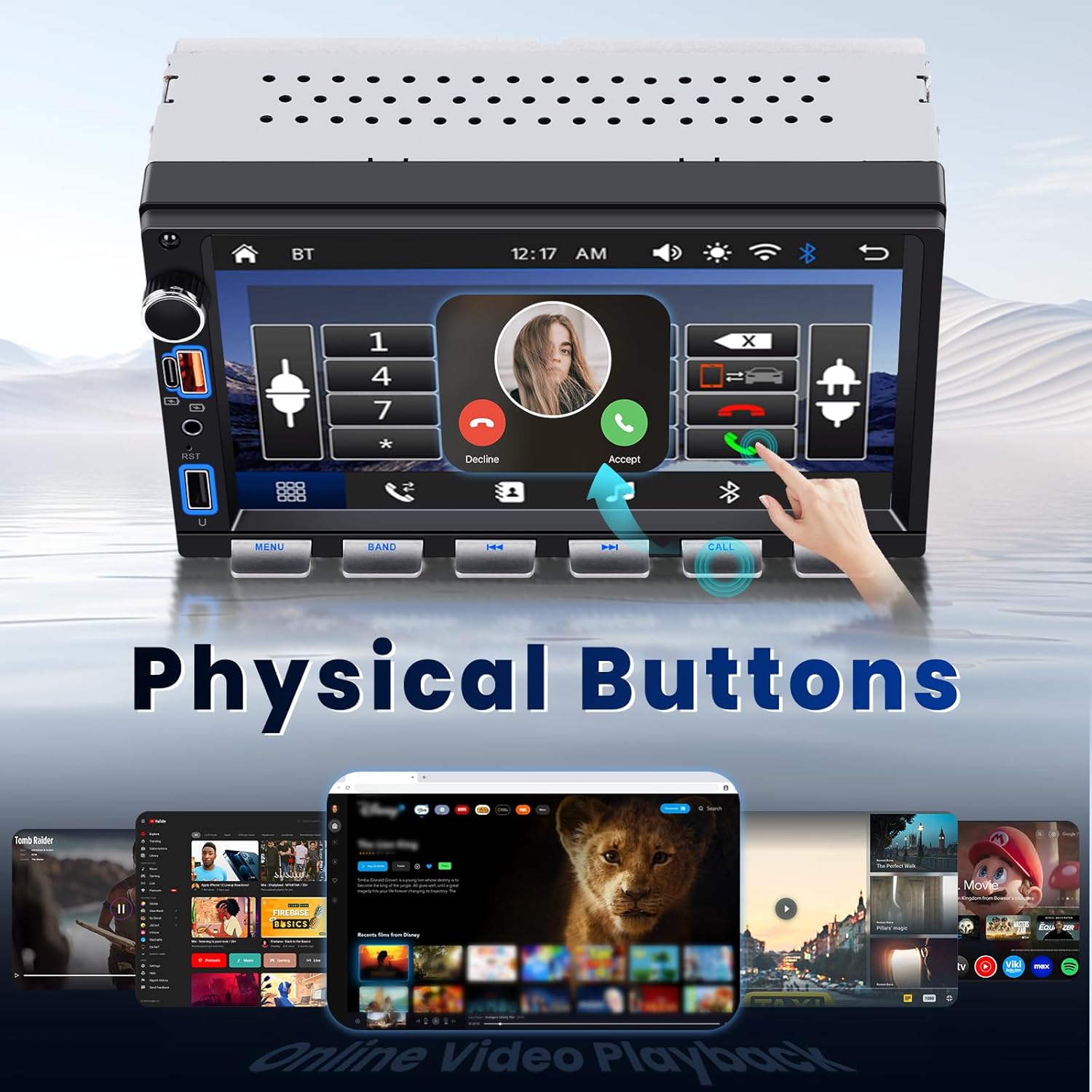
The unit features a responsive 7-inch touchscreen for primary interaction. Additionally, tactile piano keys provide precise control for essential functions. The user interface is designed for intuitive navigation. You can personalize the backlight settings with multiple color options.

Figure 3: Touchscreen and Physical Buttons
Langaton CarPlay ja Android Auto
Connect your smartphone wirelessly or via USB to access CarPlay (for iPhone) or Android Auto (for Android phones). This allows you to use navigation, make calls, send messages, and play music directly from your phone's interface displayed on the car stereo screen.
- Varmista, että Bluetooth ja Wi-Fi ovat käytössä älypuhelimellasi.
- Valitse auton stereosta CarPlay- tai Android Auto -kuvake.
- Yhdistä laitteesi noudattamalla näytön ohjeita.
- Once connected, your phone's compatible apps will appear on the stereo display.
Kuva 4: CarPlay- ja Android Auto -käyttöliittymä
Bluetooth Music and Hands-Free Calling
Pair your phone via Bluetooth for wireless audio streaming and hands-free calls.
- Siirry auton stereoiden Bluetooth-valikkoon.
- Ota Bluetooth käyttöön puhelimessasi ja hae käytettävissä olevia laitteita.
- Select "Hodozzy" (or similar device name) from your phone's list and confirm pairing.
- Once paired, you can stream music or make/receive calls directly through the stereo.
FM-radio
Access traditional FM radio stations within the frequency range of 87.5 - 108 MHz.
- Valitse päävalikosta "FM-radio" -kuvake.
- Use the scan function to find stations or manually tune to a specific frequency.
- Tallenna suosikkiasemasi esiasetuksiin nopeaa käyttöä varten.

Figure 5: Bluetooth, FM Radio, EQ, and Backlight Settings
Online-videoiden toisto
The unit supports online video streaming through its built-in browser, allowing access to platforms like YouTube. Ensure the unit is connected to a Wi-Fi hotspot (e.g., from your smartphone) for internet access.
Peililinkkitoiminto
Use Mirror Link to display your smartphone's screen directly onto the car stereo. This feature is compatible with both Android and iOS devices.
- Select the "Mirror Link" icon from the main menu.
- Follow the specific instructions displayed on the stereo for connecting your Android or iOS device. This typically involves connecting via USB and enabling USB debugging (for Android) or trusting the device (for iOS).
EQ-ääniasetukset
Fine-tune your audio experience using the built-in Equalizer (EQ). Adjust bass, treble, and other sound profiles vastaamaan mieltymyksiäsi.
- Access the EQ settings from the audio menu.
- Choose from preset sound modes or customize individual frequency bands.
USB, AUX, and Type-C Connectivity
The unit provides multiple ports for versatile connectivity:
- USB-portti: For media playback from USB drives or connecting smartphones for wired CarPlay/Android Auto.
- C-tyypin portti: For fast charging compatible devices and data transfer.
- AUX-tulo: Liitä ulkoiset äänilaitteet 3.5 mm:n äänikaapelilla.

Figure 6: Interface and Connectivity Ports
Ohjauspyörän säätö (SWC)
If your vehicle supports steering wheel controls, you can configure them to manage the stereo's functions (e.g., volume, track changes, call answering) directly from your steering wheel. Refer to the wiring diagram for SWC connections and the unit's settings menu for programming.
Varakameran tulo
The unit includes a dedicated input for the provided backup camera. When properly installed and connected, the stereo will automatically display the rear view when the vehicle is in reverse gear, enhancing safety and visibility.

Figure 7: Backup Camera and Steering Wheel Controls
Huolto
Varmistaaksesi autostereosi pitkän käyttöiän ja optimaalisen suorituskyvyn, noudata näitä huolto-ohjeita:
- Puhdistus: Use a soft, dry cloth to clean the touchscreen and physical buttons. Avoid abrasive cleaners or solvents that could damage the surface.
- Ohjelmistopäivitykset: Tarkista Hodozzy-virallinen säännöllisesti website or contact support for any available firmware updates. Updates can improve performance and add new features.
- Ympäristöolosuhteet: Vältä laitteen altistamista äärimmäisille lämpötiloille, pitkäaikaiselle suoralle auringonvalolle tai liialliselle kosteudelle.
Vianetsintä
Jos kohtaat ongelmia Hodozzy-autostereosi kanssa, tutustu seuraaviin yleisiin ongelmiin ja ratkaisuihin:
| Ongelma | Mahdollinen syy | Ratkaisu |
|---|---|---|
| Ei Virtaa | Väärä johdotus, palanut sulake, löysä liitäntä. | Check power and ground connections. Inspect vehicle's fuse box and the unit's fuse. Ensure accessory wire is connected correctly. |
| Ei ääntä | Speaker wires incorrectly connected, volume too low, mute activated, incorrect audio source. | Verify speaker wiring. Increase volume. Check if mute is active. Select the correct audio source (e.g., FM, Bluetooth, USB). |
| CarPlay/Android Auto ei muodosta yhteyttä | Bluetooth/Wi-Fi off, incorrect pairing, phone software issue, cable issue (for wired). | Ensure phone's Bluetooth and Wi-Fi are on. Forget device on both phone and stereo and re-pair. Restart phone and stereo. Try a different USB cable if using wired connection. |
| Peruutuskamera ei näy | Kameraa ei ole kytketty, peruutusliipaisinjohtoa ei ole kytketty, viallinen kamera. | Check camera video input and reverse trigger wire connection to the vehicle's reverse light circuit. Ensure camera is powered. |
| Buttons Unresponsive / Screen Frozen | Väliaikainen ohjelmistohäiriö. | Suorita pehmeä nollaus painamalla nollauspainiketta (jos sellainen on) tai sammuttamalla ajoneuvon sytytysvirta ja käynnistämällä se uudelleen. |
| Huono radiovastaanotto | Antennia ei ole kytketty, antenni on vaurioitunut, signaalialue on heikko. | Ensure antenna is securely connected. Check antenna for damage. Try scanning for stations in a different location. |
Jos ongelma jatkuu näiden ratkaisujen kokeilemisen jälkeen, ota yhteyttä Hodozzy-asiakastukeen.
Tekniset tiedot
| Ominaisuus | Yksityiskohta |
|---|---|
| Merkki | hodozzy |
| Malli | 7-Inch Double Din Car Stereo |
| Näytön koko | 7 tuumaa |
| Yhteystekniikka | Bluetooth, USB |
| Erikoisominaisuudet | Wireless/Wired Android Auto, Wireless/Wired Apple CarPlay, Built-In Bluetooth, Hands-Free Calling, Mirror Link, FM Radio, EQ, Online Video Playback, SWC, Backup Camera Input |
| Yhteensopivat laitteet | Älypuhelin |
| Liittimen tyyppi | RCA, USB, Type-C, AUX |
| Äänilähtötila | Stereot |
| Lähtöteho | 45 watts (per channel) |
| Lähtö wattage | 180 wattia (yhteensä) |
| Kanavien lukumäärä | 4 |
| Tuetut Internet-palvelut | YouTube (via built-in browser) |
| Äänilähdön tyyppi | Kaiuttimet |
| Tuetut mediamuodot | AVI, MP3 Audio, MPEG |
| FM-taajuusalue | 87.5–108 MHz |
Takuutiedot
This Hodozzy car stereo unit comes with a 2 vuoden takuu. Please retain your proof of purchase for warranty claims. For specific terms and conditions, or to initiate a warranty claim, please contact the seller or Hodozzy customer support directly.
Asiakastuki
For further assistance, technical support, or inquiries regarding your Hodozzy product, please visit the official Hodozzy store or contact their customer service department.
Merkki: hodozzy
Verkkokauppa: Hodozzy-kauppa Amazonissa