
1. Johdanto
This manual provides essential information and instructions for using your realme 16T 5G Smartphone. Please read this manual thoroughly before using your device to ensure proper operation and to maximize its performance and longevity. Keep this manual for future reference.
2. Mitä laatikossa on
Varmista, että tuotepakkauksessa on kaikki tarvittavat osat:
- realme 16T Smartphone
- USB-datakaapeli
- Puhelinkotelo
- Pika-aloitusopas
3. Laite loppuview
Familiarize yourself with the physical components of your realme 16T 5G Smartphone.
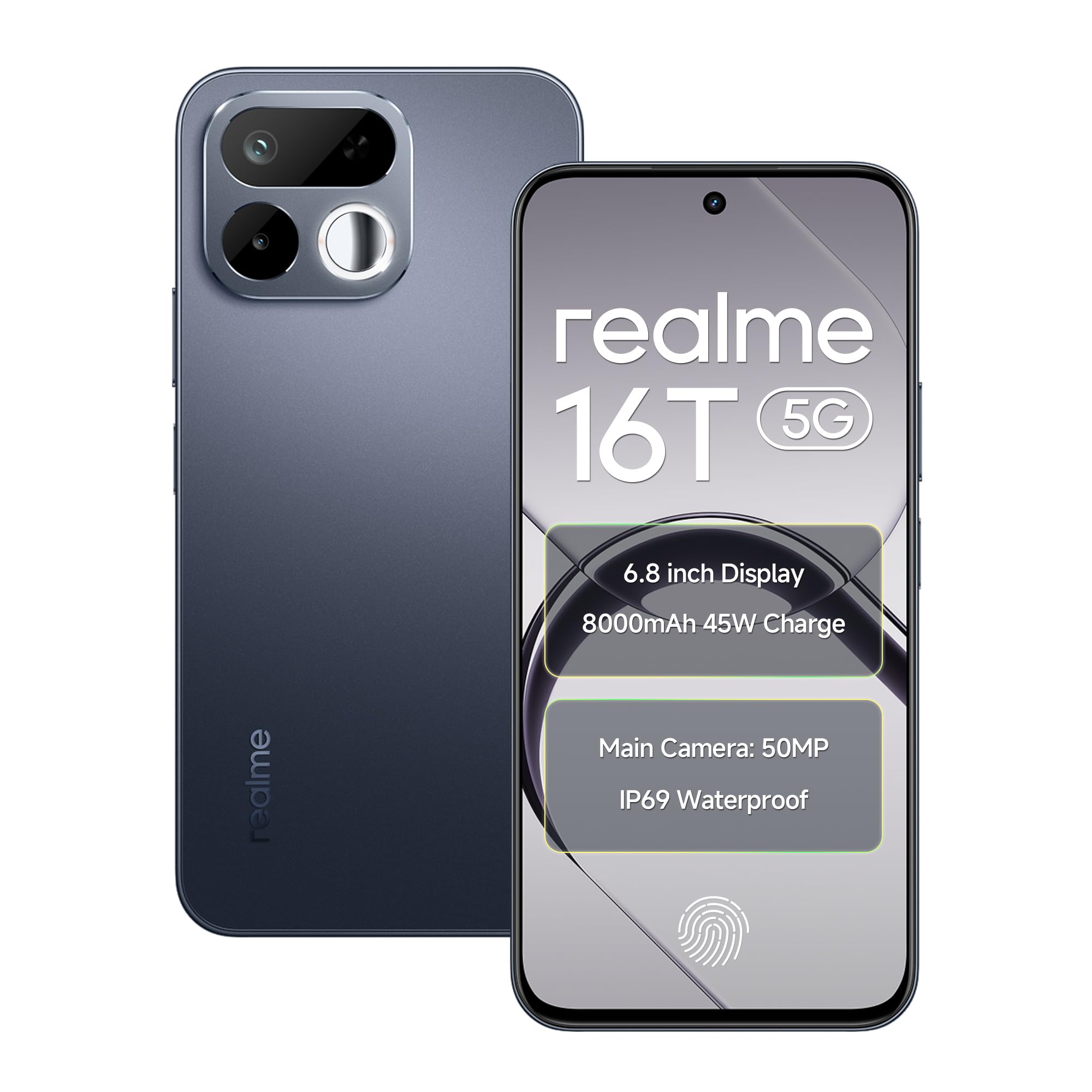
Kuva: Edestä ja takaa view Realme 16T 5G -älypuhelimen esittelyssäasing sen suunnittelu ja kameramoduuli.
Tärkeimmät ominaisuudet:
- Näyttö: 6.8-inch HD+ LCD with 144Hz refresh rate and 1200 nits peak brightness.
- Prosessori: MediaTek Dimensity 6300 Octa-core chipset.
- Akku: 8000mAh capacity with 45W SUPERVOOC flash charging.
- Kamera: 50MP AI main camera with selfie mirror functionality.
- Kestävyys: IP69 Pro dust and water resistance, MIL-STD-810H military-grade reliability.
- Käyttöjärjestelmä: Android 16 with realme UI 7.0.
4. Asennus
4.1 SIM-korttien ja microSD-kortin asettaminen
- Etsi SIM-kortin alusta laitteen sivusta.
- Avaa SIM-kortin alusta mukana toimitetulla SIM-kortin poistotyökalulla.
- Carefully place your Nano-SIM cards (supports dual 5G SIM) and a microSD card (for expandable storage up to 2TB) into the designated slots. Ensure the gold contacts are facing down.
- Työnnä SIM-kortin alustaa varovasti takaisin laitteeseen, kunnes se on tasassa reunan kanssa.
4.2 Ensimmäinen käynnistys ja perusasetukset
- Pidä virtapainiketta painettuna, kunnes Realme-logo tulee näkyviin.
- Valitse kieli ja alue sekä muodosta yhteys Wi-Fi-verkkoon noudattamalla näytön ohjeita.
- Kirjaudu sisään Google-tililläsi tai luo uusi tili käyttääksesi Googlen palveluita ja Play Kauppaa.
- Määritä haluamasi näytön lukitusmenetelmä (PIN-koodi, kuvio, salasana, sormenjälki tai kasvojentunnistus).
5. Käyttöohjeet
5.1 Virranhallinta
- Virta päälle: Press and hold the Power button until the device vibrates and the realme logo appears.
- Virta pois: Pidä virtapainiketta painettuna ja napauta sitten näytöllä 'Virta pois'.
- Käynnistä uudelleen: Pidä virtapainiketta painettuna ja napauta sitten näytöllä 'Käynnistä uudelleen'.
5.2 Näyttöasetukset
Your realme 16T features a 6.8-inch HD+ LCD with a 144Hz refresh rate for smooth visuals and a 180Hz touch sampling rate for responsive interaction. The display offers up to 1200 nits peak brightness for clear visibility in various lighting conditions.

Image: The realme 16T 5G Smartphone display showcasing a game, highlighting the 144Hz refresh rate and bright visuals.
- To adjust refresh rate: Go to Asetukset > Näyttö > Näytön virkistystaajuus.
- To adjust brightness: Go to Asetukset > Näyttö > Kirkkaustaso or use the quick settings panel.
5.3 Akku ja lataus
The device is equipped with an 8000mAh battery and supports 45W SUPERVOOC flash charging.

Image: An illustration of the realme 16T 5G Smartphone's 8000mAh battery capacity and 45W charging capability, with usage estimates for WhatsApp, Instagram, gaming, and YouTube.
- Use the provided 45W SUPERVOOC charger and USB Data Cable for optimal charging speed.
- Avoid using non-certified chargers or cables to prevent damage to the device.
5.4 Kameran toiminnot
The realme 16T features a 50MP AI main camera. It also includes a selfie mirror function, allowing you to use the rear camera for high-quality selfies.

Image: A person taking a selfie using the realme 16T 5G Smartphone's selfie mirror feature, highlighting the 50MP camera.

Image: A collage demonstrating the AI image editing capabilities of the realme 16T 5G Smartphone, including original, modeling photoshoot, 3D emoji, and cartoon shot options.
- Avaa Kamera-sovellus aloitusnäytöltä tai sovellusvalikosta.
- Switch between photo, video, portrait, and other modes.
- Utilize the AI features for enhanced image processing and editing.
5.5 Suojausominaisuudet
The device supports side fingerprint recognition and face recognition for secure and quick unlocking.
- To set up fingerprint unlock: Go to Asetukset > Suojaus > Sormenjälki ja noudata ohjeita.
- To set up face unlock: Go to Asetukset > Suojaus > Face Unlock ja noudata ohjeita.
5.6 Yhteydet
The realme 16T supports 5G dual-SIM dual-standby, Wi-Fi, Bluetooth, and USB OTG.
- 5G-verkko: Ensure your SIM cards are 5G enabled and you are in a 5G coverage area.
- Wi-Fi: Yhdistä Wi-Fi-verkkoihin kautta Asetukset > Wi-Fi.
- Bluetooth: Yhdistä Bluetooth-laitteisiin Asetukset > Bluetooth.
- USB OTG: Connect USB devices (e.g., flash drives) using a USB OTG adapter.
5.7 ääni
Experience studio-quality sound with Hi-Res high-resolution audio certification. The device also features 400% Ultra Volume for enhanced audio output.

Image: A person holding the realme 16T 5G Smartphone while playing a game, illustrating the 400% Ultra Volume feature with sound waves emanating from the device.
6. Huolto
6.1 Laitteen puhdistaminen
- Puhdista puhelimen näyttö ja runko pehmeällä, nukkaamattomalla liinalla.
- Vältä kovien kemikaalien tai hankaavien materiaalien käyttöä.
6.2 Ohjelmistopäivitykset
Tarkista ja asenna säännöllisesti ohjelmistopäivitykset varmistaaksesi, että laitteessasi on uusimmat ominaisuudet, tietoturvapäivitykset ja suorituskyvyn parannukset.
- Siirry osoitteeseen Settings > About device > realme UI version tarkistaaksesi päivitykset.
6.3 Tallennuksen hallinta
Manage your device's storage to maintain optimal performance. The device supports microSD card expansion up to 2TB.
- Siirry osoitteeseen Asetukset > Tallennus to view tallennustilan käyttöä ja tilan vapauttamista.
- Varmuuskopioi tärkeät tiedot säännöllisesti pilvitallennustilaan tai ulkoiselle laitteelle.
6.4 Durability and Resistance
The realme 16T is designed with IP69 Pro dust and water resistance and MIL-STD-810H military-grade environmental reliability.

Image: The realme 16T 5G Smartphone on a wooden surface with spilled coffee, demonstrating its IP69 Pro dust and water resistance.
Image: A person running with the realme 16T 5G Smartphone, which is shown with debris around it, illustrating its military-grade shock resistance.
While resistant, avoid intentional exposure to water or dust, and do not submerge the device. Damage caused by liquid or dust ingress may not be covered under warranty if proper care is not taken.
7. Vianmääritys
This section addresses common issues you might encounter with your realme 16T 5G Smartphone.
| Ongelma | Mahdollinen ratkaisu |
|---|---|
| Laite ei käynnisty | Ensure the battery is charged. Connect the device to the charger for at least 10 minutes, then try powering on again. If it still doesn't work, perform a force restart by holding the Power button for 10-15 seconds. |
| Akku tyhjenee nopeasti | Check for apps running in the background. Reduce screen brightness, disable unnecessary features like GPS or Bluetooth when not in use. Go to Asetukset > Akku tunnistaa virtaa kuluttavia sovelluksia. |
| Network connectivity issues (5G/Wi-Fi) | Restart the device. Check if Airplane Mode is off. For mobile data, ensure your SIM card is properly inserted and has an active plan. For Wi-Fi, try forgetting the network and reconnecting, or restart your router. |
| Sovellukset kaatuvat tai jumiutuvat | Tyhjennä ongelmallisen sovelluksen välimuisti (Asetukset > Sovellukset > [Sovelluksen nimi] > Tallennustila > Tyhjennä välimuisti). If the issue persists, try reinstalling the app. Ensure your device software is up to date. |
| Sormenjälki-/kasvojentunnistus ei toimi | Ensure your finger/face is clean and dry. Re-register your fingerprint/face in Asetukset > Suojaus. Check for any physical obstructions on the sensor or camera. |
If you encounter issues not listed here or if the suggested solutions do not resolve your problem, please contact realme customer support.
8. Tekniset tiedot
Detailed technical specifications for the realme 16T 5G Smartphone:
| Ominaisuus | Erittely |
|---|---|
| Merkki | realme |
| Malli | 16T |
| Käyttöjärjestelmä | Android 16 (with realme UI 7.0) |
| Prosessori | MediaTek Dimensity 6300 kahdeksanytiminen (2.4 GHz) |
| RAM | 6 Gt (saatavana myös 8 Gt:n versiona) |
| Sisäinen tallennustila | 128 Gt (saatavana myös 256 Gt:n versiona) |
| Laajennettava tallennustila | Jopa 2 Tt microSD-muistikortin kautta |
| Näyttö | 6.8-inch HD+ LCD, 144Hz Refresh Rate, 1200 nits Peak Brightness |
| Takakamera | 50 megapikselin tekoälyllä varustettu pääkamera |
| Akku | 8000 mAh |
| Lataus | 45 W:n SUPERVOOC-salamalataus |
| Yhteydet | 5G Dual SIM, Wi-Fi, Bluetooth, USB Type-C, USB OTG |
| Vedenkestävyys | IP69 Pro |
| Kestävyys | MIL-STD-810H Military-Grade |
| Mitat | 16.6 x 7.8 x 0.8 senttimetriä |
| Paino | 192 grammaa |
9. Takuutiedot
Your realme 16T 5G Smartphone comes with a 1-year official manufacturer warranty ostopäivästä lukien. Tämä takuu kattaa valmistusvirheet normaalissa käytössä. Säilytä ostokuitti takuuvaatimuksia varten.
Takuu ei kata:
- Damage caused by improper use, accidents, or unauthorized repairs.
- Normaalia kulumaa.
- Damage caused by liquid or dust ingress if not handled according to IP69 Pro guidelines.
For detailed warranty terms and conditions, please refer to the warranty card included in your product package or visit the official realme websivusto.
10. Support & Safety Information
10.1 Asiakastuki
For further assistance, technical support, or service inquiries, please contact realme customer service:
- Visit the official realme support websivusto: realme Support (India)
- Refer to the contact information provided in your Quick Start Guide.
10.2 Turvallisuusohjeet
To ensure safe operation of your device, please observe the following:
- Älä käytä puhelinta ajaessasi.
- Vältä altistamasta laitetta äärimmäisille lämpötiloille.
- Use only realme-approved accessories.
- Älä yritä purkaa tai korjata laitetta itse.
- Hävitä laite ja sen akku vastuullisesti paikallisten määräysten mukaisesti.