
1. Johdanto
Thank you for choosing the ETiansu 32-inch 4K 160Hz 1500R Curved VA Gaming Monitor. This manual provides essential information for setting up, operating, maintaining, and troubleshooting your new monitor. Please read this manual thoroughly before use to ensure optimal performance and safety.
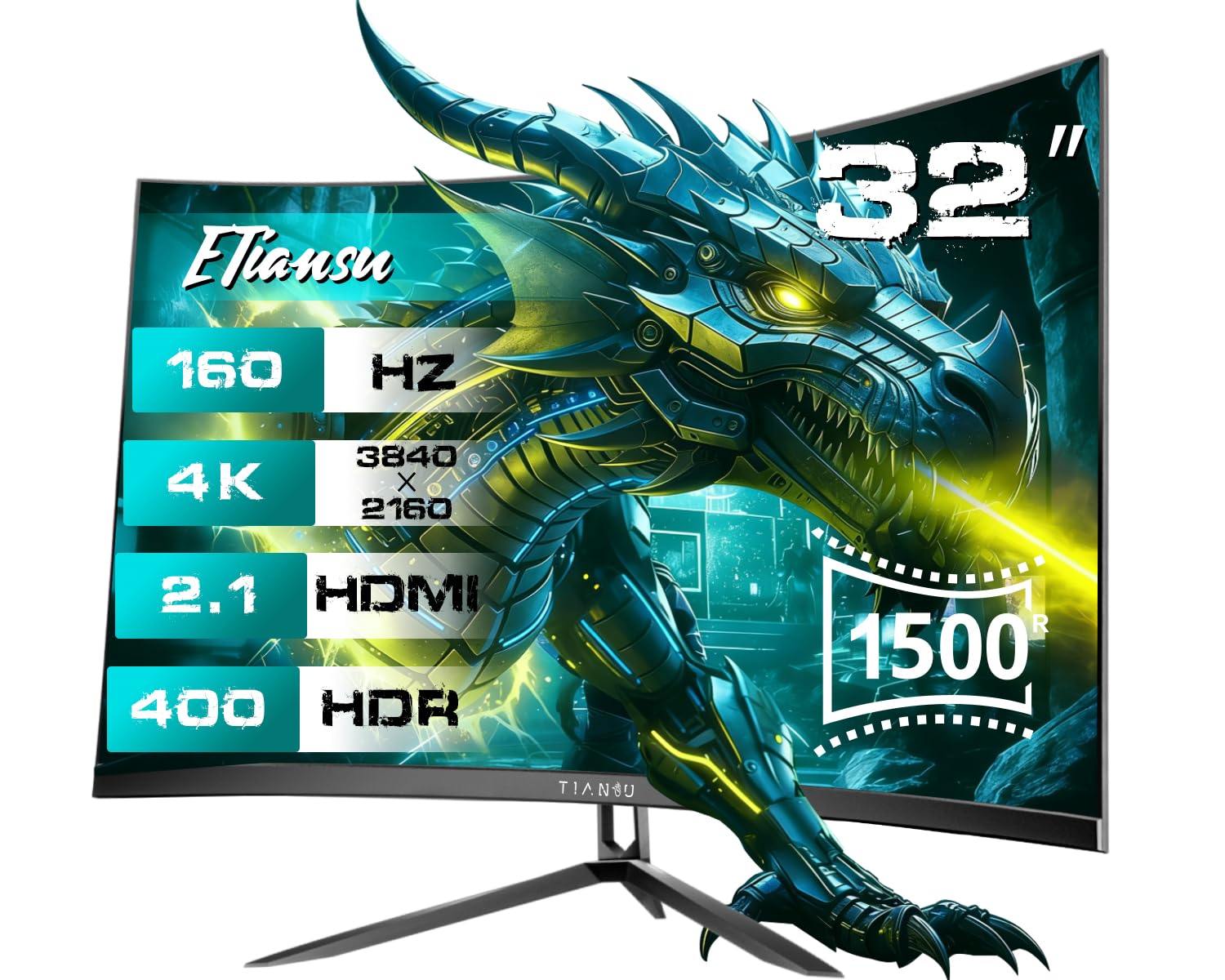
Kuva 1.1: Edessä view of the ETiansu 32-inch 4K 160Hz Curved VA Gaming Monitor.
2. Turvallisuustiedot
Noudata seuraavia turvaohjeita näytön vahingoittumisen ja itsesi loukkaantumisen estämiseksi:
- Älä altista näyttöä sateelle, kosteudelle tai äärimmäisille lämpötiloille.
- Varmista näytön ympärillä oleva asianmukainen ilmanvaihto. Älä tuki tuuletusaukkoja.
- Käytä ainoastaan valmistajan toimittamaa virtalähdettä ja kaapeleita.
- Vältä painavien esineiden asettamista virtajohdon tai näytön päälle.
- Disconnect the power cable from the outlet if the monitor will not be used for an extended period.
- Älä yritä purkaa tai korjata näyttöä itse. Jätä kaikki huoltotyöt pätevän henkilöstön tehtäväksi.
3. Pakkauksen sisältö
Varmista, että pakkauksessa on kaikki tarvittavat osat:
- 32-inch 4K curved monitor x 1
- Sturdy Stand x 1
- Virtajohto x 1
- High-speed HDMI 2.1 Cable x 1
- Display Port 1.4 x 1

Image 3.1: Contents included in the monitor package.
4. Asennus
4.1 Fyysinen kokoonpano
Jalustan asennus:
- Poista näytön ja jalustan osat varovasti pakkauksesta.
- Kiinnitä jalustan pohja jalustan kaulaan mukana toimitetuilla ruuveilla.
- Connect the assembled stand to the back of the monitor until it clicks into place or is secured with screws.
- Aseta näyttö vakaalle, tasaiselle alustalle.
VESA Mounting (Optional):
The monitor supports VESA 100x100mm mounting. If using a VESA mount, remove the stand and attach the monitor to your VESA-compatible arm or wall mount using appropriate screws (not included).
4.2 Yhteydet
Liitä laitteesi näyttöön käyttämällä käytettävissä olevia portteja:
- Teho: Connect the power cable to the monitor's DC input and then to a power outlet.
- HDMI: Use the provided HDMI 2.1 cable to connect your computer, game console (PS5, Xbox Series X), or other HDMI-enabled device to one of the monitor's HDMI 2.1 ports.
- DisplayPort: Use the provided DisplayPort 1.4 cable to connect your computer to the monitor's DisplayPort.
- Ääni ulos: Connect external speakers or headphones to the 3.5mm audio output jack if desired.

Image 4.1: Monitor connectivity ports and dimensions.
5. Käyttöohjeet
5.1 Virta päälle/pois
Press the power button, usually located on the back or bottom of the monitor, to turn the monitor on or off. The power indicator light will illuminate when the monitor is on.
5.2 Näyttövalikon (OSD) navigointi
The OSD menu allows you to adjust various monitor settings. Use the joystick or buttons (location may vary) on the back or bottom of the monitor to navigate the menu:
- Avaa OSD-valikko painamalla joystickia/painiketta.
- Move the joystick up/down or use the navigation buttons to select menu options.
- Siirrä joystickia vasemmalle/oikealle tai käytä vastaavia painikkeita arvojen säätämiseen tai alivalikoihin siirtymiseen.
- Press the joystick/button again to confirm selections or exit menus.
5.3 Tärkeimmät ominaisuudet ja asetukset
Your monitor offers several features to enhance your viewpeli- ja pelikokemus:
- 160 Hz:n virkistystaajuus ja 1 ms:n vasteaika: Provides smooth motion and reduced input lag. Ensure your graphics card settings are configured to utilize the 160Hz refresh rate.
- Adaptive Sync (AMD FreeSync & G-Sync Compatible): Synchronizes the monitor's refresh rate with your graphics card's frame rate to eliminate screen tearing and stuttering. Enable this feature in the OSD menu and your graphics card control panel.
- Display Quality (4K UHD, HDR400, Color Gamut, Contrast Ratio): Experience vibrant and detailed visuals with 4K UHD (3840x2160) resolution, HDR400 support, 95% DCI-P3 / 130% sRGB color gamut, and a 3000:1 contrast ratio. Adjust brightness, contrast, and color settings in the OSD menu for your preference.
- 1500R kaareva näyttö: 1500R:n kaarevuus tarjoaa mukaansatempaavan katselukokemuksen viewing experience by matching the natural curve of the human eye, reducing distortion and enhancing peripheral vision.
- Eye Care Features (Flicker-Free & Low Blue Light): Designed to reduce eye strain during extended use. Flicker-Free technology minimizes screen flickering, and the Low Blue Light mode reduces harmful blue light emissions. These settings can be adjusted in the OSD menu.
- Peliparannukset:
- Pelitila: Optimizes display settings for various game genres.
- Musta vakaaja: Enhances visibility in dark areas of games, making hidden enemies more apparent.
- Dynaaminen toimintojen synkronointi: Vähentää syöttöviivettä responsiivisempaan peliin.
- Pienen syöttöviiveen tila: Minimizes the delay between input and on-screen action.
- On-Screen Crosshair: Provides a virtual crosshair for improved aiming accuracy in games.

Image 5.1: High refresh rate and fast response time benefits.

Image 5.2: Adaptive Sync (FreeSync) in action.

Image 5.3: Monitor's display quality features.
Video 5.1: Demonstrates the visual difference with HDR 400 enabled and showcases 4K UHD resolution and 125% sRGB color gamut.

Image 5.4: The immersive effect of the 1500R curved screen.

Image 5.5: Eye care technologies for prolonged viewmukavuutta.

Image 5.6: Shadow Booster feature for improved visibility in dark scenes.
6. Huolto
6.1 Puhdistus
- Irrota näyttö aina ennen puhdistamista.
- Käytä pehmeää, nukkaamatonta liinaa kevyesti dampvedellä tai miedolla, hankaamattomalla näytönpuhdistusaineella.
- Älä suihkuta puhdistusainetta suoraan näytölle.
- Vältä voimakkaiden kemikaalien, liuottimien tai hankaavien materiaalien käyttöä.
6.2 Varastointi
- Jos näyttöä säilytetään pitkään, irrota kaikki kaapelit ja pakkaa se alkuperäispakkaukseen, jos mahdollista.
- Säilytä viileässä, kuivassa paikassa suojassa suoralta auringonvalolta ja äärimmäisiltä lämpötiloilta.
7. Vianmääritys
Yleisiä ongelmia ja niiden ratkaisuja on seuraavassa taulukossa:
| Ongelma | Mahdollinen syy | Ratkaisu |
|---|---|---|
| Ei kuvaa näytöllä | Virtajohto irti; Videokaapeli irti tai löysällä; Väärä tulolähde valittu. | Ensure power cable is securely connected. Check video cable connections. Select the correct input source via the OSD menu. |
| Kuva välkkyy tai on epävakaa | Video cable issue; Graphics card driver issue; Refresh rate mismatch. | Replace video cable. Update graphics card drivers. Ensure refresh rate is set correctly in display settings. Enable Adaptive Sync. |
| Ei ääntä sisäänrakennetuista kaiuttimista | Volume too low or muted; Incorrect audio output selected on PC; Audio cable not connected (if using external source). | Adjust monitor volume via OSD. Select monitor as default audio output in PC settings. Ensure audio cable is connected if applicable. |
| Värit näyttävät vääriltä | Väriasetukset väärin määritetty; Kaapeliongelma. | Reset color settings in OSD to default. Check video cable for damage. |
8. Tekniset tiedot
Detailed technical specifications for the ETiansu 32-inch 4K 160Hz Curved VA Gaming Monitor:

Kuva 8.1: Tuotteen tekniset tiedotview.
| Ominaisuus | Erittely |
|---|---|
| Merkki | ETiansu |
| Näytön koko | 32 tuumaa |
| Resoluutio | 4K UHD 2160p (3840 x 2160 pikseliä) |
| Kuvasuhde | 16:9 |
| Näytön pinnan kuvaus | Matta |
| Kontrastisuhde | 3000:1 |
| Päivitystaajuus | 160 Hz |
| Näytön tyyppi | LED VA |
| Viewkulma | 178 astetta |
| Kirkkaus | 400 Candela (HDR400) |
| Värivalikoima | 130 % sRGB, 95 % DCI-P3 |
| Vastausaika | 1 millisekunti |
| Yhteystekniikka | DisplayPort, HDMI |
| Laitteistoyhteydet | 2 x HDMI 2.1, 2 x DisplayPort 1.4 |
| Mukautuva synkronointi | FreeSync Premium, G-Sync Compatible |
| Lisäominaisuudet | Blue Light Filter, Built-In Speakers, Curved, Height Adjustment |
| Tuotteen erityiskäyttö | Desktop, Entertainment, Gaming |
| Väri | Musta |
| Tuotteen mitat S x L x K | 7.87" S x 28.15" L x 20.28" K |
| Mallinumero | 32"UHD 160Hz Curved |
| Valmistaja | ETiansu |
9. Takuu ja tuki
Takuutiedot:
This ETiansu monitor comes with a 3-year manufacturer warranty. Please retain your proof of purchase for warranty claims. The warranty covers defects in materials and workmanship under normal use.
Asiakastuki:
For technical assistance, troubleshooting, or warranty inquiries, please contact ETiansu customer support. You can find contact information and additional resources on the official ETiansu websivuston tai sen kautta ETiansu Store on Amazon.