
Johdanto
This manual provides detailed instructions for the operation and maintenance of your RadioShack Portable CD Player Boombox. Please read this manual thoroughly before using the device to ensure proper function and to maximize your listening experience. This boombox combines classic CD playback with modern connectivity options including Bluetooth, FM radio, USB, and AUX input.
Mitä laatikossa on

Figure 1: Box Contents. This image displays the items included with your purchase: the boombox unit, AC power cord, remote control, and telescopic antenna.
- 1x RadioShack Portable CD Player Boombox Unit
- 1x virtajohto
- 1x kaukosäädin
- 1x Telescopic Antenna (pre-attached)
- 1x Käyttöohje (tämä asiakirja)
Note: 4 C batteries are required for portable operation and are not included.
Tuote loppuview ja Ominaisuudet
The RadioShack Portable CD Player Boombox offers multiple audio playback options and user-friendly controls.

Kuva 2: Keskeiset ominaisuudet. This diagram highlights the boombox's main functionalities including Bluetooth 5.0, various CD formats, USB MP3 playback, FM radio, AUX input, and playback modes.
- CD-toisto: Supports CD, CD-R, CD-RW, and CD-MP3 formats.
- Bluetooth-yhteys: Suoratoista ääntä langattomasti yhteensopivista laitteista.
- FM-radio: Built-in tuner with telescopic antenna and 18 preset stations.
- USB-toisto: Toista MP3 files suoraan USB-asemalta.
- AUX-tulo: Liitä ulkoiset äänilaitteet 3.5 mm:n kaapelilla.
- Toistotilat: Includes random, repeat, and program play functions.
- Kaukosäädin: Kätevä käyttö kaukaa.
Asennus
1. Laitteen virran kytkeminen

Figure 3: Power Options. The boombox can be powered by the included AC cord or by 4 C batteries for portable use.
Your boombox can be powered in two ways:
- Vaihtovirta: Connect the included AC power cord to the AC input jack on the back of the boombox and then plug it into a standard wall outlet (110V-240V).
- Akun teho: For portable use, open the battery compartment on the bottom of the unit and insert 4 "C" size batteries (not included), ensuring correct polarity (+/-). Close the compartment securely.
2. Antenna Setup (FM Radio)
Optimaalisen FM-radiovastaanoton saavuttamiseksi vetämällä laitteen takana oleva teleskooppiantenni kokonaan ulos. Säädä sen asentoa parhaan signaalin saamiseksi.
Käyttöohjeet
Yleiset säätimet
- Virtanappi (⏻): Paina kytkeäksesi laitteen päälle tai pois päältä.
- Äänenvoimakkuuden säädin: Kierrä myötäpäivään lisätäksesi äänenvoimakkuutta, vastapäivään vähentääksesi.
- Toimintopainike (FUNC): Press to cycle through playback modes: CD, Bluetooth, FM, USB, AUX.
- Toista/Tauko (⏸/⏸)-painike: Aloittaa tai keskeyttää toiston.
- Lopettaa (⏹)-painike: Pysäyttää toiston.
- Skip/Search (⏮ / ⏭) Painikkeet: Press briefly to skip tracks. Press and hold to search within a track.
CD-toisto
- Avaa CD-lokeron kansi.
- Place a CD (CD, CD-R, CD-RW, or CD-MP3) onto the spindle with the label side facing up.
- Sulje CD-lokeron kansi tiiviisti.
- Paina TYÖNTEKIJÄ button until "CD" mode is selected.
- CD-levyn toisto alkaa automaattisesti. Jos ei, paina Toista/Tauko -painiketta.
Bluetooth-pariliitos

Kuva 4: Bluetooth-suoratoisto. Easily stream audio from your smartphone or tablet to the boombox.
- Paina TYÖNTEKIJÄ button until "BT" (Bluetooth) mode is selected. The display will show "BT" and flash, indicating it's in pairing mode.
- On your Bluetooth-enabled device (smartphone, tablet), go to its Bluetooth settings and search for available devices.
- Select "RadioShack Boombox" from the list.
- Once paired, the "BT" indicator on the boombox display will stop flashing and remain solid.
- You can now play audio from your device through the boombox.
FM-radion toiminta

Figure 5: FM Presets and Programmed Playback. Use the SCAN button to automatically save FM stations and REP/PROG for custom playback sequences.
- Paina TYÖNTEKIJÄ -painiketta, kunnes "FM"-tila on valittuna.
- Auto Scan and Save Presets: Paina ja pidä painettuna SKANNATA button (often combined with Play/Pause). The radio will automatically scan for and save up to 18 available FM stations.
- Manuaalinen viritys: Paina lyhyesti Ohita/Hae painikkeet (⏮ / ⏭) to fine-tune the frequency.
- Esiasetusten valitseminen: Paina lyhyesti PROG button (often combined with Repeat) to cycle through saved preset stations.
USB-toisto
- Aseta USB-muistitikku, jossa on MP3 files USB-porttiin.
- Paina TYÖNTEKIJÄ -painiketta, kunnes "USB"-tila on valittuna.
- The boombox will automatically detect and begin playing MP3 files USB-asemasta.
- Käytä Toista/Tauko, Stop, ja Ohita/Hae painikkeita toiston ohjaamiseen.
AUX-tulo
- Liitä 3.5 mm:n äänikaapelin (ei sisälly toimitukseen) toinen pää boomboxin AUX IN -liitäntään.
- Liitä kaapelin toinen pää ulkoisen äänilaitteen (esim. MP3-soittimen tai älypuhelimen) kuulokeliitäntään tai äänilähtöön.
- Paina TYÖNTEKIJÄ -painiketta, kunnes "AUX"-tila on valittuna.
- Ohjaa toistoa ja äänenvoimakkuutta ulkoisesta äänilaitteestasi.
Kaukosäätimen käyttö
The included remote control allows for convenient operation of most functions from a distance. Ensure the remote has working batteries (typically 2x AAA, not included) and point it towards the front of the boombox.
- Teho: Kytke laite päälle/pois.
- FUNC: Select input mode (CD, BT, FM, USB, AUX).
- Äänenvoimakkuus +/-: Säädä äänenvoimakkuutta.
- Toista/tauko, pysäytä, ohita/hae: Ohjaa toistoa.
- REP/PROG: Access repeat and program functions.
- SKANNATA: Auto-scan FM stations.
- EQ/SLEEP: Adjust equalizer settings or set sleep timer (refer to specific remote markings for details).
Playback Modes (CD/USB)
- Toista (REP): Paina TASAVALTA button (on unit or remote) to cycle through repeat modes:
- Repeat One: Repeats the current track.
- Repeat All: Repeats all tracks on the CD/USB.
- Repeat Folder (for MP3 CDs/USB): Repeats all tracks in the current folder.
- Ohjelma (OHJELMA): Allows you to program a specific order of tracks for CD or USB playback.
- In CD or USB mode, with playback stopped, press the PROG -painiketta.
- Käytä Ohita/Hae buttons to select your desired track.
- Paina PROG again to confirm and add the track to the program list.
- Repeat steps 2-3 to add more tracks.
- Paina Toista/Tauko aloittaaksesi ohjelmoidun toiston.
- Random/Shuffle: Some models may have a dedicated shuffle button (often labeled "RDM" or "SHUF") or it may be part of the REP/PROG cycle. This plays tracks in a random order.
Huolto
- Puhdistus: Use a soft, dry cloth to clean the exterior of the boombox. Do not use abrasive cleaners or solvents. For the CD lens, use a specialized CD lens cleaner disc.
- Varastointi: Kun laitetta ei käytetä pitkään aikaan, poista paristot vuotojen estämiseksi. Säilytä laitetta viileässä, kuivassa paikassa, poissa suorasta auringonvalosta ja äärimmäisistä lämpötiloista.
- Akun vaihto: Replace all 4 "C" batteries simultaneously when they are depleted. Do not mix old and new batteries or different types of batteries.
- CD:n hoito: Käsittele CD-levyjä reunoista. Pidä ne puhtaina ja naarmuuntumattomina. Säilytä niitä koteloissaan, kun niitä ei käytetä.
Vianetsintä
| Ongelma | Mahdollinen syy | Ratkaisu |
|---|---|---|
| Ei virtaa | Verkkojohtoa ei ole kytketty; Paristot ovat tyhjentyneet tai asetettu väärin. | Varmista, että virtajohto on kytketty kunnolla. Vaihda paristot uusiin ja tarkista napaisuus. |
| Ei ääntä | Volume too low; Incorrect input mode; Headphones connected. | Increase volume. Press FUNC to select correct mode. Disconnect headphones. |
| CD-levy hyppii tai ei soi | CD-levy likainen tai naarmuuntunut; CD-levy on asetettu väärin; CD-lokero ei ole suljettu. | Clean CD. Reinsert CD correctly. Close lid firmly. Try another CD. |
| Bluetooth ei muodosta pariliitosta | Boombox ei ole BT-tilassa; Laite liian kaukana; Laite on jo yhdistetty pariksi toisen yksikön kanssa. | Ensure boombox is in BT mode and flashing. Move device closer. Disconnect from other devices. |
| Huono FM -vastaanotto | Antennia ei ole ojennettu tai sijoitettu oikein; Heikko signaalialue. | Vedä teleskooppiantenni kokonaan ulos ja säädä sitä. Kokeile siirtää laite toiseen paikkaan. |
| USB ei toistu | USB-asemaa ei ole asetettu oikein; Files not MP3 format; USB drive corrupted. | Aseta USB-asema takaisin paikalleen. Varmista, että fileovat MP3-tiedostoja. Kokeile toista USB-asemaa. |
Tekniset tiedot
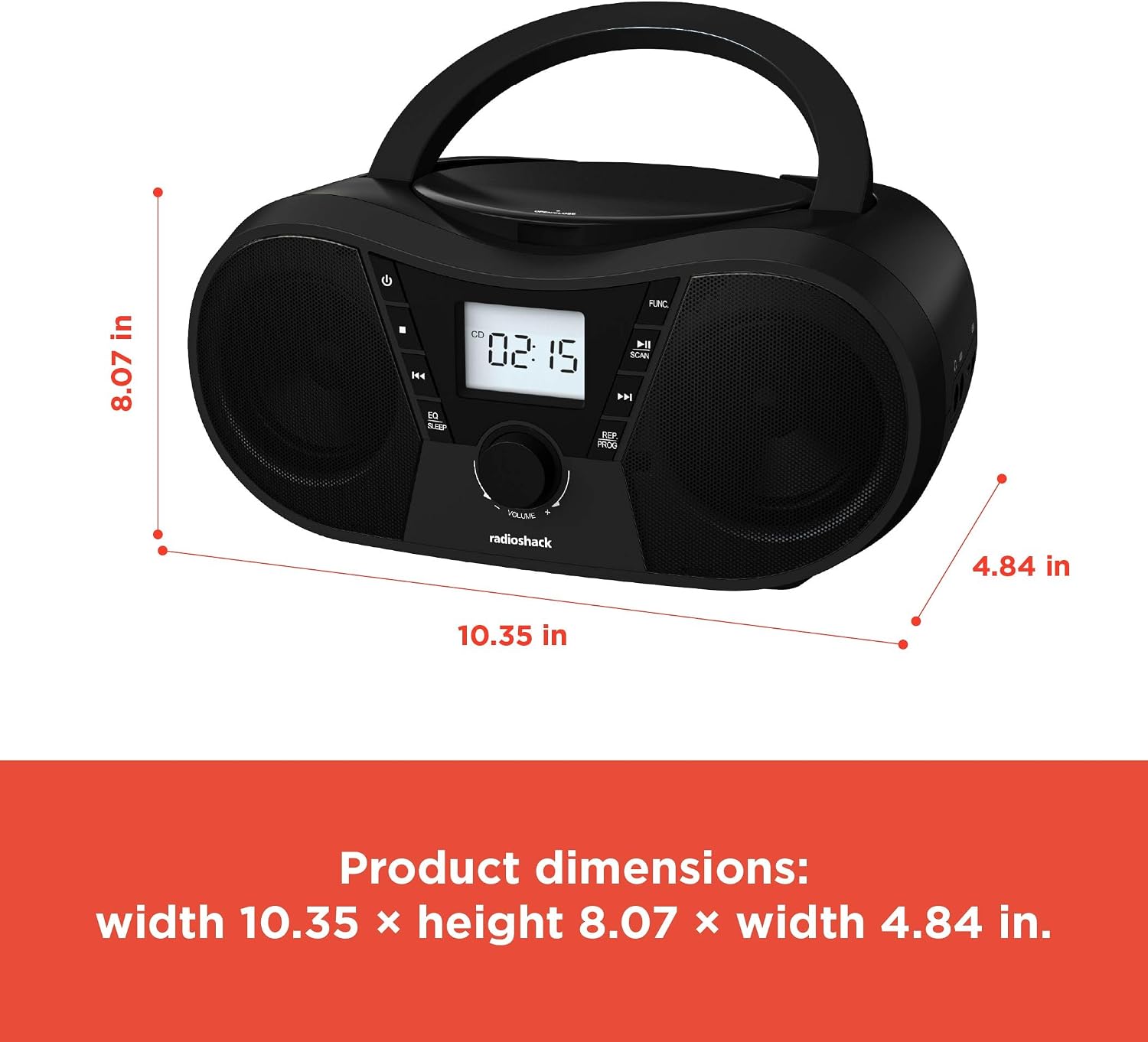
Kuva 6: Tuotteen mitat. The boombox measures approximately 10.35 inches wide, 8.07 inches high, and 4.84 inches deep.
| Ominaisuus | Yksityiskohta |
|---|---|
| Mallinumero | 1402010 |
| Virtalähde | AC 110V-240V ~ 50/60Hz or 4 x "C" Batteries (DC 6V) |
| Tuetut mediat | CD, CD-R, CD-RW, CD-MP3, USB (MP3), Bluetooth, FM Radio, AUX Input |
| Bluetooth-versio | 5.0 (Yhteensopiva) |
| FM-taajuusalue | 87.5–108 MHz |
| Äänilähtötila | Stereot |
| Kaiuttimien määrä | 2 (Built-in Stereo Speakers) |
| Wattage | 10 wattia |
| Taajuusvaste | 20 Hz–20000 XNUMX Hz |
| Mitat (L x K x S) | Noin 10.35 x 8.07 x 4.84 tuumaa |
| Väri | Musta |
Takuu ja tuki
This RadioShack Portable CD Player Boombox (Model 1402010) comes with a 1 vuoden rajoitettu takuu ostopäivästä lukien. Tämä takuu kattaa materiaalien ja työn laadun virheet normaalissa käytössä.
For warranty claims, technical support, or customer service inquiries, please contact RadioShack customer support through their official websivustolla tai ostodokumentaatiossasi annetuissa yhteystiedoissa.
Säilytä ostokuittisi takuun voimassaoloa varten.