
1. Johdanto
Thank you for choosing the AJAZZ AJ200P Wireless Gaming Mouse. This manual provides detailed instructions for setting up, operating, and maintaining your new mouse. Please read this guide thoroughly to ensure optimal performance and a seamless user experience.

Image 1.1: The AJAZZ AJ200P Wireless Gaming Mouse and its magnetic charging dock, highlighting key features like triple-mode connectivity, 24,000 DPI, 1K Hz polling rate, 300 IPS, 65g lightweight design, AI-powered interaction, and a 300mAh battery.
2. Tärkeimmät ominaisuudet
- 65 g:n erittäin kevyt muotoilu: Engineered with a high-strength internal structure for durability without added weight, ensuring comfortable extended use.
- Kolmitilayhteys: Offers versatile connection options including high-speed 2.4GHz wireless, Bluetooth, and Type-C wired modes for broad compatibility and stable performance.
- Tehokas anturi: Equipped with a professional 24,000 DPI optical sensor, 300 IPS tracking speed, and a 1K Hz polling rate for precise and responsive control.
- Smart Voice OS Integration: Features an integrated voice interaction system for voice commands, multi-language translation, and content creation, enhancing productivity.
- Subscription-Free Aim Trainer: Includes a complimentary, full-featured FPS training hub to practice tracking, flicking, and precision, with visual data performance reports.
- AI Trigger-Feel Calibration: Utilizes a companion app to analyze click tension and grip behavior, recommending and customizing optimal DPI settings for specific games.
- Magneettinen lataustelakka: Comes with an exclusive dual-purpose magnetic charging dock that provides effortless snap-charging for the mouse and integrated charging support for smartphones.
- Durable Microswitches: Features 20-million-click microswitches for long-lasting reliability.

Kuva 2.1: Räjähtänyt view of the AJAZZ AJ200P mouse, showcasing its internal components, including the 300mAh battery, 20-million-click microswitch, and magnetic base for charging.
3. Asennusopas
3.1 Laatikon purkaminen ja alkulataus
Upon unboxing, it is recommended to fully charge your mouse. Place the mouse onto the magnetic charging dock. The dock features RGB lighting that indicates charging status. Alternatively, connect the mouse directly using the provided USB Type-C cable.

Image 3.1: The AJAZZ AJ200P mouse securely placed on its magnetic wireless charging stand, which also supports wireless charging for smartphones.
3.2 Hiiren kytkeminen
The AJAZZ AJ200P supports three connection modes:
- 2.4 GHz:n langaton tila:
- Locate the USB receiver stored in the mouse's underside compartment.
- Liitä USB-vastaanotin tietokoneesi vapaaseen USB-porttiin.
- Switch the mode selector on the bottom of the mouse to the 2.4G position. The mouse will automatically connect.
- Bluetooth-tila:
- Switch the mode selector on the bottom of the mouse to the Bluetooth (BT) position.
- Siirry tietokoneellasi tai laitteellasi Bluetooth-asetuksiin ja hae uusia laitteita.
- Select "AJAZZ AJ200P" from the list of available devices to pair.
- Langallinen tila:
- Connect the provided USB Type-C cable to the front port of the mouse and the other end to your computer.
- The mouse will function immediately in wired mode and charge simultaneously.

Image 3.2: The AJAZZ AJ200P mouse demonstrating its three connectivity modes: USB-C Wired, Powerful 2.4 GHz, and Bluetooth 5.0, allowing easy switching between multiple devices.
3.3 Installing the AI Client (Web kuljettaja)
To unlock the full potential of the AI features, including voice interaction, aim training, and trigger-feel calibration, you need to download and install the dedicated AI client software (web kuljettaja).
- Käytä web driver: Hold down the 'Left Click' and 'Back' buttons on the mouse simultaneously for 5 seconds. This action will typically open a browser window directing you to the download page for the AI client.
- Download the software: On the website, locate the download for the AJAZZ AJ200P NL AI MC model. Ensure you download the correct version for your operating system.
- Install the software: Follow the on-screen instructions to complete the installation.
- Configure settings: Once installed, open the AI client to customize button functions, DPI settings, and activate AI features.

Image 3.3: A visual guide on how to access the web driver by holding down the 'Left Click' and 'Back' buttons for 5 seconds, leading to the AI client download for features like simultaneous input and translation.
Video 3.1: This video demonstrates the setup process for the AJAZZ AJ200P Tri-Mode Mouse, highlighting its ease of use for home and office environments.
4. Käyttöohjeet
4.1 Hiiren perustoiminnot
The AJAZZ AJ200P features standard left/right click buttons, a scroll wheel, and two side buttons. The scroll wheel also functions as a middle click. The DPI button on the underside allows for quick cycling through preset DPI levels.
4.2 DPI-säätö
The mouse offers up to 24,000 DPI (expandable to 36,000 DPI via software). You can cycle through different DPI settings using the dedicated button on the bottom of the mouse. For fine-tuning and customizing each DPI level and its corresponding indicator light color, use the AI client software.
4.3 AI-Powered Interaction
Once the AI client is installed, you can utilize the mouse's smart features:
- Voice Input & Commands: Use voice prompts for real-time translation, opening applications, or executing custom commands.
- Sisällön luominen: Leverage AI features to assist with generating presentations (PPT) or creating documents.
- Voice Macro: Program complex actions into simple voice commands.
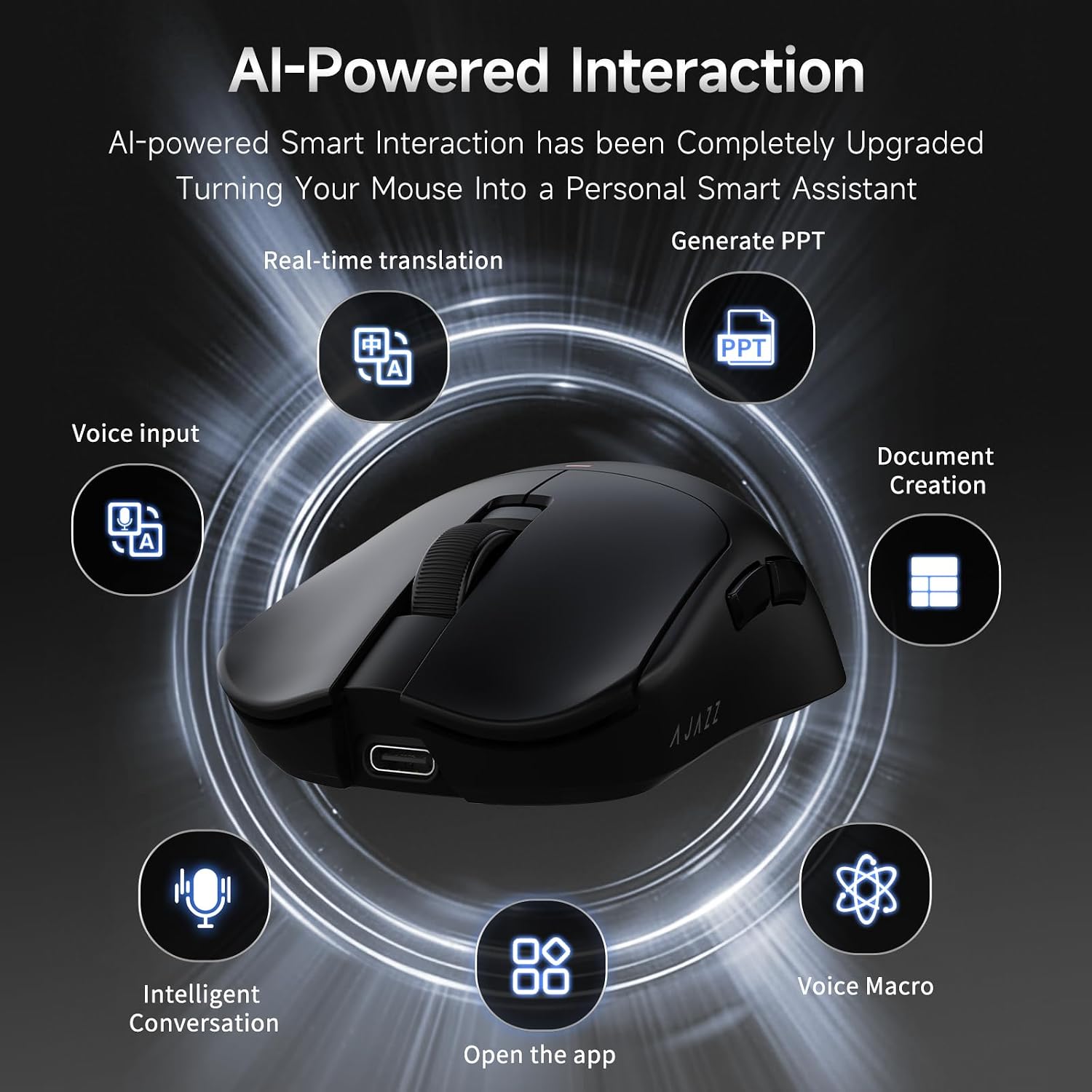
Image 4.1: A visual representation of the AI-Powered Interaction features, including real-time translation, voice input, intelligent conversation, generating PPT, document creation, opening apps, and voice macros.
Video 4.1: This video demonstrates the practical daily computer use of the AJAZZ AJ200P mouse, showcasing its features in a typical workflow.
4.4 AI Aim Trainer & Trigger-Feel Calibration
The AI client includes advanced gaming optimization tools:
- FPS Training Hub: Practice various aiming techniques like tracking, flicking, and precision timing. The software generates visual data performance reports to help analyze and improve your skills.
- Trigger-Feel Calibration: The intelligent tuning system analyzes your click tension and grip behavior to recommend and customize the ideal DPI configuration for your specific games and playstyle.

Image 4.2: A screenshot of the AI Trigger-Feel Calibration interface, showing how the system analyzes user input to recommend optimal DPI settings for various games.

Image 4.3: The AI Aim Expert training interface, providing various training modes like flicking, precision shot, and tracking shot to help users improve their aim.
Video 4.2: This video showcases the smart voice features of the AJAZZ AJ200 NL mouse, demonstrating how it can enhance desktop productivity.
5. Huolto
5.1 Puhdistus
Optimaalisen suorituskyvyn ylläpitämiseksi puhdista hiiri säännöllisesti. Pyyhi pinta pehmeällä, kuivalla liinalla. Pinttyneeseen likaan käytä hieman kuivaa liinaa.amp cloth with mild soap can be used, ensuring no liquid enters the mouse. Clean the optical sensor area periodically with a cotton swab to prevent tracking issues.
5.2 Akun hoito
The AJAZZ AJ200P is equipped with a 300mAh rechargeable battery. To prolong battery life:
- Vältä akun usein toistuvaa täydellistä tyhjentymistä.
- Charge the mouse using the provided magnetic dock or USB Type-C cable.
- Säilytä hiirtä viileässä ja kuivassa paikassa, kun sitä ei käytetä pitkään aikaan.
6. Vianmääritys
| Ongelma | Mahdollinen syy | Ratkaisu |
|---|---|---|
| Hiiri ei vastaa langattomassa tilassa. | Low battery, incorrect mode selected, USB receiver not connected, or interference. | Charge the mouse. Ensure the mode switch is set to 2.4G or BT. Re-insert the USB receiver. Move closer to the receiver or clear obstructions. |
| Bluetooth-yhteysongelmat. | Mouse not in pairing mode, device's Bluetooth off, or interference. | Ensure mouse is in BT mode and discoverable. Check your device's Bluetooth settings. Try re-pairing. |
| AI features not working. | AI client not installed or configured, internet connection issues for voice features. | Ensure the AI client software is correctly installed (refer to Section 3.3). Check your internet connection for voice-activated features. Verify button assignments in the AI client. |
| Hiiren seuranta on epätasaista tai epätarkkaa. | Dirty optical sensor, unsuitable mouse pad surface, or incorrect DPI setting. | Clean the optical sensor. Use a clean, uniform mouse pad. Adjust DPI settings via the mouse button or AI client. |
| Magnetic charging dock not charging mouse/phone. | Dock not powered, incorrect placement, or foreign objects. | Ensure the dock is connected to a power source. Verify correct placement of the mouse/phone on the dock. Remove any foreign objects. |
7. Tekniset tiedot
| Ominaisuus | Yksityiskohta |
|---|---|
| Merkki | AJAZZ |
| Mallin nimi | AJ200P NL |
| Yhteystekniikka | USB (Tri-Mode: 2.4GHz, Bluetooth, Wired) |
| Liiketunnistustekniikka | Optical (PixArt PAW3311) |
| Mouse Maximum Sensitivity | 30 000 DPI (jopa 42 000 DPI ohjelmiston kautta) |
| Äänestysprosentti | 1 kHz (8 000 Hz) |
| Seurantanopeus | 300 IPS |
| Kiihtyvyys | 35G |
| Painike Määrä | 6 |
| Käsien suuntautuminen | Oikein |
| Yhteensopivat laitteet | Pöytätietokone |
| Käyttöjärjestelmä | Windows (and Mac for basic functions) |
| Virtalähde | Wired / Rechargeable Battery |
| Akun kapasiteetti | 300 mAh |
| Tuotteen paino | 65g (0.35 kg with packaging) |
| Tuotteen mitat (P x L) | P 5 cm x L 2.5 cm (noin) |
| Kotelon materiaali | Muovi |
| Mukana olevat komponentit | Gaming Mouse, USB Type-C Cable, USB Receiver, Magnetic Charging Dock |
8. Takuutiedot
AJAZZ products typically come with a limited manufacturer's warranty. Please refer to the warranty card included in your product packaging or visit the official AJAZZ webTarkemmat takuuehdot löytyvät sivustolta. Säilytä ostokuittisi mahdollisten takuuvaatimusten varalta.
9. Asiakastuki
If you encounter any issues or have questions regarding your AJAZZ AJ200P Wireless Gaming Mouse that are not covered in this manual, please contact AJAZZ customer support through their official website or the retailer where you purchased the product. For additional resources and product information, visit the AJAZZ-kauppa Amazonissa.

